1. Entwodiksyon
This manual provides essential information for the proper installation, operation, and maintenance of your Sauermann KT 220-N Multi-Function Data Logger. Please read this manual thoroughly before using the device to ensure safe and efficient operation. Keep this manual for future reference.
2. Pwodwi souview
The Sauermann KT 220-N is a versatile multi-function data logger designed for various measurement applications, particularly temperature monitoring. It features a universal probe input, allowing connection of different types of probes (not included) to suit specific measurement needs. This model operates without an integrated display, relying on software for configuration and data retrieval.
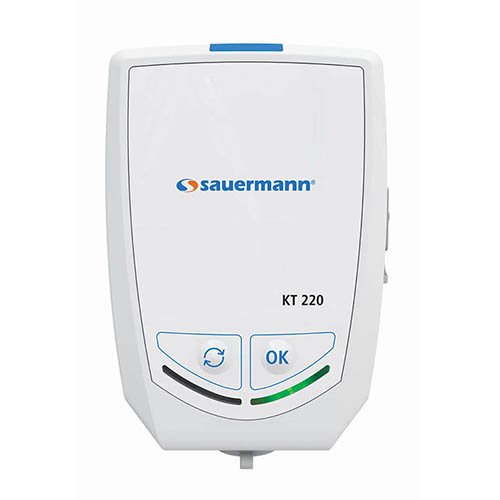
Figi 2.1: Devan view of the Sauermann KT 220-N Data Logger. Note the 'OK' and 'Cycle' buttons at the bottom.
Karakteristik kle:
- Multi-function data logging capabilities.
- Universal probe input for various sensor types.
- Compact and robust design.
- Internal temperature measurement.
- Fonksyonman ak pil.
3. Enstalasyon
- Debake: Carefully remove the data logger from its packaging. Verify that all components are present and undamaged.
- Enstalasyon batri: The KT 220-N typically comes with batteries pre-installed. If not, locate the battery compartment (usually on the rear or side) and insert the specified batteries, observing correct polarity.
- Koneksyon sonde: Connect your desired measurement probe (e.g., temperature, humidity) to the universal input port on the data logger. Ensure a secure connection.
- Enstalasyon lojisyèl: Install the Sauermann data logging software (e.g., KILOG) on your computer. This software is essential for configuring the logger, starting/stopping measurements, and downloading data. Refer to the software's specific manual for installation instructions.
- Premye konfigirasyon: Connect the data logger to your computer via the appropriate interface (e.g., USB). Use the software to set up logging parameters such as measurement interval, start mode, and alarm thresholds.
4. Operasyon Enstriksyon
The KT 220-N is primarily controlled and configured via its dedicated software. The physical buttons on the device provide basic control over logging status.
- Starting a Measurement Campaign:
- Ensure the logger is configured via the software.
- Depending on the configured start mode (e.g., immediate, delayed, button press), the logger will begin recording data.
- If configured for button press start, press the 'OK' button (refer to Figure 2.1) to initiate logging.
- Stopping a Measurement Campaign:
- Logging can be stopped via the software or, if configured, by pressing and holding the 'OK' button.
- The logger will automatically stop when its memory is full or if a programmed stop time is reached.
- Checking Status (if applicable): The KT 220-N does not have a display. Status indicators (LEDs) may provide basic information on logging activity or battery status. Consult the software for detailed status.
- Telechaje Done: Connect the logger to your computer and use the software to download recorded data. Data can then be viewed, analyzed, and exported.
5. Antretyen
- Netwayaj: Netwaye deyò anrejistreman done a avèk yon twal mou.amp cloth. Do not use abrasive cleaners or solvents. Ensure no liquid enters the device.
- Ranplasman batri: When the battery indicator (if present, or via software) shows low battery, replace the batteries with new ones of the specified type. Ensure the device is off before replacing batteries.
- Depo: Store the data logger in a cool, dry place, away from direct sunlight and extreme temperatures. If storing for extended periods, remove the batteries to prevent leakage.
- Swen Sonde: Refer to the specific probe's manual for cleaning and maintenance instructions.
NAN. Depanaj
| Pwoblèm | Kòz posib | Solisyon |
|---|---|---|
| Aparèy la pa reponn | Pil ki fèb oswa ki mouri; move enstalasyon pil. | Ranplase pil yo; verifye polarite a. |
| Pa ka konekte ak òdinatè | Incorrect USB cable; driver not installed; software not running. | Use correct cable; install drivers; open software. |
| No data being logged | Logging not started; incorrect configuration; full memory. | Start logging via software/button; reconfigure settings; download data and clear memory. |
| Lekti kòrèk | Faulty probe; probe not calibrated; environmental interference. | Check probe connection; calibrate probe; ensure stable environment. |
7. Espesifikasyon
- Modèl: KT 220-N
- Kalite: Multi-Function Data Logger
- Antre: Universal Probe Input
- Ekspozisyon: Okenn
- Sous pouvwa: Pil (kalite espesifye nan konpatiman pil la)
- Manifakti: Sauermann
- ASIN: B06XC7G96T
- Dat premye disponib: 1 mas 2017
8. Garanti ak sipò
Sauermann products are designed for reliability and performance. For information regarding warranty coverage, technical support, or service, please refer to the official Sauermann websit la oubyen kontakte distribitè otorize ou a. Kenbe resi acha ou kòm prèv acha pou reklamasyon garanti.
Pou plis asistans, tanpri vizite Gwoup Sauermann websit.


