Entwodiksyon
The Logitech Brio 4K Pro Webcam is designed to deliver exceptional video quality for streaming, recording, and video conferencing. Featuring Ultra HD 4K resolution, advanced autofocus, and a wide field of view, it provides a professional-grade visual experience. This manual provides instructions for setting up, operating, maintaining, and troubleshooting your Brio webCam.
Karakteristik kle
- Ultra HD 4K Resolution: Capture video in stunning 4096 x 2160 resolution at 30 frames per second (fps), or 1080p at 60 fps, and 720p at 90 fps.
- Otofokus: Ensures sharp, clear images even when moving closer or further from the camera.
- 5X Digital Zoom: Zoom in on details without losing clarity.
- RightLight 3 with HDR: Automatically adjusts exposure and contrast to compensate for glare and backlighting, ensuring you always look your best.
- Multiple Fields of View: Choose from 65°, 78°, or 90° diagonal fields of view to perfectly frame your video.
- Infrared Face Recognition: Supports Windows Hello for secure facial recognition login.
- Dual Integrated Microphones: Omnidirectional microphones with noise-canceling technology capture clear audio.
- Koneksyon USB 3.0: High-speed data transfer for smooth 4K video.
Kontni pake
- Logitech Brio 4K Pro Webkam
- Detachable Universal Mounting Clip
- USB 3.0 Cable (compatible with USB 2.0)
- Panno Privacy
- Pote Étui
- Dokimantasyon itilizatè
Enstalasyon
1. Monte a Webkam
The Brio webcam comes with a universal mounting clip that allows it to be securely placed on a monitor, laptop, or tripod.
- Tache Clip la: Ensure the universal mounting clip is securely attached to the webCam.
- Pozisyon sou monitè a: Louvri klip la epi mete l webcam on top of your monitor or laptop screen. Adjust the flexible base to ensure it sits flush with the back of your device.
- Montaj tripod: The universal mounting clip also features a standard tripod thread. Remove the clip from the webcam and screw the webcam directly onto a tripod if preferred.

Image: Logitech Brio 4K Pro Webkamera, devan view with monitor clip extended, illustrating how the clip unfolds for placement.
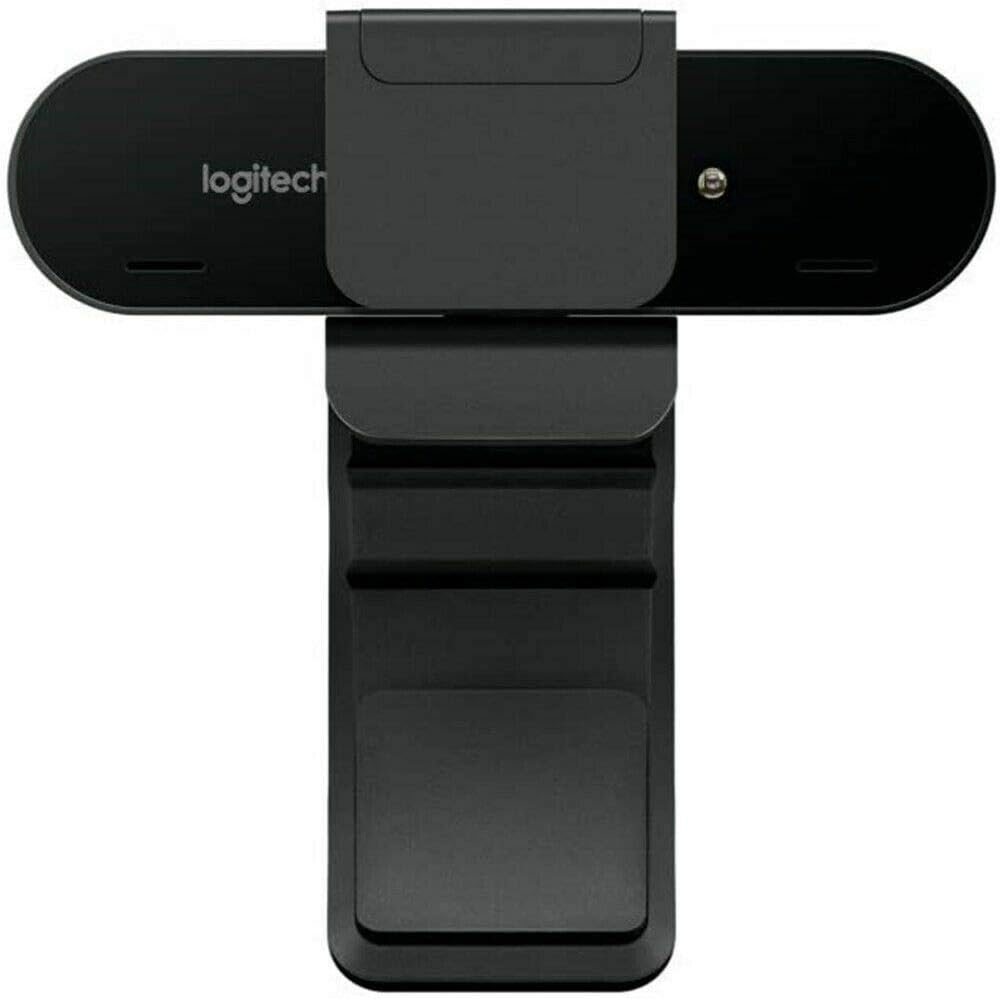
Image: Logitech Brio 4K Pro Webcam, rear view with monitor clip extended, showing the adjustable hinge for monitor placement.
2. Konekte ak òdinatè w la
Konekte a webcam nan òdinatè w lan lè l sèvi avèk kab USB yo bay la.
- Plug the USB-C end of the cable into the webCam.
- Plug the USB-A end of the cable into an available USB 3.0 port on your computer for optimal performance. The webcam is also compatible with USB 2.0 ports.
La webcam is plug-and-play and should be automatically recognized by your operating system (Windows, macOS, Linux).

Image: Logitech Brio 4K Pro Webcam mounted on a monitor, ready for use, with a computer screen displaying a login prompt.
Enstriksyon Operasyon
1. Enstalasyon lojisyèl (Si ou vle)
While the Brio webcam functions as a standard webcam without additional software, installing the Logitech Capture software (available from the Logitech website) unlocks advanced features and customization options, including:
- Adjusting field of view (65°, 78°, 90°)
- Customizing resolution and frame rate
- Enabling RightLight 3 with HDR
- Digital pan, tilt, and zoom controls
- Image adjustments (brightness, contrast, color intensity)
2. Itilizasyon Obturatè Konfidansyalite a
The included privacy shutter can be attached to the front of the webcam to physically block the lens when not in use, ensuring privacy.
3. Video Conferencing and Streaming
Once connected, select the Logitech Brio 4K Pro Webcam as your video and audio input device within your preferred video conferencing, streaming, or recording application.

Image: A person conducting a video call using the Logitech Brio 4K Pro Webcam, demonstrating its application in professional communication.

Image: The Logitech Brio 4K Pro Webcam positioned in a meeting room, illustrating its capability to maintain high performance regardless of ambient lighting.

Image: The Logitech Brio 4K Pro Webcam displaying its 4K HD resolution during a video conference, ensuring clear visual communication.
Antretyen
- Netwaye lantiy la: Sèvi ak yon twal mou ki pa gen pousyè, ki fèt espesyalman pou optik, pou siye dousman. weblantiy kam. Evite materyèl abrazif oswa pwodui chimik ki agresif.
- Netwayaj jeneral: Siye kò a webkamera ak yon mou, damp twal. Pa plonje a webkam nan dlo oubyen sèvi ak twòp imidite.
- Depo: Lè ou pa itilize, estoke webcam in the provided carrying pouch to protect it from dust and scratches.
Depanaj
- WebKamera pa detekte:
- Asire w kab USB a byen konekte ak tou de webkamera a ak òdinatè a.
- Try connecting to a different USB port, preferably a USB 3.0 port.
- Rekòmanse òdinatè w lan.
- Tcheke manadjè aparèy sistèm operasyon ou an pou wè si webKamera a nan lis la.
- Kalite videyo pòv:
- Asire w ke gen ase ekleraj nan anviwònman w lan.
- Netwaye a webCam lantiy.
- Verify that your application is set to the desired resolution and frame rate.
- Install Logitech Capture software for advanced image adjustments.
- No Audio from Webcam Microphone:
- Ensure the Logitech Brio microphone is selected as the input device in your application and operating system sound settings.
- Tcheke paramèt konfidansyalite mikwofòn nan sistèm operasyon ou an.
- Pwoblèm Autofocus:
- Asire w ke gen ase limyè.
- Avoid placing objects too close to the lens that might interfere with autofocus.
- If using Logitech Capture, ensure autofocus is enabled.
Espesifikasyon
| Nimewo Modèl Atik | 960-001178 |
| Rezolisyon Capture Videyo | 4K Ultra HD (4096 x 2160) at 30 fps, 1080p at 60 fps, 720p at 90 fps |
| Teknoloji Capteur Foto | BSI CMOS |
| Autofocus | Wi |
| Zoom dijital | 5X |
| Jaden nan View | Adjustable (65°, 78°, 90°) |
| Mikwofòn | Dual integrated omnidirectional with noise cancellation |
| Koneksyon Teknoloji | USB 3.0 (USB 2.0 konpatib) |
| Sistèm operasyon konpatibilite | Windows, macOS, Linux |
| Pwa atik | 2.22 ons (63 gram) |
| Dimansyon pwodwi | 4.02 x 1.06 x 1.06 pous (10.2 x 2.7 x 2.7 cm) |
| Koulè | Nwa |
Enfòmasyon sou Garanti
Logitech products are manufactured to high quality standards and are subject to a limited hardware warranty. Please refer to the official Logitech websit entènèt la oswa anbalaj pwodwi ou a pou kondisyon garanti espesifik ki aplikab nan rejyon ou an.
Sipò
For further assistance, driver downloads, software updates, or frequently asked questions, please visit the official Logitech support website. You can find detailed product information and contact customer support there.
Sipò Logitech Websit: www.logitech.com/support


