1. Entwodiksyon
This manual provides essential information for the installation, operation, and maintenance of the Allied Telesis AT-GS910/5-10 Unmanaged Switch. This device is a high-performance, 5-port 10/100/1000T (Gigabit Ethernet) unmanaged switch designed for small office and home office (SOHO) environments, offering simple plug-and-play connectivity without complex configuration.
The AT-GS910/5-10 is equipped with an internal power supply unit (PSU), ensuring a compact and reliable design for seamless integration into your network.
2. Enfòmasyon sou Sekirite
Please read and understand the following safety precautions before installing or operating the switch. Failure to comply with these guidelines may result in injury or damage to the device.
- Sous pouvwa: Use only the power cord supplied with the device and connect it to a grounded electrical outlet. Ensure the voltage matches the requirements specified on the switch's label.
- Vantilasyon: Do not block any ventilation openings. Ensure adequate airflow around the switch to prevent overheating. Avoid placing the switch in enclosed spaces or on soft surfaces that may impede ventilation.
- Anviwònman: Operate the switch in a dry environment, away from water, moisture, and excessive humidity. Avoid exposure to direct sunlight or extreme temperatures.
- Plasman: Place the switch on a stable, flat surface. Do not place heavy objects on top of the switch.
- Sèvis: Pa eseye fè sèvis pwodui sa a tèt ou. Refere tout sèvis yo bay pèsonèl sèvis kalifye.
3. Pake kontni
Verify that all items are present and in good condition upon unpacking. If any item is missing or damaged, contact your vendor immediately.
- Allied Telesis AT-GS910/5-10 Unmanaged Switch
- Kòd pouvwa
- Gid pou kòmanse rapidman (oswa dokiman menm jan an)
4. Pwodwi Features
The AT-GS910/5-10 switch offers robust features for reliable network connectivity:
- 5 Gigabit Ethernet pò: Provides five 10/100/1000T RJ45 ports for high-speed wired connections.
- Operasyon san jesyon: Plug-and-play functionality requires no configuration, making it easy to deploy.
- Oto-negosyasyon: Each port automatically detects the speed and duplex mode of the connected device.
- MDI/MDIX Otomatik: Elimine nesesite pou kab kwaze, senplifye konfigirasyon rezo a.
- Pwovizyon pou pouvwa entèn: Integrated power supply for a cleaner setup and reduced cable clutter.
- Endikatè ki ap dirije: Front-panel LEDs provide real-time status for power, link/activity, and speed.
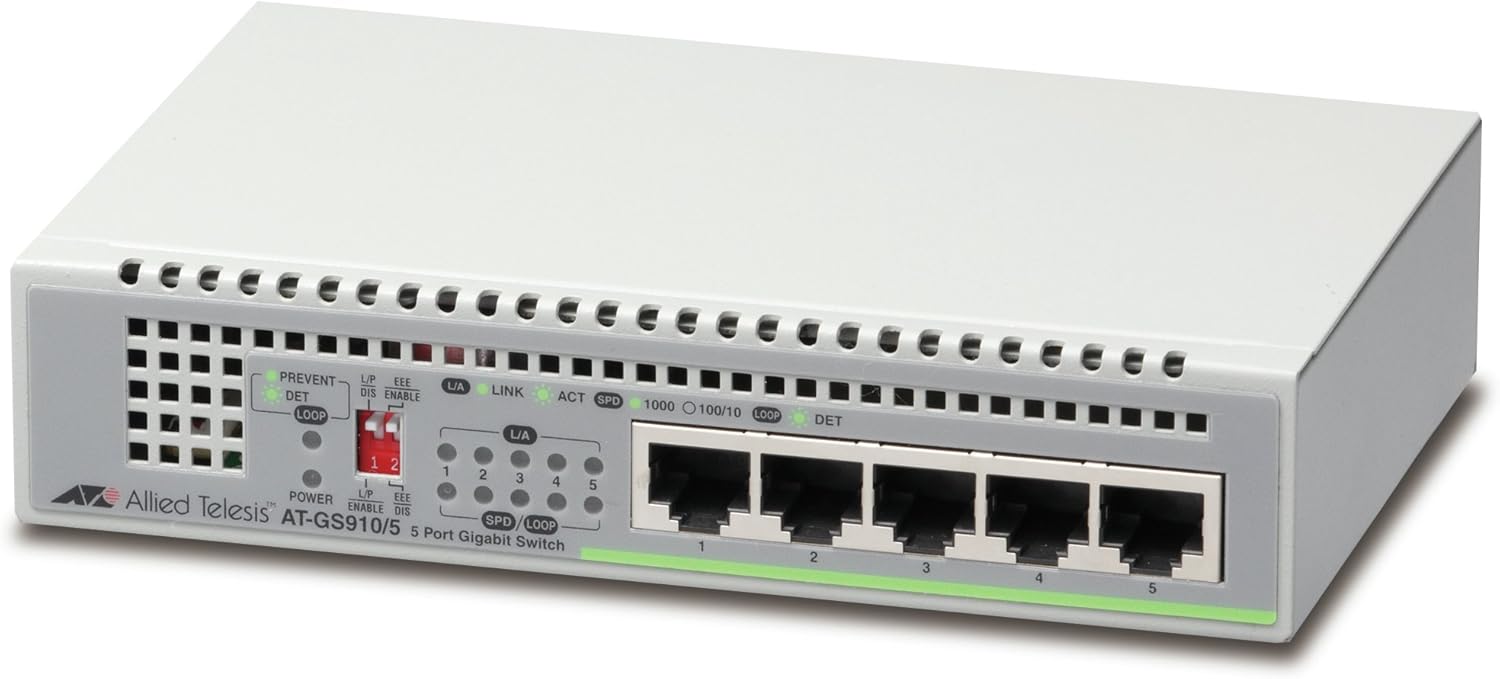
Figi 4.1: Devan view of the AT-GS910/5-10 switch, highlighting the five Gigabit Ethernet ports and status LEDs.

Figi 4.2: Dèyè view of the AT-GS910/5-10 switch, illustrating the power input and overall compact design.
5. Enstalasyon
Follow these steps to set up your AT-GS910/5-10 switch:
- Chwazi yon kote: Select a flat, stable surface for the switch. Ensure there is adequate space around the device for proper ventilation. Avoid placing it near heat sources or in direct sunlight.
- Konekte pouvwa:
- Insert one end of the provided power cord into the AC power inlet on the back of the switch.
- Branche lòt bout kòd kouran an nan yon priz elektrik estanda.
- LED pouvwa a sou panèl devan an ta dwe limen, sa vle di switch la ap resevwa kouran.
- Konekte Aparèy Rezo yo:
- Using standard Ethernet cables (Cat5e or better recommended for Gigabit speeds), connect your network devices (e.g., computers, printers, network-attached storage, routers) to any of the five RJ45 ports on the front of the switch.
- The Link/Act LED for each connected port will illuminate when a valid network connection is established and will blink to indicate data activity.
- The SPD (Speed) LED will indicate the connection speed (e.g., 1000 for Gigabit, 100 for Fast Ethernet, 10 for Ethernet).
Your AT-GS910/5-10 switch is now ready for use. As an unmanaged switch, no further configuration is required.
6. Itilizasyon switch la
The Allied Telesis AT-GS910/5-10 is an unmanaged switch, meaning it operates automatically without the need for user configuration. Once powered on and connected to network devices, it will begin forwarding data traffic.
Endikatè ki ap dirije
LED panèl devan yo bay yon vizyon sou estati fonksyònman switch la:
- Pouvwa dirije:
- Sou: Se switch la mache ak opere nòmalman.
- Off: Switch la etenn oswa li pa resevwa kouran.
- L/A (Link/Act) LED (per port):
- Sou: A valid network link is established on the port.
- Kliyote: Aktivite done ap fèt sou pò a.
- Off: No link is established or the connected device is off.
- SPD (Speed) LED (per port):
- 1000 (vèt): The port is operating at 1000 Mbps (Gigabit Ethernet).
- 100 (Orange): The port is operating at 100 Mbps (Fast Ethernet).
- 10 (Etenn): The port is operating at 10 Mbps (Ethernet).
- LOOP DET (Loop Detection) LED:
- Sou: Indicates a network loop has been detected. The switch will block the port(s) causing the loop to prevent network instability.
- Off: No network loop detected.
7. Antretyen
The AT-GS910/5-10 switch is designed for minimal maintenance. However, following these guidelines can help ensure its longevity and optimal performance:
- Netwayaj: Periodically clean the exterior of the switch with a soft, dry cloth. Do not use liquid or aerosol cleaners. Ensure the ventilation openings are free from dust and debris.
- Vantilasyon: Regularly check that the switch's ventilation holes are not obstructed. Proper airflow is crucial to prevent overheating.
- Jesyon kab: Ensure network cables are neatly organized and not excessively bent or strained. This prevents damage to cables and ports.
- Sik pouvwa: If the switch experiences unusual behavior, a simple power cycle (unplugging the power cord, waiting 10 seconds, and plugging it back in) can often resolve minor issues.
NAN. Depanaj
If you encounter issues with your AT-GS910/5-10 switch, refer to the following common problems and solutions:
| Pwoblèm | Kòz posib | Solisyon |
|---|---|---|
| Pa gen okenn endikasyon LED pouvwa. | Switch pa resevwa pouvwa. |
|
| LED Link/Act la etenn pou yon aparèy konekte. | No valid network link. |
|
| Vitès rezo a ralanti. | Pwoblèm kab, limitasyon aparèy, oswa konjesyon rezo. |
|
| LOOP DET LED is on. | Network loop detected. |
|
9. Espesifikasyon
| Karakteristik | Deskripsyon |
|---|---|
| Nimewo Modèl | AT-GS910/5-10 |
| Pò | 5 x 10/100/1000T RJ45 Gigabit Ethernet Ports |
| Chanje Kalite | San jere |
| Pousantaj Transfè Done | 10/100/1000 Mbps (gigabit Ethernet) |
| Pwovizyon pou pouvwa | Entèn PSU |
| Dimansyon (LxWxH) | 6.3 x 4.13 x 1.38 pous (160 x 105 x 35 mm) |
| Pwa atik | 1.1 liv (500 gram) |
| Kalite entèfas | RJ45 |
| Ka Materyèl | Plastik |
Nòt: Espesifikasyon yo ka chanje san avètisman. Pou jwenn enfòmasyon ki pi resan yo, tanpri al gade dokiman ofisyèl manifakti a. websit.
10. Garanti ak sipò
For information regarding the product warranty, please refer to the warranty card included with your product or visit the official Allied Telesis websit. Tèm ak kondisyon garanti yo ka varye selon rejyon an ak pwodwi a.
If you require technical assistance or have questions not covered in this manual, please contact Allied Telesis customer support or your local reseller. Support contact information can typically be found on the Allied Telesis official websit:


