1. Entwodiksyon
This manual provides essential information for the installation, operation, and maintenance of your EVGA GeForce GTX 1050 Ti SC GAMING graphics card. Please read these instructions carefully before proceeding with installation to ensure proper functionality and to prevent damage to your system components.
The EVGA GeForce GTX 1050 Ti SC GAMING is a high-performance graphics card designed for an enhanced computing experience, featuring NVIDIA Pascal architecture and 4GB of GDDR5 memory. It is optimized for gaming at 1080p resolution and supports multiple display outputs.
2. Kondisyon sistèm
- PCI Express-compliant motherboard with one x16 graphics slot.
- Minimum 300W or greater system power supply (with a minimum 18A on the +12V rail).
- 350MB espas ki disponib sou disk di a.
- 4GB system memory (6GB or higher recommended).
- Microsoft Windows 10, Windows 8, or Windows 7 (32/64-bit).
- Lektè CD-ROM/DVD-ROM oubyen koneksyon entènèt pou enstalasyon chofè a.
3. Enstalasyon Materyèl
- Prepare Sistèm ou an: Power off your computer and disconnect the power cable from the wall outlet. Open your computer case.
- Jwenn plas PCI Express la: Identify an available PCI Express x16 slot on your motherboard. This is typically the longest slot.
- Retire kouvèti fant lan: Remove the metal slot cover from the back of your computer case corresponding to the chosen PCI Express slot.
- Enstale kat grafik: Carefully align the graphics card with the PCI Express x16 slot. Press down firmly and evenly until the card is securely seated in the slot. Ensure the retention clip on the slot engages.
- Sekirize kat la: Sèvi ak yon vis pou tache sipò kat grafik la sou bwat òdinatè a.
- Connect Display Cables: Connect your monitor(s) to the appropriate video output ports on the graphics card (DisplayPort, HDMI, or DVI-D).
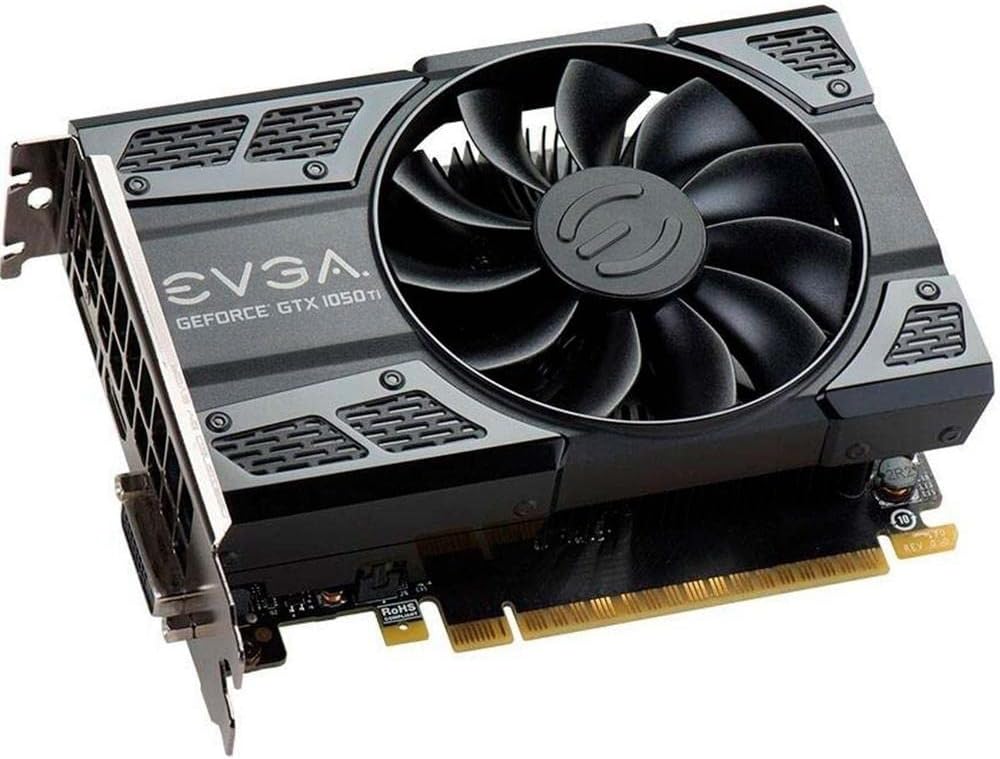
This image shows the front of the EVGA GeForce GTX 1050 Ti SC GAMING graphics card, highlighting its single cooling fan and EVGA branding.
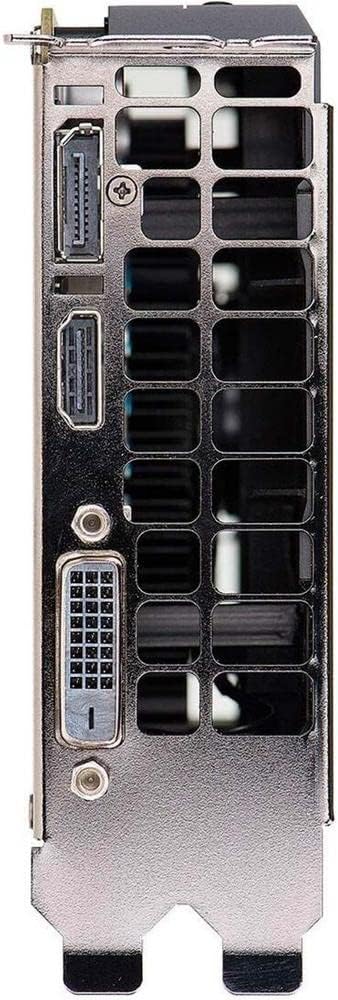
This image displays the video output ports on the graphics card, including DisplayPort, HDMI, and DVI-D connectors.
- Fèmen bwat la epi limen l: Close your computer case, reconnect the power cable, and power on your system.
4. Enstalasyon chofè
After hardware installation, the operating system may install generic drivers. For optimal performance and full functionality, install the latest drivers from EVGA or NVIDIA.
- Telechaje Chofè yo: Vizite sit ofisyèl EVGA a websit (www.evga.com/drivers/) or NVIDIA websit (www.nvidia.com/drivers).
- Chwazi pwodwi: Choose your graphics card model (GeForce GTX 1050 Ti) and operating system.
- Download and Run: Download the recommended driver package and run the installer.
- Swiv enstriksyon ki parèt sou ekran an: Follow the instructions provided by the driver installer. A system restart may be required to complete the installation.
Consider installing EVGA Precision XOC software for advanced monitoring, overclocking, and fan control features, which supports DX12 OSD (On-Screen Display).
5. Kijan pou w itilize kat grafik ou a
Once drivers are installed, your EVGA GeForce GTX 1050 Ti SC GAMING graphics card is ready for use. It will automatically handle graphics processing for applications and games. Ensure your display settings are configured correctly for resolution and refresh rate.
- Montre Anviwònman: Access your operating system's display settings to set the desired resolution (up to 1080p for optimal performance) and refresh rate (up to 240 Hz max).
- Enstalasyon milti-monitè: The card supports up to three monitors simultaneously. Configure extended desktop or duplicate display modes through your operating system's display settings or the NVIDIA Control Panel.
- Gaming: For gaming, ensure your game settings are optimized for your system's capabilities to achieve smooth frame rates.
6. Antretyen
Antretyen regilye ede asire lonjevite ak pèfòmans optimal kat grafik ou a.
- Mizajou chofè: Periodically check for and install the latest graphics drivers from EVGA or NVIDIA. Driver updates often include performance improvements, bug fixes, and support for new games.
- Netwayaj pousyè: Over time, dust can accumulate on the fan and heatsink, reducing cooling efficiency. Carefully clean the fan and heatsink using compressed air. Ensure the system is powered off and unplugged before cleaning. Avoid touching the fan blades directly.
- Airflow: Ensure your computer case has adequate airflow to prevent overheating. Keep the area around your computer clear of obstructions.
NAN. Depanaj
If you encounter issues with your graphics card, refer to the following troubleshooting steps:
- Pa gen okenn rezilta ekspozisyon:
- Ensure the monitor is powered on and the display cable is securely connected to both the graphics card and the monitor.
- Verifye ke kat grafik la byen enstale nan plas PCI Express la.
- Si sa posib, fè yon tès ak yon lòt kab ekran oswa monitè.
- Tcheke si monitè ou a configuré sou sous antre ki kòrèk la.
- Pwoblèm chofè:
- If you experience crashes or display artifacts, try reinstalling the graphics drivers. Use a clean installation option if available in the driver installer.
- Ensure you have downloaded the correct drivers for your specific graphics card model and operating system.
- Pwoblèm Pèfòmans:
- Ensure your system meets the recommended requirements for the applications or games you are running.
- Monitor GPU temperatures using software like EVGA Precision XOC. High temperatures can lead to performance throttling.
- Fèmen aplikasyon ki pa nesesè yo an background pou libere resous sistèm yo.
- Enstabilite Sistèm:
- Asire w ke inite ekipman pouvwa ou a (PSU) satisfè minimòm wat yo.tage kondisyon.
- Check for any loose connections inside your computer case.
8. Espesifikasyon
| Karakteristik | Spesifikasyon |
|---|---|
| Koprosesè grafik | NVIDIA GeForce GTX 1050 Ti |
| Mak | EVGA |
| Nimewo Modèl | 04G-P4-6253-KR |
| Gwosè RAM grafik la | 4 GB GDDR5 |
| Entèfas Sorti Videyo | DVI-D, DisplayPort, HDMI |
| Manifakti Processeur Grafik | NVIDIA |
| Revèy de baz | 1354 MHz |
| Ranfòse revèy | 1468 MHz |
| Entèfas | PCI Express 3.0 |
| Max Monitors Supported | 3 |
| Maksimòm to rafrechisman | 240 Hz |
| Dimansyon (Wotè x Longè) | 4.4 inch x 5.7 inch (Compact Size) |
| Sistèm operasyon sipò | Windows 10 (32/64bit), Windows 8 (32/64bit), Windows 7 (32/64bit) |
9. Garanti ak sipò
For warranty information, technical support, and additional resources, please visit the official EVGA website or contact EVGA customer service. Keep your proof of purchase for warranty claims.
EVGA Official Websit: www.evga.com


