1. Entwodiksyon
Thank you for choosing the Marathon CL030025WH Commercial Grade Jumbo Atomic Wall Clock. This clock is designed for clear visibility and precise timekeeping, automatically synchronizing with the NIST atomic clock signal. It features a large LCD display, indoor temperature, and date, making it suitable for various indoor environments.

Imaj 1.1: Devan view of the Marathon CL030025WH Jumbo Atomic Wall Clock.
2. Enfòmasyon sou Sekirite
- Aparèy sa a fèt pou itilize andedan kay la sèlman.
- Pa ekspoze revèy la nan tanperati ekstrèm, limyè solèy dirèk, oswa imidite ki wo.
- Use only the specified battery type (3 C batteries). Ensure correct polarity when inserting batteries.
- Remove depleted batteries promptly to prevent leakage and damage.
- Kenbe pil yo pa rive jwenn timoun yo.
3. Pake kontni
Verifye ke tout atik yo prezan nan pakè a:
- Marathon CL030025WH Jumbo Atomic Wall Clock
- 3 x C pil
- Manyèl Itilizatè (dokiman sa a)
4. Pwodwi souview
The Marathon CL030025WH clock features a large, easy-to-read LCD display and intuitive controls. Below are key components and their functions.
4.1 Ekspozisyon devan
Image 4.1: Front display showing time, date, and temperature.
- Ekspozisyon tan: Large digits for hours, minutes, and seconds. Includes AM/PM indicator.
- Dat ekspozisyon: Month, day, and day of the week.
- Tanperati andedan kay la: Displays current indoor temperature in Celsius or Fahrenheit.
- Atomic Signal Indicator: Shows status of atomic time synchronization.
- Time Zone Indicator: Displays the currently selected time zone.
- Daylight Saving Time (DST) Indicator: Shows if DST is active.
4.2 Kontwòl Panèl Dèyè

Image 4.2: Rear panel with control buttons and mounting options.
- Time Zone Switch: Selects one of the 6 available time zones (AST, CST, EST, MST, NST, PST).
- DST ON/OFF Switch: Enables or disables Daylight Saving Time adjustment.
- Chanjman Inite Tanperati: Toggles between Celsius and Fahrenheit.
- Manual Set Buttons: For manual adjustment of time and date if atomic signal is unavailable.
- Keyhole Mount: Pou aliye miray la.
- Built-in Table Stand: Pou plasman sou biwo.
5. Enstalasyon
5.1 Enstalasyon batri
- Louvri kouvèti konpatiman pil la ki sou dèyè revèy la.
- Insert 3 C batteries, ensuring correct polarity (+ and -).
- Fèmen kouvèti lòj batri a.
5.2 Senkronizasyon ak Anviwònman Inisyal
Upon battery installation, the clock will automatically attempt to synchronize with the NIST atomic clock signal. This process may take several minutes to several hours, depending on your location and signal strength. The atomic feature only functions in North America.
- Seleksyon Zòn Tan: Use the Time Zone switch on the back of the clock to select your local time zone (AST, CST, EST, MST, NST, PST).
- Lè varè (DST): Set the DST switch to ON or OFF according to your region's DST observance.
- Inite Tanperati: Select Celsius or Fahrenheit using the dedicated switch.
- Plasman: For optimal signal reception, place the clock near a window and away from electronic devices that may cause interference.
5.3 Montaj Opsyon
The clock can be wall-mounted or placed on a flat surface using its built-in stand.
- Mi Mount: Use the keyhole slot on the back of the clock to hang it securely on a screw or nail.
- Tab kanpe: Extend the built-in stand from the back of the clock for desktop or shelf placement.

Image 5.1: Clock mounted on an office wall.
5.4 Gid Videyo Enstalasyon
For a visual guide on setting up your Marathon Atomic Wall Clock, please watch the video below:
Video 5.1: MARATHON CL030025 Commercial Grade Jumbo Atomic Wall Clock with 6 Time Zones, Indoor Temp. & Date. This video demonstrates the automatic synchronization feature and general setup of the clock.
6. Fonksyone revèy la
6.1 Automatic Time Synchronization
The clock automatically receives the atomic time signal from NIST's Colorado Atomic Clock. This ensures accurate timekeeping without manual adjustment. The signal icon on the display indicates reception status.
- A solid signal icon indicates successful synchronization.
- A flashing icon indicates the clock is attempting to receive the signal.
6.2 Manual Time and Date Adjustment
In areas where the atomic signal is weak or unavailable, you can manually set the time and date.
- Locate the manual set buttons on the rear panel.
- Press the 'SET' button to enter setting mode.
- Sèvi ak bouton '+' oswa '-' yo pou ajiste valè ki ap flache a (pa egzanp, èdtan, minit, ane, mwa, jou).
- Press 'SET' again to confirm and move to the next setting.
- Exit setting mode by not pressing any button for a few seconds, or by cycling through all settings.
6.3 Montre mòd
- Fòma 12/24 èdtan: The clock supports both 12-hour (with AM/PM) and 24-hour time displays. This setting can typically be toggled via a button on the rear panel or during manual setup.
- Ekspozisyon Tanperati: Switch between Celsius (°C) and Fahrenheit (°F) using the dedicated switch on the back.
7. Antretyen
7.1 Netwayaj
To clean the clock, use a soft, dry cloth. Do not use abrasive cleaners or solvents, as these may damage the display or casing.
7.2 Ranplasman batri
The clock features a low battery indicator. When this indicator appears, replace all 3 C batteries with new ones to ensure continued accurate operation.
NAN. Depanaj
| Pwoblèm | Kòz posib | Solisyon |
|---|---|---|
| Clock not synchronizing with atomic signal. | Weak signal due to location, interference, or distance from transmitter. | Relocate the clock near a window or in a different room. Ensure it is away from electronic devices (TVs, computers, microwaves). Allow up to 24 hours for synchronization. |
| Lè oswa dat ki pa kòrèk ki parèt. | Incorrect time zone setting, DST setting, or failed atomic synchronization. | Verify time zone and DST settings. If atomic sync fails, manually set the time and date. |
| Ekran an fèb oswa vid. | Pil ki fèb oswa ki fin itilize. | Replace all 3 C batteries with new ones. |
| Lekti tanperati a sanble pa egzak. | Clock exposed to direct sunlight or heat source. | Move the clock to a location with stable ambient temperature. |
9. Espesifikasyon
| Karakteristik | Detay |
|---|---|
| Nimewo Modèl | CL030025WH |
| Mak | MARATHON |
| Kalite ekspozisyon | Digital LCD |
| Dimansyon | 16" lajè x 11" wotè (40.64 cm lajè x 27.94 cm wotè) |
| Sous pouvwa | 3 x C Batteries (Included) |
| Mòd operasyon | Atomic (North America only) |
| Zòn tan | 6 (AST, CST, EST, MST, NST, PST) |
| Display Tanperati | Indoor, Celsius/Fahrenheit |
| Kalite aliye | Wall Mount, Table Stand |
| Materyèl | Plastik |
| Pwa atik | 2.54 liv (1152 gram) |
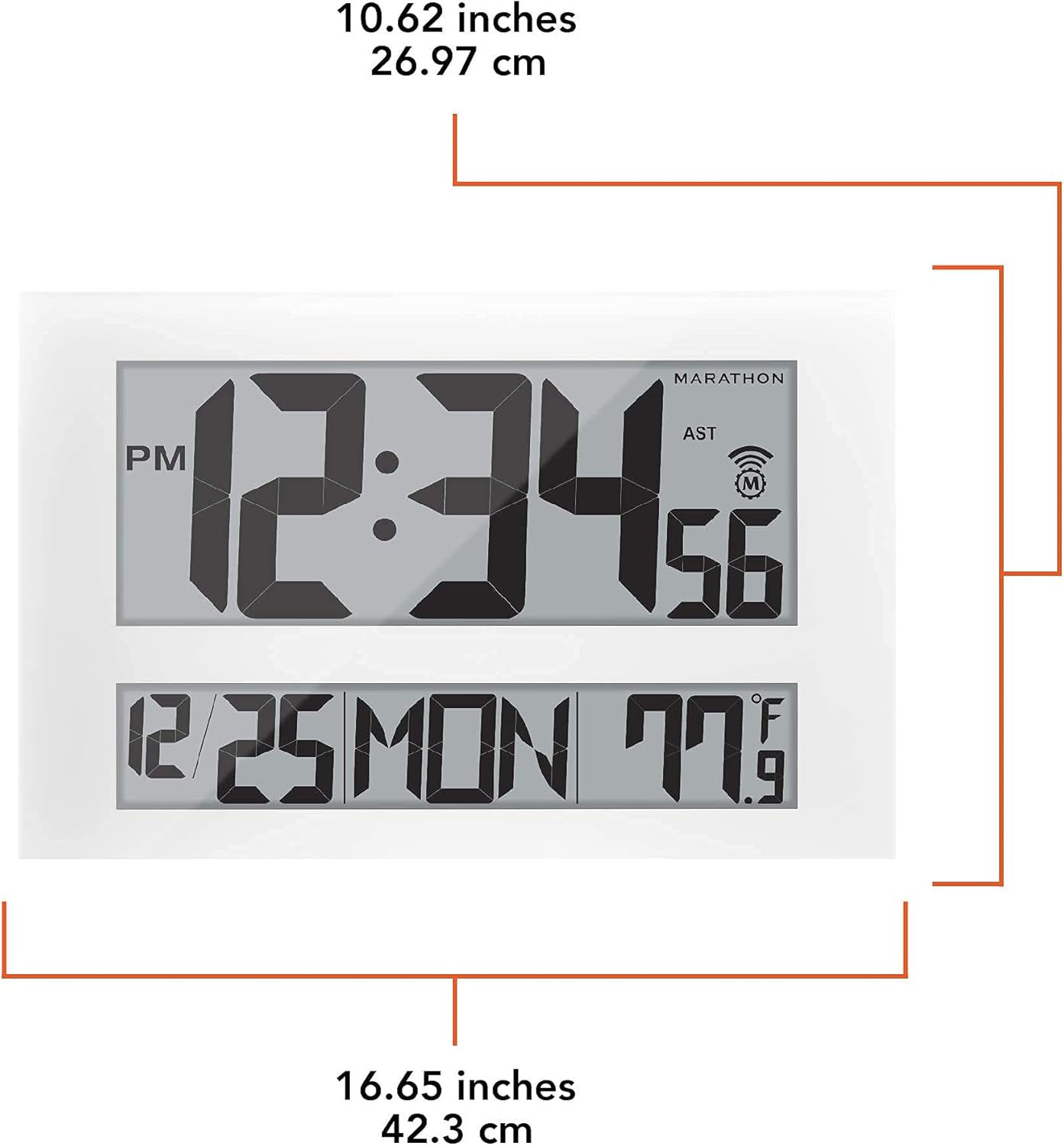
Image 9.1: Detailed dimensions of the clock.
10. Enfòmasyon sou Garanti
The Marathon CL030025WH Jumbo Atomic Wall Clock comes with a 2-year warranty from the date of purchase. This warranty covers manufacturing defects and workmanship. It does not cover damage caused by misuse, accidents, unauthorized repairs, or normal wear and tear. Please retain your proof of purchase for warranty claims.
11. Sipò pou Kliyan
If you encounter any issues not covered in this manual or require further assistance, please contact Marathon customer support. Refer to the product packaging or the official Marathon websit la pou jwenn enfòmasyon kontak ki pi resan yo.


