Entwodiksyon
The Fitbit Flex 2 is a slim, swim-proof fitness wristband designed for all-day activity and sleep tracking. Its ultra-thin, removable tracker can be worn in various accessories, offering versatility. Key features include automatic activity and sleep tracking, SmartTrack automatic exercise recognition, and a discreet LED display for progress and notifications. This manual provides essential information for setting up, operating, maintaining, and troubleshooting your device.

The Fitbit Flex 2 tracker embedded in its black elastomer wristband, displaying the LED progress lights.
Enstalasyon
1. Chaje aparèy ou an
Before initial use, fully charge your Fitbit Flex 2. Connect the charging cable to the tracker and a USB power source. The LED lights on the tracker will indicate charging progress, with all five lights solid when fully charged.
2. Wearing Your Device
For optimal tracking and comfort, ensure your Flex 2 is worn correctly. Wear the band loosely enough that it can move back and forth on your wrist. Avoid wearing it too tightly, as prolonged pressure can cause skin irritation. For exercise, you may secure the band slightly tighter and higher on your wrist (approximately 2-3 finger widths above your wrist bone) for more accurate readings, then loosen it afterward.
3. Pairing with the Fitbit App
- Download the Fitbit app from your device's app store (iOS, Android, Windows).
- Open the Fitbit app and create an account or log in.
- Follow the on-screen instructions to pair your Flex 2 with your smartphone or tablet via Bluetooth. Ensure Bluetooth is enabled on your mobile device.
Opere aparèy ou an
Aktivite Tracking
The Flex 2 automatically tracks your daily activity, including steps taken, distance traveled, calories burned, and active minutes. This data is synchronized with the Fitbit app for detailed analysis.
Suivi dòmi
Wear your Flex 2 to bed to automatically track your sleep patterns. The device monitors your sleep duration and quality, providing insights into your rest in the Fitbit app.
SmartTrack Automatic Exercise Recognition
The SmartTrack feature automatically recognizes and records select workouts, such as walks, runs, swims, and elliptical sessions, without requiring manual input. Your activity is logged in the Fitbit app.
Swim Tracking
The Flex 2 is swim-proof, allowing it to track your swimming activities. It can be worn in the pool or shower. Ensure proper drying after exposure to water.
Notifikasyon
The discreet LED display uses color-coded lights to notify you of incoming calls, text messages, and Reminders to Move from your paired smartphone. Customize notification settings within the Fitbit app.

Yon detaye view of the Fitbit Flex 2 tracker, highlighting the five LED lights, with one green light indicating a specific status or goal achievement.
Antretyen
Netwayaj aparèy ou an
- Regularly clean your band and wrist, especially after workouts or sweating.
- Rense gwoup la ak dlo oswa siye li ak yon ti kantite alkòl fwote.
- PA fè sa use hand soap, body soap, dish soap, hand sanitizers, cleaning wipes, or household cleaners, as these can get trapped beneath the band and irritate skin.
- Always dry the band thoroughly before putting it back on.
Keeping It Dry
- While the Flex 2 is water resistant, prolonged wear of a wet band can irritate your skin.
- If your elastomer band gets wet (e.g., after sweating or showering), rinse and dry it completely before re-wearing.
- Ensure your skin is dry before putting the band back on.
Giving Your Wrist a Rest
To prevent skin irritation from prolonged rubbing and pressure, remove your Flex 2 for at least an hour after extended wear to allow your skin to breathe.
Depanaj
Device Not Syncing
- Asire w ke Bluetooth aktive sou telefòn entelijan oswa tablèt ou.
- Verify that the Fitbit app is open and running in the background.
- Try restarting your Fitbit Flex 2 and your mobile device.
- Asire w ke sistèm operasyon aparèy ou an ajou.
Kout lavi batri
- Frequent notifications and alarms can impact battery performance. Adjust these settings in the Fitbit app.
- Asire w ke aparèy la chaje konplètman anvan w itilize li.
- Avoid extreme temperatures, which can affect battery longevity.
Iritasyon po
- Review the cleaning and wearing instructions in the Maintenance section.
- Ensure the band is not worn too tightly and is kept clean and dry.
- Si iritasyon an pèsiste, sispann itilize li epi konsilte yon dèrmatològ.
Espesifikasyon
| Karakteristik | Detay |
|---|---|
| Nimewo Modèl | FB403BK |
| Dimansyon pwodwi | 10 x 0.45 x 0.37 pous (0.64"L x 0.35"W x 0.45"H) |
| Pwa atik | 18.14 g (0.64 ons) |
| Materyèl | Elastomer, Stainless Steel |
| Koulè | Nwa |
| Kalite batri | Entèn rechargeable ityòm-ion batri |
| Kalite Capteur | Akseleromètr |
| Aparèy konpatib | Smartphones, Tablets, Desktops |
| UPC | 810351028888 |
| Rezistans dlo | Swim-proof (up to 50 meters) |
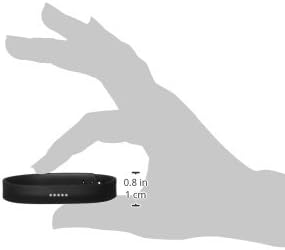
A visual representation of the compact size of the Fitbit Flex 2 tracker, held in a hand, with measurements indicating its small form factor.
Garanti ak sipò
For warranty information and technical support, please contact Fitbit customer service.
- Kontakte manifakti: support@fitbit.com
- Gid Itilizatè Ofisyèl (PDF): For a detailed PDF version of the user guide, please refer to the official Fitbit documentation available online. A general user guide can be found isit la.


