1. Entwodiksyon
This manual provides instructions for the proper use and maintenance of your Paulmann 500.01 Smart Home Bluetooth Remote Control. This remote allows you to control various Paulmann Smart Home Bluetooth lighting products, offering convenient operation without the need for a smartphone or tablet application.
2. Pwodwi souview
The Paulmann 500.01 remote control is designed for intuitive control of your Paulmann Smart Home lighting. It features dedicated buttons for power, brightness adjustment, color temperature control, and scene selection.

Imaj 1: Devan view of the Paulmann 500.01 Smart Home Bluetooth Remote Control. It is a black, rectangular remote with multiple buttons for controlling smart home lighting functions.
2.1. Karakteristik kle
- Controls all Paulmann Bluetooth Smart Home products.
- Operating range of up to 10 meters in open field conditions.
- Battery-powered for portability (requires AAA batteries).
2.2. Pake kontni
- Paulmann 500.01 Smart Home Bluetooth Remote Control
- Manyèl Itilizatè (dokiman sa a)
- Remak: Pil AAA yo pa enkli epi yo dwe achte separeman.
3. Enstalasyon
3.1. Enstalasyon batri
- Jwenn kouvèti lòj batri a sou do kontwòl remote la.
- Glise oswa dousman louvri kouvèti a.
- Mete de (2) pil AAA, asire w polarite a kòrèk (+ ak -) jan yo endike anndan konpatiman an.
- Remèt kouvèti konpatiman batri a jiskaske li fè yon klik byen fèm nan plas li.
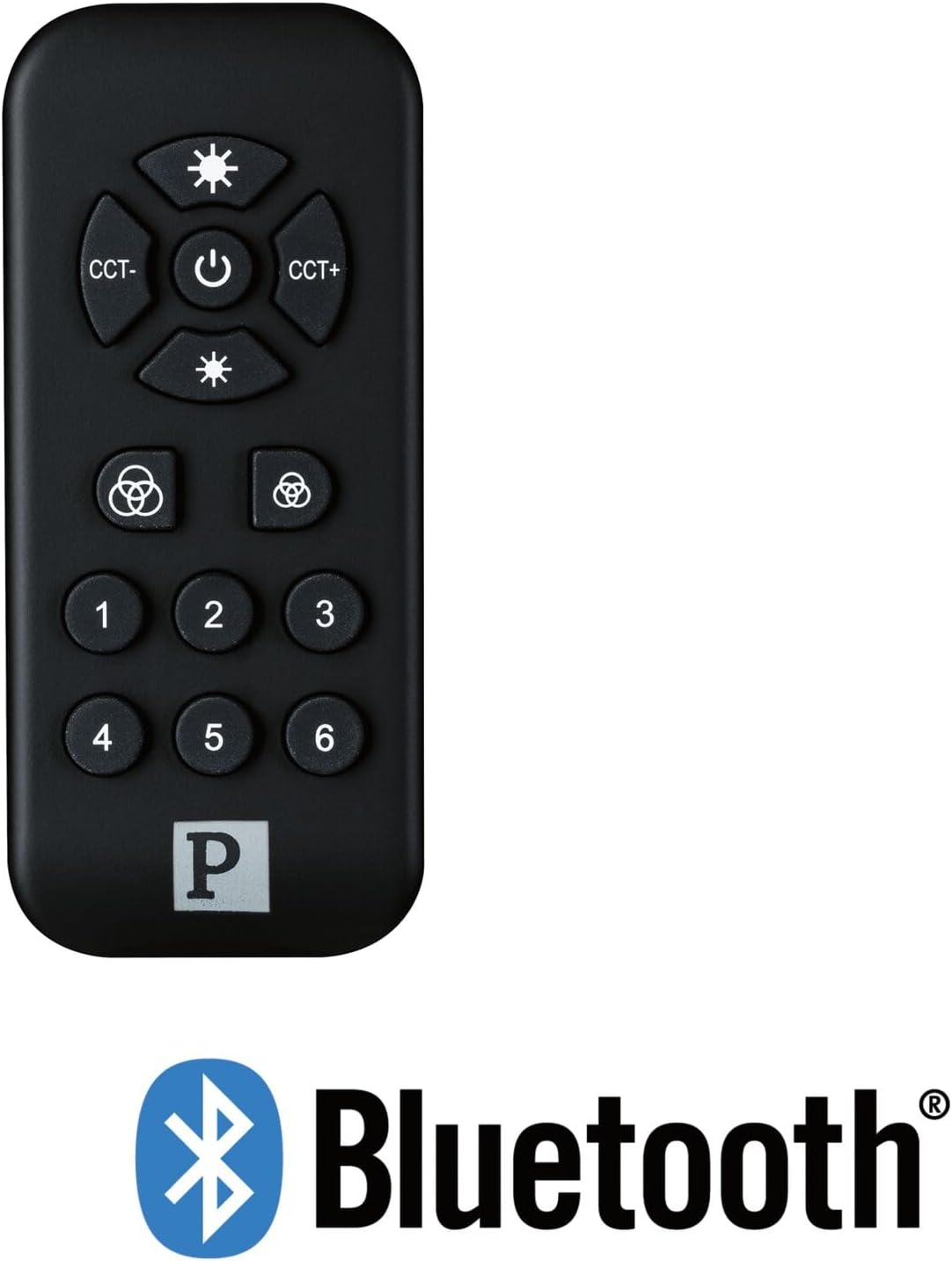
Imaj 2: The Paulmann 500.01 remote control displayed alongside the Bluetooth logo, indicating its wireless connectivity technology.
3.2. Pairing with Smart Home Devices
To use the remote control, it must be paired with your Paulmann Smart Home Bluetooth lighting products. The specific pairing process may vary slightly depending on the individual lighting product. Generally, the steps involve:
- Ensure your Paulmann Smart Home lighting device is powered on and in pairing mode (refer to the specific device's manual for details on how to activate pairing mode).
- Sou kontwòl remote la, peze epi kenbe la Pouvwa button (or a designated pairing button, if available) for several seconds until an indicator light on the remote or the lighting device confirms pairing initiation.
- Once paired, the lighting device should respond to commands from the remote control.
- If pairing fails, ensure the remote is within range (up to 10 meters) and repeat the process.
For detailed pairing instructions, always consult the user manual of the specific Paulmann Smart Home lighting product you intend to control.
4. Operasyon Enstriksyon
The Paulmann 500.01 remote control features several buttons for controlling your Smart Home lighting:
- Bouton Pouvwa (Sant): Press to turn the connected lighting devices ON or OFF.
- Brightness Up (Top Sun Icon): Increases the brightness of the light.
- Brightness Down (Bottom Sun Icon): Decreases the brightness of the light.
- CCT- (Left CCT Button): Adjusts the color temperature towards warmer white.
- CCT+ (Right CCT Button): Adjusts the color temperature towards cooler white.
- Color Cycle / Scene Buttons (Color Wheel Icons): These buttons typically cycle through predefined color modes or activate specific lighting scenes. Refer to your lighting device's manual for exact functionality.
- Bouton nimewote (1-6): These buttons are usually used to select or save specific lighting scenes or groups of devices. Their function can often be customized through the Paulmann Smart Home app or by following specific pairing procedures with your lighting products.
5. Antretyen
5.1. Netwayaj
Pou netwaye kontwòl remote la, sèvi ak yon twal mou epi sèk. Pa sèvi ak pwodui netwayaj abrazif, solvan, oswa pwodui chimik ki agresif, paske sa yo ka domaje sifas la oswa konpozan entèn yo.
5.2. Ranplasman batri
When the remote control's performance degrades or it stops responding, it is likely time to replace the batteries. Follow the battery installation steps outlined in Section 3.1. Always replace both AAA batteries simultaneously with new ones.
NAN. Depanaj
| Pwoblèm | Kòz posib | Solisyon |
|---|---|---|
| Telekòmand lan pa reponn. | Pil ki mouri oswa ki mal enstale. | Ranplase pil yo, asire w ke polarite a kòrèk. |
| Telekòmand lan pa reponn. | Soti nan ranje. | Move closer to the lighting device (within 10 meters). |
| Telekòmand lan pa reponn. | Pa konekte ak aparèy la. | Follow pairing instructions in Section 3.2. |
| Kontwòl tanzantan. | Entèferans oswa siyal fèb. | Ensure no obstructions between remote and device. Check for other Bluetooth devices causing interference. |
7. Espesifikasyon
- Mak: Paulman
- Nimewo Modèl: 50001
- Koneksyon Teknoloji: Bluetooth
- Koulè: Nwa
- Aparèy konpatib: Paulmann Smart Home lighting products
- Kalite kontwolè: Kontwòl bouton
- Ranje maksimòm: 10 mèt
- Kondisyon pou batri: 2 x AAA pil
8. Garanti ak sipò
For warranty information and technical support, please refer to the official Paulmann website or contact Paulmann customer service directly. Keep your purchase receipt as proof of purchase for any warranty claims.
Anjeneral, ou ka jwenn enfòmasyon pou kontakte ak resous sipò sou paj ofisyèl manifakti a. websit: www.paulmann.com


