1. Entwodiksyon
The Soundstream VM-22B is a versatile Single DIN Digital Media Receiver designed to enhance your in-car audio experience. It offers a range of features including Bluetooth connectivity, SD/USB media playback, and an AM/FM radio tuner. This manual provides detailed instructions for the setup, operation, and maintenance of your device.

Figure 1: Soundstream VM-22B Single DIN Digital Media Receiver
Karakteristik kle:
- Koneksyon Bluetooth: Pou apèl men lib ak difizyon odyo san fil.
- Lektur SD/USB: Supports MP3, WMA, M4A audio files, AVI, MP4, H264 video files, and JPEG, GIF, PNG, BMP image files.
- Sentonizè AM/FM: Access your favorite radio stations.
- Entegre Amplifier: Features a Class A/B integrated circuit audio amplifier.
- Revolve: Customizable audio settings with several pre-set genre EQs.
- USB rapid chaje: Keep your devices powered.
- Mirror Link Functionality: Sync your smartphone to the display (when parked).
2. Enstalasyon
2.1. Enstalasyon
The VM-22B is designed for Single DIN installation. Ensure your vehicle's dashboard opening is compatible. Professional installation is recommended for optimal performance and safety.
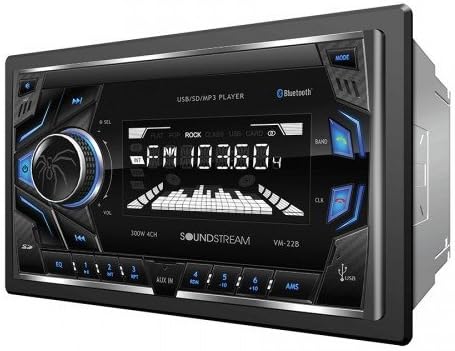
Figi 2: Devan view of the Soundstream VM-22B unit.
2.2. Koneksyon fil elektrik
Before connecting, ensure the vehicle's ignition is turned off and the negative battery terminal is disconnected. Use the provided wiring harness and refer to the diagram below for correct connections. It is highly recommended to use a wiring adapter specific to your vehicle to avoid cutting original car wires.

Figure 3: General Wiring Diagram for the VM-22B. Consult your vehicle's specific wiring diagram for accurate connections.
Ensure all speaker wires are connected with correct polarity (positive to positive, negative to negative) to prevent phase issues and poor sound quality. Secure all connections properly, preferably by soldering and heat-shrinking, rather than crimping.
The unit features RCA line outputs for connecting external amplifiers and an antenna input for the AM/FM tuner. A dedicated wire is available for connecting to a reverse camera, which will automatically display the camera feed when the vehicle is in reverse.
3. Operasyon Enstriksyon
3.1. Kontwòl Panel Front
- Pouvwa / Mode bouton: Press to turn on/off, short press to cycle through audio sources (FM, AM, Bluetooth, AUX, USB, SD).
- Volim bouton: Rotate to adjust volume. Press to access audio settings (Bass, Treble, Balance, Fade, EQ).
- Track Skip/Search Buttons: Use to skip tracks or search radio stations.
- Pò USB: For media playback and device charging.
- Plas kat SD: Pou lekti medya.
- Antre AUX: Yon priz 3.5mm pou aparèy odyo ekstèn.
- Mikwofòn: Pou apèl san men.
3.2. Bluetooth Operasyon
To pair your smartphone:
- Asire w ke Bluetooth aktive sou smartphone ou.
- Select 'Bluetooth' as the source on the VM-22B. The unit will enter pairing mode.
- Chèche pou 'VM-22B' on your smartphone's Bluetooth device list and select it to connect.
- Once paired, you can make/receive calls hands-free and stream audio wirelessly.
The unit supports hands-free profile for dialing, receiving calls, and displaying call logs. Advanced Audio Distribution Profile (A2DP) allows for wireless audio streaming.
3.3. Lekti Medya
Insert a USB drive or SD card into the respective slots. The unit will automatically switch to the USB or SD source and begin playback of compatible media files. Supported formats include MP3, WMA, M4A for audio, and AVI, MP4, H264 for video. Image files like JPEG, GIF, PNG, and BMP are also viewkapab.

Figure 4: VM-22B supports various audio, video, and image file fòma.
3.4. Anviwònman egalize
Press the volume knob to cycle through audio settings. You can adjust Bass, Treble, Balance (left/right speakers), and Fade (front/rear speakers). The unit also includes several pre-set genre equalizers (EQs) such as Flat, Rock, Pop, Classic, and Jazz to tailor the sound to your preference.

Figure 5: Customize your audio with various equalizer settings.
3.5. Lyen Mirror
The Mirror Link function allows you to display your smartphone's screen on the VM-22B's display. This feature is intended for passenger use only when the vehicle is safely parked. Consult your smartphone's manual for specific Mirror Link setup instructions.
4. Antretyen
To ensure the longevity and optimal performance of your Soundstream VM-22B, follow these maintenance guidelines:
- Netwayaj: Sèvi ak yon twal mou epi sèk pou netwaye ekran ak bouton aparèy la. Evite pwodui netwayaj abrazif oswa solvan.
- Tanperati: Evite ekspoze aparèy la nan tanperati ekstrèm, limyè solèy dirèk pou peryòd pwolonje, oswa imidite ki wo.
- Koneksyon: Tcheke tout koneksyon fil elektrik yo detanzantan pou asire yo byen fèm epi yo pa gen korozyon.
NAN. Depanaj
If you encounter issues with your VM-22B, refer to the following common troubleshooting steps:
| Pwoblèm | Kòz posib | Solisyon |
|---|---|---|
| Pa gen pouvwa | Fuzib boule, fil elektrik ki pa kòrèk, koneksyon kouran ki lach. | Check vehicle's fuse box and unit's fuse. Verify power and ground connections. |
| Pa gen Son | Volume too low, incorrect source selected, speaker wiring issues. | Increase volume. Select correct audio source. Check speaker connections and polarity. |
| Bluetooth pa konekte | Unit not in pairing mode, Bluetooth off on phone, interference. | Ensure unit is in Bluetooth mode. Restart phone and unit. Try re-pairing. |
| USB/SD Playback Error | Enkonpatib file format, corrupted media, faulty USB/SD card. | Tcheke file formats. Try a different USB/SD card. Ensure media is not corrupted. |
6. Espesifikasyon
| Karakteristik | Detay |
|---|---|
| Nimewo Modèl | VM-22B |
| Dimansyon pwodwi | 4 x 7 x 4 pous |
| Pwa atik | 2.31 liv |
| Koneksyon Teknoloji | Bluetooth, USB |
| Kominikasyon san fil | Bluetooth |
| Karakteristik espesyal | Equalizer, Spotify (via connected device) |
| Aparèy konpatib | Smartphone, Oratè |
| Audio Sòti Mode | Stereo |
| Konfigirasyon chanèl son antoure | 4.0 |
| Sortie pouvwa | 75 Watts |
| Koulè | Nwa |
7. Garanti ak sipò
For warranty information, technical support, or service inquiries, please refer to the documentation included with your Soundstream VM-22B Digital Media Receiver or visit the official Soundstream websit la. Kenbe prèv acha ou pou reklamasyon garanti.


