1. Entwodiksyon
This manual provides comprehensive instructions for the installation, operation, and maintenance of your DS18 DD652 Double DIN In-Dash Car Multimedia System. Please read this manual thoroughly before using the product to ensure proper functionality and to prevent damage. Keep this manual for future reference.
2. Enfòmasyon sou Sekirite
- Do not operate the system in a way that distracts you from driving. Always prioritize road safety.
- Ensure all wiring is correctly connected to prevent short circuits or damage. Incorrect wiring can lead to fire or electric shock.
- Evite ekspoze aparèy la nan imidite oswa tanperati ekstrèm.
- Pa eseye demonte oswa modifye aparèy la. Konfye tout antretyen bay pèsonèl kalifye.
- Kenbe volim nan nan yon nivo ki pèmèt ou tande bri trafik deyò a.
3. Pwodwi souview
3.1 Aranjman Panèl Devan an
The DS18 DD652 features a 6.2-inch HD digital panel and intuitive controls for easy operation. Below is an illustration of the front panel with key components identified.
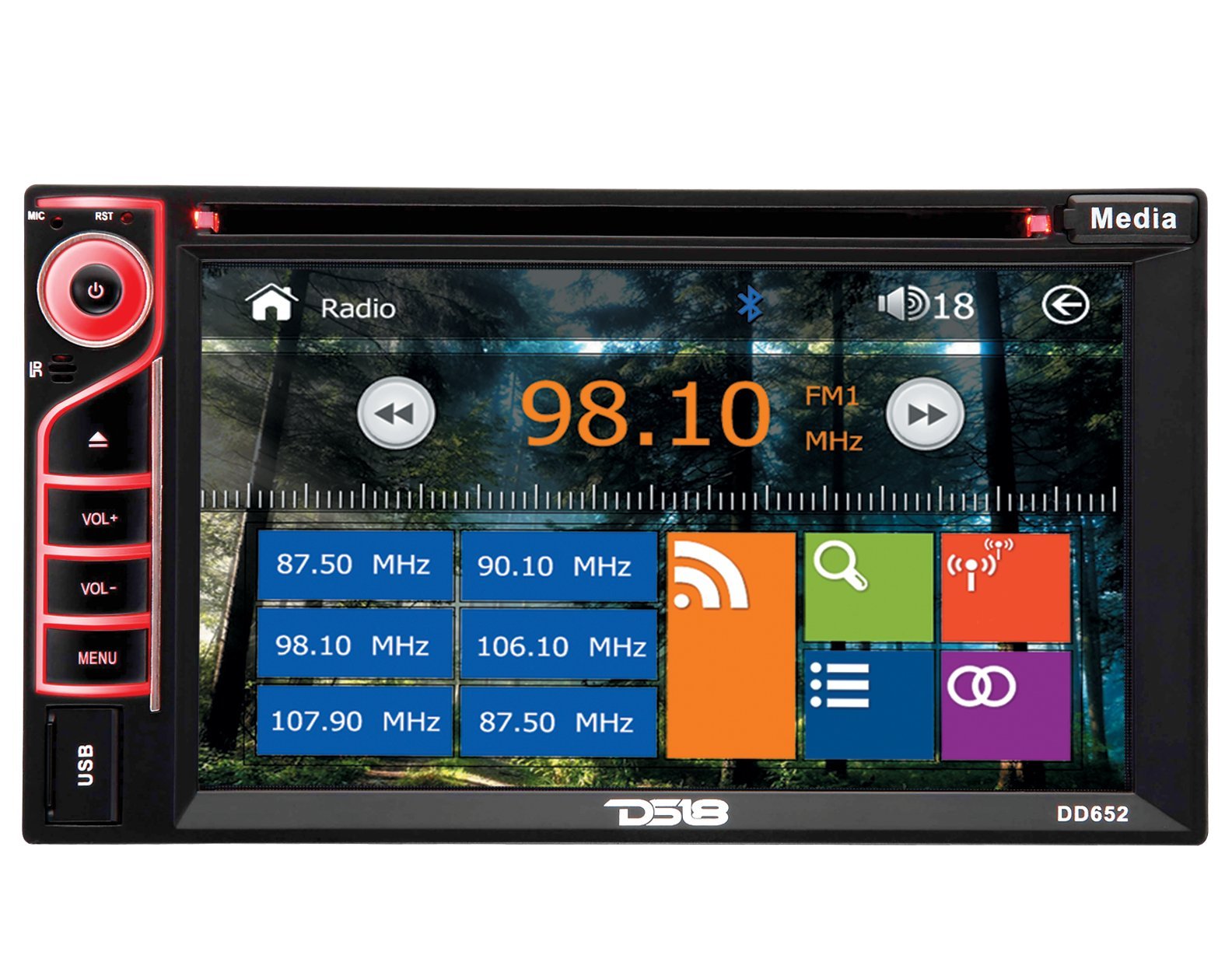
Figure 1: Front Panel of DS18 DD652 Multimedia System
- Power/Mute Button (G): Peze pou limen/etenn aparèy la. Peze yon ti kras pou aktive/dezaktive odyo a.
- MIC: Mikwofòn entegre pou apèl men-gratis.
- RST (Reyajiste): Small button for system reset (requires a pointed object).
- IR: Reseptè enfrawouj pou kontwòl remote la.
- VOL+ / VOL-: Volume Up / Volume Down buttons.
- MENI: Access the main menu or return to the previous screen.
- Pò USB: Konekte aparèy depo USB pou lekti medya.
- Bouton Media: Chanje ant diferan sous medya yo.
- 6.2" HD Digital Touchscreen: Primary interface for navigation and control. Displays radio frequency (e.g., 98.10 MHz), Bluetooth icon, and various application icons.
- Plas kat SD: Located behind the panel (not visible in image, but mentioned in features).
4. Enstalasyon
Installation of the DS18 DD652 requires technical knowledge and experience with car audio systems. It is highly recommended to have this unit installed by a professional car audio technician to ensure proper wiring and functionality, and to avoid damage to your vehicle or the unit.
4.1 Wiring Diagram (General Guidelines)
Refer to the wiring diagram provided with your product packaging for specific connections. General connections include:
- Pouvwa: Konekte fil jòn nan 12V konstan an, fil wouj la nan 12V akseswa a, epi fil nwa a nan tè a.
- Oratè: Connect speaker wires to the corresponding positive and negative terminals.
- Antèn: Connect the car's radio antenna.
- Dèyèview Antre kamera: Connect the video signal from a rearview kamera.
- Kontwòl volan: Connect to your vehicle's steering wheel control interface (if applicable).
Warning: Incorrect wiring can cause severe damage to the unit and your vehicle's electrical system. Always disconnect the vehicle's battery before beginning installation.
5. Inisyal Enstalasyon
5.1 Limen
After installation, press the Power button (G) on the front panel to turn on the unit. The DS18 logo will appear, followed by the main menu or the last active source.
5.2 Anviwònman debaz yo
From the main menu, navigate to the "Settings" icon (often represented by a gear). Here you can adjust:
- Lang: Chwazi lang ou pi pito.
- Lè/Dat: Mete lè ak dat aktyèl la.
- Ekspozisyon: Adjust brightness, contrast, and backlight settings.
- Odyo: Fine-tune equalizer settings, balance, and fader.
6. Operasyon Enstriksyon
6.1 Operasyon radyo
From the main menu, tap the "Radio" icon. The screen will display the current frequency (e.g., 98.10 MHz FM1). You can:
- melodi: Use the left/right arrow icons on the screen to manually tune or seek for stations.
- Seleksyon Band: Tap "FM1" to cycle through FM1, FM2, FM3, AM1, AM2 bands.
- Estasyon Prereglaj: Touch and hold a frequency box (e.g., "87.50 MHz") to save the current station as a preset. Tap a preset box to recall a saved station.
- RDS (Radyo Done Sistèm): If available in your region, RDS provides station information like station name and program type.
6.2 Lekti Medya (DVD/CD/USB/SD)
The DS18 DD652 supports various media formats including DVD, VCD, CD, MP3, and MP4. Insert the media into the appropriate slot (DVD/CD slot or USB/SD card slot).
- DVD/CD: Insert a disc into the slot. The system will automatically switch to DVD/CD mode and begin playback.
- USB/SD: Insert a USB drive into the front USB port or an SD card into the SD card slot. Select "USB" or "SD" from the main menu or by pressing the "Media" button. Browse files and select your desired media.
- Fòma sipòte: MP3, MP4, WMA, AVI, etc. (Refer to product specifications for a complete list).
6.3 Koneksyon Bluetooth
Pair your Bluetooth-enabled device (e.g., smartphone) with the DD652 for hands-free calling and audio streaming.
- From the main menu, tap the "Bluetooth" icon (often represented by a 'B' or a Bluetooth symbol).
- On your mobile device, search for available Bluetooth devices. The unit's name will typically be "DS18 DD652" or similar.
- Select the unit and enter the pairing code (usually "0000" or "1234") if prompted.
- Yon fwa yo konekte, ou ka fè/resevwa apèl epi difize odyo san fil.
6.4 Dèyèview Antre kamera
When a rearview camera is connected and the vehicle is shifted into reverse, the unit will automatically display the camera feed on the screen, enhancing parking safety.
6.5 Kontwòl Volan
If your vehicle supports steering wheel controls, the DD652 can be configured to respond to these controls. Refer to the installation section for wiring and the system settings for programming the functions.
7. Antretyen
- Netwaye ekran an: Sèvi ak yon twal mou ki pa gen pousyè pou siye ekran tactile a dousman. Pa sèvi ak pwodui netwayaj abrazif oswa solvan.
- Swen Disk: Manyen disk yo nan kwen yo. Kenbe yo pwòp epi san reyur.
- Swen Jeneral: Kenbe aparèy la pwòp de pousyè ak debri. Evite tanperati ekstrèm ak limyè solèy dirèk pou peryòd pwolonje.
NAN. Depanaj
| Pwoblèm | Kòz posib | Solisyon |
|---|---|---|
| Pa gen pouvwa | Fil elektrik ki pa kòrèk; Fuzib boule; Batri machin nan fèb. | Check power connections; Replace fuse; Charge/check vehicle battery. |
| Pa gen son | Volim twò ba; Silans aktive; Fil elektrik oratè a pa kòrèk. | Ogmante volim nan; Dezaktive silans lan; Tcheke koneksyon oratè yo. |
| Resepsyon radyo pòv | Antèn pa konekte; Zòn nan siyal fèb. | Ensure antenna is properly connected; Try tuning to a stronger station. |
| Bluetooth pa konekte | Device not in pairing mode; Incorrect pairing code. | Ensure device is discoverable; Re-enter pairing code; Restart both devices. |
| Disc/USB/SD not playing | Unsupported format; Damaged media; Incorrectly inserted. | Check media format; Try a different disc/USB/SD; Re-insert media correctly. |
If problems persist after attempting these solutions, please contact DS18 customer support or a qualified service technician.
9. Espesifikasyon
| Nimewo Modèl | DD652 |
| Kalite ekspozisyon | LCD |
| Rezolisyon ekspozisyon | 800x480 |
| Gwosè ekran | 6.2 pous |
| Sipòte Medya | DVD, VCD, CD, MP3, MP4 |
| Koneksyon | USB, SD Card, Bluetooth, Rearview Camera Input, Steering Wheel Control |
| Karakteristik espesyal | RDS, Internal Microphone, Wireless Remote Control |
| Dimansyon (L x W x H) | 24.13 x 16.51 x 22.86 cm (9.5 x 6.5 x 9 pous) |
| Pwa | 2.04 kg (4.5 liv) |
10. Garanti ak sipò
DS18 products are designed and engineered for quality. For warranty information, please refer to the warranty card included with your product or visit the official DS18 website. For technical support or service inquiries, please contact DS18 customer service through their official channels.
Tanpri kenbe prèv ou achte pou reklamasyon garanti.


