1. Pwodwi souview
The Kit Magnetic Bluetooth Keyboard Case transforms your 9-10 inch tablet into a portable laptop, offering both protection and enhanced typing capabilities. Its sleek design features a leather-effect finish and an integrated stand for versatile use. The detachable Bluetooth keyboard ensures quick and easy pairing with a wide range of devices.
Karakteristik kle:
- Koneksyon Bluetooth: Seamlessly connect the wireless keyboard to your tablet.
- Lajè konpatibilite: Designed for 9-10 inch iOS, Android, and Windows tablets, including various iPad and Samsung Galaxy Tab models.
- Long lavi batri: The rechargeable battery provides approximately 65 hours of continuous typing.
- Kanpe entegre: Folds into a stable stand for comfortable viewang ak tape.
- Mayetik Design: Securely holds the tablet and keyboard in place.

Image: The Kit Magnetic Bluetooth Keyboard Case with a tablet securely placed, illustrating its use as a portable workstation.
2. Kòmanse
2.1 Kontni pake a
- Kit Magnetic Bluetooth Keyboard Case
- USB Chaje Kab
- Manyèl itilizatè
2.2 Chaje klavye a
Before first use, fully charge the keyboard. Connect the provided USB charging cable to the keyboard's charging port and plug the other end into a USB power source (e.g., computer USB port, USB wall adapter). The charging indicator light will illuminate during charging and turn off when fully charged.
2.3 Mete Tablèt Ou a
- Open the keyboard case flat.
- Carefully slide your 9-10 inch tablet into the designated slot or frame within the case. Ensure it is securely seated and aligned with any cutouts for buttons or ports.
- The magnetic design will help hold the tablet in place.
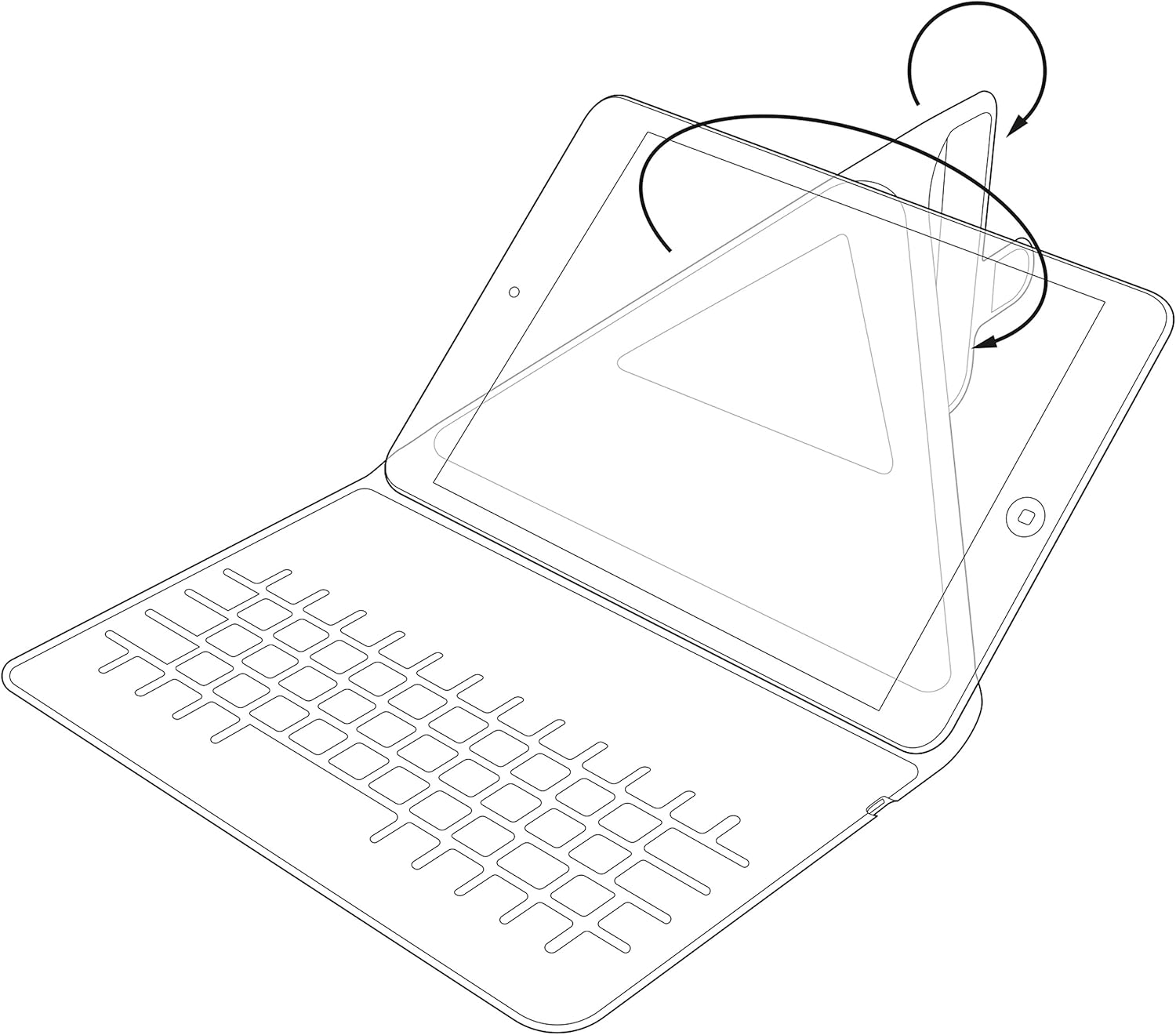
Image: Diagram showing the process of inserting a tablet into the case's holding mechanism.
2.4 Pairing the Bluetooth Keyboard
- Turn on the keyboard by sliding the power switch to the 'ON' position. The power indicator light will briefly illuminate.
- Press the 'Connect' or 'Pair' button on the keyboard (refer to the keyboard layout for exact button location). The Bluetooth indicator light will start blinking, indicating it is in pairing mode.
- On your tablet, go to 'Settings' > 'Bluetooth'. Ensure Bluetooth is enabled.
- Your tablet will search for available Bluetooth devices. Select 'Kit Keyboard' or a similar name from the list of found devices.
- If prompted, enter the pairing code displayed on your tablet screen using the keyboard, then press 'Enter'.
- Once paired, the Bluetooth indicator light on the keyboard will stop blinking and remain solid or turn off, and your tablet will show the keyboard as 'Connected'.
3. Operasyon Enstriksyon
3.1 Fonksyon klavye
The keyboard features a standard QWERTY layout with additional function keys (Fn) for quick access to multimedia controls, volume, and other tablet-specific functions. Refer to the key labels for their specific actions. For example, you may find keys for Home, Search, Volume Up/Down, Play/Pause, etc.

Imaj: Detaye view of the keyboard layout, highlighting various function keys and standard alphanumeric keys.
3.2 Using the Integrated Stand
The case is designed to fold into a stable stand, allowing you to position your tablet at an optimal viewing angle for typing, watching videos, or making video calls. Simply fold the back cover of the case to create a triangular support structure.

Image: Diagram demonstrating the folding mechanism of the case to create a stable viewing stand for the tablet.
4. Swen ak Antretyen
- Netwayaj: Sèvi ak yon mou, damp cloth to wipe the exterior of the case. For the keyboard, use a dry, lint-free cloth. Avoid harsh chemicals or abrasive cleaners.
- Depo: Lè w pa itilize klavye a pou yon bon bout tan, sere l nan yon kote ki fre epi sèk.
- Swen batri: Pou pwolonje lavi batri a, evite dechaje klavye a nèt souvan. Chaje l regilyèman, menm si li pa konplètman dechaje.
- Evite likid: Keep the keyboard case away from water and other liquids to prevent damage to electronic components.
NAN. Depanaj
5.1 Klavye a pa konekte/pa konekte
- Asire w klavye a limen epi li chaje nèt.
- Make sure Bluetooth is enabled on your tablet.
- Place the keyboard and tablet within close proximity (within 10 meters).
- Delete any previous pairings of the keyboard from your tablet's Bluetooth settings and attempt to pair again.
- Restart both the keyboard (turn off and on) and your tablet.
5.2 Kle yo pa reponn
- Check the keyboard's battery level and charge if necessary.
- Ensure the keyboard is properly connected via Bluetooth. Re-pair if needed.
- Netwaye tout debri ki ozalantou kle yo.
5.3 Pwoblèm chaj
- Verify that the charging cable is securely connected to both the keyboard and the power source.
- Eseye yon pò USB diferan oswa yon adaptè pouvwa.
- Asire w ke kab chaje a pa domaje.
6. Spécifications pwodwi
| Mak | Twous |
| Nimewo Modèl | KBMAG10BK |
| Dimansyon pwodwi | 1.6 x 20 x 24.5 cm |
| Pwa atik | 356 g |
| Koulè | Nwa |
| Materyèl | Kwi |
| Koneksyon Teknoloji | Bluetooth |
| Kalite batri | Lityòm Polymère |
| Kontni enèji batri a | 1 Watt èdtan |
| Aparèy konpatib | 9-10 inch iOS, Android, Windows Tablets (e.g., iPad, Samsung Galaxy Tab) |
7. Garanti ak sipò
This Kit Magnetic Bluetooth Keyboard Case comes with a full one-year warranty from the date of purchase. For any technical assistance, troubleshooting, or warranty claims, please contact Kit's experienced and friendly UK-based customer service team. Refer to your purchase documentation for specific contact details.


