1. Entwodiksyon
Mèsi pou acha aasing the Omron M400 Automatic Upper Arm Blood Pressure Monitor. This device is designed to measure your blood pressure and pulse rate simply and quickly. It utilizes the oscillometric method of blood pressure measurement. This manual provides essential information for the safe and effective use of the monitor.
Regular monitoring of your blood pressure can provide valuable health insights. The Omron M400 is equipped with the Intelli Wrap Cuff for accurate readings and Intellisense technology for comfortable inflation.

Image 1: The Omron M400 Blood Pressure Monitor with its Intelli Wrap Cuff. The monitor features a large digital display and control buttons.
2. Enfòmasyon enpòtan sou sekirite
Please read this section carefully before using the device. Incorrect use may lead to inaccurate readings or injury.
- Konsilte doktè w anvan w itilize aparèy sa a si w gen nenpòt pwoblèm medikal.
- Pa fè pwòp dyagnostik ou oswa tretman ou dapre rezilta mezi yo. Toujou konsilte yon pwofesyonèl swen sante.
- Kenbe aparèy la lwen tibebe ak timoun.
- Pa sèvi ak aparèy la sou yon bra ki blese oswa sou yon bra k ap sibi tretman medikal.
- Evite pran mezi nan yon machin k ap deplase oswa pandan aktivite fizik.
- Sèvi ak sèlman pyès ak akseswa otorize yo.
3. Pake kontni
Verifye ke tout konpozan yo prezan nan pake a:
- Omron M400 Automatic Upper Arm Blood Pressure Monitor
- Intelli Wrap Cuff (22-42 cm arm circumference)
- 4 x AA pil
- Manyèl Enstriksyon

Image 2: The retail packaging for the Omron M400, showing the monitor and cuff.
4. Enstalasyon
4.1. Enstale pil
- Louvri kouvèti konpatiman batri a ki sou dèyè monitè a.
- Insert the four AA batteries according to the polarity markings (+/-) inside the compartment.
- Fèmen kouvèti lòj batri a byen.
4.2. Attaching the Air Tube to the Monitor
- Insert the air plug of the Intelli Wrap Cuff firmly into the air jack on the left side of the monitor.
- Asire w koneksyon an byen fèm pou anpeche lè koule pandan mezi a.
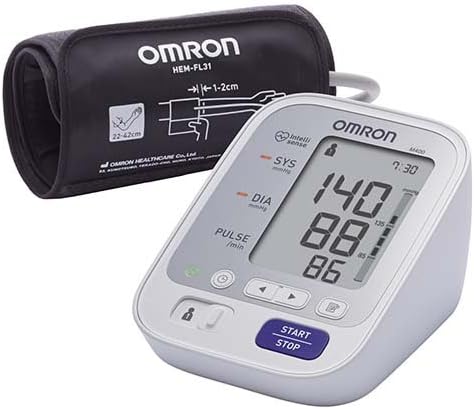
Image 3: The Omron M400 monitor with the Intelli Wrap Cuff connected, ready for use.
4.3. Setting Date and Time (If applicable)
Refer to the on-screen prompts or specific buttons (often indicated by a clock icon) to set the current date and time. This ensures accurate time-stamping of your measurement results in the memory.
5. Operasyon
5.1. Aplike braslè Intelli Wrap la
The Intelli Wrap Cuff is designed for easy and accurate placement. It can be applied to virtually any position around the upper arm.
- Chita nan yon chèz ak pye ou plat atè. Repoze bra ou sou yon tab pou braslè a nan nivo kè.
- Glise bra ou nan bouk manchèt la. Tib lè a ta dwe desann anndan bra ou.
- Position the cuff so the bottom edge is 1-2 cm above your elbow.
- Secure the cuff firmly using the fabric fastener. Ensure it is snug but not too tight. The monitor features a cuff wrap guide to confirm correct placement.
5.2. Pran yon mezi
- Select User 1 or User 2 using the designated switch or button, if available. The M400 supports memory for two users.
- Peze a KÒMANSE/KANPE button. The cuff will begin to inflate automatically using Intellisense technology, which ensures comfortable inflation without over-pressurization.
- Rete trankil epi an silans pandan mezi a.
- Once the measurement is complete, your systolic pressure (SYS), diastolic pressure (DIA), and pulse rate will be displayed on the screen.
- The monitor will also indicate if an irregular heartbeat was detected or if your blood pressure is excessively high (hypertension indicator).
- Peze a KÒMANSE/KANPE button again to turn off the monitor. If you do not turn it off, it will automatically shut down after a few minutes.

Imaj 4: Yon gwo plan view of the Omron M400's digital display, showing systolic, diastolic, and pulse readings.
5.3. Fonksyon memwa
The Omron M400 stores up to 60 measurement values for each of two users (User 1 and User 2). To review lekti sot pase yo:
- Ensure the monitor is off.
- Press the memory button (often indicated by a symbol like a book or 'M').
- Use the arrow buttons to scroll through the stored readings.
6. Antretyen
6.1. Netwayaj
- Siye monitè a ak braslè a ak yon twal mou epi sèk.
- Si sa nesesè, sèvi ak yon twal mouye ki mouye ak dlo ak yon savon dou, apresa siye l sèk.
- Pa sèvi ak pwodui netwayaj abrazif oswa plonje aparèy la nan dlo.
6.2. Depo
- Sere aparèy la nan yon kote ki pwòp, sèk.
- Evite tanperati ekstrèm, imidite, limyè solèy dirèk, ak pousyè.
- Do not fold the cuff or air tube tightly.
6.3. Ranplasman batri
Lè endikatè pil la parèt sou ekran an, ranplase kat pil AA yo ak pil nèf. Pa melanje pil fin vye granmoun ak pil nèf oubyen diferan kalite pil.
NAN. Depanaj
| Pwoblèm | Kòz posib | Solisyon |
|---|---|---|
| Pa gen ekspozisyon lè li limen. | Pil yo mouri oswa yo pa byen mete. | Ranplase pil yo oubyen mete yo tounen kòrèkteman. |
| Mesaj erè (pa egzanp, "E1", "E2"). | Braslè a pa byen mete, mouvman pandan mezi a, oswa flit lè. | Reapply cuff, remain still, check air tube connection. Retake measurement. |
| Lekti ki pa kòrèk. | Incorrect cuff size, improper cuff placement, or movement/talking during measurement. | Ensure correct cuff size (22-42 cm), proper placement, and follow measurement guidelines. |
| Senbòl batman kè iregilye a parèt souvan. | Indicates an irregular heartbeat. | Consult your physician if this symbol appears frequently. |
8. Espesifikasyon
- Modèl: Omron M400
- Ekspozisyon: Digital LCD
- Metòd mezi: Metòd osilometrik
- Kalite manchèt: Braslè Intelli Wrap (HEM-FL31)
- Sikonferans manchèt la: 22 a 42 cm
- memwa: 60 mezi pou 2 itilizatè
- Sous pouvwa: 4 pil "AA" 1.5V
- Dimansyon: Apeprè 19.2 x 18 x 11.6 cm
- Pwa: Apeprè 310 gram
- Karakteristik: Intellisense Technology, Cuff Wrap Guide, Irregular Heartbeat Detection, Hypertension Indicator.

Image 5: Certification seal indicating clinical validation for measurement accuracy.
9. Garanti ak sipò
Omron products are manufactured under a strict quality system. For information regarding warranty, repairs, or any technical support, please refer to the warranty card included with your product or visit the official Omron websit la. Pa eseye repare aparèy la tèt ou.
For further assistance, you may contact Omron customer service through their official channels. Keep your purchase receipt as proof of purchase for warranty claims.


