1. Entwodiksyon
Thank you for choosing the Acctim 74314 Parona Radio Controlled Wall Clock. This clock is designed for precise timekeeping, automatically synchronizing with the UK's atomic clock transmitter (MSF signal) for accurate time and automatic adjustment for daylight saving changes. This manual provides essential information for setting up, operating, and maintaining your new clock.
2. Enfòmasyon sou Sekirite
- Use only the specified battery type (1 x AA Alkaline battery).
- Pa melanje ansyen ak nouvo pil, oswa diferan kalite pil.
- Retire pil ki fin itilize yo byen vit pou anpeche yo koule epi domaje.
- Kenbe pil yo pa rive jwenn timoun yo.
- Pa ekspoze revèy la nan tanperati ekstrèm, limyè solèy dirèk, oswa imidite ki wo.
- Avoid dropping or subjecting the clock to strong impacts.
3. Pake kontni
Tanpri verifye ke pake ou a gen atik sa yo ladan l:
- Acctim 74314 Parona Radio Controlled Wall Clock
- Manyèl Itilizatè (dokiman sa a)
Nòt: 1 x AA battery is required and not included in the package.
4. Enstriksyon Enstalasyon
Follow these steps to set up your Acctim Radio Controlled Wall Clock:
- Mete batri: Locate the battery compartment on the back of the clock. Insert one new AA Alkaline battery, ensuring the correct polarity (+/-). We recommend using Energizer or Panasonic batteries for optimal performance.
- Initial Hand Movement: Upon battery insertion, the second hand will begin to turn clockwise and stop at the 12 o'clock position. Within a few minutes, the minute and hour hands will also move to the 12 o'clock position.
- Resepsyon siyal: The clock will then enter receiving mode to search for the MSF radio signal. This process can take some time. For best results, place the clock near a window and away from electronic devices that might cause interference.
- Overnight Synchronization: It is highly recommended to leave the clock undisturbed overnight for signal reception. The MSF signal transmission is generally stronger and more reliable during nighttime hours.
- Anviwònman Tan Otomatik: Once the clock successfully receives the signal, it will automatically set itself to the correct time, including adjusting for summer/winter time changes.

Figi 1: Dèyè view nan revèy la, mete aksan sou konpatiman batri a.
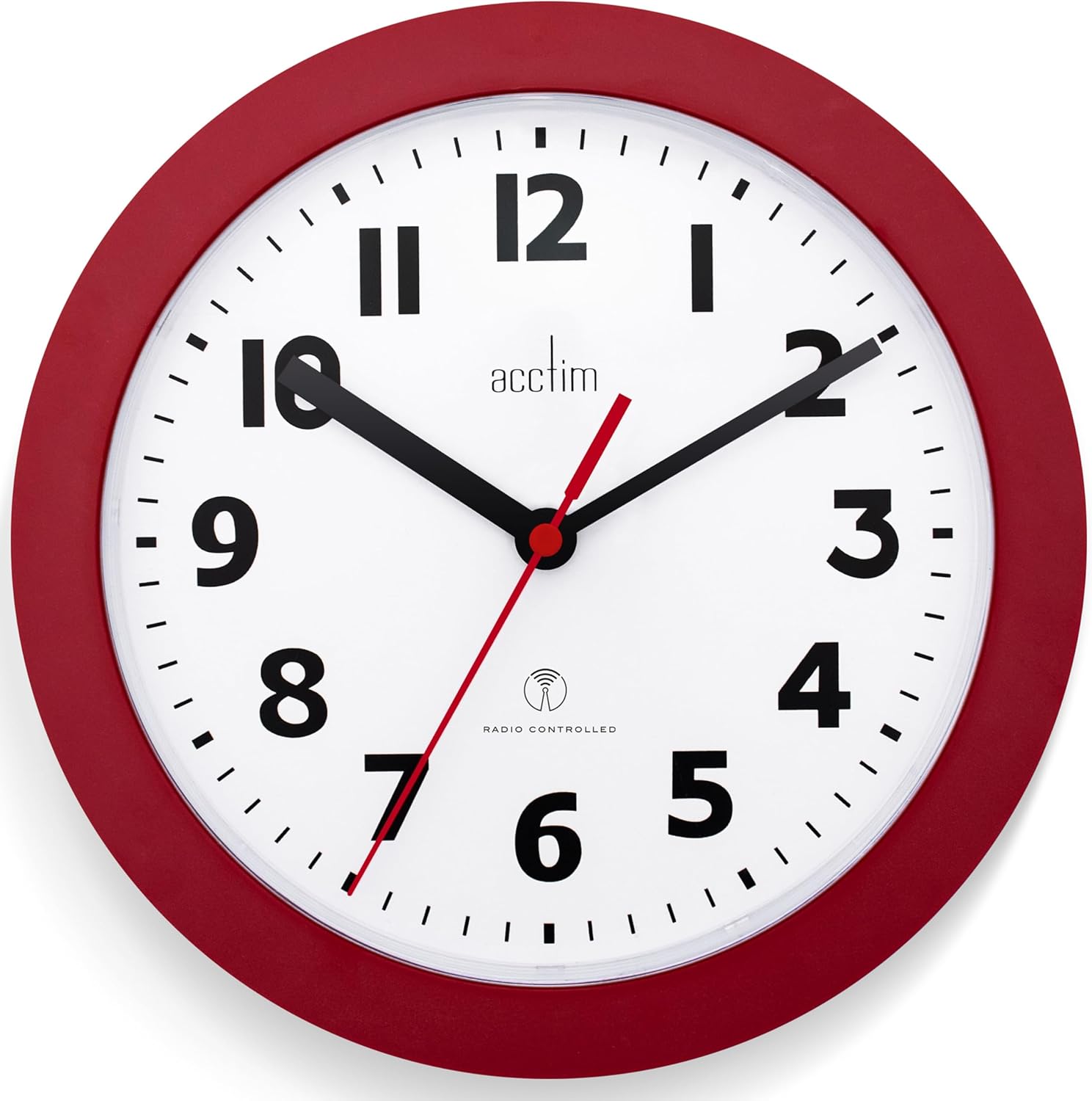
Figi 2: Devan view of the Acctim 74314 Parona Wall Clock.
5. Operasyon Enstriksyon
Once successfully set up, your Acctim Radio Controlled Wall Clock operates automatically:
- Senkronizasyon tan otomatik: The clock continuously monitors the MSF radio signal to maintain accurate time.
- Daylight Saving Time (DST) Adjustment: The clock will automatically adjust for summer and winter time changes, eliminating the need for manual adjustments.
- Regular Signal Checks: To ensure ongoing accuracy, the clock will search for the time signal every second hour, starting at 1 o'clock, 3 o'clock, 5 o'clock, and so on.
6. Antretyen
- Netwayaj: Wipe the clock with a soft, dry cloth. Do not use abrasive cleaners or solvents, as these may damage the finish.
- Ranplasman batri: When the clock stops or the hands move erratically, it is time to replace the battery. Follow the battery insertion steps in the "Setup Instructions" section. Always use a new AA Alkaline battery.
- Depo: If the clock will not be used for an extended period, remove the battery to prevent potential leakage.
NAN. Depanaj
| Pwoblèm | Kòz posib | Solisyon |
|---|---|---|
| Clock does not set to the correct time. |
|
|
| Hands are stuck or moving erratically. |
|
|
| Clock loses time or is inaccurate. |
|
|
Nòt enpòtan: The Radio Controlled signal will be off-air due to scheduled annual maintenance between 3rd and 21st September (8am - 6pm). During this period, the clock may not be able to receive the signal and set itself automatically.
8. Espesifikasyon
| Mak | Acctim |
| Nimewo Modèl | 74314 |
| Non pwodwi | Parona Radio Controlled Wall Clock |
| Koulè | Wouj |
| Kalite ekspozisyon | Analòg |
| Karakteristik espesyal | Atomic (Radio Controlled) |
| Dimansyon pwodwi | 23cm Diameter (9.06"W x 9.06"H) |
| Sous pouvwa | Mache ak pil (1 x pil AA, pa enkli) |
| Materyèl | Plastik |
| Kalite aliye | Mi mòn |
| Pwa atik | 0.28 kilogram (9.9 ons) |
9. Garanti ak sipò
For warranty information or technical support, please refer to the documentation provided with your purchase or contact Acctim customer service directly. Contact details can typically be found on the manufacturer's official websit la oubyen sou anbalaj pwodwi a.


