Entwodiksyon
This manual provides essential information for the proper installation, operation, and maintenance of your Lowrance Hook-5 Sonar/GPS Mid/High/Downscan Fishfinder. Please read this manual thoroughly before using the device to ensure optimal performance and longevity.
The Lowrance Hook-5 combines CHIRP sonar and DownScan Imaging technologies to provide a clear view of the underwater environment. It features a highly accurate built-in GPS antenna and detailed mapping capabilities.
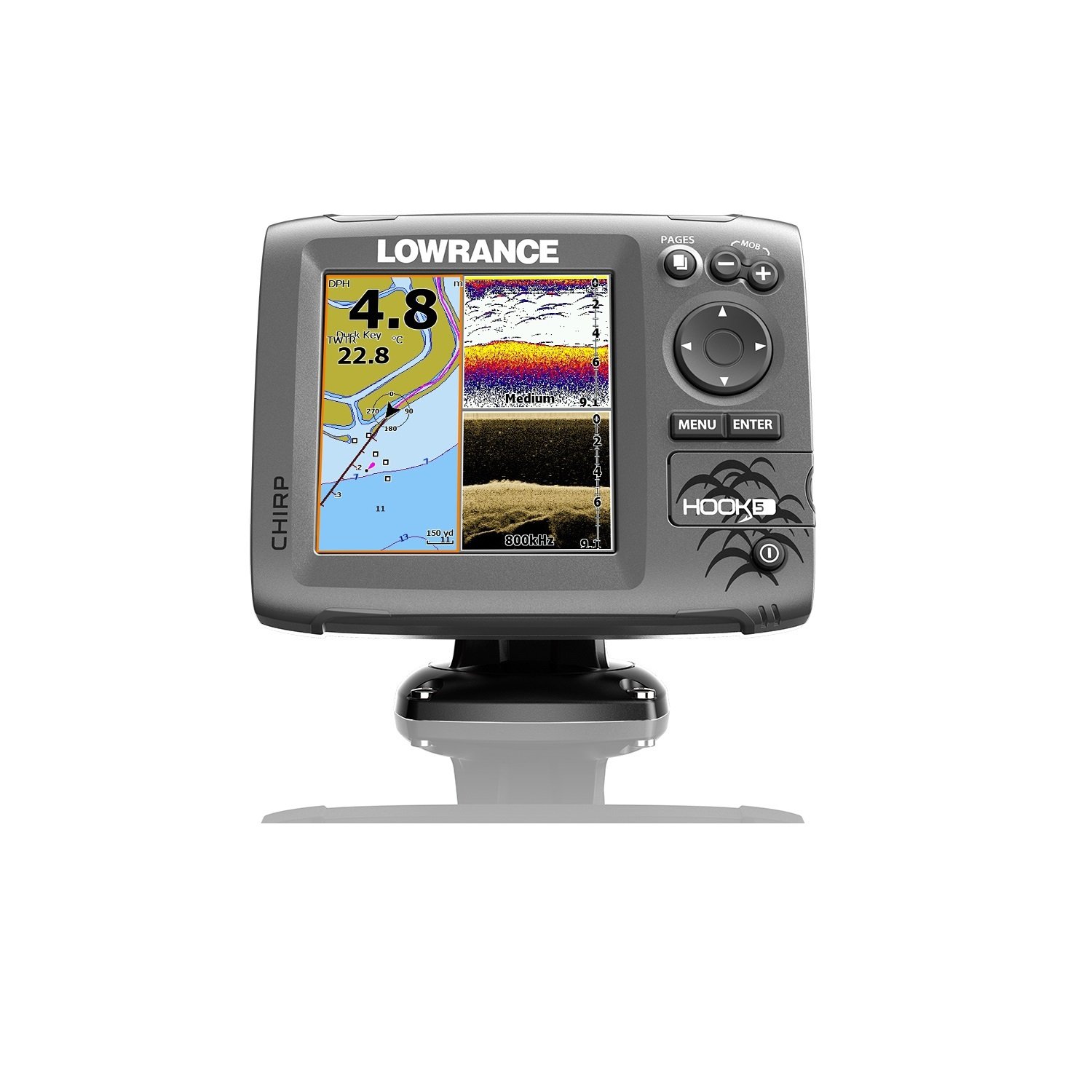
Figure 1: Lowrance Hook-5 Fishfinder unit. The display shows a GPS map on the left with depth (4.8m) and water temperature (22.8°C), and sonar/DownScan imaging on the right, indicating medium frequency sonar and 800kHz DownScan. Control buttons for PAGES, MOB, MENU, ENTER, and directional navigation are visible on the right side.
Enstalasyon ak Enstalasyon
Proper installation is crucial for the performance of your Hook-5 unit. Ensure all components are securely mounted and connections are watertight.
Mounting the Display Unit
The display unit should be mounted in a location that provides clear visibility and is protected from excessive moisture and direct sunlight. Use the included bracket and hardware for secure mounting. Ensure adequate ventilation around the unit.
Enstalasyon transducer
The transducer is typically mounted on the transom of the boat. It must be positioned to have an unobstructed view of the water beneath the hull. Avoid mounting near propellers or other sources of turbulence. Refer to the detailed instructions provided with your transducer for specific mounting procedures.
Koneksyon pouvwa
Connect the power cable to a 12V DC power source. Ensure the connection is fused and protected from short circuits. The red wire connects to the positive (+) terminal, and the black wire connects to the negative (-) terminal. Verify correct polarity before powering on the unit.
Enstriksyon Operasyon
Familiarize yourself with the controls and menu system to effectively use your Hook-5 fishfinder.
Limen / Off
Peze epi kenbe la POUVWA button (usually marked with a circle and vertical line) to turn the unit on or off. A short press typically accesses the backlight or system menu.
Navigasyon nan meni yo
Use the directional keypad to navigate through menu options. The MENI button accesses the main menu, and the ANTRE bouton konfime seleksyon yo. La PAJ button cycles through different display views (e.g., Sonar, Chart, DownScan, split screens).
Operasyon sonar
The Hook-5 utilizes CHIRP sonar for excellent target separation and DownScan Imaging for photo-like views of structure and fish. Adjust sensitivity, range, and frequency settings as needed for different water conditions.
- Sonar CHIRP: Provides traditional sonar views with superior clarity.
- Imaj DownScan: Offers detailed, high-resolution images of underwater structure and bottom composition.
GPS and Chartplotter Functions
The built-in GPS antenna provides accurate positioning. Use the chartplotter to view your current location, navigate to waypoints, and follow routes. The unit comes with a detailed U.S. map, and optional chart upgrades are available.
- Waypoints: Make kote espesifik ki enteresan yo.
- Wout: Plan and follow predefined paths.
- Tracks: Record your path for future reference.
Antretyen
Regular maintenance ensures the longevity and reliability of your Lowrance Hook-5.
- Netwayaj: Clean the display screen with a soft, damp twal. Evite pwodui netwayaj abrazif oswa solvan.
- Koneksyon: Tcheke tout koneksyon kab yo detanzantan pou wè si yo pa koroziv oswa domaje. Asire w ke yo byen tache.
- Depo: When not in use for extended periods, store the unit in a dry, temperate environment. Disconnect power if storing for a long time.
- Mizajou lojisyèl: Tcheke Lowrance la websit la pou dènye nouvèl lojisyèl ki disponib pou asire pèfòmans optimal ak aksè a nouvo fonksyonalite yo.
Depanaj
This section addresses common issues you might encounter with your Hook-5 unit.
| Pwoblèm | Kòz posib | Solisyon |
|---|---|---|
| Pa gen pouvwa | Koneksyon kouran ki lach, fizib boule, batri mouri. | Tcheke koneksyon kab kouran an, enspekte fizib la, epi verifye chaj batri a. |
| No Sonar Reading | Transducer not connected, air bubbles under transducer, incorrect settings. | Ensure transducer is plugged in, check transducer mounting for obstructions, adjust sensitivity/range. |
| Inaccurate GPS Position | Poor satellite signal, unit obstructed. | Asire w klè view of the sky, move unit if possible, allow time for satellite acquisition. |
| Screen Freezes/Unresponsive | Pwoblèm lojisyèl, varyasyon kouran. | Perform a soft reset (refer to manual for specific key combination), check power supply stability. |
If the problem persists, contact Lowrance customer support or refer to the full user manual available online.
Espesifikasyon
Key technical specifications for the Lowrance Hook-5 Sonar/GPS Mid/High/Downscan Fishfinder.
- Non modèl: Lowrance Hook-5 Sonar/GPS Mid/High/Downscan Fishfinder
- Nimewo Modèl: 000-12656-001
- Gwosè ekran: 1 pous
- Kalite ekspozisyon: LCD
- Sous pouvwa: Mache ak pil (12V DC)
- Pwa atik: 8 ons
- Kalite montaj: Transom Mount (for transducer)
- Dimansyon (LxWxH): 9.5 x 7.38 x 7.88 inches (Item)
- Frekans Sonar: Mid/High CHIRP, 83/200 kHz, 455/800 kHz DownScan
- GPS: Built-in high-sensitivity GPS antenna
- Katografik: Detailed U.S. Map with over 3,000 lakes, rivers & coastal contours.
Garanti ak sipò
Lowrance products are designed for reliability and performance. For specific warranty details, please refer to the warranty card included with your product or visit the official Lowrance websit. Tèm garanti yo anjeneral kouvri domaj fabrikasyon pou yon peryòd espesifik apati dat acha a.
For technical support, product registration, or to download the latest software updates and full user manuals, please visit the official Lowrance support portal. You can also find contact information for customer service on their websit.
Yon vèsyon PDF manyèl itilizatè a disponib pou telechaje: Lowrance Hook-5 User Manual (PDF).


