Entwodiksyon
This manual provides comprehensive instructions for the Mesqool Projection Alarm Clock with FM Radio. Designed for convenience and reliability, this device features a large LED display, adjustable time projection, dual alarms, FM radio with presets, a sleep timer, and a built-in USB charging port. Please read this manual thoroughly to ensure proper operation and to fully utilize all features.

Figure 1: Mesqool Projection Alarm Clock with a phone connected for charging.
Enstalasyon
1. Koneksyon pouvwa
Connect the provided power adapter to the DC input port on the back of the alarm clock and plug it into a standard wall outlet. The clock will power on automatically.
2. Battery Backup Installation (Optional but Recommended)
For retaining time and alarm settings during power outages, install two 1.5V AAA batteries (not included) into the battery compartment on the back of the unit. Ensure correct polarity (+/-) as indicated inside the compartment.

Figi 2: Dèyè view of the alarm clock showing the battery compartment for backup power.
Enstriksyon Operasyon
1. Mete Tan an
- Peze a METE TAN bouton an yon fwa. Chif lè yo ap flache.
- Sèvi ak la LÈ bouton pou ajiste lè a.
- Sèvi ak la MIN bouton pou ajiste minit yo.
- Peze METE TAN ankò pou konfime epi sòti nan mòd reglaj tan an.
- Pou chanje ant fòma 12 èdtan ak 24 èdtan, peze bouton an TU+ button during normal time display.
- To adjust for Daylight Saving Time (DST), press the DST bouton.

Figure 3: The clock supports 24-hour, 12-hour, and DST time formats.
2. Mete Alam
Revèy la sipòte de alam endepandan (Alam 1 ak Alam 2).
- Peze a ALARM1 or ALARM2 button. The alarm time will flash.
- Sèvi ak la LÈ epi MIN bouton yo pou mete lè alam ou vle a.
- Peze a ALARM1 or ALARM2 button again to select the alarm sound: Buzzer or FM Radio.
- Press the respective alarm button one more time to confirm and activate the alarm. An alarm icon will appear on the display.
- To turn off an active alarm, press the corresponding ALAM OFF bouton.
Ajiste Volim Alam
The alarm volume can be adjusted from Level 1 to 5. Level 5 provides a loud 106dB sound, suitable for heavy sleepers. Use the volume buttons on the side of the unit to adjust the alarm volume.

Figure 4: Visual representation of adjustable alarm volume levels.
Fonksyon Snooze
Lè alam lan sonnen, peze gwo bouton an OK/SNOOZE/SLEEP button to activate the 9-minute snooze function. The alarm will sound again after 9 minutes.

Figure 5: The large button for activating the snooze function.
3. Operasyon radyo FM
The FM radio operates within the 87.5–108 MHz frequency range and can store up to 20 preset stations.
- Peze a RADYO bouton pou limen radyo FM.
- Sèvi ak la LÈ or MIN buttons to tune into the desired radio channel.
- To save a preset station, press and hold the MEM/M+ bouton.
- Peze a OK/SNOOZE/SLEEP button to confirm storing the channel.
- Pou fèmen radyo a, peze la RADYO OFF bouton.
Revèy dòmi
Pandan radyo a ap limen, peze bouton an OK/SNOOZE/SLEEP button repeatedly to set the sleep timer (10-90 minutes). The radio will automatically turn off after the set time.

Figure 6: Step-by-step guide for FM radio operation and setting presets.
4. Karakteristik Pwojeksyon
The 180° adjustable projector allows you to display the time onto a wall or ceiling.
- To activate or deactivate the projection, use the PWOJEKSYON ON/FLIP/OFF chanje.
- Rotate the projector lens to adjust the projection angle.
- Adjust the focus ring on the projector to achieve a clear image.
- The projected image can be flipped 180° for optimal viewing.
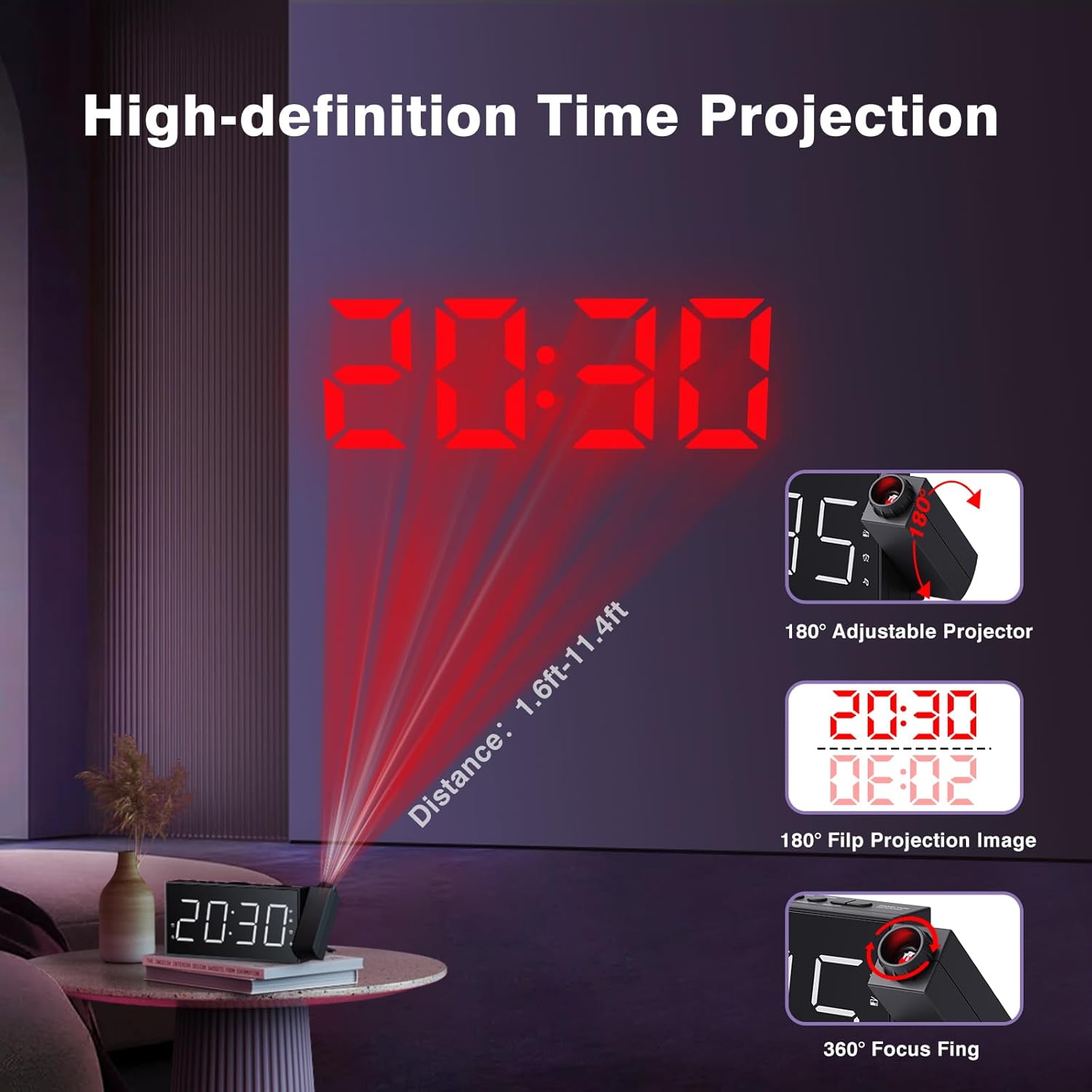
Figure 7: Time projected onto a wall from the alarm clock.

Figure 8: Demonstrating the 180-degree adjustable projection angle.
5. Ekspozisyon Ajisteman Klate
The 7-inch LED display offers 5 dimming levels to suit your preference for day or night viewing. Peze a DIMMER button repeatedly to cycle through the brightness levels.

Figure 9: The clock display showing different brightness levels from 20% to 100%.
6. USB chaje Port
A built-in USB charging port is located on the back of the unit, allowing you to charge your mobile devices. Simply connect your device's USB charging cable to the port.

Figi 10: Dèyè view of the clock highlighting the USB output and DC input ports.
Antretyen
To maintain your Mesqool Projection Alarm Clock, regularly wipe the unit with a soft, dry cloth. Avoid using abrasive cleaners or solvents, as these may damage the surface. Ensure the projector lens is clean for optimal clarity.
Depanaj
| Pwoblèm | Kòz posib | Solisyon |
|---|---|---|
| Ekran revèy la vid. | Pa gen pouvwa oswa pouvwa outage. | Check power adapter connection. Ensure battery backup is installed and functional during outages. |
| Alam lan pa sonnen. | Alarm not set, volume too low, or alarm deactivated. | Verify alarm settings, increase alarm volume, and ensure alarm is activated (icon visible). |
| Pwojeksyon an flou oswa li pa klè. | Focus not adjusted, or projection surface too far/bright. | Adjust the focus ring on the projector. Ensure the projection surface is within optimal distance (1.6ft-11.4ft) and sufficiently dark. |
| FM Radio static or poor reception. | Siyal fèb oswa antèn nan pa lonje. | Adjust the position of the clock or extend the antenna for better reception. |
| Chaje USB a pa fonksyone. | Pwoblèm kab oswa aparèy la pa konpatib. | Eseye yon lòt kab USB. Asire w ke aparèy la konpatib ak chajman USB estanda. |
Espesifikasyon
- Mak: Mesqool
- Modèl: FBA_MQL-AC-01
- Kalite ekspozisyon: Dijital dirije
- Dimansyon pwodwi: 7.99" lajè x 3.58" wotè x 1.18" pwofondè
- Sous pouvwa: Alimante pa kouran altènatif (ak pil rezèv)
- Batri Backup: 2 x AAA pil (pa enkli)
- Frekans radyo FM: 87.5-108 MHz (20 preset stations)
- Pwojeksyon: 180° adjustable, focusable
- Ekspozisyon klète: 5 nivo reglabl
- Volim alam: 5 levels adjustable (up to 106dB)
- Sòti USB: For charging mobile devices
- Materyèl: Akrilonitrile butadien stirèn (ABS)
Garanti ak sipò
Mesqool provides a one-year warranty for this product, along with a 30-day free return policy. For technical support or warranty claims, please refer to the contact information provided in the original product packaging or visit the official Mesqool websit.
Yon Gid Itilizatè ofisyèl (PDF) disponib tou pou telechaje: Telechaje Gid Itilizatè a


