1. Pwodwi souview
The Plumeet Kids Alarm Clock is a compact and user-friendly digital alarm clock designed for easy readability and portability. It features a large LCD display, a soft backlight, an ascending alarm sound, and an 8-minute snooze function. Its durable silicone cover provides shock protection, making it suitable for children and travel.

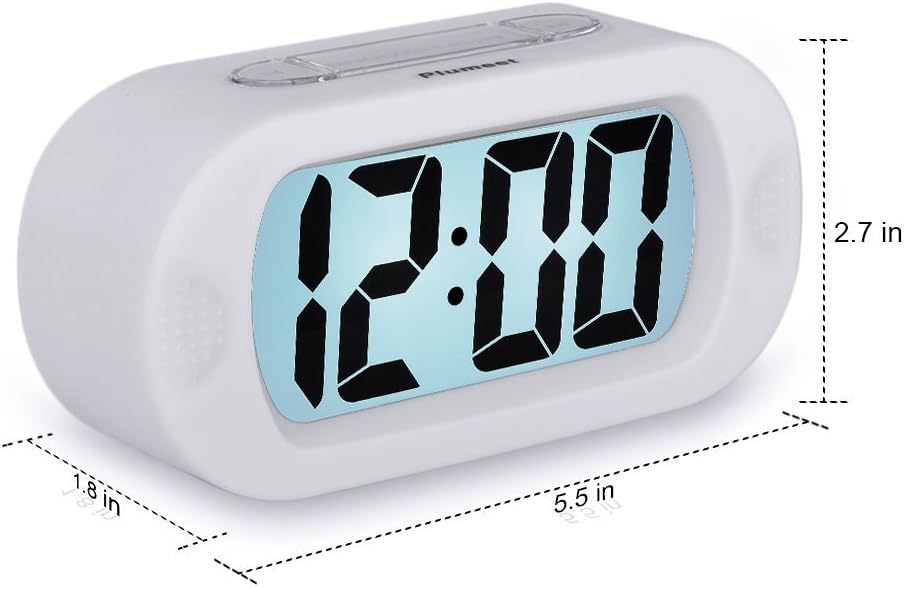
Figi 1: Devan view of the Plumeet Kids Alarm Clock, showing the large digital LCD display.
Kontni pake:
- 1 x Plumeet Digital Alarm Clock
- 1 x manyèl itilizatè
- 1 x Kat Mèsi
2. Enstalasyon
2.1 Enstalasyon batri
The clock requires 3 AAA 1.5V batteries (not included). Follow these steps to install them:
- Jwenn kouvèti konpatiman pil la sou dèyè revèy la.
- Glise kouvèti a anba pou ouvri konpatiman an.
- Mete 3 pil AAA, asire w ke polarite a kòrèk (+/-) jan yo endike anndan konpatiman an.
- Remèt kouvèti konpatiman batri a lè w glise l anlè jiskaske li fè yon klik pou l antre nan plas li.
Figi 2: Dèyè view of the clock showing the battery compartment with the cover removed.
2.2 Mete tan an
To set the current time on your Plumeet alarm clock:
- Peze a TAN SET button located on the back of the clock. The hour digits will begin to flash.
- Peze a LÈ button to adjust the hour. Note the AM/PM indicator for 12-hour format.
- Peze a TAN SET bouton an ankò. Chif minit yo ap kòmanse flache.
- Peze a MINIT bouton pou ajiste minit yo.
- Peze a TAN SET button one more time to confirm the time setting and exit time setting mode.

Figure 3: Diagram illustrating the location of Hour, Minute, and Time Set buttons.
3. Operasyon Enstriksyon
3.1 Mete alam la
To set an alarm time:
- Peze a SET ALARM button (often labeled "SET" on the side). The alarm hour digits will flash.
- Peze a LÈ bouton pou ajiste lè alam la.
- Peze a SET ALARM button again. The alarm minute digits will flash.
- Peze a MINIT bouton pou ajiste minit alam lan.
- Peze a SET ALARM button one more time to confirm the alarm setting.
Figure 4: Location of the Alarm Setting button on the side of the clock.
3.2 Aktive/Dezaktive Alam lan
To turn the alarm on or off, use the ON/OFF switch/button, typically located on the side or back of the clock. When the alarm is active, an alarm icon (often a bell) will appear on the display.
Figure 5: Location of the Alarm ON/OFF button.
3.3 Snooze Function and Night Light
Lè alam lan sonnen, peze gwo bouton an SNOOZE-LIGHT button on top of the clock to activate the snooze function. The alarm will pause for approximately 8 minutes and then sound again. This button also activates the soft backlight for about 6 seconds, allowing you to view the time in the dark without disturbing sleep.

Figi 6: Top view highlighting the SNOOZE-LIGHT button.
3.4 Son alam k ap monte
The alarm features an ascending beep sound. When the alarm is activated, the beeping sound will gradually increase in volume and speed over 60 seconds, ensuring a gentle yet effective wake-up experience.

Figure 7: Visual representation of the ascending alarm sound feature.
4. Antretyen
4.1 Netwayaj
To clean your alarm clock, gently wipe the surface with a soft, dry cloth. Do not use abrasive cleaners, solvents, or immerse the clock in water.
4.2 Ranplasman batri
Replace the batteries when the display becomes dim or the alarm sound weakens. Always replace all three AAA batteries at the same time with new ones. Dispose of old batteries responsibly according to local regulations.
NAN. Depanaj
- Clock not turning on or display is blank:
Ensure batteries are installed correctly with the right polarity. Replace with fresh AAA batteries.
- Alam pa sonnen:
Check if the alarm is set to the correct time. Verify that the alarm ON/OFF switch is in the "ON" position. Ensure batteries are not depleted.
- Limyè dèyè a pa fonksyone:
The backlight only illuminates for 6 seconds when the SNOOZE-LIGHT button is pressed. If it doesn't light up, check battery levels.
- Time or alarm setting is difficult:
Refer to sections 2.2 and 3.1 for detailed instructions. Ensure you are pressing the correct buttons in sequence.
6. Espesifikasyon
| Mak | Plumeet |
| Nimewo Modèl | EMAU-8002-WH |
| Dimansyon pwodwi | 14.22 x 6.86 x 4.06 cm (5.6 x 2.7 x 1.6 pous) |
| Pwa | 150.25 g (0.33 lbs) |
| Sous pouvwa | 3 pil AAA 1.5V (Pa enkli) |
| Kalite ekspozisyon | LCD |
| Karakteristik espesyal | Snooze, Ascending Alarm, Night Light |
| Kalite Materyèl | Plastic with Silicone Cover |

Figure 8: Product dimensions of the Plumeet Kids Alarm Clock.
7. Garanti ak sipò
7.1 Enfòmasyon sou Garanti
For detailed warranty information regarding your Plumeet Kids Alarm Clock, please refer to the warranty card included in your product packaging or your purchase documentation. Warranty terms and conditions may vary by region and retailer.
7.2 Sipò pou Kliyan
If you encounter any issues or have questions not covered in this manual, please contact Plumeet customer support. Contact details can typically be found on the product packaging, the official Plumeet websit entènèt la, oubyen atravè chanèl sipò détayan ou an.


