1. Entwodiksyon
This manual provides comprehensive instructions for the setup, installation, operation, maintenance, and troubleshooting of your Antec VSK2000-U3 Micro-ATX Desktop Case. Please read this manual thoroughly before beginning installation to ensure proper assembly and optimal performance.
Video 1: Computer Case Display. This video provides a visual overview of a computer case, demonstrating its external features and design.
2. Karakteristik kle
The Antec VSK2000-U3 Micro-ATX Desktop Case is designed for efficient and compact PC builds. Key features include:
- Motherboard Support: Up to Micro-ATX
- Cooling: 1 x 92 mm temperature-controlled fan included
- Power Supply Unit (PSU) Support: TFX form factor
- Drive Bays: Supports up to 1 x 5.25” ODD, 1 x 3.5" HDD & 1 x 2.5" SSD
- Fant ekspansyon: 4

Figi 1: Devan view of the Antec VSK2000-U3 case, highlighting the front panel I/O and optical drive bay.
3. Enstalasyon ak Enstalasyon
Follow these steps to install your components into the Antec VSK2000-U3 case. Ensure all power is disconnected before handling internal components.
3.1. Prepare Ka a
- Retire Panno Side: Carefully remove the side panels of the case to access the interior.
- Enstale Pwoteksyon E/S la: Enstale pwoteksyon E/S ki vini ak kat manman w lan nan ouvèti dèyè bwat la.

Figi 2: Side view of the Antec VSK2000-U3 case with the side panel removed, showing the internal layout.
3.2. Enstalasyon mèr
- Align Motherboard: Carefully align your Micro-ATX motherboard with the standoffs inside the case.
- Kat manman an sekirite: Use the provided screws to secure the motherboard to the standoffs.
3.3. Enstalasyon ekipman pou pouvwa
- Pozisyon PSU: Install your TFX form factor power supply into its designated bay.
- Alimantasyon elektrik an sekirite: Secure the power supply with screws from the rear of the case.
- Konekte kab pouvwa yo: Route and connect the necessary power cables to your motherboard and other components.

Figi 3: Dèyè view of the Antec VSK2000-U3 case, showing the I/O shield area, expansion slots, and PSU mounting.
3.4. Drive Installation (ODD, HDD, SSD)
- Optical Drive (ODD): Install your 5.25" optical drive into the front bay. The case features a tool-less ODD housing system.
- Hard Disk Drive (HDD): Install your 3.5" HDD into the designated bay. The case features a tool-less HDD housing system.
- Solid State Drive (SSD): Install your 2.5" SSD into the designated bay.
- Connect Drives: Connect SATA data and power cables to all installed drives.
3.5. Enstalasyon Kat Ekspansyon
- Retire kouvèti fant yo: Retire kouvèti fant ekspansyon ki nesesè yo nan dèyè bwat la.
- Install Card: Insert your expansion card (e.g., graphics card) into the appropriate PCI-E slot on the motherboard.
- Kat Sekirite: Secure the expansion card with a screw.
3.6. Koneksyon Panèl Devan an
Connect the front panel cables (USB 3.0, audio, power switch, reset switch, LED indicators) to the corresponding headers on your motherboard. Refer to your motherboard manual for specific header locations.
3.7. Jesyon kab
Route cables neatly to improve airflow and aesthetics. Use cable ties or the case's cable management features to secure cables away from moving parts and airflow paths.
3.8. Video Tutorials for Installation
Video 2: Detailed Installation Tutorial. This video demonstrates the step-by-step process of installing components into a computer case, including the motherboard, power supply, and drives.
Video 3: Micro ATX PC Case Installation. This video illustrates the assembly process for a Micro ATX PC case, covering component placement and cable routing.
4. Operasyon Enstriksyon
Once all components are securely installed and connected, replace the side panels. Connect your monitor, keyboard, mouse, and other peripherals to the appropriate ports on the rear I/O panel and front panel. Connect the power cable to the power supply and a wall outlet, then press the power button on the front of the case to start your system.
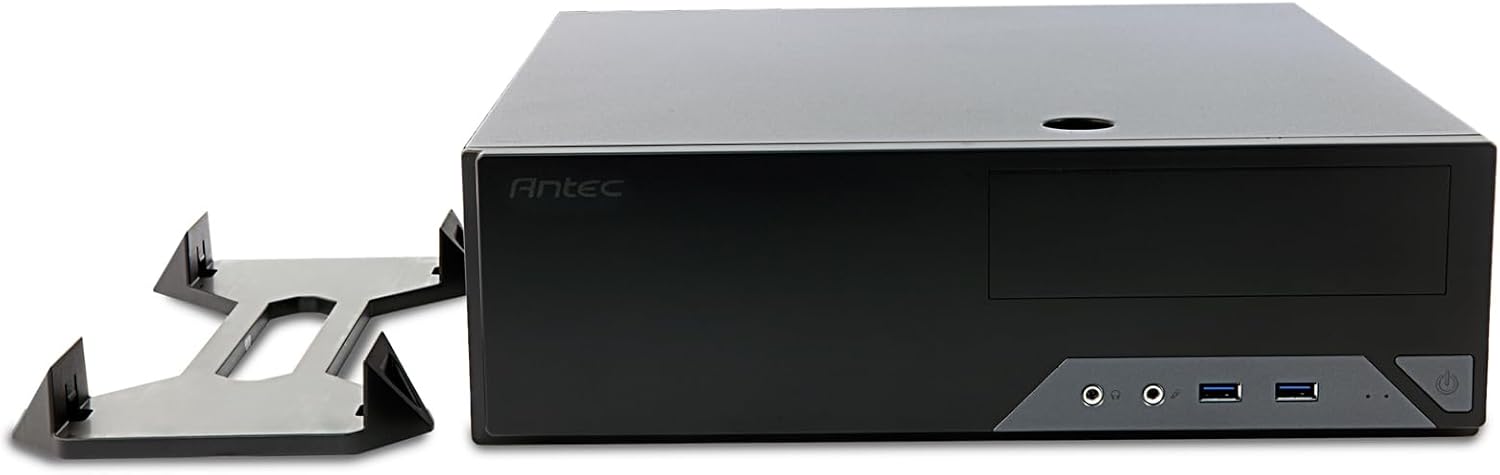
Figure 4: The Antec VSK2000-U3 case shown in a horizontal orientation with its included stand, demonstrating versatile placement options.
5. Antretyen
Regular maintenance helps ensure the longevity and optimal performance of your PC.
- Netwayaj pousyè: Periodically clean dust from the case interior, fans, and air vents using compressed air or a soft brush. Ensure the system is powered off and unplugged before cleaning.
- Jesyon kab: Check cable routing periodically to ensure no cables are obstructing airflow or fan operation.
- Verifikasyon Vantilatè: Ensure the included 92mm temperature-controlled fan and any other installed fans are operating correctly and free from obstructions.
NAN. Depanaj
Si ou rankontre pwoblèm ak konfigirasyon PC ou a, konsidere etap depanaj komen sa yo:
- Pa gen pouvwa:
- Verify the power cable is securely connected to the PSU and wall outlet.
- Asire w ke switch PSU a nan pozisyon 'ON'.
- Check all internal power connections (24-pin ATX, 8-pin CPU, GPU power, drive power).
- Confirm front panel power switch cable is correctly connected to the motherboard.
- Pa gen ekspozisyon:
- Ensure the monitor is connected to the correct graphics output (dedicated GPU or motherboard integrated graphics).
- Remete kat grafik la ak modil RAM yo.
- Twòp bri:
- Identify the source of the noise (fan, HDD).
- Clean dust from fans.
- Ensure no cables are touching fan blades.
7. Espesifikasyon
| Karakteristik | Detay |
|---|---|
| Mak | Antec |
| Seri | VSK2000-U3 |
| Non modèl | VSK2000-U3 |
| Mèr konpatibilite | Mikwo ATX |
| Kalite Ka | Mid Tower (Slim Desktop) |
| Dimansyon (LxWxH) | 18.6 x 15.9 x 7 pous |
| Pwa atik | 5.28 liv |
| Koulè | Nwa |
| Materyèl | Painted/Coated Metal (Likely Steel Or Aluminum With Plastic Components) |
| Kalite montaj ekipman pouvwa | Rear Mount (TFX form factor) |
| Metòd refwadisman | Air (1 x 92 mm temperature-controlled fan included) |
| Gwosè fanatik | 92 Milimèt |
| Kondwi Bays | 1 x 5.25” ODD, 1 x 3.5" HDD, 1 x 2.5" SSD |
| Fant ekspansyon | 4 |
8. Garanti ak sipò
The Antec VSK2000-U3 Micro-ATX Desktop Case comes with a 2-ane garanti. For technical support, warranty claims, or additional product information, please visit the official Antec websit la oubyen kontakte depatman sèvis kliyan yo. Kenbe prèv acha ou a pou validasyon garanti a.
Pou plis asistans, tanpri al gade nan Antec Store.


