Entwodiksyon
Mèsi pou acha aasing the SENTRY HPXBT150 Bluetooth Flat Cord Earbuds. This manual provides detailed instructions on how to set up, operate, and maintain your new wireless earbuds. Please read this manual thoroughly before use to ensure optimal performance and longevity of your device.
Kontni pake
- SENTRY HPXBT150 Bluetooth Flat Cord Earbuds
- Ka Pwoteksyon
- USB Charging Cable (Micro-USB)
- Removable Ear Hooks
- Manyèl itilizatè
Pwodwi souview
The SENTRY HPXBT150 earbuds feature Bluetooth wireless technology, allowing for a cord-free listening experience. They include an in-line microphone for hands-free calls and media control buttons for easy operation. Removable ear hooks provide a secure fit, especially during physical activity.
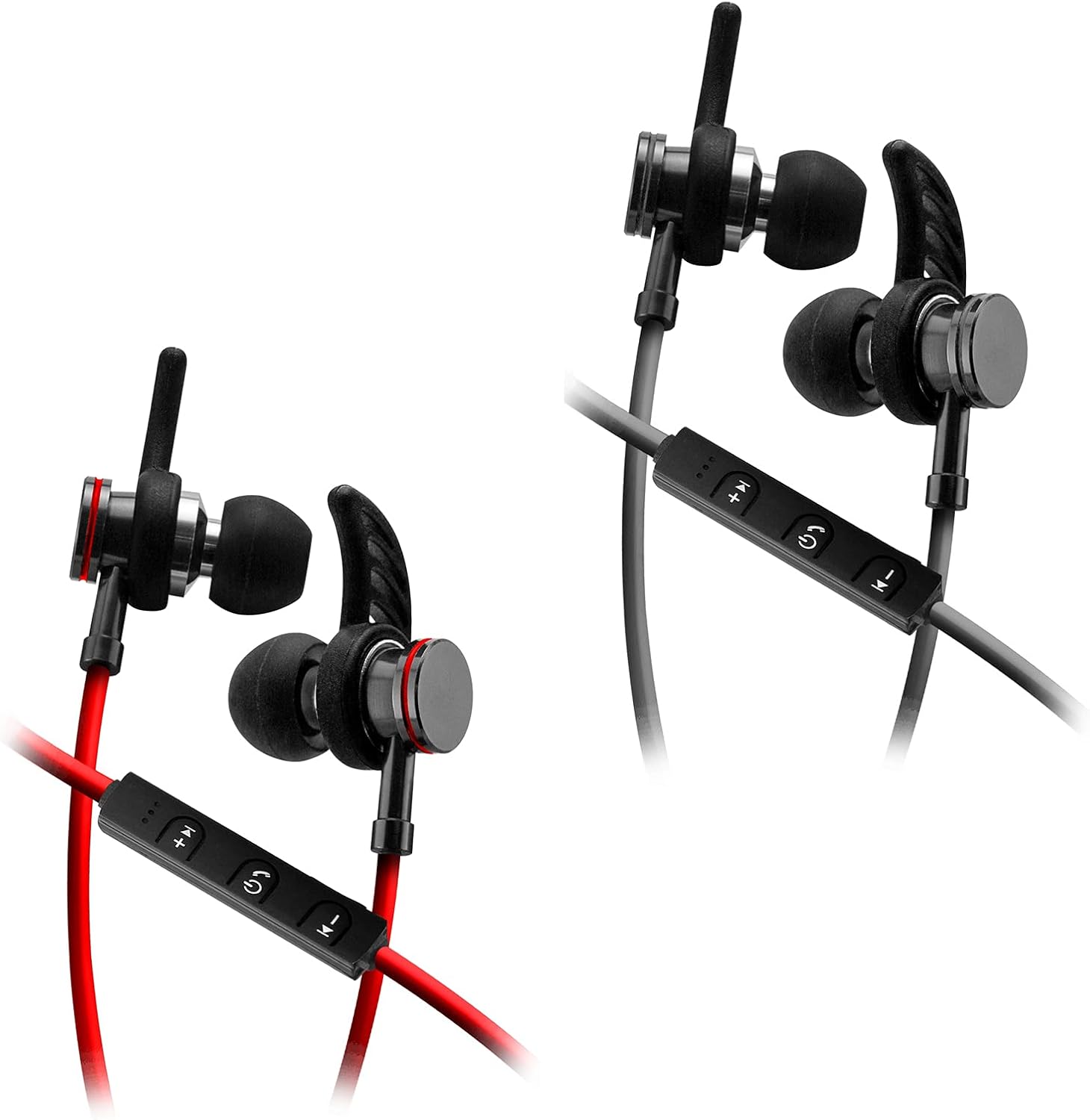
Image: SENTRY HPXBT150 Bluetooth Earbuds showing the in-line control panel and ear hooks. The control panel features volume up/next track, power/multifunction, and volume down/previous track buttons.
Enstalasyon
1. Chaje ekoutè yo
- Locate the Micro-USB charging port on the in-line control unit.
- Konekte kab chaje USB ki vini ak ekoutè a nan pò chaje ekoutè a.
- Branche lòt bout kab USB a nan yon sous kouran USB konpatib (pa egzanp, yon pò USB òdinatè, yon adaptè USB nan miray).
- The LED indicator light will illuminate during charging. It will change color or turn off once charging is complete. A full charge typically takes approximately 1-2 hours.
2. Pè Bluetooth
- Asire w ke ekoutè yo byen chaje anvan premye koneksyon an.
- Press and hold the multi-function button (usually the center button on the in-line control) for approximately 5-7 seconds until the LED indicator light flashes red and blue alternately. This indicates the earbuds are in pairing mode.
- On your Bluetooth-enabled device (smartphone, tablet, computer), go to the Bluetooth settings menu.
- Pèmèt Bluetooth epi chèche aparèy ki disponib.
- Select "HPXBT150" or a similar name from the list of found devices.
- Once successfully paired, the LED indicator on the earbuds will typically flash blue slowly or turn off, and you will hear an audible confirmation.
- Si yo mande w yon modpas, antre "0000".
Enstriksyon Operasyon
Power On/Off
- Pouvwa sou: Press and hold the multi-function button for approximately 3 seconds until the LED indicator flashes blue and you hear a power-on tone.
- Pouvwa Off: Press and hold the multi-function button for approximately 3-5 seconds until the LED indicator flashes red and you hear a power-off tone.
Lèktur Klas Mizik
- Jwe/Poz: Peze bouton milti-fonksyon an yon fwa.
- Volim moute: Peze bouton '+' la.
- Volim desann: Peze bouton '-' la.
- Pwochen Track: Peze epi kenbe bouton '+' la.
- Track Previous: Peze epi kenbe bouton '-' la.
Jesyon Rele
- Reponn/Fen Apèl: Peze bouton milti-fonksyon an yon fwa.
- Rejte apèl: Peze epi kenbe bouton milti-fonksyon an pou apeprè 2 segonn.
- Recomposition Dènye Nimewo: Peze bouton milti-fonksyon an de fwa.
Antretyen
- Netwayaj: Sèvi ak yon twal mou epi sèk pou netwaye ekoutè yo. Pa sèvi ak pwodui chimik ki agresif oswa materyèl abrazif.
- Depo: When not in use, store the earbuds in the provided protective case to prevent damage.
- Swen batri: Pou konsève lavi batri a, evite dechaje ekoutè yo nèt souvan. Chaje yo regilyèman, menm si ou pa itilize yo pandan yon bon bout tan.
- Evite imidite: Keep the earbuds away from water and excessive moisture.
Depanaj
| Pwoblèm | Solisyon posib |
|---|---|
| Ekoutè yo pa limen. | Ensure the earbuds are fully charged. Connect to a power source and allow time to charge. |
| Pa ka konekte ak aparèy la. | Ensure earbuds are in pairing mode (flashing red/blue). Turn off and on Bluetooth on your device. Move earbuds closer to your device. Forget previous pairings on your device and try again. |
| Pa gen son oswa volim nan ba. | Check volume levels on both the earbuds and your connected device. Ensure earbuds are properly paired. Try re-pairing the earbuds. |
| Koneksyon tanzantan. | Ensure there are no obstructions between the earbuds and your device. Move closer to your device. Avoid environments with strong Wi-Fi or other wireless interference. |
Espesifikasyon
- Modèl: HPXBT150
- Koneksyon Teknoloji: San fil (Bluetooth)
- Inite chofè: 10mm
- Enpedans: 32+/-3 Ohms
- Sansiblite: 103dB +/-3dB
- Repons frekans: 20Hz - 20kHz
- Aparèy konpatib: Phones, Tablets, MP3 Players, Computers, Gaming Consoles
- Kalite kontwòl: Kontwòl Medya
- Karakteristik espesyal: Microphone Included, USB Connectivity, Removable Ear Hooks
- Pwa atik: 2.08 ons
Enfòmasyon sou Sekirite
- Do not expose the earbuds to extreme temperatures, direct sunlight, or fire.
- Do not disassemble or modify the earbuds. This may void the warranty and cause damage.
- Evite koute nan nivo volim wo pou peryòd pwolonje pou anpeche domaj tande.
- Kenbe lwen timoun ak bèt kay.
- Jete pwodwi a yon fason responsab dapre règleman lokal yo.
Garanti ak sipò
For warranty information and technical support, please refer to the documentation included with your purchase or contact SENTRY customer service directly. Keep your proof of purchase for warranty claims.


