Entwodiksyon
Mèsi pou acha aasing the Acctim Adelphi 15082 Red LED Mains Electric Bedside Alarm Clock. This manual provides detailed instructions for setting up, operating, and maintaining your new alarm clock. Please read this manual thoroughly before use and retain it for future reference.
Pwodwi souview ak Karakteristik
The Acctim Adelphi 15082 is a compact and reliable bedside alarm clock designed for ease of use. Its key features include:
- Bold Red LED Display (0.6 inches / 16mm high)
- Mains powered operation
- Battery backup function (requires 1x AA battery, not included)
- Crescendo alarm with Hi-Lo volume option
- Fonksyon snooze
- Easy-to-set controls
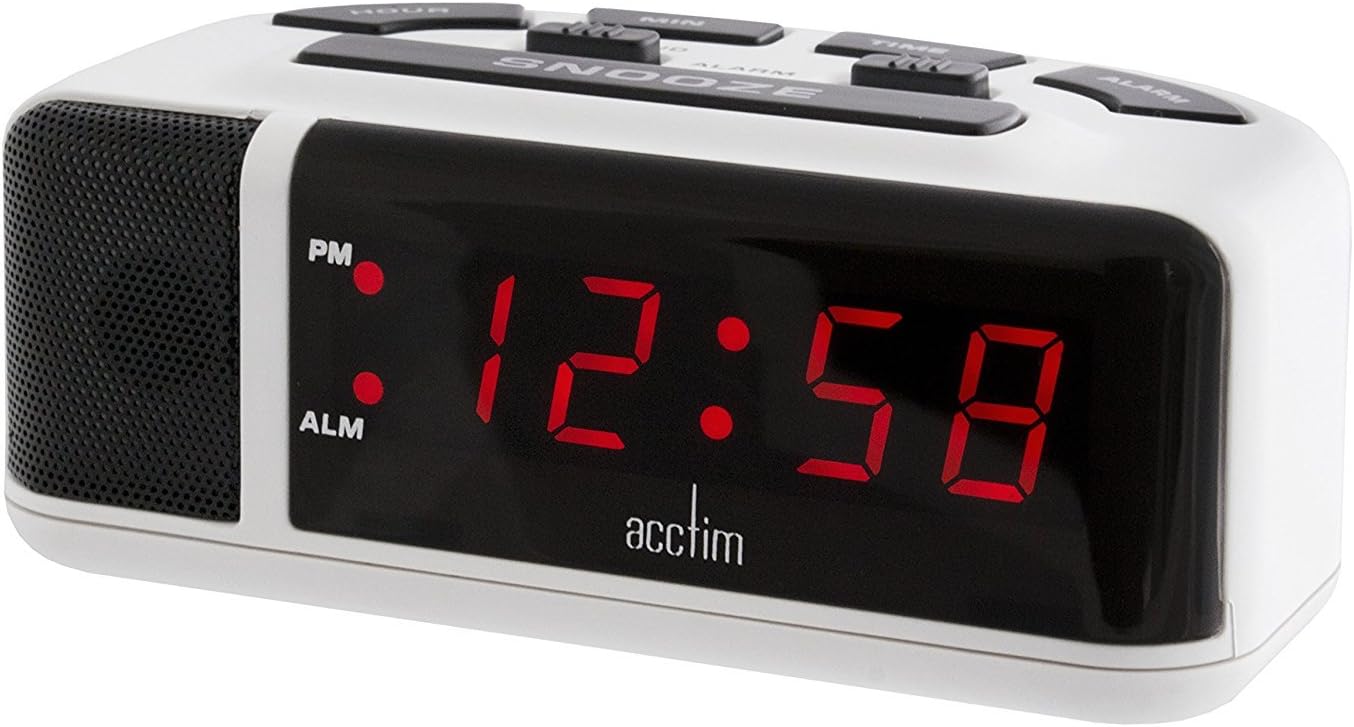
Figi 1: Devan view of the Acctim Adelphi 15082 Red LED Alarm Clock. This image shows the large, clear red LED display and the overall compact design of the clock.
Enstalasyon
1. Koneksyon pouvwa
- Kouran prensipal: Connect the integrated UK 3-pin plug to a standard 240V AC wall outlet. The LED display will illuminate.
- Batri Backup: For timekeeping during power outages, insert 1x AA battery (not included) into the battery compartment located on the underside of the clock. Ensure correct polarity (+/-). The battery backup will not power the LED display but will maintain the time settings.
2. Anviwònman Tan Inisyal
Upon first connection to mains power, the display may show a default time or flash. To set the correct time:
- Peze epi kenbe la TAN bouton.
- Pandan w ap kenbe TAN, peze la LÈ button repeatedly to adjust the hour. Observe the PM indicator for afternoon hours.
- Pandan w ap kenbe TAN, peze la MIN bouton an plizyè fwa pou ajiste minit yo.
- Lage a TAN button once the correct time is set.

Figi 2: Top view of the Acctim Adelphi 15082, illustrating the layout of the HOUR, MIN, TIME, ALARM, and SNOOZE buttons, along with the alarm ON/OFF and SOFT/LOUD switches.
Enstriksyon Operasyon
Mete Alam la
- Peze epi kenbe la ALAM button. The alarm time will appear on the display.
- Pandan w ap kenbe ALAM, peze la LÈ Peze bouton an plizyè fwa pou ajiste lè alam lan.
- Pandan w ap kenbe ALAM, peze la MIN Peze bouton an plizyè fwa pou ajiste minit alam lan.
- Lage a ALAM button once the desired alarm time is set.
Aktive/Dezaktive Alam lan
Jwenn la ALAM ON/OFF switch on the top of the clock (refer to Figure 2).
- Glise switch la nan ON to activate the alarm. An "ALM" indicator will appear on the display.
- Glise switch la nan OFF to deactivate the alarm. The "ALM" indicator will disappear.
Fonksyon Snooze
Lè alam lan sonnen, peze gwo bouton an SNOOZE bouton anlè revèy la. Alam lan ap sispann tanporèman epi sonnen ankò apre apeprè 9 minit.
Alarm Volume (Hi-Lo)
The alarm features a crescendo sound, gradually increasing in volume. You can select between two volume levels:
- Jwenn la SOFT/LOUD switch on the top of the clock (refer to Figure 2).
- Glise switch la nan SOFT for a lower alarm volume.
- Glise switch la nan BWÒ for a higher alarm volume.
Antretyen
Netwayaj
To clean the clock, gently wipe the surface with a soft, dry cloth. Do not use abrasive cleaners, solvents, or chemical sprays, as these may damage the finish or electronic components.
Ranplasman batri
If the clock experiences a power outage and the time is not maintained, the AA backup battery may need replacement. To replace the battery:
- Disconnect the clock from the mains power supply.
- Carefully turn the clock over to access the battery compartment.
- Louvri kouvèti lòj batri a.
- Remove the old AA battery and dispose of it responsibly.
- Insert a new AA battery, ensuring correct polarity (+/-).
- Fèmen kouvèti lòj batri a.
- Reconnect the clock to the mains power supply.
Depanaj
| Pwoblèm | Kòz posib | Solisyon |
|---|---|---|
| Ekspozisyon an vid. | Pa gen kouran elektrik. | Ensure the clock is securely plugged into a working wall outlet. Check the power supply. |
| Lè a pa kòrèk apre yon pann kourantage. | Batri backup la mouri oswa li pa la. | Replace the AA backup battery. Reset the time manually. |
| Alam lan pa sonnen. | Alam lan pa aktive oswa li pa byen configuré. | Asire w la ALAM ON/OFF switch se nan la ON position. Verify the alarm time is set correctly. |
| Alam lan twò dousman/twò fò. | Anrejistreman volim nan pa kòrèk. | Ajiste a SOFT/LOUD switch to the desired volume level. |
Espesifikasyon
- Nimewo Modèl: jo3436941
- Mak: Acctim
- Kalite ekspozisyon: LED dijital (wouj)
- Wotè ekspozisyon: 0.6 pous (16mm)
- Sous pouvwa: Mains Electric (240V AC, UK 3-pin plug)
- Batri Backup: 1x batri AA (pa enkli)
- Dimansyon (L x W x H): Apeprè 120 x 66 x 50 mm (4.72 x 2.6 x 1.97 pous)
- Pwa: Apeprè 340 g
- Karakteristik espesyal: Alarm, Snooze, Hi-Lo Alarm Volume
Garanti ak sipò
For information regarding warranty coverage, please refer to the documentation provided at the time of purchase or contact your retailer. For technical support or further assistance, please visit the official Acctim websit oswa kontakte depatman sèvis kliyan yo.


