1. Entwodiksyon
This manual provides essential instructions for the safe and efficient operation, maintenance, and troubleshooting of your Dolphin Premier Robotic Pool Cleaner. The Dolphin Premier is designed for in-ground swimming pools up to 50 feet in length, offering automated cleaning of the pool floor, walls, and waterline.

Image 1.1: The Dolphin Premier Robotic Pool Cleaner, ready for use.
2. Enstalasyon ak Premye Itilizasyon
Follow these steps for the initial setup of your Dolphin Premier Robotic Pool Cleaner:
- Unboxing: Carefully remove all components from the packaging. Ensure all parts are present according to the packing list.
- Plasman ekipman pouvwa: Position the power supply unit approximately 10 feet (3 meters) from the edge of the pool. Ensure it is not exposed to direct sunlight or standing water.
- Koneksyon kab: Connect the floating cable from the cleaner to the power supply unit. Ensure the connection is secure.
- Submerging the Cleaner: Gently place the Dolphin Premier into the pool. Allow it to sink to the bottom. Ensure the floating cable is untangled and spread out across the pool surface to prevent kinks.
- Pouvwa sou: Plug the power supply into a grounded electrical outlet. Press the single power button on the power supply to begin the cleaning cycle.

Image 2.1: The 'Drop and Go' installation method, showing the cleaner being placed into the pool.
The cleaner is designed for 'Drop and Go' installation, simplifying the initial setup process.
3. Operasyon Enstriksyon
The Dolphin Premier utilizes advanced navigation and cleaning technologies for comprehensive pool coverage.
3.1 Sik Netwayaj
Once activated, the cleaner will navigate your pool, cleaning the floor, walls, and waterline. A typical cleaning cycle lasts approximately 3 hours. The CleverClean technology employs advanced algorithms to ensure complete pool coverage, while the anti-tangle patented swivel cable allows for unrestricted movement.

Image 3.1: The Dolphin Premier performing waterline scrubbing, ensuring thorough cleaning up to the pool's edge.
3.2 Weekly Scheduler
The power supply unit includes an automatic weekly scheduler. You can program the cleaner to operate daily, every other day, or every third day. Refer to the power supply unit's interface for specific programming instructions.
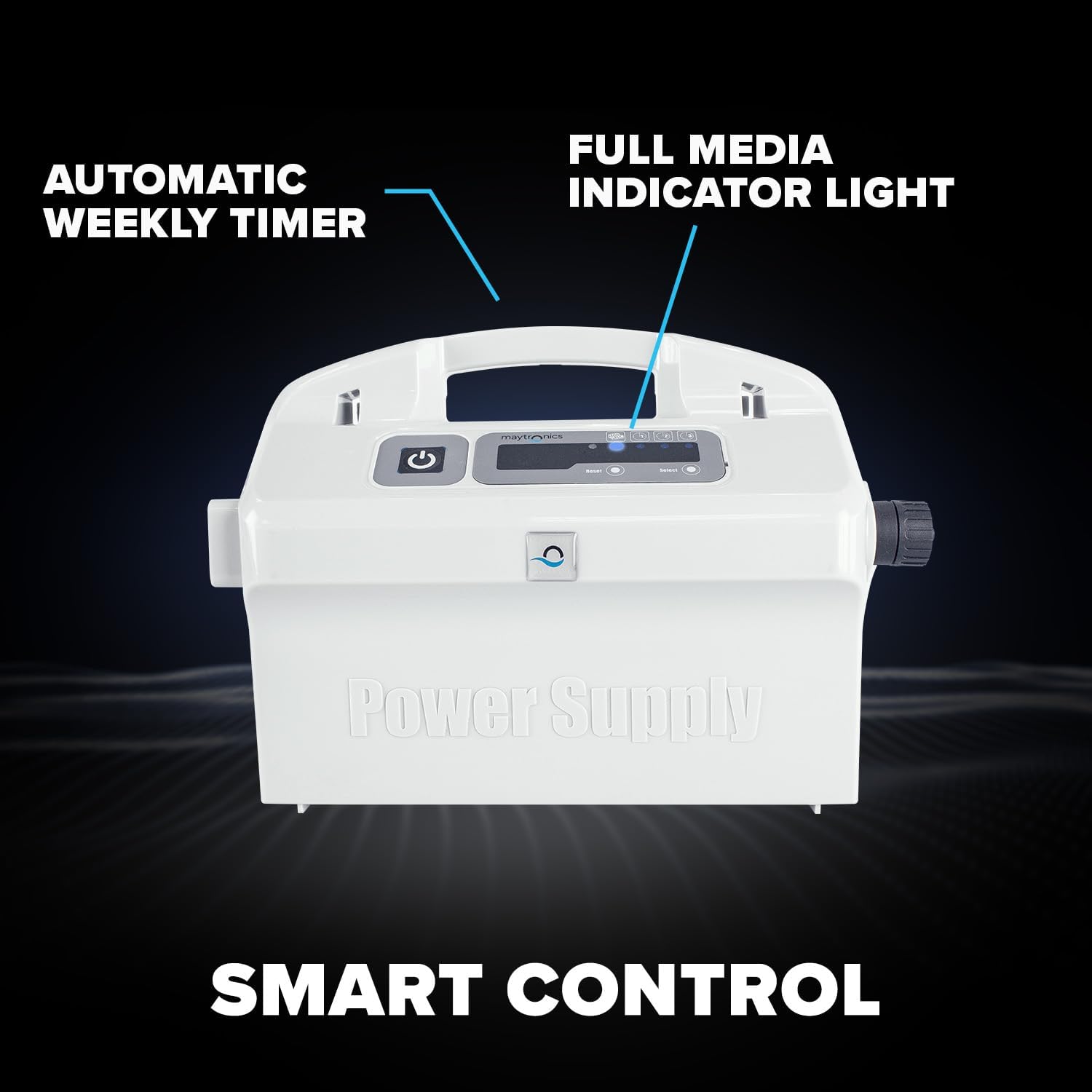
Image 3.2: The power supply unit featuring the automatic weekly timer and full media indicator light for convenient control.
3.3 Tangle-Free Swivel
The integrated 360-degree tangle-free swivel on the cable prevents tangling, ensuring continuous and efficient cleaning without interruptions.

Image 3.3: Close-up of the 360-degree tangle-free swivel, designed to prevent cable entanglement during operation.
4. Antretyen
Regular maintenance ensures optimal performance and longevity of your Dolphin Premier.
4.1 Netwayaj filtè
The Dolphin Premier offers multiple filter options: bottom-load fine cartridge filters, ultra-fine cartridge filters, and an oversized fine filter bag. The power supply unit features a full filter indicator light, signaling when the filter requires cleaning.
- Retrieve Cleaner: After each cleaning cycle, carefully remove the cleaner from the pool.
- Filtè Aksè: Open the filter compartment according to the cleaner's design.
- Empty and Rinse: Remove the chosen filter media (cartridges or bag) and empty collected debris. Rinse the filter thoroughly with a garden hose until clean.
- Réinstaller: Reinsert the clean filter media into the compartment and close it securely.

Image 4.1: The Dolphin Premier's multimedia filtration system, showcasing the oversized leaf bag, fine filter cartridges, and microfilter cartridges.
4.2 Swen Jeneral
- Wipe down the exterior of the cleaner with a soft cloth after use.
- Inspect the scrubbing brushes for wear and tear. Replace if necessary.
- Store the unit in a dry, shaded area when not in use, away from direct sunlight and extreme temperatures.
NAN. Depanaj
This section addresses common issues you might encounter with your Dolphin Premier.
| Pwoblèm | Kòz posib | Solisyon |
|---|---|---|
| Cleaner does not start or stops unexpectedly. | No power, tangled cable, clogged filter, motor issue. | Ensure power supply is plugged in and receiving power. Check for cable tangles. Clean filters. If issues persist, contact support. |
| Pòv pèfòmans netwayaj. | Clogged filters, worn brushes, improper water chemistry. | Clean or replace filters. Inspect and replace worn brushes. Ensure pool water chemistry is balanced. |
| Cleaner does not climb walls or waterline effectively. | Clogged filters, air in cleaner, slippery pool surfaces (algae). | Clean filters. Ensure cleaner is fully submerged and air has escaped. Manually brush heavy algae from pool surfaces before operating. |
| Cable tangles frequently. | Improper cable deployment, swivel malfunction. | Ensure cable is fully extended and untangled before placing cleaner. Check the swivel for obstructions or damage. |
If you encounter issues not listed here or if solutions do not resolve the problem, please contact Dolphin customer support.
6. Espesifikasyon
Key technical specifications for the Dolphin Premier Robotic Pool Cleaner:
| Karakteristik | Detay |
|---|---|
| Non modèl | Dolphin Premier |
| Mak | Dolphin |
| Manifakti | Maytronics |
| Metòd kontwòl | Manyen |
| Voltage | 115 Volts |
| Sous pouvwa | Fil elektrik |
| Longè kawotchou | 60 pye |
| Pwa atik | 36.1 liv |
| Kalite enstalasyon | Lage epi ale |
| Efikasite | Cleans pools in approximately 3 hours, Energy Efficient |
| Karakteristik espesyal | Pwopoze pwòp tèt ou |
| UPC | 055989025834, 081159076436 |
7. Garanti ak sipò
7.1 Enfòmasyon sou Garanti
The Dolphin Premier Robotic Pool Cleaner is backed by a 3-year limited quality assurance warranty. This warranty covers manufacturing defects and ensures the product meets specified quality standards. For detailed terms and conditions, please refer to the warranty documentation included with your product or contact Dolphin customer service.
7.2 Sipò pou Kliyan
For technical assistance, troubleshooting guidance, or warranty claims, please contact Dolphin customer support. Have your product model and serial number ready when contacting support to expedite the process.
You can find contact information on the official Dolphin website or in the documentation provided with your cleaner.




