Entwodiksyon
The Olympus Infinity SuperZoom 3500 is a sophisticated 35mm point and shoot film camera designed for ease of use and high-quality photography. Featuring a versatile 35-120mm Olympus Zoom Lens, this camera allows for a wide range of photographic expressions, from wide-angle landscapes to telephoto portraits. This manual provides essential information for setting up, operating, maintaining, and troubleshooting your camera to ensure optimal performance and longevity.
Enstalasyon
1. Enstalasyon batri
The camera requires batteries for operation. Ensure you use fresh batteries of the correct type (refer to the battery compartment for specifications, typically CR123A or similar). Incorrect battery insertion can prevent the camera from functioning.
- Jwenn kouvèti konpatiman batri a anba kamera a.
- Open the cover by sliding or rotating it as indicated by the arrow.
- Mete pil yo dapre endikatè polarite yo (+/-) anndan konpatiman an.
- Fèmen kouvèti konpatiman batri a byen fèm jiskaske li fè yon klik an plas.

Figi 1: Anba view kamera a, ki montre konpatiman batri a ak sipò trépied la.
2. Chaje fim nan
This camera uses standard 35mm film. Always load film in subdued light to prevent accidental exposure.
- Open the camera back cover by sliding the latch on the side of the camera.
- Place the film cartridge into the film chamber.
- Pull the film leader across to the film take-up spool, ensuring it aligns with the red mark or engages with the sprocket teeth.
- Close the camera back cover firmly until it latches. The camera will automatically advance the film to the first frame. The frame counter on the top display will show '1'.

Figi 2: Dèyè view of the camera, showing the film door and viewChèche.
Opere kamera a
1. Power On/Off
To power on the camera, slide the power switch, usually located near the shutter button. The lens will extend, and the display will activate. To power off, slide the switch back; the lens will retract.
2. Tire debaz
Point and shoot operation is straightforward:
- Objektif: Frame your subject through the viewChèche.
- Konsantre: Lightly press the shutter button halfway down. The camera will automatically focus, and a focus indicator (e.g., a green light) will illuminate in the viewChèche.
- Tire: Peze bouton deklanchè a nèt pou pran foto a. Kamera a ap avanse fim nan otomatikman nan pwochen imaj la.
3. Fonksyon Zoom
The Infinity SuperZoom 3500 features a 35-120mm zoom lens. Use the 'W' (Wide) and 'T' (Telephoto) buttons to adjust the focal length.
- Press 'W' to zoom out (wider angle).
- Press 'T' to zoom in (telephoto).

Figi 3: Devan-anwo view of the camera with the zoom lens extended.
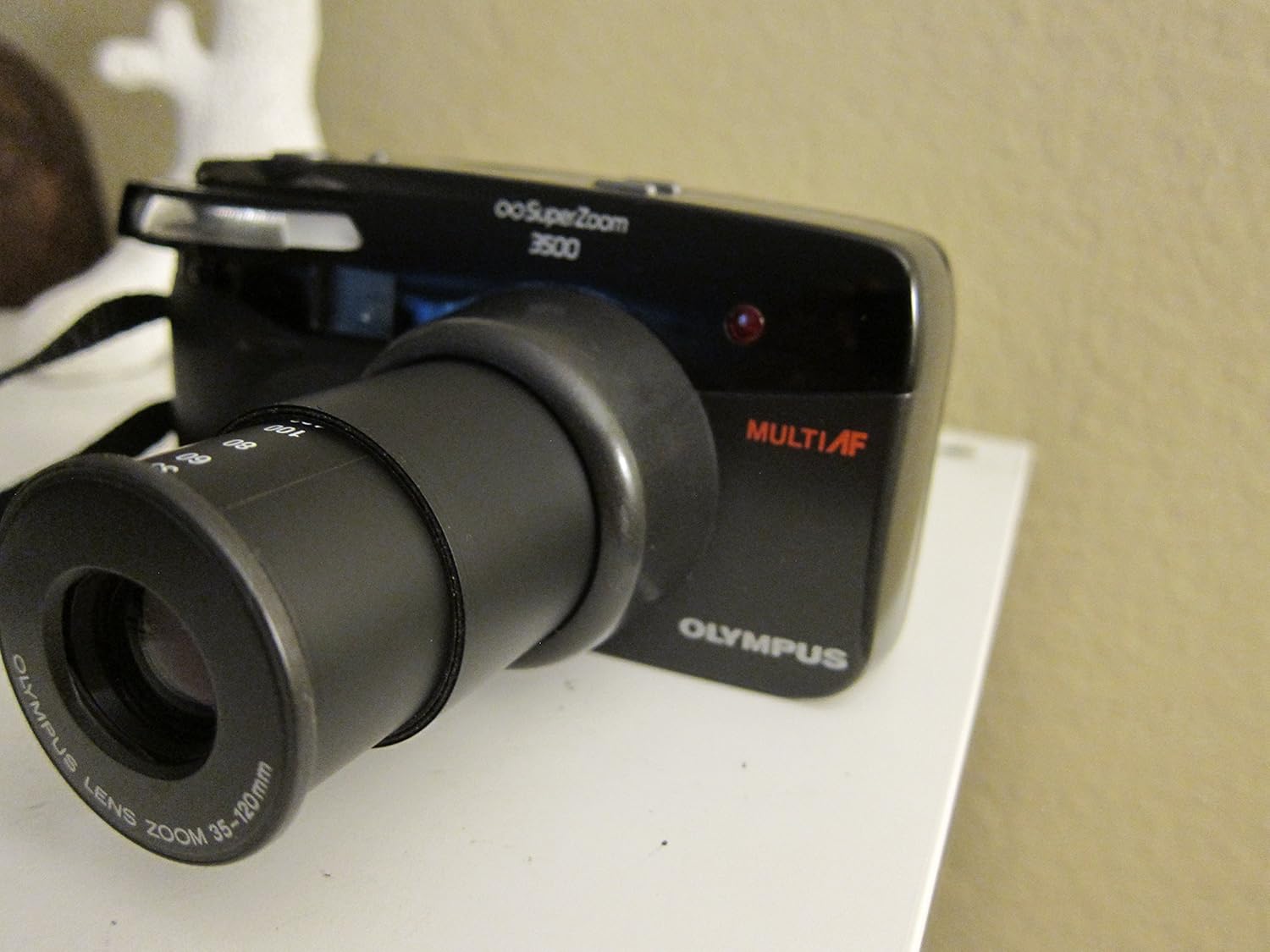
Figi 4: Devan-anwo view of the camera with the zoom lens retracted.
4. Mòd Flash
The camera offers various flash modes to suit different lighting conditions. Press the FLASH button to cycle through available modes, which may include:
- Flash oto: Kamera a aktive flach la otomatikman lè sa nesesè.
- Rediksyon Je Wouj: Li tire yon pre-flash pou diminye efè je wouj la.
- Flash ranpli: Fòse flash la pou li tire, itil pou klere lonbraj nan kondisyon klere.
- Etenn flach: Enfim flash la.

Figi 5: Top view of the camera, highlighting the display and control buttons.

Figure 6: Close-up of the LCD display, showing the 'FILL-IN' flash mode indicator.
5. Seleksyon mòd
Peze a MÒD button to select different shooting modes, if available. Common modes might include:
- Program Auto: Standard automatic shooting.
- Oto-revèy: Delays the shutter release for a few seconds.
- Kontwòl Remote: For use with an optional remote control.
6. Film Rewinding and Unloading
Once all frames on the film roll have been exposed, the camera will typically rewind the film automatically. Listen for the rewinding sound. Once rewinding is complete, the frame counter will reset or show 'E' (Empty).
- Wait for the camera to complete automatic film rewinding.
- Louvri kouvèti dèyè kamera a.
- Remove the rewound film cartridge.
- Close the camera back cover.
Antretyen
1. Netwayaj
- Lantiy: Sèvi ak yon twal mou ki pa gen pousyè oswa yon bwòs pou lantiy pou retire pousyè a dousman. Pou tach, sèvi ak yon solisyon ak yon twal espesyal pou netwaye lantiy. Evite touche sifas lantiy la ak dwèt ou.
- Kò kamera: Siye kò kamera a ak yon twal mou epi sèk. Pou pousyè tè ki difisil pou retire, siye l yon ti kras.ampen the cloth with water. Do not use solvents or abrasive cleaners.
- ViewChèche: Use a soft brush or air blower to remove dust.
2. Depo
- Sere kamera a nan yon kote ki fre epi sèk, lwen limyè solèy dirèk ak tanperati ekstrèm.
- Si w ap sere l pou yon bon bout tan, retire pil yo pou anpeche yo koule.
- Keep the camera in a protective case to prevent dust and scratches.
3. Swen batri
- Replace batteries promptly when the low battery indicator appears.
- Pa melanje ansyen ak nouvo pil, oswa diferan kalite pil.
- Jete pil yo itilize yon fason responsab selon règleman lokal yo.
Depanaj
| Pwoblèm | Kòz posib | Solisyon |
|---|---|---|
| Kamera a pa limen. | Pil ki mouri oswa ki mal mete. | Tcheke polarite pil yo; ranplase yo ak pil nèf. |
| Fim nan pa avanse. | Film not loaded correctly; film leader not engaged. | Re-open camera back and re-load film, ensuring leader is properly engaged. |
| Flash la pa tire. | Flash mode set to 'Off'; insufficient charge; too much ambient light. | Check flash mode setting; wait for flash to charge; use 'Fill-in' mode if desired. |
| Foto yo twoub. | Camera shake; subject too close/far for focus; dirty lens. | Hold camera steady; ensure subject is within focusing range; clean lens. |
| Lens does not extend/retract. | Obstruction; low battery. | Check for obstructions; replace batteries. |
Espesifikasyon
| Karakteristik | Detay |
|---|---|
| Non modèl | Infinity Superzoom 3500 |
| Nimewo Modèl Atik | 102-960 |
| Mak | Olympus |
| Kalite fòma fim | 35mm |
| Lantiy | 35-120mm Olympus Zoom Lens |
| Karakteristik espesyal | Ekspozisyon oto |
| Pwa atik | 12.8 ons |
| Dimansyon pake | 6.4 x 4.6 x 2.8 pous |
| Konpozan ki enkli | Kò Kamera a sèlman |
| UPC | 050332104723 |
Garanti ak sipò
For specific warranty information, please refer to the documentation provided at the time of purchase or contact your retailer. Olympus provides customer support for its products. For technical assistance, service, or further inquiries, please visit the official Olympus websit oswa kontakte depatman sèvis kliyan yo.
You can visit the Olympus Store on Amazon for more information: Olympus Store


