Entwodiksyon
This manual provides detailed instructions for the assembly, operation, and maintenance of your Norstone Tiblen SB TV Stand. This versatile stand is designed to support televisions from 82 to 117 cm (approximately 32 to 46 inches) with VESA compatibility up to 700 x 400 mm. It features an adjustable height mechanism, an integrated glass shelf for media devices, and a dedicated attachment for a soundbar, ensuring a clean and organized entertainment setup.
Karakteristik kle:
- Supports TVs from 82 to 117 cm (32-46 inches)
- VESA compatibility up to 700 x 400 mm
- Adjustable height from 1055 mm to 1355 mm
- Integrated glass shelf (450 x 300 mm) with a maximum load of 10 kg
- Soundbar attachment capability
- Integrated cable management system
- Durable brushed steel construction
Enfòmasyon sou Sekirite
Tanpri li tout enstriksyon yo ak anpil atansyon anvan ou monte epi itilize li. Si ou pa swiv enstriksyon sa yo, ou ka domaje materyèl oswa blese yon moun.
- Asire w tout konpozan yo prezan epi yo pa domaje anvan ou kòmanse asanblaj la.
- Do not exceed the maximum weight capacity for the TV mount or the glass shelf.
- Always use appropriate tools and follow the assembly steps in order.
- Kenbe timoun ak bèt kay lwen zòn asanble a.
- Regularly check all fasteners to ensure they remain tight and secure.
- Pa eseye modifye kanpe a nan okenn fason.
Kontni pake
Your Norstone Tiblen SB TV Stand package includes the following components:
- Main support column and base
- TV mounting brackets and hardware
- Glass shelf and support brackets
- Soundbar attachment bracket
- All necessary screws, bolts, and washers
- Assembly tools (e.g., Allen keys, wrench)
- Manyèl enstriksyon (dokiman sa a)
Note: If any parts are missing or damaged, please contact Norstone customer support.
Enstriksyon Asanble
Follow these steps carefully to assemble your Norstone Tiblen SB TV Stand. It is recommended to have a second person assist with certain steps, especially when mounting the television.
- Step 1: Assemble the Base and Main Column
Attach the main support column to the circular base using the provided screws and tools. Ensure the column is securely fastened and stands upright.
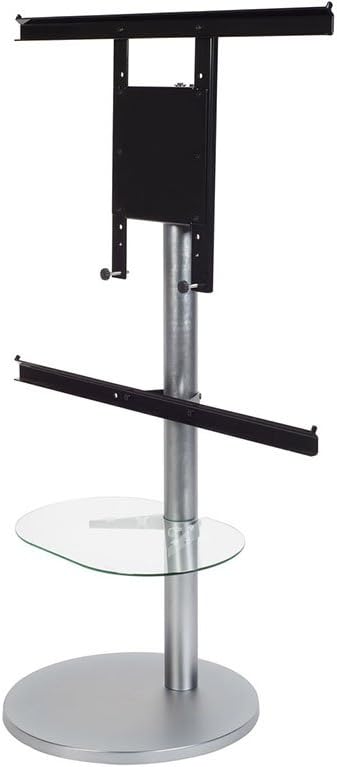
Image: Initial components of the Norstone Tiblen SB TV stand, including the base, central pole, and various mounting brackets, ready for assembly.
- Step 2: Install the Glass Shelf
Secure the glass shelf support brackets to the main column at your desired height. Carefully place the glass shelf onto the brackets, ensuring it is level and stable. The shelf is designed to hold media players or game consoles up to 10 kg.
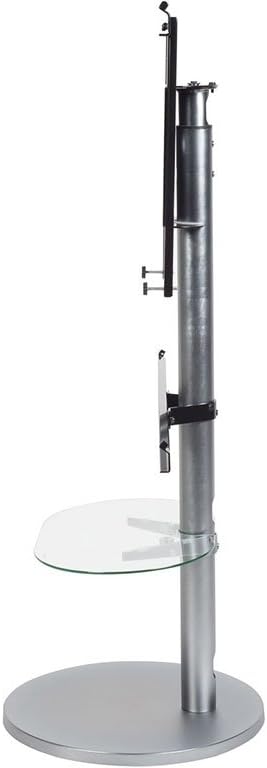
Imaj: Bò kote view of the assembled stand, highlighting the glass shelf and the adjustable TV mounting mechanism.
- Step 3: Attach TV Mounting Brackets
Secure the TV mounting plate to the main column. Then, attach the horizontal TV mounting rails to the back of your television, ensuring they align with the VESA mounting holes. Refer to your TV's manual for specific VESA patterns.
- Step 4: Mount the Television
With assistance, carefully lift your television and hook the mounting rails onto the TV mounting plate on the stand. Secure the TV in place using the locking mechanisms or screws provided.
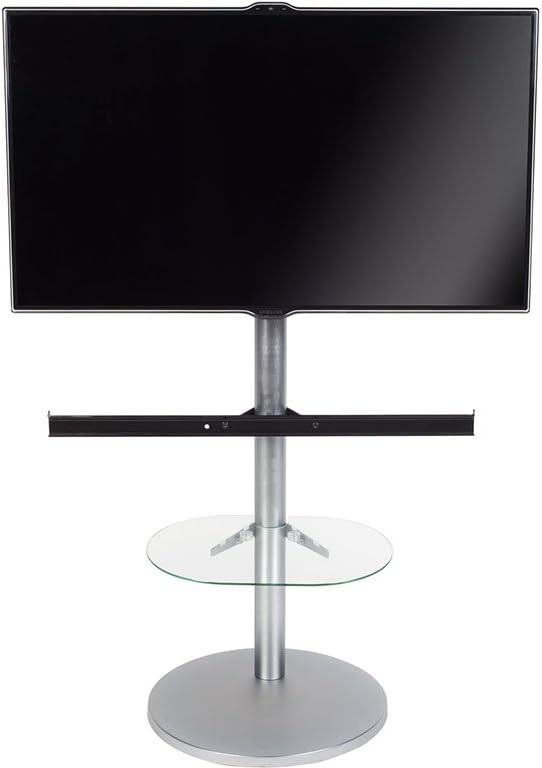
Image: The Norstone Tiblen SB TV stand fully assembled with a television mounted, demonstrating its functional design.
- Step 5: Install Soundbar Attachment (Optional)
If using a soundbar, attach the soundbar bracket to the main column below the television. Place your soundbar onto this bracket.

Image: A conceptual diagram showing a television mounted on the stand, with a soundbar positioned below it and a media device on the glass shelf, illustrating a complete setup.
- Etap 6: Jesyon kab
Utilize the integrated cable management system within the main column to route and conceal all power and signal cables for a clean and organized appearance.
Operasyon
Ajiste wotè televizyon an
The Norstone Tiblen SB allows for height adjustment of your television. To adjust the height, loosen the securing bolts on the main column that hold the TV mounting plate. Carefully raise or lower the television to the desired position, then re-tighten the bolts securely. The adjustable height range is from 1055 mm to 1355 mm.
Using the Glass Shelf
The glass shelf provides a stable surface for media devices such as Blu-ray players, streaming boxes, or game consoles. Ensure that the total weight of items placed on the shelf does not exceed 10 kg (22 lbs).
Antretyen
Netwayaj
To clean the stand, use a soft, damp cloth. For the glass shelf, a standard glass cleaner can be used. Avoid abrasive cleaners or harsh chemicals that may damage the finish.
Chèk regilye
Periodically inspect all screws and fasteners to ensure they remain tight. Re-tighten any loose connections to maintain the stability and safety of the stand.
Depanaj
- Kanpe a ap tranble: Ensure all assembly screws are fully tightened. Check that the base is on a flat, stable surface.
- Televizyon an pa nivo: Verify that the TV mounting rails are evenly attached to the back of your television and that the TV mounting plate on the stand is level.
- Cables are visible: Re-route cables through the integrated cable management system in the main column.
- Difikilte pou ajiste wotè a: Ensure the securing bolts are sufficiently loosened before attempting to adjust the TV height. Do not force the adjustment.
If you encounter issues not listed here, please contact Norstone customer support.
Espesifikasyon
| Karakteristik | Detay |
|---|---|
| Mak | Norstone |
| Nimewo Modèl | NORTIB045ASRA |
| Koulè | Nwa/Ajan |
| Aparèy konpatib | Televizyon |
| Konpatibilite Gwosè televizyon | 82 to 117 cm (approx. 32 to 46 inches) |
| VESA konpatibilite | Jiska 700 x 400 mm |
| Wotè reglabl | 1055 mm a 1355 mm |
| Glass Shelf Dimensions (W x D) | 450 x 300 mm |
| Glass Shelf Max Load | 10 kg (22 liv) |
| Dyamèt baz | 450 mm |
| Materyèl | Brushed Steel, Glass |
| Kòd Atik Entènasyonal | 03760221802759 |
Garanti ak sipò
Enfòmasyon sou Garanti
This Norstone Tiblen SB TV Stand comes with a 1-year limited warranty from the date of purchase. This warranty covers manufacturing defects in materials and workmanship under normal use. It does not cover damage caused by improper assembly, misuse, accidents, or unauthorized modifications.
Sipò pou Kliyan
For technical assistance, missing parts, or warranty claims, please contact Norstone customer support. Refer to the official Norstone websit la pou jwenn enfòmasyon kontak ki pi ajou yo.


