
Entwodiksyon
This manual provides comprehensive instructions for the proper installation, operation, and maintenance of your LAMAX DRIVE C7 Dashcam. Please read this manual thoroughly before using the device to ensure optimal performance and longevity. The LAMAX DRIVE C7 is designed to record your journeys in Full HD 1080p, offering crucial evidence in case of incidents and enhancing your driving safety.
Kontni pake
- LAMAX DRIVE C7 Dashcam
- Chargeur machin
- Aspirasyon tas mòn
- Adezif mòn
- USB kab
- Memory Card (as per product specifications)
- Manyèl Itilizatè (dokiman sa a)
Aparèy souview
Familiarize yourself with the various components and controls of your LAMAX DRIVE C7 Dashcam.
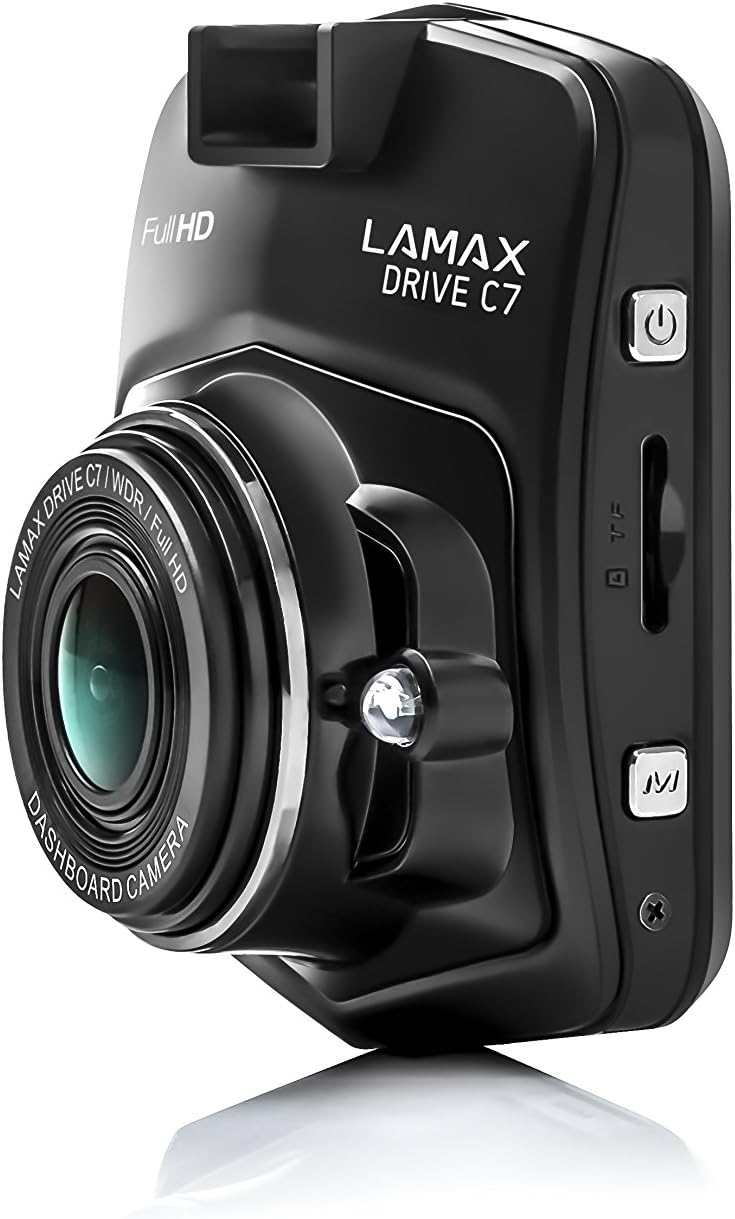
Imaj: Bò kote view of the dashcam, highlighting the power button, memory card slot, and USB port.

Imaj: Devan view of the dashcam with the 2.4-inch LCD display and control buttons below.
- Lantiy: High-resolution camera lens.
- Ekspozisyon: Ekran LCD 2.4 pous pou viewing recordings and menu.
- Bouton pouvwa: Limen/éteint aparèy la.
- Bouton meni: Aksè a paramèt ak opsyon yo.
- Bouton monte / desann: Navige nan opsyon meni yo.
- OK bouton: Konfime seleksyon yo.
- MicroSD Kat plas: Insert memory card here.
- Pò USB: For power supply and data transfer.
- Bouton Reyajiste: Resets the device (use a thin object).
Enstalasyon
1. Mete kat memwa a
Ensure the dashcam is powered off before inserting or removing the microSD card. Insert the card into the slot until it clicks into place. Use a Class 10 or higher microSD card, up to 32GB capacity, for optimal performance. It is recommended to format the memory card within the dashcam settings before first use and periodically thereafter.
2. Monte Dashcam la
Chwazi yon kote sou vit machin ou an ki pa bloke je ou. view of the road. Clean the windshield surface thoroughly before applying the mount.

Image: The dashcam attached to its suction cup mount, ready for windshield installation.

Imaj: Dèyè view of the dashcam with the suction cup mount attached, showing the screen and buttons.
- Attach the chosen mount (suction cup or adhesive) to the dashcam.
- Press the mount firmly against the windshield and secure it.
- Ajiste ang kamera a pou asire yon imaj klè view nan wout ki devan an.
3. Konekte ak pouvwa
Connect the car charger to the dashcam's USB port and plug the other end into your vehicle's 12V power outlet (cigarette lighter socket). The dashcam will automatically power on and begin recording when the vehicle's ignition is turned on.
Enstriksyon Operasyon
Power On/Off
- Otomatik: The dashcam powers on/off automatically with the vehicle's ignition.
- Manyèl: Peze epi kenbe bouton Pouvwa a pou limen oswa etenn aparèy la manyèlman.
Anrejistreman mòd
- Anrejistreman bouk: The dashcam records video in continuous loops (e.g., 1, 3, or 5 minutes). When the memory card is full, the oldest unlocked files yo ranplase.
- G-Capteur: In the event of a sudden impact or collision, the G-Sensor automatically locks the current recording, preventing it from being overwritten. The sensitivity of the G-Sensor can be adjusted in the settings.
- Mòd pakin: When enabled, the dashcam will automatically start recording if it detects motion or an impact while the vehicle is parked. This feature provides 24-hour surveillance for your vehicle.
- Videyo tan-erè: This feature allows the camera to record at a lower frame rate (e.g., 1 frame per second), compressing long periods of time into short videos. This can significantly extend the recording capacity of your memory card.
Navigasyon Menu
Peze a Menu button to access the settings. Use the Leve/Desann buttons to navigate through options and the OK button to confirm selections. Press Menu again to exit the settings.
Lektur
Pou view recorded videos, stop recording (if active), then press the Mode button to switch to playback mode. Use the Leve/Desann bouton pou chwazi yon file epi OK to play it. You can also connect the dashcam to a computer via USB to access files dirèkteman.
Antretyen
Jesyon kat memwa
- Fòma: Regularly format your microSD card (at least once a month) using the dashcam's format function to prevent data corruption and ensure smooth recording.
- Kapasite: Ensure sufficient free space on the memory card. Locked files from G-Sensor events can accumulate and fill the card. Periodically review and delete unnecessary locked files.
Netwayaj
Wipe the camera lens with a soft, lint-free cloth to ensure clear video quality. Use a slightly damp cloth to clean the body of the dashcam. Do not use harsh chemicals or abrasive cleaners.
Mizajou mikrolojisyèl
Check the official LAMAX website periodically for available firmware updates. Updates can improve performance, add new features, or fix bugs. Follow the instructions provided with the firmware update carefully.
Depanaj
| Pwoblèm | Kòz posib / Solisyon |
|---|---|
| Dashcam la pa limen. |
|
| Anrejistreman an sispann sanzatann. |
|
| Kalite videyo a pa bon oswa li twoub. |
|
| Dashcam freezes or becomes unresponsive. |
|
Espesifikasyon
| Karakteristik | Detay |
|---|---|
| Rezolisyon videyo | Full HD 1080p |
| Viewing Ang | 150° |
| Gwosè ekspozisyon | 2.4 inches (6.1 cm) LCD |
| Anrejistreman bouk | Wi |
| G-Capteur | Wi |
| Mòd pakin | Yes (24h) |
| Vizyon lannwit | Wi |
| GPS entegre | Optional (via external module) |
| Depo | MicroSD card (Class 10+, up to 32GB recommended) |
| Dimansyon | 3.3 x 6.1 x 7.2 cm |
| Pwa | 60 g |
| Konpozan ki enkli | Memory Card (as per product details) |
Garanti ak sipò
Enfòmasyon sou Garanti
The LAMAX DRIVE C7 Dashcam comes with a standard manufacturer's warranty. Please refer to the warranty card included in your package or visit the official LAMAX websit la pou wè kondisyon garanti detaye espesifik pou rejyon ou an. Kenbe prèv acha ou pou reklamasyon garanti.
Sipò pou Kliyan
For technical assistance, troubleshooting, or product inquiries, please visit the official LAMAX support websit entènèt la oubyen kontakte depatman sèvis kliyan yo. Anjeneral, ou ka jwenn enfòmasyon kontak yo sou paj ofisyèl mak la. websit la oubyen sou anbalaj pwodwi a.
Official LAMAX Store: Visit LAMAX Store on Amazon


