1. Entwodiksyon
This manual provides detailed instructions for the setup, operation, and maintenance of your Intermec EasyCoder PX4i Thermal Transfer Printer. The PX4i is a robust and flexible industrial printer designed for high-volume label printing, offering monochrome output at a resolution of 203 dpi and speeds up to 12 inches per second. Please read this manual thoroughly before using the printer to ensure safe and efficient operation.
2. Pwodwi Features
- Enpresyon gwo vitès: Capable of printing at speeds up to 12 inches per second.
- Segondè rezolisyon: Delivers clear monochrome prints at 203 dpi.
- Manyaj medya fleksib: Supports various media types including black mark, continuous label, fanfold, gap, general identification label, notch, roll fed, tag, and ticket.
- Koneksyon Ethernet: Integrated Ethernet for network integration.
- Pwogramasyon: Designed for optimized printing operations and streamlined deployment.
- Konsepsyon dirab: Industrial-grade construction for demanding environments.
3. Pake kontni
Verify that all items listed below are included in your printer package. If any items are missing or damaged, contact your supplier immediately.
- Intermec EasyCoder PX4i Thermal Transfer Printer
- Kòd pouvwa
- Labels (Included Components)
- User Documentation (This manual)
4. Enfòmasyon sou Sekirite
Always observe the following safety precautions to prevent injury and damage to the printer:
- Asire w ke enprimant lan mete sou yon sifas ki estab e ki plat.
- Connect the printer to a grounded power outlet.
- Do not operate the printer in wet or excessively humid conditions.
- Kenbe men ak rad ki lach lwen pati k ap deplase yo pandan w ap opere.
- Dekonekte kouran an anvan ou fè nenpòt antretyen oswa netwayaj.
- Sèvi ak sèlman pati ranplasman apwouve ak Pwodwi pou Telefòn.
5. Enstalasyon
5.1 Debake
- Ak anpil atansyon retire enprimant lan nan anbalaj li yo.
- Retire tout materyèl anbalaj, tep adezif, ak fim pwoteksyon yo.
- Kenbe anbalaj orijinal la pou transpò oswa depo nan lavni.
5.2 Konekte pouvwa
- Asire w ke switch pouvwa enprimant lan nan pozisyon OFF.
- Konekte kòd kouran an nan priz kouran enprimant lan.
- Ploge lòt pwent fil kouran an nan yon priz elektrik ki chita.
5.3 Loading Media (Labels)
The PX4i printer supports various label types. Follow these general steps to load your labels:

Imaj: Devan view of the Intermec EasyCoder PX4i printer, showing a label being fed out of the front slot. The control panel with an LCD screen and numeric keypad is visible on the top front.
- Louvri kouvèti medya enprimant lan.
- Place the roll of labels onto the media supply spindle, ensuring it unwinds correctly.
- Feed the leading edge of the labels through the media guides and under the printhead assembly.
- Adjust the media guides to fit the width of your labels snugly but without binding.
- Close the media cover. The printer may automatically calibrate to the new media.
5.4 Connecting to a Computer/Network
The PX4i offers Ethernet connectivity for network integration.
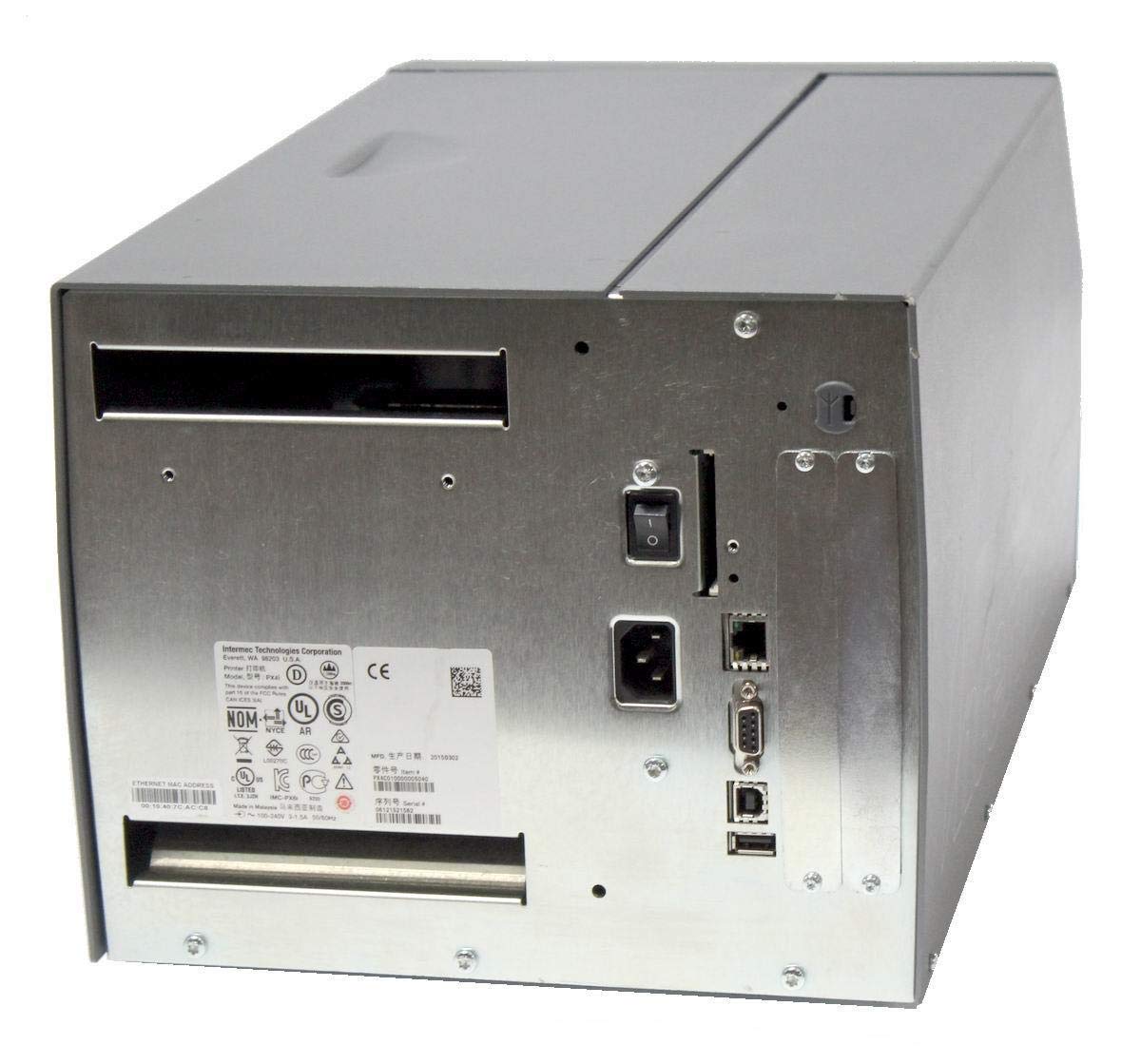
Imaj: Dèyè view of the Intermec EasyCoder PX4i printer, displaying the power inlet, power switch, Ethernet port, serial ports, and USB ports. The metallic casing is clearly visible.
- Locate the Ethernet port on the rear of the printer.
- Connect a standard Ethernet cable from the printer to your network router or switch.
- For direct connection to a computer, use an appropriate USB or serial cable if supported by your system and printer configuration.
- Refer to the printer's network configuration guide for setting up IP addresses and other network parameters.
6. Operasyon
6.1 Kontwòl Panel Overview
The front control panel provides access to printer functions and status information.
Image: Close-up of the Intermec EasyCoder PX4i control panel, featuring an LCD display, navigation buttons (up, down, left, right, enter), and a numeric keypad with function keys like Pause, Feed, and Clear.
- Ekspozisyon LCD: Montre estati enprimant lan, opsyon meni yo, ak mesaj erè yo.
- Bouton Navigasyon: Used to scroll through menus and select options.
- Klavye nimerik: For entering data or selecting numbered options.
- bouton poz: Temporarily stops printing.
- Bouton Feed: Advances one label.
- Bouton konfigirasyon: Accesses printer configuration menus.
6.2 Enpresyon debaz
- Asire w ke enprimant lan limen epi li konekte ak òdinatè w la oswa rezo a.
- Open the document or application from which you wish to print labels.
- Select the Intermec PX4i printer from your printer list.
- Configure print settings such as label size, orientation, and quantity as needed.
- Initiate the print job. The printer will begin feeding and printing labels.
6.3 Adjusting Print Settings
Advanced print settings can be adjusted through the printer's control panel or via the printer driver on your computer. These settings include print darkness, print speed, label gap sensing, and more. Consult your printer driver documentation for software-based adjustments.
7. Antretyen
Regular maintenance ensures optimal performance and extends the life of your printer.
7.1 Netwaye tèt enprime a
The printhead should be cleaned regularly, especially if print quality degrades.
- Etenn enprimant lan epi dekonekte kòd kouran an.
- Louvri asanble printhead la.
- Sèvi ak yon twal ki pa gen pousyè oswa yon plim netwayaj tèt enprime ki mouye ak alkòl izopropilik, siye sifas tèt enprime a dousman soti nan sant rive nan kwen.
- Kite tèt enprime a seche nèt anvan ou fèmen asanblaj la epi rekonekte kouran an.
7.2 Ranplase Medya ak Riban
When the label roll or thermal transfer ribbon (if used) runs out, replace it promptly.
- Etenn enprimant lan epi ouvri kouvèti medya a.
- Remove the empty label roll and/or used ribbon core.
- Install a new roll of labels and/or a new ribbon, following the loading instructions in Section 5.3.
- Ensure media and ribbon are properly tensioned and aligned.
- Fèmen kouvèti medya a.
NAN. Depanaj
This section addresses common issues you might encounter with your PX4i printer.
- Enprimant pa limen: Check power cord connection, power outlet, and printer's power switch.
- Pa gen rezilta enprime: Verify printer is online, connected to the computer/network, and has media loaded. Check for error messages on the LCD.
- Kalite enprime pòv: Clean the printhead (Section 7.1). Adjust print darkness settings. Ensure correct media and ribbon are used.
- Etikèt ki pa ap byen alimante: Check media loading (Section 5.3) and ensure media guides are properly adjusted. Calibrate media sensors if necessary.
- Mesaj erè: Refer to the printer's LCD display for specific error codes and consult the full Intermec PX4i technical manual for detailed explanations and solutions.
9. Espesifikasyon
| Karakteristik | Deskripsyon |
|---|---|
| Non modèl | PX4i |
| Nimewo Modèl Atik | PX4C010000000020 |
| Teknoloji Enpresyon | Transfè tèmik |
| Ekri an lèt detache Koulè | Monokrom |
| Maksimòm vitès enprime | 12 in/s (Monochrome) |
| Maksimòm rezolisyon enprime | 203 dpi |
| Koneksyon Teknoloji | Ethernet |
| Gwosè Maksimòm Medya | 12 pous |
| Konpozan ki enkli | Etikèt |
| Kalite kontwolè | Pouse bouton |
| Manifakti | INTERMEC INDUSTRIAL PRINTERS |
| Dimansyon pake | 23.25 x 15.5 x 15.25 pous; 36.2 liv |
10. Garanti ak sipò
The Intermec EasyCoder PX4i Thermal Transfer Printer comes with a standard manufacturer's warranty. For specific warranty terms and conditions, please refer to the warranty card included with your product or visit the official Intermec (Honeywell) support website. For technical assistance, troubleshooting beyond this manual, or to inquire about service, please contact Intermec customer support or your authorized dealer.
Resous sou entènèt: For the latest drivers, firmware updates, and additional documentation, please visit the official Intermec support portal.


