1. Entwodiksyon
Mèsi pou acha aasing the Intex IT-11500 SUF Multimedia Speaker system. This 2.0 channel speaker system is designed to provide high-quality audio for your entertainment needs. It features multiple connectivity options including AUX, USB, SD/MMC card playback, and a digital FM radio. The system also includes a cordless microphone for added versatility and a fully functional remote control for convenient operation. Please read this manual carefully before using the product to ensure proper setup and optimal performance.
2. Pake kontni
Tanpri verifye sa ki nan pake a lè w ap debale l. Si gen nenpòt atik ki manke oswa ki domaje, kontakte machann ou imedyatman.
- Main Speaker Unit (Subwoofer)
- Oratè satelit (2 inite)
- Cordless Microphone
- Kontwòl Remote
- Audio Input Cable (AUX)
- Kòd pouvwa
- Manyèl itilizatè
3. Pwodwi Features
- 2.0 Channel multimedia speaker with Cordless MIC
- AUX audio input compatible with DVD/PC/LCD TV
- MP3 playability with USB/SD/MMC
- Digital FM playability
- Fully function smart remote control
- Dirije ekspozisyon
- Frequency Response : 50Hz - 20KHz
- S/N rapò: ≥ 60dB
- Separasyon: ≥ 40dB
- Bass Up/down : ±15dB
4. Enstalasyon
4.1 Debalaj ak plasman
Carefully remove all components from the packaging. Place the main speaker unit on a stable, flat surface. Position the satellite speakers to the left and right of your listening area for optimal stereo separation. Ensure adequate ventilation around the units.
4.2 Konekte moun kap pale yo
Connect the satellite speakers to the corresponding output jacks on the rear panel of the main speaker unit. Ensure the connections are secure.
4.3 Connecting Audio Source (AUX)
To connect an external audio device (e.g., DVD player, PC, TV), use the provided audio input cable. Insert one end into the AUX input jack on the main speaker unit and the other end into the audio output jack of your external device.
4.4 Koneksyon pouvwa
Connect the power cord to the AC power input on the rear of the main speaker unit, then plug the other end into a standard AC 200V ~ 240V / 50Hz power outlet.
4.5 Premye pouvwa sou
After all connections are made, switch on the power button located on the main speaker unit. The LED display will illuminate.
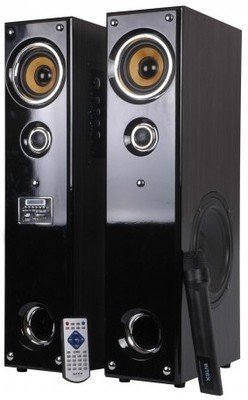
Imaj: Devan view of the Intex IT-11500 SUF Multimedia Speaker, showing the main unit with control panel and LED display, and two satellite speakers.
5. Operasyon Enstriksyon
5.1 Power On/Off
Peze a POUVWA bouton ki sou inite prensipal la oswa sou kontwòl remote la pou limen oswa etenn sistèm nan.
5.2 Seleksyon mòd
Peze a MÒD button on the main unit or remote control to cycle through available input modes: AUX, USB, SD/MMC, and FM.
5.3 Kontwòl Volim
Ajiste volim prensipal la avèk la VOLIM +/- buttons on the main unit or remote control. Bass levels can be adjusted using the BASS +/- controls on the remote.
5.4 USB/SD/MMC Playback
Insert a USB drive or an SD/MMC card into the respective slot on the main unit. The system will automatically switch to USB/SD/MMC mode and begin playing compatible MP3 audio files. Sèvi ak la JWE/POZ, PREV, ak PWOCHÈ bouton pou kontwole lèktur.
5.5 Operasyon Radyo FM
Nan mòd FM, peze la ESKANYE button on the remote control to automatically scan and save available FM stations. Use the PREV epi PWOCHÈ bouton navige nan estasyon sove.
5.6 Using the Cordless Microphone
Ensure the cordless microphone has fresh batteries. Turn on the microphone. The microphone's audio will be mixed with the main audio source. Adjust microphone volume if available on the main unit or remote.
5.7 Fonksyon kontwòl Remote
The remote control provides full functionality for the speaker system. Refer to the diagram on the remote for specific button functions, including power, mode, volume, track control, FM scan, and bass adjustment.
6. Antretyen
6.1 Netwayaj
Wipe the speaker surfaces with a soft, dry cloth. Do not use abrasive cleaners, waxes, or solvents as they may damage the finish. Ensure the unit is powered off and unplugged before cleaning.
6.2 Depo
Si w ap sere aparèy la pou yon bon bout tan, debranche l nan priz kouran an epi sere l nan yon kote ki fre epi sèk, lwen limyè solèy dirèk ak tanperati ekstrèm.
6.3 Prekosyon sekirite
- Pa ekspoze aparèy la nan dlo oswa imidite twòp.
- Pa louvri oratè a casing; pa gen okenn pyès itilizatè a ka repare anndan an.
- Kenbe lwen sous chalè ak limyè solèy la dirèk.
- Asire bon vantilasyon pou anpeche surchof.
NAN. Depanaj
| Pwoblèm | Kòz posib | Solisyon |
|---|---|---|
| Pa gen pouvwa | Power cord not connected; Power outlet faulty; Power switch off. | Check power cord connection; Try a different outlet; Ensure power switch is ON. |
| Pa gen son | Volume too low; Incorrect input mode; Audio cable loose/faulty; Mute activated. | Increase volume; Select correct input mode (AUX, USB, FM); Reconnect audio cable; Deactivate mute. |
| Son defòme | Volume too high; Source audio quality poor; Speaker placement. | Reduce volume; Check audio source; Adjust speaker position. |
| Remote kontwòl pa travay | Pil yo fin itilize; Gen yon obstak ant telekòmand lan ak aparèy la; Capteur telekòmand lan bloke. | Replace batteries; Remove obstructions; Ensure clear line of sight to sensor. |
| FM reception poor | Siyal fèb; Antèn nan pa lonje. | Adjust antenna position; Rescan for stations. |
8. Espesifikasyon
| Kalite Oratè | Miltimedya |
| Chèn konte genyen | 2.0 |
| Repons Frekans | 50Hz - 20KHz |
| S/N rapò | ≥ 60dB |
| Separasyon | ≥ 40dB |
| Bass monte / desann | ± 15dB |
| Sansiblite | <500mV |
| Reseptè frekans FM | 88MHz pou 108MHz |
| Pwovizyon pou pouvwa | AC 200V ~ 240V / 50Hz |
| Koneksyon Teknoloji | USB |
| Metòd kontwòl | Remote |
| Pwa atik | 17 kg |
| Nimewo Modèl | 1112-1150-0 |
9. Garanti ak sipò
For warranty information, please refer to the warranty card included with your product or contact your local Intex customer service. Keep your purchase receipt as proof of purchase. For technical support or service inquiries, please visit the official Intex website or contact their customer support helpline.
Remak: Espesifikasyon yo ka chanje san avètisman alavans pou amelyore pwodwi a.


