1. Entwodiksyon
This manual provides instructions for the proper setup, operation, and maintenance of your Amazon Basics Large Portable Bluetooth Speaker (Model BTV3_2). Please read this manual thoroughly before using the product to ensure optimal performance and safety.
2. Enfòmasyon sou Sekirite
- Pa ekspoze oratè a nan dlo oswa imidite twòp.
- Evite mete oratè a toupre sous chalè oswa anba limyè solèy dirèk.
- Pa eseye demonte oswa modifye oratè a. Sa ap anile garanti a.
- Use only the provided AC power adapter for charging.
- Kenbe oratè a lwen timoun yo.
3. Pake kontni
Verifye ke tout atik yo prezan nan pakè a:
- Amazon Basics Large Portable Bluetooth Speaker
- AC pouvwa adaptè

Deskripsyon: This image shows the Amazon Basics Large Portable Bluetooth Speaker securely placed within its brown cardboard packaging, indicating how the product is received.
4. Pwodwi souview
4.1. Devan View

Deskripsyon: This image displays the front of the Amazon Basics Large Portable Bluetooth Speaker, featuring a black mesh grille that covers the speaker drivers.
4.2. Kontwòl Panèl Anlè a

Deskripsyon: This image shows the top panel of the speaker with four circular buttons and a small LED indicator. From left to right, the buttons are: Volume Down (-), Play/Pause, Volume Up (+), and Bluetooth Pairing/Call Answer. Below the buttons, a small Bluetooth logo and an LED indicator are visible.
- - (Volume Down): Diminye volim odyo.
- Jwe/Poz: Jwe oswa mete lekti odyo a sou poz.
- + (Volume Up): Ogmante volim odyo.
- Bluetooth/Call: Initiates Bluetooth pairing mode or answers/ends phone calls.
- Endikatè ki ap dirije: Displays power and Bluetooth status.
4.3. Side Panel Ports

Deskripsyon: This image shows the right side panel of the speaker, featuring a power switch, a DC input port for charging, and an AUX input port for wired audio connections.
- ON / OFF switch: Limen oswa etenn oratè a.
- DC IN Pò: Connects to the AC power adapter for charging.
- Pò AUX: Connects to audio devices using a 3.5mm stereo cable (not included).
5. Enstalasyon
5.1. Chaje Oratè a
- Connect the provided AC power adapter to the DC IN port on the side of the speaker.
- Plug the AC power adapter into a wall outlet.
- The LED indicator will illuminate to show charging status. A full charge provides up to 8 hours of playback.
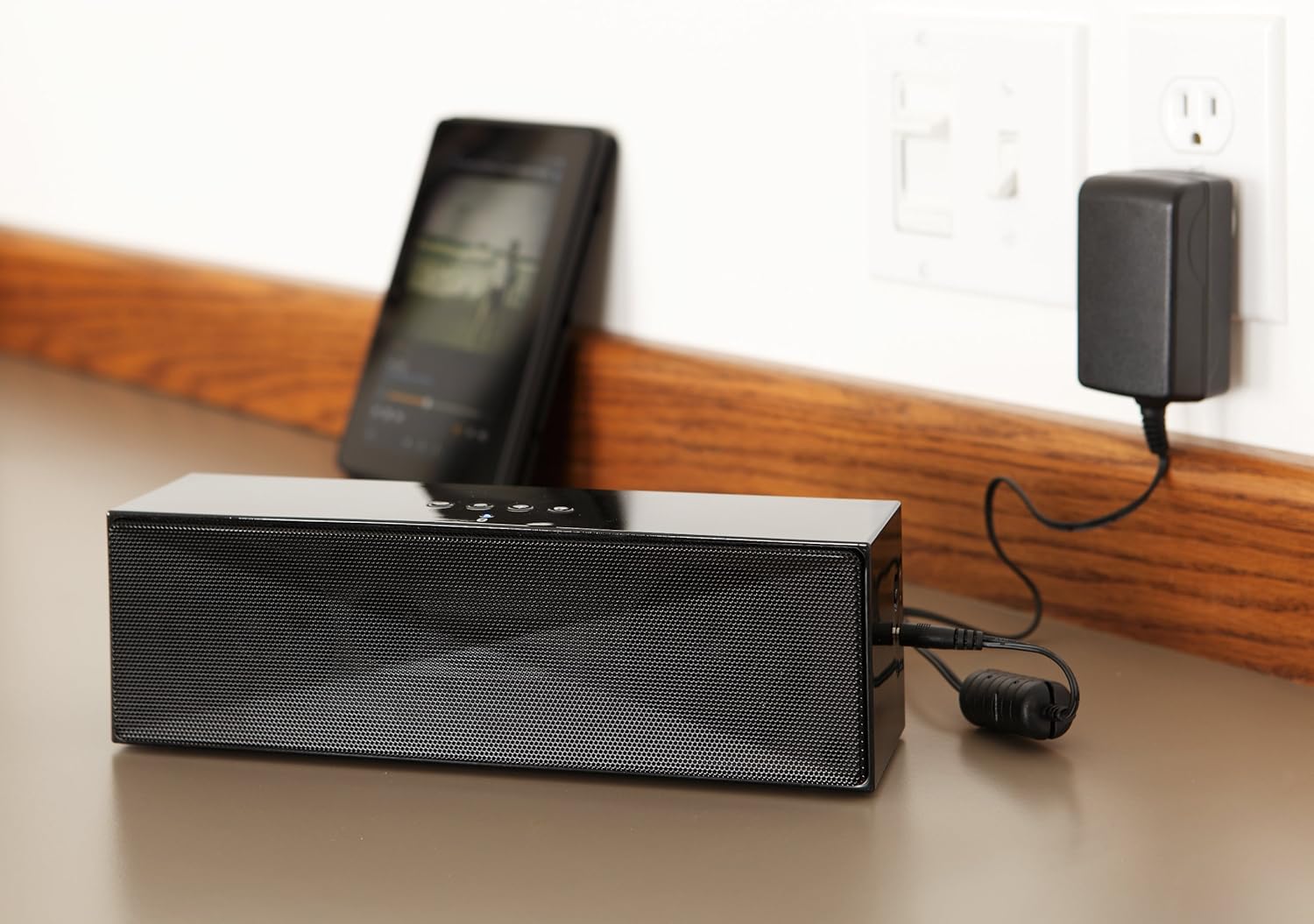
Deskripsyon: This image shows the speaker placed on a surface, with its AC power adapter plugged into a wall outlet, illustrating the charging process.
5.2. Powering On / Off
Slide the ON/OFF switch located on the side panel to the "ON" position to power on the speaker. Slide it to the "OFF" position to power off.
6. Operasyon Enstriksyon
6.1. Pè Bluetooth
- Ensure the speaker is powered on. The LED indicator will flash, indicating it is in pairing mode.
- Sou aparèy ou ki gen Bluetooth la (telefòn entelijan, tablèt, òdinatè pòtab), aktive Bluetooth epi chèche aparèy ki disponib yo.
- Select "Amazon Basics BTV3_2" from the list of devices.
- Once paired, the LED indicator on the speaker will glow solid blue.
- The speaker can connect to devices up to 30 feet (10 meters) away.

Deskripsyon: This image shows the speaker positioned next to a tablet displaying a music playback interface, demonstrating a typical Bluetooth connection scenario.
6.2. Connecting via AUX Cable
- Connect one end of a 3.5mm stereo audio cable (not included) to the AUX port on the speaker.
- Connect the other end of the cable to the audio output jack of your device.
- Oratè a ap chanje otomatikman nan mòd antre AUX.
6.3. Rele men-gratis
The speaker features a built-in microphone for hands-free calls when connected via Bluetooth.
- Reponn yon apèl: Press the Bluetooth/Call button once.
- Fini yon apèl: Press the Bluetooth/Call button once during a call.
- Rejte yon apèl: Press and hold the Bluetooth/Call button.
7. Antretyen
- Netwaye oratè a avèk yon twal mou epi sèk. Pa sèvi ak pwodui netwayaj likid oswa ayewosòl.
- Sere oratè a nan yon kote ki fre epi sèk lè w pa itilize li pou yon bon bout tan.
- Evite lage oratè a oswa sibi gwo enpak.
NAN. Depanaj
| Pwoblèm | Kòz posib | Solisyon |
|---|---|---|
| Oratè a pa limen. | Batri ap vide. | Connect the speaker to the AC power adapter and charge it. |
| Pa ka konekte atravè Bluetooth. | Speaker is not in pairing mode; device Bluetooth is off; device is out of range. | Ensure speaker LED is flashing; enable Bluetooth on your device; move device closer to the speaker (within 30 feet/10 meters). |
| Pa gen son oswa volim nan ba. | Volume on speaker or connected device is too low; incorrect input source. | Increase volume on both the speaker and your connected device. Ensure correct connection (Bluetooth or AUX). |
| Speaker turns off automatically when using AUX. | Automatic power-off feature activated due to prolonged silence. | This model may have an automatic power-off feature after a period of inactivity or silence, even when connected via AUX. To resume playback, power the speaker off and then on again using the side switch. |
| Son deformation. | Volume too high; weak battery; interference. | Reduce volume; charge the speaker; move away from other electronic devices. |
9. Espesifikasyon
| Karakteristik | Detay |
|---|---|
| Nimewo Modèl | BTV3_2 |
| Dimansyon (L x W x H) | 10.2 x 2.9 x 3.1 pous (25.9 x 7.4 x 7.9 cm) |
| Pwa | 1.61 liv (0.73 kg) |
| Sòti Oratè | 2 x 5W (10W total) |
| Koneksyon | Bluetooth, 3.5mm AUX |
| Gamme Bluetooth | Jiska 30 pye (10 mèt) |
| Lavi batri | Jiska 8 èdtan |
| Kapasite batri | 8000 mAh |
| Mikwofòn entegre | Wi |
| Sous pouvwa | Battery Powered, AC Adapter |
| Materyèl | Plastik |

Deskripsyon: This image provides a visual representation of the speaker's dimensions, showing its length (10.2"), width (2.9"), and height (3.1").
10. Garanti ak sipò
Pou enfòmasyon sou garanti a ak sipò kliyan, tanpri al gade dokiman ki vini ak acha ou a oswa vizite paj ofisyèl Amazon Basics la. websit la. Kenbe prèv acha ou pou reklamasyon garanti.
Sipò sou entènèt: Magazen Amazon Basics


