1. Pwodwi souview
The Comfast CF-WR150N is a versatile 150M high-speed 802.11n wireless device designed to enhance and extend your Wi-Fi network. It functions as a personal assistant for your existing router, improving transfer rates and expanding coverage.
This device supports three primary operating modes: Access Point (AP), Repeater, and Router, offering flexible solutions for various networking needs. It is backward compatible with all 802.11b/g/n devices.
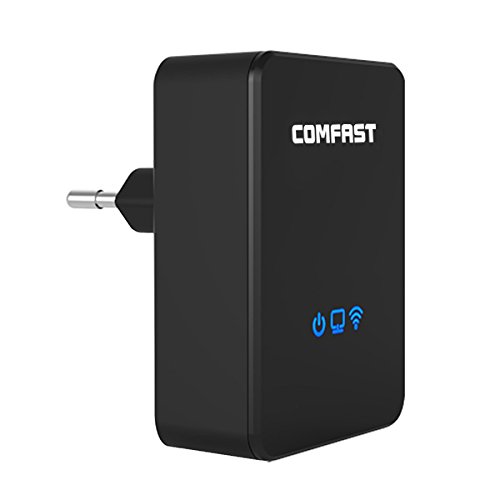
Figi 1.1: Devan view of the Comfast CF-WR150N Wireless Repeater.
2. Pake kontni
Anvan ou kontinye ak konfigirasyon an, tanpri verifye si tout bagay yo prezan nan pake a:
- 1 x Comfast CF-WR150N Wireless Repeater
- 1 x Network Cable (Ethernet Cable)
- 1 x Manyèl Itilizatè (dokiman sa a)
- 1 x Kat Garanti
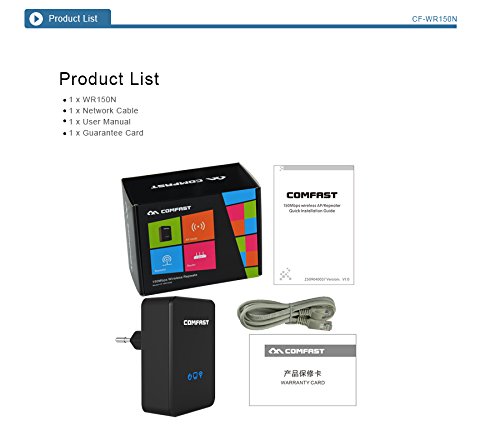
Figure 2.1: Contents included in the Comfast CF-WR150N product package.
3. Konpozan aparèy
Familiarize yourself with the various parts and indicators of the CF-WR150N device:
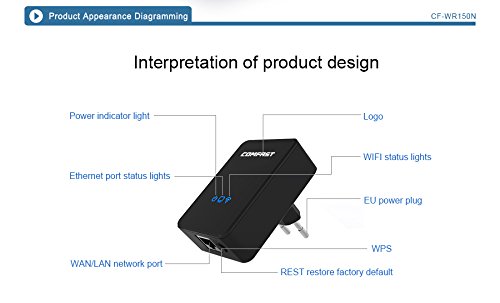
Figure 3.1: Detailed diagram of the CF-WR150N's external components and indicators.
- Limyè endikatè pouvwa: Endike estati pouvwa.
- Ethernet Port Status Lights: Indicate activity on the WAN/LAN port.
- WAN/LAN Network Port: Used for wired connections.
- EU Power Plug: Pou konekte ak yon priz kouran.
- WPS bouton: For quick and secure wireless setup.
- REST (Reset) Button: Itilize pou retabli paramèt defo faktori yo.
- Logo: Comfast brand logo.
- WIFI Status Lights: Endike aktivite rezo san fil la.
4. Enstalasyon ak Konfigirasyon
The Comfast CF-WR150N can be configured to operate in three distinct modes: Access Point (AP) Mode, Repeater Mode, and Router Mode. Choose the mode that best suits your network requirements.
4.1. General Setup Steps
- Pouvwa sou: Plug the CF-WR150N into a standard power outlet. Wait for the power indicator light to stabilize.
- Konekte ak aparèy:
- Koneksyon san fil: On your computer or mobile device, search for available Wi-Fi networks. Connect to the network named "COMFAST_XXXX" (where XXXX are the last four digits of the device's MAC address). No password is required for the initial connection.
- Koneksyon filaire: Connect your computer directly to the CF-WR150N's WAN/LAN port using the provided Ethernet cable.
- Aksè Web Entèfas: Louvri a web browser and enter the default IP address (usually 192.168.10.1 or 192.168.1.254) into the address bar. Refer to the label on the device or the quick start guide for the exact IP.
- Konekte: Enter the default username and password (typically "admin" for both).
- Chwazi mòd operasyon: Once logged in, you will be prompted to select the desired operating mode (AP, Repeater, or Router).
4.2. Operating Modes Explained
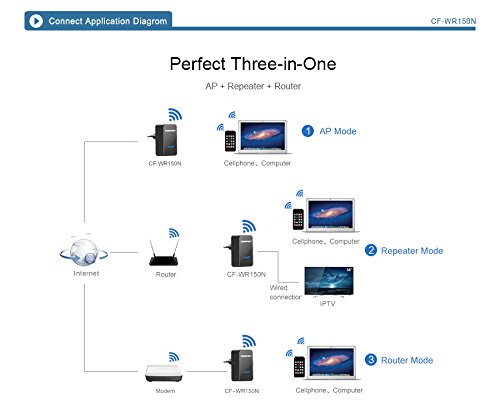
Figure 4.1: Application diagram showing AP, Repeater, and Router modes.
- Mòd AP (Pwen Aksè): In this mode, the CF-WR150N connects to a wired network (e.g., from a modem or router) and broadcasts a new wireless network. This is ideal for adding Wi-Fi capability to a wired-only network.
- Mòd Repetè (Ekstansyon Ranje): This mode extends the coverage of an existing wireless network. The CF-WR150N connects wirelessly to your main router's Wi-Fi signal and re-broadcasts it, effectively eliminating Wi-Fi dead zones.
- Mòd Routeur: When configured as a router, the CF-WR150N connects directly to your internet service provider's modem via the WAN/LAN port and creates a new wireless network, providing internet access to connected devices.
4.3. WPS Setup (Wireless Protected Setup)
For a quick and secure wireless connection to your existing router in Repeater Mode, you can use the WPS function:
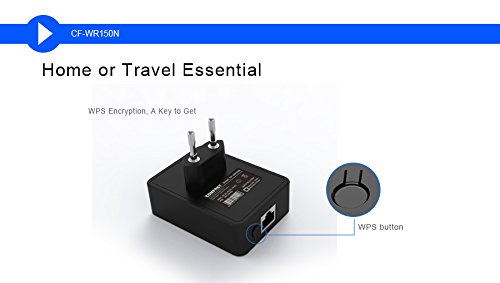
Figure 4.2: Location of the WPS button on the CF-WR150N.
- Plug the CF-WR150N into a power outlet near your main router.
- Peze bouton WPS la sou routeur prensipal ou a.
- Within two minutes, press the WPS button on the CF-WR150N.
- The devices will automatically establish a secure connection. The Wi-Fi status light on the CF-WR150N will indicate a successful connection.
5. Operasyon ak Itilizasyon
Once configured, the CF-WR150N operates automatically based on the selected mode. Ensure the device is placed in an optimal location for signal coverage.
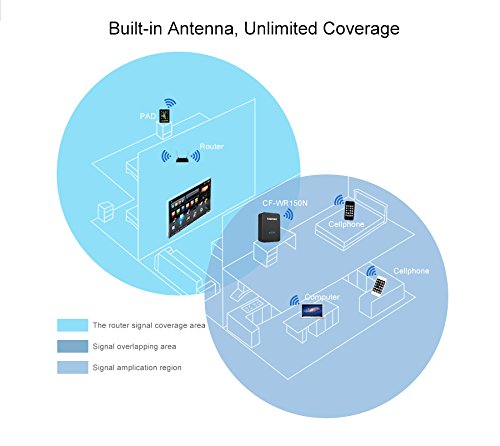
Figure 5.1: Illustration of signal coverage extension with the CF-WR150N.
For Repeater Mode, place the CF-WR150N approximately halfway between your router and the area where you need improved Wi-Fi signal. Avoid placing it in areas with significant interference or physical obstructions.
6. Antretyen
To ensure optimal performance and longevity of your Comfast CF-WR150N, consider the following maintenance tips:
- Mizajou mikrolojisyèl: Tcheke paj ofisyèl Comfast la regilyèman. website for any available firmware updates. Updating firmware can improve performance, add new features, and fix bugs.
- Netwayaj: Kenbe aparèy la pwòp epi san pousyè. Sèvi ak yon twal mou epi sèk pou siye deyò a. Pa sèvi ak pwodui netwayaj likid oswa ayewosòl.
- Vantilasyon: Ensure the device has adequate ventilation to prevent overheating. Do not cover the device or place it in an enclosed space.
- Rekòmanse: If you experience network issues, a simple restart of the device (unplugging and re-plugging after 10 seconds) can often resolve minor glitches.
NAN. Depanaj
This section addresses common issues you might encounter with your Comfast CF-WR150N.
| Pwoblèm | Kòz posib | Solisyon |
|---|---|---|
| Pa ka jwenn aksè nan web koòdone jesyon. | Incorrect IP address, device not powered on, or network configuration issue. |
|
| No internet access after setup. | Incorrect mode configuration, weak signal (Repeater Mode), or ISP issue. |
|
| Frequent disconnections or slow speeds. | Interference, poor placement, or network congestion. |
|
| Forgot login password or device settings are corrupted. | Password forgotten or misconfiguration. |
|
8. Espesifikasyon
| Karakteristik | Detay |
|---|---|
| Mak | Comfast |
| Nimewo Modèl | CF-WR150N |
| Kalite koneksyon | Wi-Fi |
| Kalite san fil | 802.11b, 802.11g, 802.11n |
| Wireless Kominikasyon Creole | 802.11b, 802.11g, 802.11n |
| Pousantaj Transfè Done | 150 Megabits Per Second (as per product description, not 750 from spec list) |
| Gwoup Gwoup Frekans | Single-Band (implied by 802.11n 150M, Dual-Band from spec list seems incorrect for 150M) |
| Karakteristik espesyal | Mòd Pwen Aksè, Endikatè LED |
| Pwa atik | 180 g |
| Dimansyon pake | 13.8 x 10.4 x 6.2 cm |
| Premye Dat ki disponib | 1ye jiyè 2014 |
Note: Data Transfer Rate and Frequency Band Class are based on the primary product description. Some specification lists may contain discrepancies.
9. Garanti ak sipò
For detailed information regarding the product warranty, please refer to the Kat Garanti included in your product package. This card contains specific terms, conditions, and duration of the warranty.
For technical support, troubleshooting assistance beyond this manual, or service inquiries, please contact Comfast customer support through the channels provided on the Guarantee Card or the official Comfast websit.


