Entwodiksyon
Welcome to the user manual for your HTC One M8 Developer Edition. This guide provides essential information on setting up, operating, maintaining, and troubleshooting your device. The HTC One M8 is a high-performance smartphone featuring a 5.0-inch display, HTC UltraPixel camera, and powered by Android 4.4.2 (KitKat). This Developer Edition is factory unlocked, offering flexibility with various GSM carriers.

Figi 1: Devan view of the HTC One M8 Developer Edition, showcasing ekran vibran li yo ak konsepsyon elegant li yo.
Ki sa ki nan bwat la
Upon unboxing your HTC One M8 Developer Edition, please verify that all standard components are present. Contents may vary slightly based on region or retailer.
- HTC One M8 Developer Edition Smartphone
- USB Sync/Charge Cable
- Mi Charger Adaptè
- Zouti èkstrè SIM
- Gid demaraj rapid (fizik oswa dijital)
Enstalasyon
1. Mete kat SIM la
- Jwenn plato kat SIM lan sou bò aparèy la.
- Mete zouti pou retire kat SIM lan nan ti twou ki akote plato a pou ouvri li.
- Mete kat Nano-SIM ou a nan plato a ak kontak lò yo anba.
- Dousman pouse plato a tounen nan fant lan jiskaske li fè yon klik.
2. Premye Limen ak Asistan Enstalasyon
- Press and hold the Power button (located on the top edge) until the HTC logo appears.
- Follow the on-screen prompts to complete the initial setup, including language selection, Wi-Fi connection, Google account setup, and data transfer options.

Figi 2: Plizyè views of the HTC One M8, highlighting its slim profile and metallic finish.
Opere aparèy ou an
Ekspozisyon ak Navigasyon
The HTC One M8 features a 5.0-inch Full HD (1920 x 1080) display, offering clear and vibrant visuals. Navigation is primarily touch-based, with on-screen buttons for Home, Back, and Recent Apps. Swipe down from the top of the screen to access the notification panel and quick settings.
Kamera
Equipped with an HTC UltraPixel camera, the device is designed for enhanced low-light performance and faster capture. It records Full HD 1080p video. The Duo Camera setup allows for advanced depth effects and post-capture editing features like UFocus.

Figi 3: Dèyè view of the HTC One M8, highlighting the UltraPixel camera and dual-LED flash.
Odyo
The HTC One M8 incorporates BoomSound front-facing stereo speakers, delivering rich and immersive audio quality for media playback and calls.
Performance and Operating System
The device runs on Android 4.4.2 (KitKat) and is powered by a 2.3 GHz processor with 2 GB of RAM, ensuring smooth multitasking and application performance. The HTC Sense user interface provides a streamlined and intuitive experience.
Lavi batri
The HTC One M8 is equipped with a 2600 mAh battery. Through optimized hardware and software, the device offers extended battery life for daily usage, including web browsing, media consumption, and communication.
Koneksyon
This factory unlocked device supports GSM carriers such as AT&T and T-Mobile, and is compatible with GSM SIM cards from various prepaid carriers. It will not function with CDMA carriers like Sprint, Verizon, Boost, or Virgin. The phone also supports Wi-Fi connectivity for internet access.
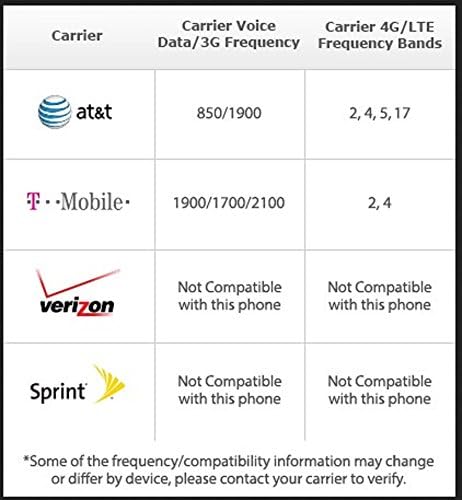
Figure 4: Carrier compatibility chart for the HTC One M8, indicating supported GSM networks and incompatible CDMA networks.
Antretyen
Netwayaj aparèy ou an
To clean your HTC One M8, use a soft, lint-free cloth. For stubborn smudges, slightly dampen the cloth with water. Avoid using harsh chemicals, abrasive cleaners, or compressed air, as these can damage the device's finish or internal components.
Swen batri
To maximize battery lifespan, avoid extreme temperatures. It is recommended to keep the battery charge between 20% and 80% for optimal long-term health. Use only the provided or certified charging accessories.
Mizajou lojisyèl
Regularly check for and install software updates. These updates often include performance improvements, security patches, and new features. You can check for updates in the device's Settings menu under 'About phone' or 'Software updates'.
Depanaj
Pwoblèm komen ak solisyon yo
- Device Freezing or Unresponsive: Press and hold the Power button for about 10-15 seconds to force a restart. If the issue persists, try a factory reset (back up data first).
- Batri Vide byen vit: Check background app usage in Settings > Battery. Reduce screen brightness, disable unnecessary features like GPS or Wi-Fi when not in use, and ensure all apps are updated.
- Pwoblèm koneksyon (Wi-Fi/Selilè): Toggle Wi-Fi or Mobile Data off and on. Restart the device. For cellular issues, ensure your SIM card is properly inserted and your plan is active. Verify carrier compatibility (refer to Figure 4).
- Aplikasyon k ap kraze: Clear the cache and data for the problematic app in Settings > Apps. If the issue continues, uninstall and reinstall the app. Ensure the device's operating system is up to date.
Espesifikasyon
| Karakteristik | Spesifikasyon |
|---|---|
| Dimansyon pwodwi | 2.78 x 0.37 x 5.76 pous |
| Pwa atik | 5.6 ons |
| Sistèm operasyon | Android 4.4.2 (KitKat) |
| Gwosè ekspozisyon | 5.0 pous |
| Rezolisyon | 1920 x 1080 piksèl |
| Vitès processeur | 2.3 GHz |
| Gwosè memwa RAM enstale | 2 GB |
| Kapasite Depo memwa | 32 GB |
| Karakteristik Kamera | HTC UltraPixel, 5 MP, captures Full HD 1080p video |
| Teknoloji Kominikasyon San Fil | Cellular (GSM), Wi-Fi |
| Audio Jack | 3.5 mm |
| Faktè fòm | Bar |
| Koulè | Grey (Gunmetal Grey) |
Garanti ak sipò
US Warranty Information
The HTC One M8 Developer Edition comes with a US Warranty. For specific terms and conditions, including coverage details and duration, please refer to the warranty card included with your product or visit the official HTC support websit.
Sipò pou Kliyan
For technical assistance, troubleshooting beyond this manual, or warranty claims, please contact HTC customer support. You can find contact information and additional resources, including a downloadable PDF user manual, on the official HTC website. The PDF user manual can be accessed via this link: HTC One M8 User Manual (PDF).


