1. Entwodiksyon
This manual provides comprehensive instructions for the installation, operation, and maintenance of the ACTi B Series B61 Video Camera. Please read this manual thoroughly before using the product to ensure proper and safe operation.
The ACTi B61 is a 5MP Indoor Zoom Dome camera designed for surveillance applications. It features a 3x zoom lens, adaptive IR illumination, and supports H.264 video compression at 1080p/30fps. Key features include:
- 5MP Indoor Zoom Dome with Day/Night functionality
- Adaptive IR for enhanced low-light performance
- Basic Wide Dynamic Range (WDR)
- 3x Zoom Lens (3-9mm / F1.2-2.1) with DC Iris Auto Focus
- 30 frames per second at 1920 x 1080 resolution
- Rediksyon bri dijital (DNR)
- Antre/sòti odyo
- Micro SD HC/Micro SDXC card slot for local storage
- Power over Ethernet (PoE) or DC12V power input
- IK09 vandal resistance rating
- Digital Input/Output (DI/DO)
2. Pake kontni
Tanpri verifye ke tout atik yo prezan epi yo an bon kondisyon lè w ap ouvri pakè a. Si gen nenpòt atik ki manke oswa ki domaje, kontakte vandè w la imedyatman.
- ACTi B Series B61 Video Camera
- Mounting Template/Hardware (screws, anchors)
- Gid Quick Start
- CD lojisyèl (si sa aplikab)

Figi 1: Devan view of the ACTi B Series B61 Video Camera. The camera is a white dome-shaped unit with a dark lens assembly visible through the clear dome cover.
3. Camera Components and Connections
Familiarize yourself with the various components and connection ports of the ACTi B61 camera.
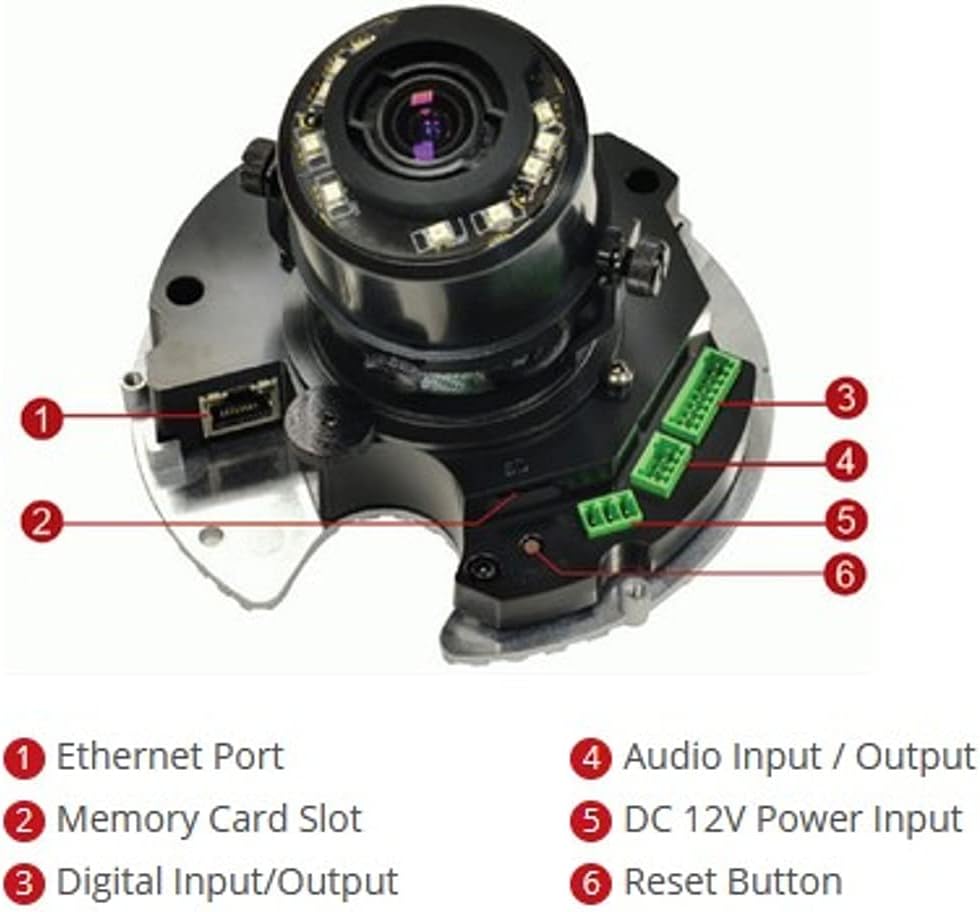
Figi 2: Entèn view of the ACTi B61 camera with key components labeled.
- 1. Ethernet Port: Pou koneksyon rezo ak Power over Ethernet (PoE).
- 2. Memory Card Slot: For inserting a Micro SD HC/Micro SDXC card for local storage.
- 3. Digital Input/Output: For connecting external sensors or alarms.
- 4. Audio Input / Output: For connecting an external microphone and speaker.
- 5. DC 12V Power Input: Alternative power input if PoE is not used.
- 6. Reyajiste bouton: Itilize pou retabli paramèt defo faktori yo.
4. Enstalasyon ak Enstalasyon
4.1 Monte Kamera a
The ACTi B61 is designed for indoor ceiling mount installation. Ensure the mounting surface is strong enough to support the camera's weight (approximately 1.58 pounds).
- Choose a suitable location on the ceiling for optimal surveillance coverage.
- Use the provided mounting template to mark the drill holes on the ceiling.
- Fè twou gid epi mete lank miray si sa nesesè.
- Secure the camera's mounting base to the ceiling using the provided screws.
- Connect necessary cables (Ethernet, power, audio, DI/DO) before fully securing the camera body.
- Adjust the camera's lens angle and zoom as needed.
4.2 Alimante Kamera a
The camera can be powered via Power over Ethernet (PoE) or a 12V DC power adapter.
- PoE: Connect an Ethernet cable from a PoE-enabled switch or injector to the camera's Ethernet port (1).
- DC 12V: Connect a 12V DC power adapter (not included) to the DC 12V Power Input port (5).
Note: Do not connect both PoE and DC 12V power simultaneously.
4.3 Rezo Koneksyon
Connect the camera to your network using an Ethernet cable plugged into the Ethernet Port (1). The camera will obtain an IP address automatically via DHCP by default. For initial setup, it is recommended to connect the camera to a network segment where a DHCP server is active.
While the specifications mention Wi-Fi, the primary connection method for this type of surveillance camera is typically wired Ethernet for stability and power (PoE). Refer to the camera's software manual for detailed Wi-Fi configuration if applicable.
4.4 Aksè Inisyal ak Konfigirasyon
After connecting the camera to the network and powering it on, you can access its web koòdone pou konfigirasyon.
- Use the ACTi IP Utility software (typically found on the included CD or ACTi's website) to discover the camera's IP address on your network.
- Louvri a web browser (e.g., Chrome, Firefox) and enter the camera's IP address in the address bar.
- Log in using the default username and password (refer to the Quick Start Guide or ACTi documentation for default credentials).
- Chanje modpas default la imedyatman pou rezon sekirite.
- Configure network settings, video streaming parameters, recording options, and other features through the web koòdone.
5. Itilizasyon Kamera a
5.1 Viv View ak Anrejistreman
Yon fwa ou fin konfigire l, ou kapab view the live video feed and manage recordings through the camera's web interface or compatible Network Video Recorder (NVR) software.
- Viv View: Access the "Live View" section in the web interface to see the real-time video feed.
- Anrejistreman: Configure recording schedules, motion detection triggers, and storage locations (Micro SD card, NVR, NAS) via the "Recording" or "Event" settings.
5.2 Anviwònman Videyo
Adjust video quality, resolution, frame rate, and image settings to suit your surveillance needs.
- Rezolisyon: Supports up to 5MP effective still resolution and 1080p video capture resolution at 30 fps.
- Zoom ak Konsantre: Utilize the 3x optical zoom and auto-focus features to capture detailed images. These settings are typically adjusted via the web koòdone.
- Mòd lajounen/lannwit: The camera automatically switches between day (color) and night (black and white with IR illumination) modes based on ambient light.
5.3 Audio and I/O
If external audio devices or sensors are connected, configure their settings in the camera's web koòdone.
- Odyo: Enable audio input for listening and audio output for two-way communication if supported by external devices.
- I/O dijital: Configure digital inputs to trigger events (e.g., recording, alarm notification) from external sensors, and digital outputs to control external devices.
6. Antretyen
6.1 Netwayaj
Netwayaj regilye ede kenbe yon bon jan kalite imaj optimal epi pwolonje lavi kamera a.
- Gently wipe the camera's dome cover with a soft, damp twal. Evite pwodui netwayaj abrazif oswa solvan.
- For stubborn dirt, use a mild soap solution. Ensure no liquid enters the camera body.
- Clean the lens with a lens cleaning cloth and solution designed for optical surfaces.
6.2 Mizajou Firmware
Periodically check the ACTi official website for firmware updates. Firmware updates can provide new features, improve performance, and address security vulnerabilities.
- Download the latest firmware for your B61 model from the ACTi support websit.
- Follow the instructions provided with the firmware update package for a safe upgrade process.
- Warning: Do not power off the camera during a firmware update.
NAN. Depanaj
This section addresses common issues you might encounter with your ACTi B61 camera.
| Pwoblèm | Kòz posib | Solisyon |
|---|---|---|
| Pa gen manje videyo |
|
|
| Pòv bon jan kalite imaj |
|
|
| Pa ka konekte nan web koòdone |
|
|
For more detailed troubleshooting, refer to the comprehensive user manual available on the ACTi support website or contact ACTi technical support.
8. Espesifikasyon
| Karakteristik | Deskripsyon |
|---|---|
| Modèl | B61 |
| Rezolisyon toujou efikas | 5 MP |
| Rezolisyon Capture Videyo | 1080p |
| To Frame | 30 fps |
| Lantiy | 3x Zoom Lens (3-9mm / F1.2-2.1), DC Iris Auto Focus |
| Kalite Zoom | Zoom optik |
| Teknoloji limyè ki ba | Night Color, Adaptive IR |
| Koneksyon Teknoloji | San fil (Wi-Fi), Filaire (Etènèt) |
| Sous pouvwa | Corded Electric (PoE/DC12V) |
| Faktè fòm | Dome |
| Kalite aliye | Mòn plafon |
| Itilizasyon Andedan kay la / Deyò | Andedan kay la |
| Rating Pwoteksyon Entènasyonal | IK09 (Vandal Resistance), IP54 |
| Dimansyon (L x W x H) | 5.7 x 2 x 4.2 pous |
| Pwa atik | 1.58 liv |
| Kalite memwa flash | Micro SD HC/Micro SDXC |
| Fòma Capture Videyo | H.264, MPEG-4 |
| Manifakti | ACTi CORPORATION INC. |
| Koulè | Blan |
| UPC | 187441266124, 888034003507 |
9. Garanti ak sipò
For detailed warranty information, technical support, and additional resources, please visit the official ACTi websit oswa kontakte depatman sèvis kliyan yo.
ACTi Official Websit: www.acti.com
Please have your product model (B61) and serial number ready when contacting support.


