1. Entwodiksyon
This manual provides detailed instructions for the installation, operation, and maintenance of your Axis P1355 Surveillance/Network Camera. The Axis P13 series offers high-performance fixed cameras designed for both indoor and outdoor surveillance, delivering superb image quality with H.264 compression. These models support HDTV 720p/1080p video and are equipped with features like Wide Dynamic Range and Day/Night functionality for clear imaging in various lighting conditions. Specific models within the P13 series, including HDTV 720p, incorporate Axis Lightfinder technology for enhanced low-light sensitivity, while HDTV 1080p and 5-megapixel cameras feature P-iris control for optimized depth of field and lens resolution.
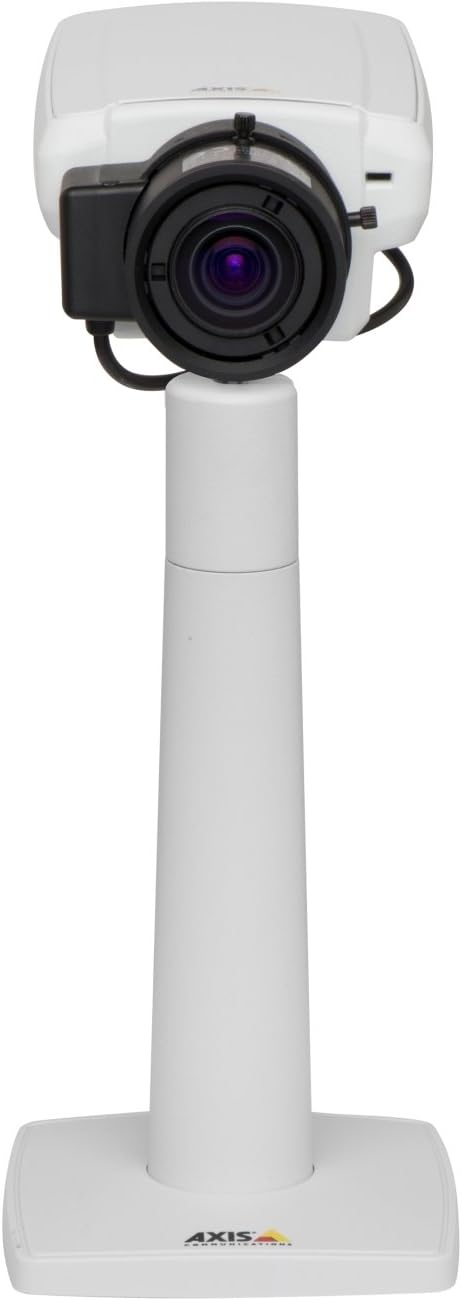
Figi 1: The Axis P1355 Surveillance Camera shown mounted on its stand. This image illustrates the camera's physical appearance and typical mounting configuration.
2. Enfòmasyon sou Sekirite
Please read all safety instructions before installing or operating the camera.
- Ensure the power source matches the camera's requirements to prevent electrical hazards.
- Se pèsonèl kalifye ki ta dwe fè enstalasyon an, dapre kòd elektrik lokal yo.
- Pa ekspoze kamera a nan tanperati ekstrèm, imidite, oswa anviwònman koroziv.
- Evite ekspoze lantiy la dirèkteman anba sous limyè fò, tankou solèy la, paske sa ka domaje detèktè imaj la.
- Disconnect power before cleaning or servicing the camera.
3. Enstalasyon ak Enstalasyon
The Axis P1355 camera is designed for both indoor and outdoor use and supports various mounting options.
3.1 Montaj
The camera is typically designed for wall mount installation. Ensure the mounting surface is strong enough to support the camera's weight (approximately 2 pounds). Use appropriate screws and anchors for the chosen surface.
- Select a suitable location for optimal surveillance coverage.
- Fikse sipò montaj la byen fèm sou miray la.
- Mount the camera onto the bracket, ensuring it is firmly in place.
- Adjust the camera's angle for the desired field of view.
3.2 Koneksyon
The Axis P1355 camera primarily uses wired connectivity for reliable data transmission and power.
- Koneksyon pouvwa: Connect the provided power adapter to the camera's power input and then to a suitable electrical outlet. The camera operates on a corded electric power source.
- Rezo Koneksyon: Connect an Ethernet cable from the camera's network port to your network switch or router. This provides wired connectivity for video streaming and control.
- Wireless Connectivity (Optional/Configuration): While primarily wired, the camera supports Wi-Fi for certain configurations. Refer to the Axis product documentation for specific wireless setup instructions if applicable to your model variant.
4. Operasyon Enstriksyon
Once installed and connected, the Axis P1355 camera can be configured and operated via a network interface.
4.1 Aksè Inisyal ak Konfigirasyon
- Use the Axis IP Utility or a similar network discovery tool to find the camera's IP address on your network.
- Louvri a web navigatè a epi antre adrès IP kamera a pou jwenn aksè a li web koòdone.
- Log in using the default credentials (refer to Axis documentation for default username/password, typically 'root' and 'pass' or similar, which should be changed immediately).
- Follow the on-screen prompts to set up basic network settings, date/time, and user accounts.
4.2 Video Monitoring and Features
- Viv View: Access the live video feed through the web interface or compatible video management software.
- Rezolisyon: The camera supports video capture resolutions up to 720p and effective video resolutions of 1080 pixels, with effective still resolution of 2 MP.
- Color and Monochrome Modes: The camera can operate in both color and monochrome (black and white) modes, automatically switching based on light conditions or configured manually.
- Vizyon lannwit: Utilize the integrated night vision capabilities for surveillance in low-light or complete darkness.
- Zoom optik: Adjust the optical zoom for detailed views of specific areas.
- P-Iris Control: For models equipped with P-iris, this feature allows precise control over the iris position to optimize depth of field and lens resolution, enhancing image sharpness. This can be configured via the web koòdone.
- Fòma videyo: Video is typically captured in MP4 format.
- Kontwòl Remote: The camera supports remote control for various settings and adjustments.
5. Antretyen
Regular maintenance ensures optimal performance and longevity of your Axis P1355 camera.
- Netwayaj: Gently clean the camera lens and housing with a soft, damp twal. Evite pwodui netwayaj abrazif oswa solvan.
- Mizajou mikrolojisyèl: Periodically check the Axis Communications website for firmware updates. Keeping the firmware updated ensures access to the latest features, security patches, and performance improvements.
- Enspeksyon kab: Regularly inspect all cables for signs of wear or damage, especially for outdoor installations.
- Tcheke anviwònman an: Asire w ke anviwònman fonksyònman kamera a rete nan limit tanperati ak imidite espesifye yo.
NAN. Depanaj
This section addresses common issues you might encounter with your Axis P1355 camera.
- Pa gen pouvwa:
- Verify the power adapter is securely connected to both the camera and a working power outlet.
- Tcheke kab pouvwa a pou nenpòt domaj.
- Pa gen koneksyon rezo:
- Ensure the Ethernet cable is properly connected to the camera and the network switch/router.
- Check network switch/router status.
- Confirm the camera has a valid IP address and is on the same network segment as your viewing aparèy.
- Kalite imaj pòv:
- Netwaye lantiy kamera a.
- Adjust focus and zoom settings via the web koòdone.
- Check lighting conditions; enable night vision or adjust exposure settings if necessary.
- Ensure P-iris control is correctly configured for optimal sharpness (if applicable).
- Pa Ka Aksè Web Entèfas:
- Verify the camera's IP address.
- Asire w ke òdinatè w la sou menm rezo ak kamera a.
- Try restarting the camera and your network equipment.
7. Espesifikasyon
| Karakteristik | Detay |
|---|---|
| Mak | Aks Kominikasyon |
| Nimewo Modèl | AKS P1355 |
| Itilizasyon Andedan kay la / Deyò | Andedan kay la, deyò |
| Koneksyon Teknoloji | Wired (Wi-Fi capable for certain configurations) |
| Karakteristik espesyal | Vizyon lannwit |
| Sous pouvwa | Aparèy elektrik ak fil (7.1 wat) |
| Rezolisyon Capture Videyo | 720p |
| Rezolisyon Videyo efikas | 1080 piksèl |
| Rezolisyon toujou efikas | 2 MP |
| Kalite Zoom | Optical Zoom (2.9x Optical) |
| Kalite kontwolè | Iris (P-iris control) |
| Kalite aliye | Mi mòn |
| Dimansyon pwodwi (L x W x H) | 3.07 x 5.94 x 1.69 pous |
| Pwa atik | 2 liv |
| Rating Pwoteksyon Entènasyonal | IP54 |
| Fòma Capture Videyo | MP4 |
8. Garanti ak sipò
For detailed warranty information and technical support, please refer to the official Axis Communications websit la oubyen kontakte sèvis kliyan yo dirèkteman.
Manifakti: AXIS COMMUNICATION INC.
Websit: www.axis.com (Tanpri vizite adrès ofisyèl la) website for the most current support resources, drivers, and documentation.)


