1. Entwodiksyon
This manual provides essential instructions for the safe and effective use of your Ricoh Compatible Toner Cartridge, Model 8541625508. This high-yield toner cartridge is designed to work seamlessly with Ricoh MP C4501 and MP C5501 series printers, delivering consistent print quality.
2. Enfòmasyon sou Sekirite
- Kenbe katouch toner yo lwen timoun yo.
- Pa vale toner. Si ou vale toner, chèche swen medikal imedyatman.
- Evite kontak dirèk ak poud toner la. Si kontak rive, lave byen avèk savon ak dlo.
- Do not incinerate used toner cartridges, as this may cause toner to explode and release fine particles.
- Store cartridges in a cool, dry place away from direct sunlight and extreme temperatures.
3. Pake kontni
Pake ou a ta dwe genyen bagay sa yo:
- One (1) Ricoh Compatible Toner Cartridge (Black, Cyan, Magenta, or Yellow, depending on your purchase).
4. Enstriksyon Enstalasyon
Follow these steps to install the toner cartridge into your Ricoh MP C4501 or MP C5501 series printer:
- Etenn enprimant lan: Asire w ke enprimant ou a etenn epi debranche li nan sous kouran an anvan ou kòmanse pwosesis enstalasyon an.
- Louvri kouvèti devan an: Locate and open the front cover of your printer to access the toner cartridge compartment.
- Retire ansyen katouch la (si sa aplikab): Gently pull out the empty toner cartridge by its handle. Place it in a protective bag for recycling.
- Depake nouvo katouch la: Carefully remove the new compatible toner cartridge from its packaging.
- Gently Shake: Hold the new cartridge horizontally and gently shake it 5-6 times to distribute the toner evenly inside.
- Retire sele pwoteksyon yo: Remove any orange protective caps, seals, or pull-tabs from the cartridge. Be careful not to touch the green drum surface.
- Mete nouvo katouch la: Align the new toner cartridge with the corresponding slot in the printer and slide it in until it clicks firmly into place. Ensure it is fully seated.
- Fèmen Kouvèti a: Close the front cover of the printer securely.
- Limen enprimant lan: Plug in and turn on your printer. The printer will typically perform a self-test and recognize the new cartridge.
- Enprime paj tès la: Enprime yon paj tès pou konfime bon enstalasyon an ak bon jan kalite enprime a.
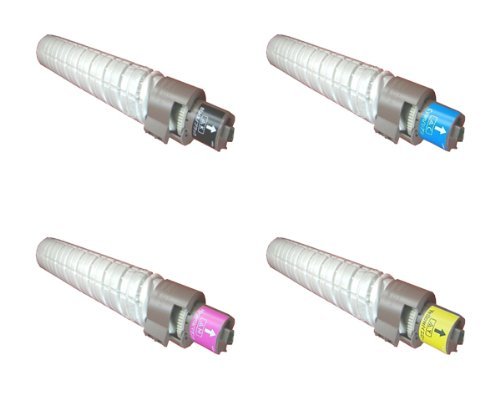
This image displays the compatible toner cartridge, similar to the one you have purchased. Note the packaging and the general shape of the cartridge before installation.
5. Itilizasyon ak Swen
- Kontwole Nivo Toner yo: Your printer's display or software will indicate current toner levels. Replace the cartridge when prompted or when print quality deteriorates significantly.
- Manyen ak Swen: Avoid touching the green drum surface on the cartridge, as oils from your skin can affect print quality.
- Konsiderasyon anviwònman an: Dispose of empty toner cartridges responsibly through recycling programs.
6. Depo
For optimal performance and longevity, store unused toner cartridges:
- In their original, unopened packaging.
- In a cool, dry environment (e.g., 10-30°C or 50-86°F).
- Away from direct sunlight, heat sources, and excessive humidity.
- Horizontally, not vertically.
NAN. Depanaj
If you encounter issues with your toner cartridge, refer to the table below:
| Pwoblèm | Kòz posib | Solisyon |
|---|---|---|
| Poor Print Quality (faded, streaks, spots) | Low toner, uneven toner distribution, dirty drum, incorrect printer settings. | Gently shake cartridge, check printer settings, perform a printer cleaning cycle, or replace cartridge if empty. |
| Katouch pa rekonèt | Improper installation, protective seals not removed, printer firmware issue. | Reinstall cartridge, ensure all protective seals are removed, check printer's display for error codes, consult printer manual for firmware updates. |
| Toner Leakage | Damaged cartridge, improper installation. | Carefully remove cartridge, inspect for damage. If damaged, replace. Ensure proper installation. Clean any spilled toner with a damp twal. |
8. Espesifikasyon
- Nimewo Modèl: 8541625508
- Modèl enprimant konpatib: Ricoh MP C4501, Ricoh MP C5501
- Kalite: Katouch Toner konpatib
- Karakteristik: Segondè Sede
- Eleman ki enkli: Katouch Toner
9. Garanti ak sipò
For information regarding warranty coverage or technical support, please refer to the seller's policies or contact their customer service directly. Keep your purchase receipt as proof of purchase.


