Entwodiksyon
This manual provides essential instructions for the safe and efficient use of your ONKYO RC-1000M Audio Remote Control. Please read this manual thoroughly before using the product and retain it for future reference.
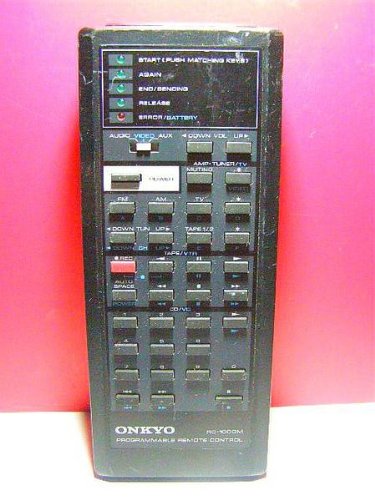
Image: The ONKYO RC-1000M Audio Remote Control, a black rectangular device with various control buttons.
Enstalasyon
1. Enstalasyon batri
- Jwenn kouvèti lòj batri a sou do kontwòl remote la.
- Glise kouvèti a anba oubyen peze latch la pou ouvri li.
- Mete de pil AAA (pa enkli), asire w ke tèminal pozitif (+) ak negatif (-) yo aliyen ak endikatè ki anndan konpatiman an.
- Remèt kouvèti konpatiman batri a, epi asire w li byen klike nan plas li.
Nòt: Toujou sèvi ak pil nèf epi ranplase tou de pil yo an menm tan. Pa melanje pil fin vye granmoun ak pil nèf oubyen diferan kalite pil.
2. Premye koneksyon (si sa aplikab)
The ONKYO RC-1000M is typically pre-programmed for compatible ONKYO audio devices. No manual pairing is usually required. If the remote does not respond, ensure your audio device is powered on and within range. Refer to your ONKYO audio component's manual for specific remote control compatibility and setup instructions if issues persist.
Enstriksyon Operasyon
The RC-1000M remote control provides comprehensive control over your ONKYO audio system. Point the remote control directly at the main unit's remote sensor.
- POUVWA: Press to turn the audio component on or off.
- SÈVIS SELEKSYON: Use dedicated buttons (e.g., CD, TUNER, DVD) to switch between audio input sources.
- VOLIM +/-: Ajiste nivo volim prensipal la.
- Bèbè: Temporarily silences the audio output. Press again to restore sound.
- PLAY/PAUSE/STOP/SKIP: Control playback functions for compatible media players (e.g., CD player, network player).
- MENU/ENTER/NAVIGATION: Access and navigate on-screen menus of your ONKYO audio component.
For detailed functions of specific buttons, refer to the instruction manual of the ONKYO audio component you are controlling.
Antretyen
Netwayaj
Wipe the remote control with a soft, dry cloth. Do not use abrasive cleaners, waxes, or solvents. Avoid spraying liquids directly onto the remote control.
Ranplasman batri
If the remote control's range decreases or it becomes unresponsive, replace the batteries as described in the "Battery Installation" section. Dispose of used batteries according to local regulations.
Depo
When storing the remote control for extended periods, remove the batteries to prevent leakage and potential damage to the unit.
Depanaj
| Pwoblèm | Kòz posib | Solisyon |
|---|---|---|
| Remote control does not operate. |
|
|
| Remote control operates intermittently. |
|
|
Espesifikasyon
- Modèl: RC-1000M
- Mak: ONKYO
- Pwovizyon pou pouvwa: DC 3V (AAA batteries x 2)
- Ranje operasyon: Approximately 7 meters (23 feet) under normal conditions.
- Dimansyon (apeprè): Not specified in product data.
- Pwa (Apeprè): Not specified in product data.
Espesifikasyon yo sijè a chanje san avètisman pou amelyorasyon.
Garanti ak sipò
For warranty information, technical support, or service inquiries, please refer to the documentation included with your ONKYO audio component or visit the official ONKYO websit la. Kenbe resi acha ou kòm prèv acha pou reklamasyon garanti.
Official ONKYO Websit: www.onkyo.com


