Entwodiksyon
Welcome to the user manual for your Alcatel Sigma 260 DECT Cordless Phone. This guide provides detailed instructions on how to set up, operate, maintain, and troubleshoot your new phone. Please read this manual carefully to ensure optimal performance and longevity of your device.
The Alcatel Sigma 260 is a reliable DECT cordless phone featuring a 50-entry phonebook, hands-free function, and caller ID, designed for clear communication and ease of use.
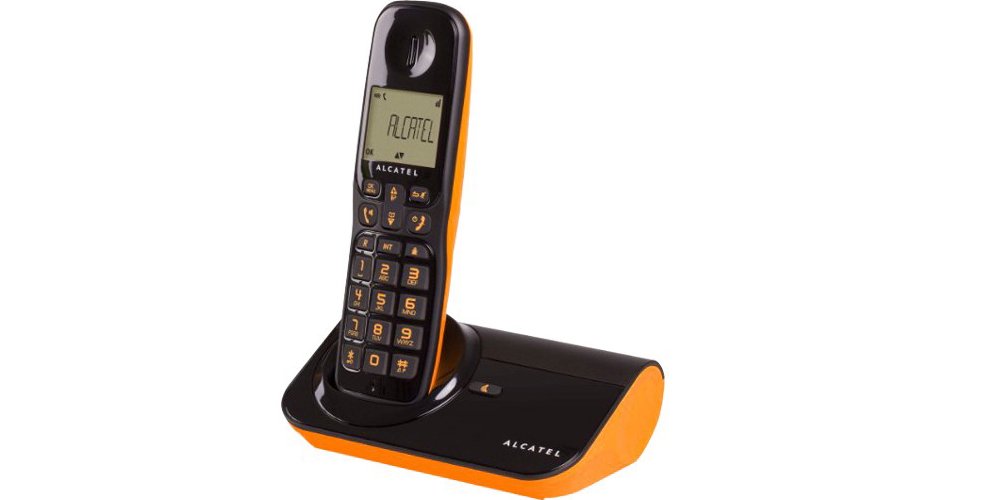
Figi 1: Alcatel Sigma 260 DECT Cordless Phone Handset and Base Station.
1. Enstalasyon
Follow these steps to set up your Alcatel Sigma 260 phone.
1.1 Debale ak Kontni Pakè a
Carefully unpack all items and ensure you have the following components:
- Alcatel Sigma 260 Handset
- Alcatel Sigma 260 Base Station
- Adaptè kouran pou estasyon baz
- Liy telefòn kòd
- Rechargeable AAA Batteries (typically 2x)
- Manyèl Itilizatè (dokiman sa a)
1.2 Enstalasyon batri
- Jwenn kouvèti konpatiman batri a sou dèyè aparèy la.
- Leve oswa glise kouvèti a pou ouvri konpatiman an.
- Insert the rechargeable AAA batteries, observing the correct polarity (+ and -) as indicated inside the compartment.
- Remèt kouvèti konpatiman batri a, epi asire w li byen klike nan plas li.
Enpòtan: Only use the supplied rechargeable batteries or equivalent approved replacements. Non-rechargeable batteries may damage the device.
1.3 Konekte Estasyon Baz la
- Connect one end of the telephone line cord to the TEL socket on the base station.
- Konekte lòt bout fil telefòn nan nan priz telefòn miray ou a.
- Plug the power adapter into the DC IN socket on the base station.
- Ploge adaptè pouvwa a nan yon priz elektrik apwopriye.
- Place the handset on the base station to charge the batteries. Allow at least 12-15 hours for the initial charge.
Nòt: Position the base station away from other electrical appliances to avoid interference.
1.4 Handset Registration (for additional handsets or re-registration)
Your primary handset is usually pre-registered. If you have additional handsets (up to 4 connectable handsets are supported) or need to re-register a handset, follow these general steps:
- On the base station, press and hold the registration button (often marked with a signal icon or "PAGE") for approximately 5 seconds until an indicator light on the base starts flashing.
- On the handset, access the menu, navigate to "Registration" or "Register Handset" (refer to the handset display for exact menu options).
- Enter the system PIN (default is usually 0000 or 1234).
- The handset will search for the base station and register. A confirmation message will appear on the handset display once successful.
Konsèy: If registration fails, ensure the handset is close to the base station and try again.
2. Itilizasyon Telefòn Ou
This section covers the basic functions of your Alcatel Sigma 260.
2.1 Fè Apèl
- Dialing Directly: Ranmase appareil la oswa peze la PALE button. Enter the phone number using the keypad. The call will connect automatically.
- Soti nan anyè telefòn nan: Peze a TELEFON button (or navigate via menu). Use the arrow keys to scroll through entries. Press PALE pou w konpoze nimewo w chwazi a.
- Rekomanse: Peze a RAPLIKE bouton pou view a list of recently dialed numbers. Use arrow keys to select, then press PALE.
2.2 Resevwa Apèl
- Lè telefòn nan sonnen, peze bouton an PALE bouton pou reponn apèl la.
- Pou fini yon apèl, peze la FINI bouton an oubyen mete aparèy la tounen sou estasyon baz la.
2.3 Anyè telefòn (50 antre)
Your phone can store up to 50 names and numbers.
- Ajoute yon Kontak: Access the menu, select "Phonebook", then "Add New Entry". Enter the name and number using the keypad. Save the entry.
- Modifye yon Kontak: Access the phonebook, select the contact, then "Edit". Make changes and save.
- Deleting a Contact: Access the phonebook, select the contact, then "Delete". Confirm deletion.
2.4 Fonksyon men lib
To activate the hands-free speakerphone during a call, press the Oratè button (often marked with a speaker icon). Press it again to switch back to handset mode.
2.5 ID moun kap rele
If you subscribe to Caller ID service from your telephone provider, the caller's number (and name, if available in your phonebook or provided by the service) will be displayed on the handset screen before you answer the call.
3. Antretyen
Proper care ensures the longevity of your Alcatel Sigma 260.
3.1 Netwayaj
Siye telefòn nan ak estasyon baz la ak yon twal mou.amp cloth. Do not use abrasive cleaners, solvents, or strong chemicals, as these can damage the surfaces. Ensure no liquid enters the device openings.
3.2 Swen Batri
- Always return the handset to the base station when not in use to ensure it remains charged.
- Si w pa pral itilize telefòn nan pou yon bon bout tan, retire pil yo pou anpeche likid koule.
- Replace batteries when their performance significantly degrades. Use only approved rechargeable AAA batteries.
NAN. Depanaj
If you encounter issues with your phone, try the following solutions before seeking professional assistance.
| Pwoblèm | Kòz posib / Solisyon |
|---|---|
| Pa gen ton |
|
| Pa ka fè oswa resevwa apèl |
|
| Move kalite son / Statik |
|
| Telefòn nan pa chaje |
|
| Ekran an vid oswa li pa lizib |
|
5. Espesifikasyon teknik
Below are the key technical specifications for the Alcatel Sigma 260 DECT Cordless Phone:
| Mak | Alcatel |
| Nimewo Modèl | Sigma 260 |
| Kalite Telefòn | Telefòn san fil DECT |
| Sous pouvwa | Battery Powered (Rechargeable AAA) |
| Kalite klavye | Single klavye |
| ID moun kap rele | Wi |
| Kapasite Anyè telefòn | 50 Entry |
| Men-gratis Fonksyon | Wi |
| Connectable Handsets | Jiska 4 |
| Kalite ekspozisyon | Alfanimerik |
| Reponn machin | Non |
6. Garanti ak sipò
For information regarding warranty terms and conditions, please refer to the warranty card included with your product or contact your retailer. Specific warranty details are not provided in this manual.
For technical support or inquiries, you may contact the seller directly via email:
Imèl: tecnotorba.amazon@gmail.com
Please provide your product model (Alcatel Sigma 260) and a detailed description of your issue when contacting support.