1. Entwodiksyon
Thank you for choosing the Antec HCG-850M 850W Power Supply. This manual provides essential information for the safe and efficient installation, operation, and maintenance of your power supply unit. Please read this manual thoroughly before installation and retain it for future reference.
2. Enfòmasyon sou Sekirite
Always observe the following safety precautions to prevent injury or damage to your system:
- pa fè sa open the power supply casing. Gwo volimtages are present inside, even when the unit is unplugged.
- pa fè sa insert any objects into the power supply's ventilation openings.
- Asire w ke ekipman pou pouvwa a enstale nan yon zòn ki byen ayere.
- Use only the modular cables provided with this power supply. Using incompatible cables can cause damage.
- Disconnect the AC power cord from the wall outlet before installing or removing the power supply.
- This product is designed for use in personal computers only.
3. Pake kontni
Verifye ke tout atik yo prezan nan pakè ou a:
- Antec HCG-850M 850W Alimantasyon
- Modular Cable Set (PCI-E, SATA, Peripheral, CPU)
- AC pouvwa kòd
- Montaj Vis
- Manyèl Itilizatè (dokiman sa a)
4. Pwodwi souview
The Antec HCG-850M is an 850-watt, 80 PLUS Bronze certified, semi-modular power supply designed for high-performance personal computers. It features a quiet 135mm fan for efficient cooling and robust protection circuits to ensure stable power delivery.
4.1 Karakteristik kle
- 850 Watts Continuous Power
- 80 PLUS Bronze Certified Efficiency
- Semi-Modular Cable Management
- 135mm fanatik an silans
- Faktè fòm ATX
- Multiple Protection Circuits (OCP, OVP, UVP, SCP, OPP, OTP)
4.2 Power Supply Unit
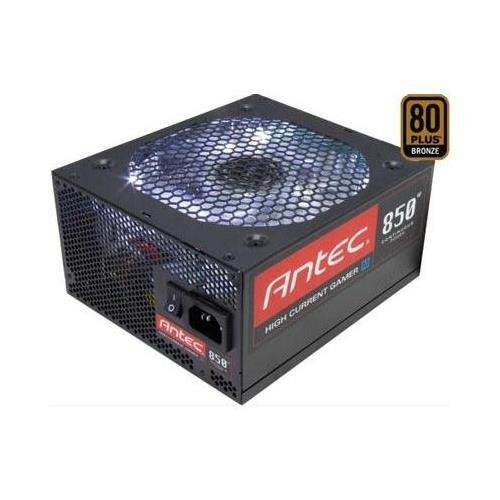
Imaj 1: Devan view of the Antec HCG-850M 850W Power Supply, showing the fan grille and modular cable connectors. This unit provides stable power to your computer components.
5. Enstalasyon ak Enstalasyon
Follow these steps to install your Antec HCG-850M power supply:
- Prepare Sistèm ou an: Asire w òdinatè w la etenn nèt epi li debranche nan priz miray la. Louvri bwat òdinatè w la.
- Retire ansyen PSU a (si sa aplikab): Dekonekte tout kab ki nan ansyen ekipman pou pouvwa a. Devise epi retire ansyen ekipman pou pouvwa a nan bwat la.
- Monte nouvo PSU a: Carefully place the Antec HCG-850M into the power supply bay of your computer case. Secure it with the provided mounting screws. Ensure the fan is oriented correctly for optimal airflow (typically facing down if there's a bottom vent, or up if not).
- Konekte Kab Esansyèl yo:
- Connect the 24-pin ATX motherboard power cable.
- Connect the 4+4-pin or 8-pin EPS/CPU power cable to your motherboard.
- Konekte Kab Modilè yo: Attach the necessary modular cables for your components (e.g., PCI-E for graphics cards, SATA for hard drives/SSDs, Peripheral for fans/accessories). Connect them securely to both the power supply and the respective components.
- Jesyon kab: Route cables neatly to improve airflow and aesthetics.
- Fèmen bwat la epi limen l: Close your computer case. Connect the AC power cord to the power supply and then to a wall outlet. Flip the power switch on the PSU to the 'ON' position. Power on your computer.
6. Operasyon Enstriksyon
Once installed, the Antec HCG-850M operates automatically. Here are some general operating guidelines:
- Limen/Etenyen: Use your computer's power button to turn the system on or off. The switch on the power supply itself should generally remain in the 'ON' position during normal operation.
- Estabilite sistèm: Ensure your system is stable. If you experience unexpected shutdowns or reboots, refer to the troubleshooting section.
- Vantilasyon: Maintain good airflow around your computer case to prevent overheating of components, including the power supply.
7. Antretyen
Proper maintenance can extend the lifespan of your power supply:
- Netwayaj pousyè: Periodically clean dust from the power supply's fan grille and the interior of your computer case using compressed air. Toujou dekonekte kòd kouran AC a anvan ou netwaye li.
- Tcheke kab: Occasionally check that all power cables are securely connected to the power supply and components.
- Anviwònman: Operate the power supply in a clean, dry environment with stable temperatures.
NAN. Depanaj
Si ou rankontre pwoblèm ak ekipman pou pouvwa ou a, eseye etap sa yo:
8.1 No Power to System
- Ensure the AC power cord is securely plugged into both the wall outlet and the power supply.
- Check that the power supply's ON/OFF switch is in the 'ON' position.
- Verify all internal power cables (24-pin ATX, CPU, PCI-E) are correctly and firmly connected.
- Teste priz miray la ak yon lòt aparèy pou asire w ke li gen kouran.
- If possible, test the power supply in another known working system or with a PSU tester.
8.2 System Instability or Random Shutdowns
- Ensure your system's power requirements do not exceed the 850W capacity of the PSU.
- Check for overheating components. Ensure proper case ventilation and clean any dust buildup.
- Verify all power connections are secure. Loose connections can cause intermittent power delivery.
- If the issue persists, it may indicate a fault with the power supply or another component. Consider professional diagnosis.
9. Espesifikasyon
| Karakteristik | Detay |
|---|---|
| Nimewo Modèl | HCG-850M |
| Sòti Wattage | 850 Watts |
| Sètifikasyon Efikasite | 80 PLUS Bwonz |
| Faktè fòm | ATX |
| Metòd refwadisman | Lè (Vantilatè 135mm) |
| Kalite modilè | Semi-modilè |
| Aparèy konpatib | Odinatè pèsonèl |
| Pwa atik | 9 liv (apeprè 4.08 kg) |
| ASIN | B00ESAI3M0 |
10. Garanti ak sipò
Antec products are backed by a manufacturer's warranty. For specific warranty terms and conditions, please refer to the warranty card included with your product or visit the official Antec website. For technical support or customer service, please contact Antec directly through their official support channels.
Antec ofisyèl la Websit: www.antec.com


