1. Entwodiksyon
This manual provides essential instructions for the safe and efficient use of your Kyocera EBVK-2650 Engine Blower Vacuum. Please read this manual thoroughly before operating the machine and keep it for future reference. The EBVK-2650 is designed for blowing and vacuuming leaves and light debris in outdoor environments.
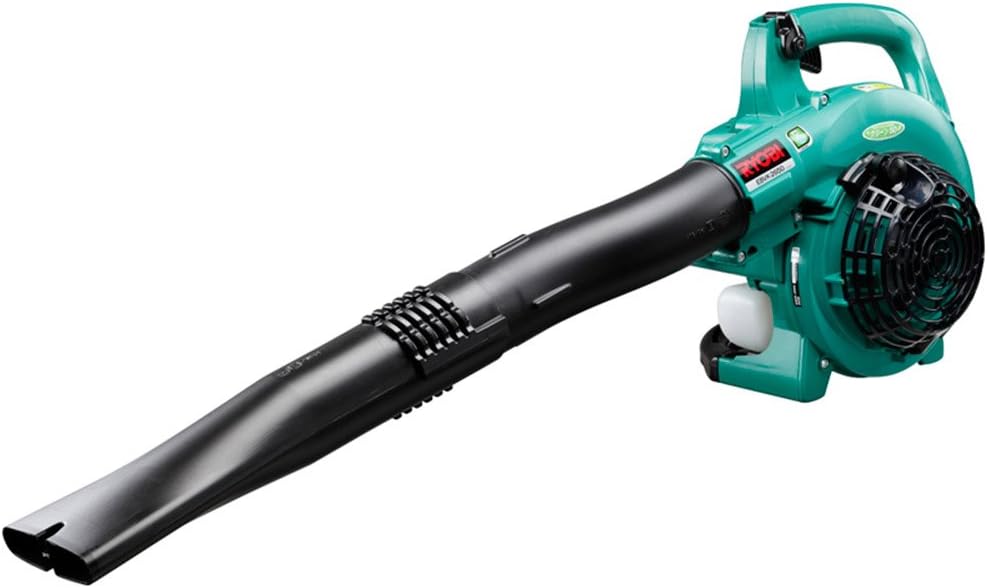
Image 1.1: The Kyocera EBVK-2650 Engine Blower Vacuum in its primary blower configuration. This image shows the main unit with the straight nozzle attached, ready for blowing leaves and debris.
2. Enfòmasyon sou Sekirite
Toujou bay sekirite priyorite lè w ap itilize zouti elektrik. Si ou pa swiv enstriksyon sa yo, ou ka blese gravman oswa domaje materyèlman.
2.1 Règ jeneral sekirite yo
- Li epi konprann tout enstriksyon yo anvan ou opere machin nan.
- Wear appropriate personal protective equipment (PPE), including eye protection, hearing protection, gloves, and sturdy footwear.
- Do not operate the machine in wet conditions or in the presence of flammable liquids or gases.
- Kenbe timoun yo, moun ki prale bò kote w, ak bèt kay yo a yon distans ki an sekirite (omwen 15 mèt / 50 pye) ak zòn operasyon an.
- Inspect the machine for loose parts, damage, or wear before each use. Do not operate a damaged machine.
- Ensure proper ventilation when operating the engine, as exhaust fumes contain carbon monoxide.
- Pa janm dirije bouch souflè a sou moun oswa bèt.
- Turn off the engine and allow it to cool before refueling, cleaning, or performing maintenance.
- Sere machin nan nan yon kote ki sèk, an sekirite, kote timoun pa ka rive.
2.2 Sekirite gaz
- Use only the recommended fuel mixture: unleaded gasoline and 2-cycle engine oil at a 50:1 ratio.
- Mix fuel in a well-ventilated area, away from sparks or open flames.
- Do not smoke while mixing or refueling.
- Siye nenpòt gaz ki koule a imedyatman.
- Sere gaz nan yon veso ki apwouve nan yon kote ki fre, sèk.
3. Kontni ak konpozan pake a
Verifye ke tout konpozan yo prezan epi yo pa domaje lè w ap debalaje.
3.1 Pwodwi pou Enkli
- Main Unit (Engine Blower Vacuum)
- Dwat Bouch
- Koube bouch
- Tiyo pou aspirasyon
- Bouch Fan
- Bag pousyè
- Socket Wrench (13x19mm)
- Manyèl Enstriksyon
3.2 Key Components Overview
Familiarize yourself with the main parts of the EBVK-2650.

Image 3.1: The Kyocera EBVK-2650 configured for vacuuming. This view shows the suction pipe and the dust bag attached, ready to collect leaves and debris.
- Inite motè: The core power source.
- Tank gaz: For mixed fuel.
- Manch demarè: For manual engine start.
- Levier akseleratè: Kontwole vitès motè a.
- One Stop switch: Pou etenn motè a.
- Kouvèti Filtè Lè a: Pwoteje filtè lè a.
- Bouji: For ignition.
- Blower/Vacuum Port: Where nozzles or suction pipe attach.
- Dust Bag Connection: For attaching the collection bag in vacuum mode.
4. Enstalasyon ak Asanble
4.1 Assembling for Blower Mode
- Asire w motè a etenn epi li frèt.
- Attach the desired nozzle (straight or curved) to the blower port. Twist until securely locked.
- Confirm all connections are tight before use.

Imaj 4.1: Yon gwo plan view of the Kyocera EBVK-2650 in operation, demonstrating the blower function. The user is holding the unit, directing the airflow.
4.2 Assembling for Vacuum/Mulching Mode
- Asire w motè a etenn epi li frèt.
- Remove any blower nozzles from the blower port.
- Attach the suction pipe to the intake port. Secure it firmly.
- Connect the dust bag to the exhaust port. Ensure the bag is properly sealed to prevent debris leakage.
- Confirm all connections are tight before use.

Image 4.2: The Kyocera EBVK-2650 being used in vacuum mode. The suction pipe is directed towards leaves, and the dust bag is visible, collecting the mulched debris.
4.3 Fuel Preparation and Filling
The EBVK-2650 uses a 2-cycle engine. It requires a specific mixture of unleaded gasoline and 2-cycle engine oil.
- Fuel Ratio: Unleaded Gasoline : 2-Cycle Engine Oil = 50:1
- Use high-quality 2-cycle engine oil specifically designed for air-cooled engines.
- Mix the fuel in a separate, approved fuel container. Shake well before filling.
- Open the fuel tank cap slowly to release pressure.
- Fill the fuel tank (capacity 0.47 L) carefully, avoiding overfilling.
- Fèmen bouchon tank gaz la byen fèm.
5. Operasyon Enstriksyon
5.1 Kòmanse motè a
- Mete machin nan sou yon sifas ki plat ki estab.
- Ensure the stop switch is in the "ON" position.
- Angaje levye choke a (si machin nan demaraj frèt).
- Peze anpoul amorseur a plizyè fwa jiskaske gaz la vizib.
- Pull the starter handle firmly and smoothly until the engine starts. Do not pull the rope to its full extension.
- Yon fwa motè a kòmanse, debloke choke a piti piti.
- Allow the engine to warm up for a few moments before applying full throttle.

Image 5.1: A user demonstrating the engine starting procedure for the Kyocera EBVK-2650. The starter handle is being pulled to ignite the engine.
5.2 Operasyon soufle
- Hold the machine firmly with both hands.
- Direct the nozzle towards the debris you wish to move.
- Gradually increase the throttle to achieve the desired airflow.
- Use a sweeping motion to gather leaves and debris into piles.

Image 5.2: A user operating the Kyocera EBVK-2650 in blower mode, clearing leaves from a path. The machine is held comfortably, directing the airflow.
5.3 Vacuum/Mulching Operation
- Ensure the machine is correctly assembled for vacuum mode with the dust bag attached.
- Hold the machine firmly, guiding the suction pipe over the leaves.
- Move slowly and steadily to allow the machine to pick up and mulch debris.
- Monitor the dust bag and empty it when it becomes full to maintain optimal performance.
- Note: Mulching performance varies based on leaf type, size, and moisture content. Avoid vacuuming wet leaves or large, hard objects.

Image 5.3: A user operating the Kyocera EBVK-2650 in vacuum mode, actively collecting leaves from a paved area. The dust bag is visible, indicating collection.
5.4 Sispann motè a
- Release the throttle lever to allow the engine to idle.
- Move the stop switch to the "OFF" position.
- Allow the machine to cool down before storage or maintenance.
6. Antretyen
Regular maintenance ensures optimal performance and extends the lifespan of your EBVK-2650. Always ensure the engine is off and cool before performing any maintenance.
6.1 Netwayaj Filtè Lè a
- Retire kouvèti filtè lè a.
- Retire eleman filtè lè a avèk prekosyon.
- Clean the filter by tapping it gently or using compressed air. If heavily soiled, wash with warm, soapy water, rinse thoroughly, and allow to dry completely before reinstallation.
- Ranplase kouvèti filtè lè a.
6.2 Spark Plug Inspection and Replacement
- Retire bouchon bouji a.
- Use the provided socket wrench to remove the spark plug (NGK BPM8Y).
- Inspect the spark plug for wear, carbon buildup, or damage. Clean if necessary.
- Check the electrode gap and adjust if needed.
- Replace with a new spark plug of the recommended type if worn or damaged.
- Reinstall the spark plug and cap securely.
6.3 Filtè gaz
The fuel filter is located inside the fuel tank. Inspect it periodically for debris. If clogged, replace it. This procedure may require professional assistance.
6.4 Ajisteman Karburateur
Carburetor adjustments should ideally be performed by a qualified service technician. Incorrect adjustments can lead to engine damage or poor performance.
6.5 Depo
- For long-term storage, drain all fuel from the tank and run the engine until it stops to clear the carburetor.
- Netwaye eksteryè machin nan.
- Store in a dry, dust-free location, away from direct sunlight and extreme temperatures.
NAN. Depanaj
Seksyon sa a adrese pwoblèm komen ou ka rankontre. Pou pwoblèm ki pa nan lis la a, kontakte sèvis kliyan.
| Pwoblèm | Kòz posib | Solisyon |
|---|---|---|
| Motè pa kòmanse |
|
|
| Motè a ap mache, men li pa gen puisans |
|
|
| Twòp Vibration |
|
|
8. Espesifikasyon
| Karakteristik | Detay |
|---|---|
| Mak | Kyocera |
| Nimewo Modèl | EBVK-2650 |
| Kalite motè | Air-cooled 2-cycle single cylinder gasoline engine |
| Deplasman | 25.4 ml |
| Average Air Volume | 8.7 m³/min |
| Volim lè maksimòm | 67.5 m³/min |
| Metòd ignisyon | Electronic ignition (Flywheel magnet) |
| Bouji | NGK BPM8Y |
| Kalite karburateur | Kalite dyafram |
| Gaz | Mixed fuel (Unleaded gasoline: 2-cycle engine oil = 50:1) |
| Kapasite tank gaz | 0.47 L |
| Dimensions (L x W x H, excluding nozzle) | 330 x 270 x 345 mm |
| Weight (excluding nozzle, fuel) | 4.2 kg |
| Pwodwi pou Telefòn enkli | Straight nozzle, Curved nozzle, Suction pipe, Fan nozzle, Dust bag, Socket wrench (13x19mm) |
| Itilizasyon Rekòmande | Dust cleaning, Leaf cleaning |
Note: Product specifications are subject to change without notice for improvement. The listed weight of 8.1 kg in some product descriptions likely includes packaging and all accessories, while 4.2 kg refers to the bare unit.
9. Garanti ak sipò
For warranty information, service, or technical support, please refer to the warranty card included with your product or visit the official Kyocera websit la. Kenbe prèv acha ou pou reklamasyon garanti.
Kyocera Customer Support: Please visit the official Kyocera website or contact your local dealer for assistance.


