1. Entwodiksyon
Mèsi pou acha aasing the Onkyo LS-T10 6.1-Channel 3D Surround Base System. This manual provides essential information for the safe and efficient use of your new audio system. Please read it thoroughly before installation and operation, and keep it for future reference.
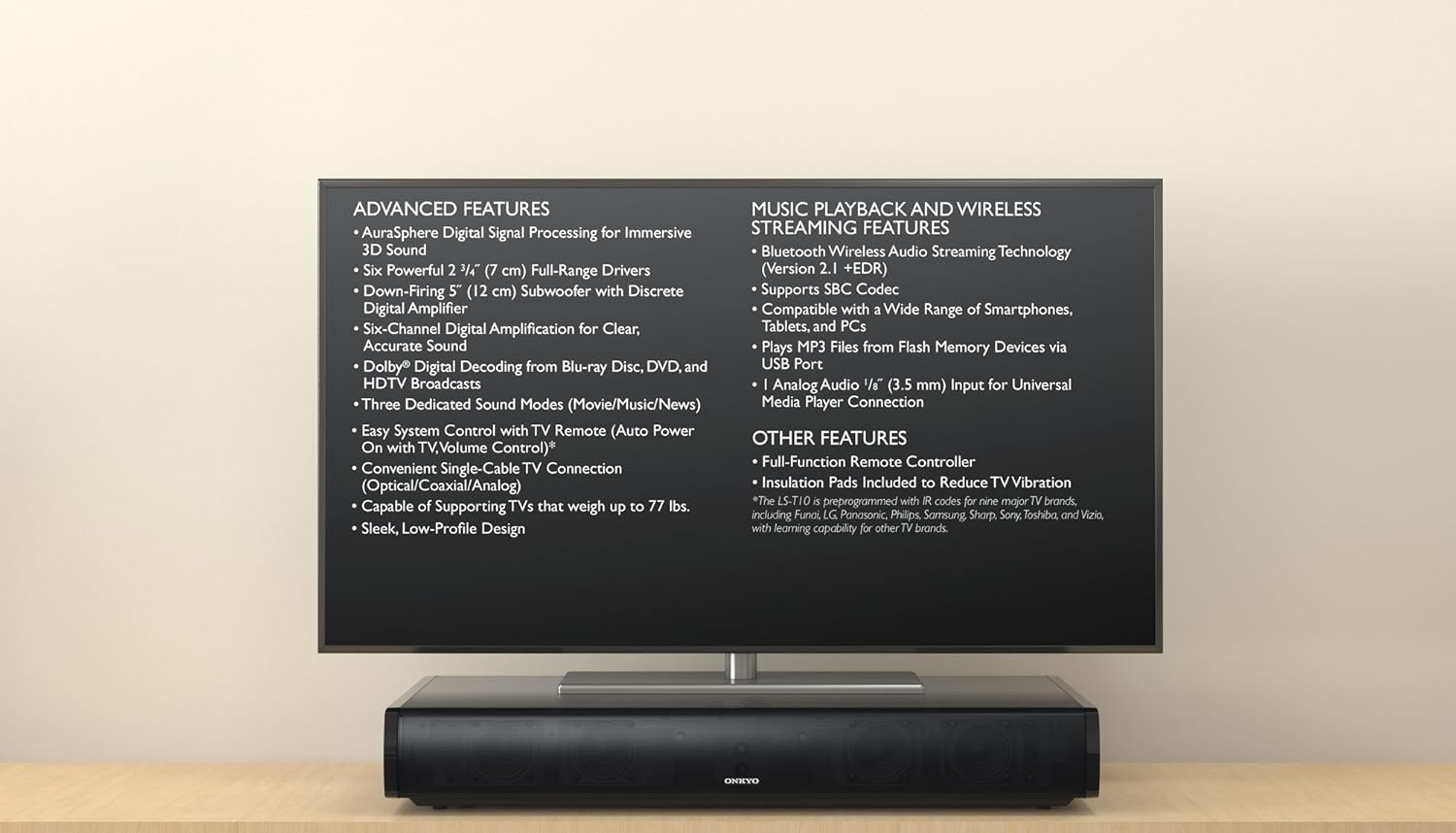
The Onkyo LS-T10 system positioned beneath a television, illustrating its compact design and listing key functionalities such as AuraSphere 3D sound, Bluetooth streaming, and various input options.
2. Enfòmasyon sou Sekirite
Pou asire yon operasyon an sekirite epi pou anpeche domaj, tanpri obsève prekosyon sa yo:
- Pwovizyon pou pouvwa: Konekte aparèy la sèlman nan yon priz kouran altènatif ki gen vòltaj la.tage espesifye sou panèl la dèyè.
- Vantilasyon: Pa bloke ouvèti vantilasyon yo. Asire w ke gen ase espas ozalantou aparèy la pou yon bon sikilasyon lè.
- Dlo ak imidite: Pa ekspoze aparèy la anba lapli, imidite, oswa imidite twòp. Pa mete objè ki plen likid sou aparèy la.
- Chalè: Kenbe aparèy la lwen sous chalè tankou radyatè, recho, oswa lòt aparèy ki pwodui chalè.
- Netwayaj: Unplug the unit from the wall outlet before cleaning. Use a dry, soft cloth. Do not use liquid or aerosol cleaners.
- Sèvis: Pa eseye fè antretyen aparèy la tèt ou. Konfye tout antretyen bay pèsonèl sèvis kalifye.
3. Pake kontni
Tanpri verifye ke pake ou a gen atik sa yo ladan l:
- Onkyo LS-T10 3D Surround Base System Unit
- Kontwòl Remote
- Kòd pouvwa
- Optik Digital Audio Kab
- Manyèl Enstriksyon (dokiman sa a)
- Insulation Pads (to reduce TV vibration)
- Pil AAA (x2) pou kontwòl remote
4. Pwodwi Features
The Onkyo LS-T10 is designed to enhance your home entertainment experience with a range of advanced audio and connectivity features:
- AuraSphere Digital Signal Processing: Creates an immersive 3D sound field.
- Powerful Speaker Configuration: Features six 2 3/4" (7 cm) full-range drivers and a down-firing 5" (12 cm) subwoofer with a discrete digital amplifier for 6.1-channel sound.
- Dekodaj Dolby Digital: Supports high-quality audio from Blu-ray Disc, DVD, and HDTV broadcasts.
- Dedicated Sound Modes: Optimize audio for Movie, Music, and News content.
- Easy System Control: Compatible with TV remote controls for auto power on and volume adjustment.
- Versatile TV Connection: Connects to your TV via a single optical, coaxial, or analog cable.
- Konsepsyon solid: Capable of supporting TVs weighing up to 77 lbs.
- Bluetooth Wireless Audio Streaming: Version 2.1 +EDR with SBC Codec for streaming from smartphones, tablets, and PCs.
- USB lèktur: Jwe MP3 files directly from Flash Memory Devices via the USB port.
- Antre odyo analòg: Includes a 1/8" (3.5 mm) input for universal media player connection.

An inverted view of the Onkyo LS-T10 system, providing a clear perspective of the six full-range drivers and the powerful down-firing subwoofer that contribute to its 6.1-channel sound.

Yon detaye view of one of the Onkyo LS-T10's integrated speaker drivers, emphasizing the quality components used for audio reproduction.
5. Enstalasyon
5.1 Plasman
- Place the LS-T10 on a stable, flat surface directly under your television.
- Ensure the unit is centered with your TV for optimal sound dispersion.
- Leave adequate space around the unit for ventilation.
- If your TV is heavy, ensure the surface can support both the TV and the LS-T10 (the LS-T10 supports TVs up to 77 lbs).
- Apply the included insulation pads to the bottom of the LS-T10 to reduce TV vibration.

Bò a view of the Onkyo LS-T10, demonstrating its compact and elegant design, suitable for placement under various television sizes.
5.2 Koneksyon
- Konekte ak televizyon an: Use the supplied optical digital audio cable to connect the OPTICAL OUT port on your TV to the OPTICAL IN port on the LS-T10. If your TV does not have an optical output, use a coaxial digital audio cable or an analog audio cable (3.5mm stereo mini-jack).
- Koneksyon pouvwa: Plug the power cord into the AC IN jack on the LS-T10, then plug the other end into a wall outlet.
6. Operasyon Enstriksyon
6.1 Operasyon debaz
- Limen/Etenyen: Peze a POUVWA button on the remote control or the unit to turn the system on or off.
- Kontwòl Volim: Sèvi ak la VOLIM +/- buttons on the remote or unit to adjust the sound level.
- Seleksyon Antre: Peze a Antre button on the remote or unit to cycle through available inputs (Optical, Coaxial, Analog, Bluetooth, USB).
- Mòd son: Peze a FILM, MIZIK, oswa NOUVEL buttons on the remote to select the desired sound mode.
6.2 Difizyon Bluetooth
- Peze a Antre button until "Bluetooth" is selected. The Bluetooth indicator on the unit will flash.
- Sou telefòn entelijan ou, tablèt ou, oswa òdinatè w la, aktive Bluetooth epi chèche aparèy ki disponib yo.
- Select "ONKYO LS-T10" from the list of devices. Once paired, the Bluetooth indicator will glow steadily.
- Start playing audio on your device, and it will stream wirelessly to the LS-T10.

A smartphone streaming audio via Bluetooth to the Onkyo LS-T10 3D Surround Base System, showcasing its capability for streaming music, podcasts, and internet radio.
6.3 Lekti USB
- Mete yon kle USB ki gen odyo MP3 ladan l files into the USB port on the LS-T10.
- Peze a Antre button until "USB" is selected.
- The system will automatically begin playing MP3 files from the USB drive. Use the remote control to skip tracks or pause playback.
7. Antretyen
- Netwayaj: Siye aparèy la avèk yon twal mou epi sèk. Pa sèvi ak pwodui netwayaj abrazif, sir, oswa solvan.
- Vantilasyon: Periodically check that the ventilation openings are not obstructed by dust or debris.
- Batri Remote Control: Replace the AAA batteries in the remote control when its operating range decreases.
NAN. Depanaj
If you experience issues with your LS-T10, refer to the following common problems and solutions:
- Pa gen pouvwa:
- Asire w ke kòd kouran an byen branche nan tou de aparèy la ak nan priz miray la.
- Tcheke si priz miray la ap fonksyone lè w branche yon lòt aparèy.
- Pa gen son:
- Verify that the correct input source is selected on the LS-T10.
- Check the volume level on both the LS-T10 and your TV/connected device.
- Ensure audio cables are securely connected. Try a different cable if possible.
- Confirm that your TV's audio output is set to the correct format (e.g., PCM for optical if Dolby Digital is not working).
- Pwoblèm koneksyon Bluetooth:
- Ensure the LS-T10 is in Bluetooth input mode and discoverable (indicator flashing).
- Delete "ONKYO LS-T10" from your device's Bluetooth list and try pairing again.
- Move your Bluetooth device closer to the LS-T10.
- Kontwòl Remote pa travay:
- Tcheke epi ranplase pil yo (2x AAA).
- Asire w pa gen okenn obstak ant telekòmand lan ak detèktè inite a.
9. Espesifikasyon
| Nimewo Modèl | LS-T10 |
| Sorti pouvwa | 100 W (6.1 channels) |
| Konfigirasyon Oratè | 6 x 2 3/4" (7 cm) Full-Range Drivers, 1 x 5" (12 cm) Down-Firing Subwoofer |
| Koneksyon | Bluetooth (Version 2.1 +EDR, SBC Codec), USB (MP3 playback), 1 x Analog Audio (1/8" / 3.5 mm) |
| TV Audio Inputs | 1 x Optical Digital, 1 x Coaxial Digital, 1 x Analog (RCA) |
| Supported TV Weight | Jiska 77 liv (35 kg) |
| Batri Remote Kontwòl | 2 x AAA (enkli) |
10. Garanti ak sipò
Onkyo products are manufactured to high standards and are designed for reliable performance. For warranty information specific to your region, please refer to the warranty card included with your product or visit the official Onkyo websit.
For technical support, service, or inquiries, please contact your authorized Onkyo dealer or the customer support center in your country. Keep your purchase receipt as proof of purchase for warranty claims.


