1. Entwodiksyon
This manual provides comprehensive instructions for the installation, operation, and maintenance of the Supermicro X10SLM+-LN4F motherboard. Designed for server applications, this motherboard features an LGA1150 socket, Intel C224 PCH, DDR3 memory support, and multiple Gigabit Ethernet ports. Please read this manual thoroughly before proceeding with installation to ensure proper setup and optimal performance.
2. Pwodwi souview
The Supermicro X10SLM+-LN4F is a microATX server motherboard built for reliability and performance. Key features include:
- LGA1150 Socket for Intel Xeon E3-1200 v3/v4 and 4th Gen Core i3 processors.
- Intel C224 PCH chipset.
- Four DDR3 DIMM slots supporting up to 64GB ECC/non-ECC UDIMM.
- Multiple SATA3 (6Gbps) ports.
- Integrated quad Gigabit Ethernet ports.
- USB 3.0 and USB 2.0 support.
- VGA output for integrated graphics.
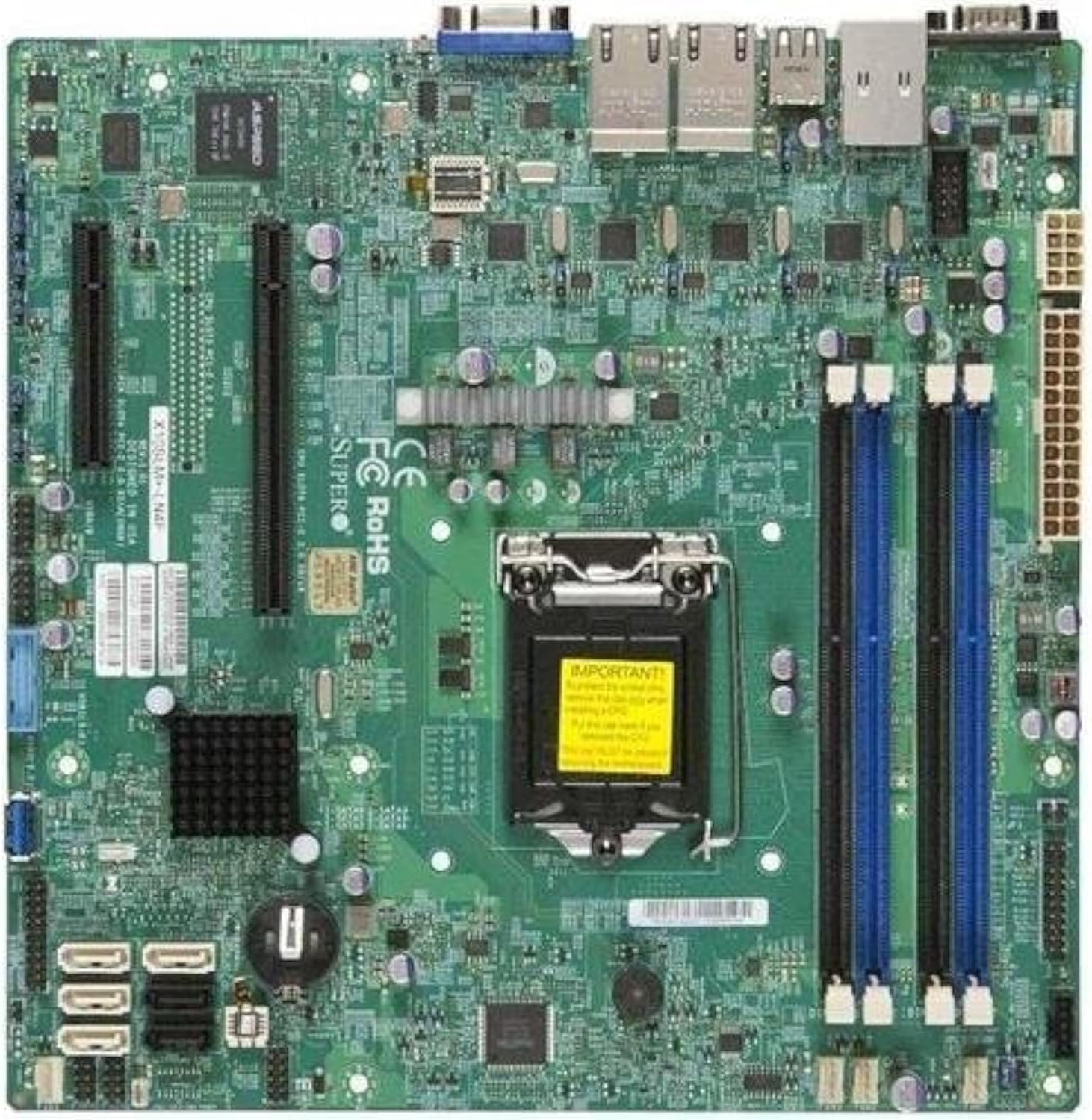
Figi 2.1: Top-desann view of the Supermicro X10SLM+-LN4F motherboard, showing the CPU socket, DIMM slots, PCIe slots, and various connectors.

Figi 2.2: Angle view of the motherboard, highlighting the layout of components and expansion slots.
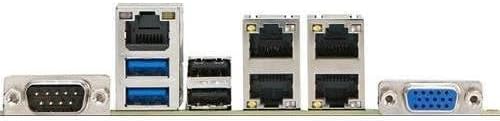
Figi 2.3: Rear I/O panel of the Supermicro X10SLM+-LN4F motherboard, featuring multiple LAN ports, USB ports, and serial ports.
3. Enstalasyon ak Enstalasyon
Before beginning installation, ensure your system is powered off and disconnected from the power source. Wear an anti-static wrist strap to prevent electrostatic discharge (ESD) damage to components.
3.1. Enstalasyon CPU a
- Jwenn priz CPU LGA1150 la sou kat manman an.
- Dousman pouse levye chajman an desann epi rale l sou kote pou ouvri ankadreman retansyon priz CPU a.
- Carefully align the triangular mark on the CPU with the corresponding mark on the socket.
- Mete CPU a nan priz la san fòse li.
- Close the retention frame and secure it with the load lever.
- Aplike yon kouch mens e inifòm pat tèmik sou difizè chalè entegre CPU a (IHS).
- Enstale radyatè CPU a dapre enstriksyon manifakti a.
3.2. Enstalasyon memwa (RAM)
- Locate the four DDR3 DIMM slots. For optimal performance, refer to the motherboard's specific memory population guidelines, typically starting with slots closest to the CPU or specific colored slots for dual-channel configurations.
- Open the retention clips at both ends of the DIMM slot.
- Aliyen dan ki sou modil memwa DDR3 la ak kle ki nan plas DIMM lan.
- Insert the memory module firmly into the slot until the retention clips snap into place.
- Ensure both clips are fully closed and the module is seated correctly.
3.3. Enstalasyon Aparèy Depo
Connect SATA storage devices (HDDs/SSDs) to the SATA ports on the motherboard using SATA data cables. Connect the power cables from your power supply unit (PSU) to the storage devices.
3.4. Enstalasyon Kat Ekspansyon
This motherboard features PCI Express (PCIe) slots. To install an expansion card:
- Remove the corresponding slot cover from your chassis.
- Align the expansion card with the PCIe slot.
- Press down firmly until the card is fully seated in the slot.
- Secure the card with a screw or retention clip from your chassis.
3.5. Koneksyon pouvwa
- Konektè pouvwa ATX 24-pin: Connect the main 24-pin power cable from your PSU to the ATX power connector on the motherboard.
- 8-pin EPS/CPU Power Connector: Connect the 8-pin (or 4+4 pin) CPU power cable from your PSU to the EPS connector near the CPU socket.
3.6. Koneksyon Antre/Sòti sou Panèl Devan an ak Dèyè a
- Konektè panèl devan: Connect the power switch, reset switch, power LED, and HDD activity LED cables from your chassis to the corresponding pins on the motherboard's front panel header. Refer to the motherboard's silkscreen labels for correct orientation.
- Tèt USB: Connect front panel USB ports to the onboard USB headers.
- Audio Headers: Connect front panel audio jacks to the onboard audio header.
- Panèl I/O dèyè: Connect peripherals such as keyboard, mouse, monitor (via VGA), and network cables (to the Gigabit Ethernet ports) to the rear I/O panel.
4. Operasyon Enstriksyon
4.1. Initial Power On and BIOS/UEFI Setup
- After all components are installed and connected, connect the power cord to the PSU and turn on the power switch on the PSU.
- Peze bouton pouvwa a sou chasi ou a.
- Pandan tès otomatik la (POST) a, peze bouton an plizyè fwa. DEL or F2 kle a (oswa jan sa endike sou ekran an) pou antre nan zouti konfigirasyon BIOS/UEFI a.
- In the BIOS/UEFI, configure essential settings such as date and time, boot order, and enable/disable specific features as required for your operating system and hardware.
- Sove chanjman yo epi sòti nan BIOS/UEFI a. Sistèm nan pral rekòmanse.
4.2. Enstalasyon Sistèm Operasyon an
To install an operating system (e.g., Windows, Linux, VMware ESXi):
- Insert the operating system installation media (USB drive or DVD) into the system.
- Boot from the installation media (you may need to adjust the boot order in BIOS/UEFI).
- Follow the on-screen prompts to install the operating system on your chosen storage device.
- After installation, install all necessary drivers for the motherboard components (chipset, LAN, VGA, etc.) from the Supermicro websit la oubyen disk chofè ki founi an.
5. Antretyen
Antretyen regilye ede asire lonjevite ak fonksyònman ki estab nan kat manman ou ak sistèm ou an.
5.1. Netwayaj
- Periodically clean dust from the motherboard and system components using compressed air. Ensure the system is powered off and unplugged before cleaning.
- Evite sèvi ak pwodui netwayaj likid dirèkteman sou konpozan yo.
- Ensure proper airflow within the chassis by keeping fan vents clear.
5.2. Firmware and Driver Updates
- Tcheke Supermicro la website periodically for updated BIOS/UEFI firmware and drivers for your motherboard model.
- Follow the provided instructions carefully when updating firmware to avoid system instability.
5.3. Konsiderasyon anviwònman
- Operate the motherboard within recommended temperature and humidity ranges to prevent damage.
- Ensure adequate ventilation in the server chassis.
NAN. Depanaj
Seksyon sa a bay solisyon pou pwoblèm komen ou ka rankontre.
6.1. Pa gen kouran / Pa gen POST (Oto-tès lè w ap limen)
- Verify that the power supply unit (PSU) is connected correctly to the motherboard (24-pin ATX and 8-pin EPS connectors).
- Ensure the PSU is switched on and receiving power from the wall outlet.
- Check that the front panel power switch cable is correctly connected to the motherboard header.
- Reseat the CPU, RAM modules, and any expansion cards.
- Try booting with only essential components (CPU, one RAM stick, CPU cooler) to isolate the issue.
- Listen for beep codes from the system speaker, which can indicate specific hardware failures. Refer to the Supermicro website for beep code interpretations.
6.2. Pwoblèm ekspozisyon
- Ensure the monitor is properly connected to the motherboard's VGA port.
- Verifye ke monitè a limen epi li konfigire sou sous antre ki kòrèk la.
- If using a discrete graphics card, ensure it is properly seated and connected to power (if required).
6.3. Operating System Not Booting
- Check the boot order in the BIOS/UEFI to ensure the correct storage device is prioritized.
- Verify that the operating system is installed correctly on the storage device.
- Ensure SATA data and power cables are securely connected to the storage device and motherboard.
7. Espesifikasyon
Below are the technical specifications for the Supermicro X10SLM+-LN4F motherboard:
| Karakteristik | Detay |
|---|---|
| Mak | Supermicro |
| Non modèl | X10SLM+-LN4F-B |
| CPU Socket | LGA1150 |
| Kalite Chipset | Intel C224 |
| Teknoloji memwa RAM | DDR3 SDRAM |
| Vitès memwa | 1600 MHz |
| Kapasite Depo memwa | Jiska 64 GB |
| Kantite USB 2.0 pò | 2 (Antre/Sòti dèyè) |
| Entèfas kat grafik | Integrated, PCI |
| Aparèy konpatib | Sèvè |
| Platfòm | Windows 10 |
| Pwa atik | 5.8 liv |
| Dimansyon pwodwi (LxWxH) | 10 x 10 x 2 pous |
| Dat Premye Disponib | 4 jen 2013 |
Note: Specifications are subject to change without notice. For the most current information, please refer to the official Supermicro product page.
8. Garanti ak sipò
Pou jwenn enfòmasyon detaye sou garanti a, tanpri gade kat garanti ki vini ak pwodwi w la oswa vizite sit entènèt ofisyèl Supermicro a. website. Technical support is available through Supermicro's customer service channels, including their support portal, email, and phone. Please have your product model number (X10SLM+-LN4F) and serial number ready when contacting support.
For the latest drivers, BIOS updates, and additional documentation, please visit: www.supermicro.com