Entwodiksyon
The Behringer Pro Mixer NOX101 is a premium 2-channel DJ mixer designed for demanding turntablists, remixers, and digital DJs. This manual provides comprehensive instructions for setting up, operating, and maintaining your NOX101 mixer to ensure optimal performance and longevity.

Figi 1: Top view of the Behringer Pro Mixer NOX101, showing main controls and layout.
Enfòmasyon sou Sekirite
Please read and follow all safety instructions carefully before operating the device. Retain this manual for future reference.
- Sous pouvwa: Konekte mixer la sèlman ak ekipman pou pouvwa espesifye a. Asire w ke vòl latage matche ak kondisyon yo.
- Vantilasyon: Pa bloke okenn ouvèti vantilasyon. Enstale li dapre enstriksyon manifakti a.
- Dlo ak imidite: Pa sèvi ak aparèy sa a toupre dlo epi pa ekspoze l a degoute oswa eklatman.
- Netwayaj: Netwaye sèlman ak yon twal sèk.
- Sèvis: Refere tout sèvis yo bay pèsonèl sèvis kalifye. Reparasyon nesesè lè aparèy la domaje nenpòt fason, tankou kòd kouran oswa ploge domaje, likid koule oswa objè tonbe nan aparèy la, aparèy la te ekspoze a lapli oswa imidite, li pa fonksyone nòmalman. , oswa li te tonbe.
Enstalasyon
Follow these steps to set up your Behringer NOX101 mixer:
- Debake: Carefully remove the mixer from its packaging. Verify that all components listed in the "What's in the Box" section are present.
- Plasman: Place the mixer on a stable, flat surface. Ensure adequate ventilation around the unit.
- Koneksyon pouvwa: Connect the provided power cord to the mixer's power input and then to a suitable electrical outlet.
- Koneksyon Antre odyo:
- Connect your turntables to the PHONO inputs using RCA cables. Ensure the PHONO/LINE switch is set to PHONO.
- Connect CD players, media players, or other line-level devices to the LINE inputs using RCA cables. Ensure the PHONO/LINE switch is set to LINE.
- Connect a microphone to the MIC input (XLR or 1/4" TRS).
- Koneksyon Sòti odyo:
- Connect the MAIN OUTPUTS (RCA or 1/4" TRS) to your amplifier, powered speakers, or PA system.
- Connect headphones to the HEADPHONE output for monitoring.

Figi 2: Dèyè view of the Behringer Pro Mixer NOX101, showing the crossfader curve adjustment and headphone jack.

Figi 3: Detaye view of the input and output connections on the Behringer NOX101 mixer, including RCA and TRS options.
Enstriksyon Operasyon
This section details the functions of the Behringer NOX101 mixer's controls.
Channel Controls (Channels 1 & 2)
- Bouton GAIN: Adjusts the input level for the respective channel. Set to an appropriate level to avoid clipping (indicated by the PEAK LED).
- Bouton EQ yo (HIGH, MID, LOW): These are 3-band EQs with "full-kill" filters, allowing you to completely remove specific frequency ranges.
- Segondè: Ajiste frekans treble yo.
- MID: Ajiste frekans mitan-ranje yo.
- BA: Ajiste frekans bas yo.
- PHONO/LINE Switch: Selects between PHONO (for turntables) and LINE (for CD players/other line-level devices) input for the channel.
- Chèn Fader: Controls the volume level of the individual channel.
- Bouton PFL/CUE: Sends the channel's audio to the headphone output for pre-fader listening.
- CURVE Knob: Adjusts the curve of the channel fader, from a smooth fade to a sharp cut.
Seksyon Mikwofòn
- Bouton GAIN MIC: Ajiste nivo antre pou mikwofòn nan.
- Bouton MIC LEVEL: Controls the overall volume of the microphone output.
Seksyon Mèt
- Bouton MASTER: Kontwole volim jeneral pwodiksyon mixer la.
- CUE GAIN Knob: Ajiste volim pwodiksyon kas ekoutè a.
- CUE MIX Slider: Blends between the PFL (Pre-Fader Listen) signal and the Master output in your headphones.
- VU mèt: Displays the output level of the main mix and PFL signal. Aim for levels that are strong but do not consistently peak into the red.
Crossfader
- Crossfader: Blends between Channel 1 and Channel 2.
- XFADE CURVE Knob: Located on the rear panel, this knob adjusts the curve of the crossfader, from a smooth blend to a sharp cut for scratching.
- Bouton REV: Envèse direksyon crossfader la.
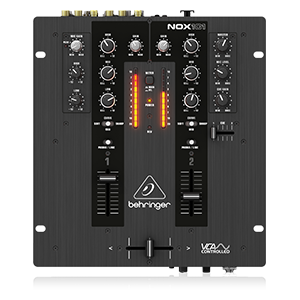
Figure 4: Simplified diagram of the Behringer NOX101 mixer's control layout.
Antretyen
Proper maintenance ensures the longevity and optimal performance of your NOX101 mixer.
- Netwayaj: Regularly wipe the mixer's surface with a soft, dry, lint-free cloth. Avoid using abrasive cleaners, solvents, or waxes.
- Pwoteksyon pousyè: Lè w pa ap itilize mixer a, kouvri l pou pwoteje l kont pousyè ak debri.
- Swen Fader: While the faders are designed for durability, excessive force or exposure to liquids can cause damage. Keep them clean and free of foreign particles.
- Depo: Sere mixer a nan yon kote ki fre epi sèk, lwen limyè solèy dirèk ak tanperati ekstrèm.
Depanaj
If you encounter issues with your Behringer NOX101 mixer, refer to the following common problems and solutions:
| Pwoblèm | Kòz posib | Solisyon |
|---|---|---|
| Pa gen pwodiksyon son |
|
|
| Son defòme |
|
|
| Crossfader not working smoothly |
|
|
Espesifikasyon
| Karakteristik | Detay |
|---|---|
| Modèl | NOX101 |
| Mak | Behringer |
| Kantite Chanèl | 2 |
| EQ | 3-band EQs with "Full-kill" Filters |
| Crossfader | VCA-controlled Ultraglide Crossfader with adjustable curve |
| Koneksyon Teknoloji | XLR, TRS, RCA |
| Sous pouvwa | Fil elektrik |
| Koulè | Nwa |
| Pwa atik | 4.63 liv (2.1 kg) |
| Dimansyon pwodwi (L x W x H) | 10.04 x 10.79 x 3.94 pous (25.5 x 27.4 x 10 cm) |
| Premye Dat ki disponib | 1 me 2013 |
Garanti ak sipò
Pou enfòmasyon sou garanti a ak sipò teknik, tanpri al gade paj ofisyèl Behringer la. websit la oubyen kontakte sèvis kliyan yo dirèkteman. Kenbe resi acha w la kòm prèv acha pou reklamasyon garanti.
Pa gen okenn videyo pwodwi ofisyèl nan men vandè a ki te disponib pou entegre nan manyèl sa a.


