1. Pwodwi souview
The KJB DD1206 iProtect Digital RF Detector is a sophisticated handheld device designed for detecting various wireless protocols. Unlike typical searching devices, it can detect modern hidden bugs that use protocols such as Bluetooth and Wi-Fi at a long distance. The DD1206 utilizes a separate channel with a high (2.4/5 GHz) frequency pre-selector to detect and locate Bluetooth and Wi-Fi with significantly higher sensitivity. Additionally, the unit can detect all classical bugs and analyze them for correlation by sending sound impulses, as well as other digital transmissions (GSM, LTE, 3G, 4G, 5 GHz, DECT, etc.). This device incorporates the ability to detect nearly any type of wireless protocol, including digital frequencies like Wi-Fi and analog frequencies, reaching up to 12 GHz in range.
Karakteristik kle:
- Wide-band antenna for comprehensive signal detection.
- Micro-Pointer microwave antenna for enhanced sensitivity to signals above 2 GHz, including Bluetooth, Wi-Fi 2.4 GHz, Wi-Fi 5GHz, and wireless video cameras.
- 16-segment bargraph indicator for clear signal strength visualization.
- Three alert modes: sound, vibration, and mixed, for discreet or audible alerts.
- Correlation function to identify FM transmitters by analyzing probing sound.
- Two levels of sensitivity (attenuator) for precise signal location.

Figi 1: The KJB DD1206 iProtect Digital RF Detector highlighting its capabilities for detecting RF, GSM, Bluetooth, Wi-Fi, and Wi-Max signals.
2. Enstalasyon ak Asanble
Before operating the DD1206, ensure proper battery installation and antenna attachment.
2.1 Enstalasyon batri
- Jwenn konpatiman batri a sou dèyè aparèy la.
- Louvri kouvèti lòj la.
- Insert two AAA batteries (2xLR 03), ensuring correct polarity.
- Fèmen kouvèti lòj batri a byen.
2.2 Antèn Atachman
The DD1206 comes with two types of antennas:
- Wide-band antenna: Connects to the ANT1 socket for general frequency detection (50-12000 MHz).
- Micro-Pointer microwave antenna: Connects to either ANT1 or ANT2 socket for enhanced detection of higher frequencies (2.4-2.48 GHz, 4.9-5.875 GHz). This antenna is particularly effective for Bluetooth and Wi-Fi signals.
- Gently screw the desired antenna into the appropriate socket (ANT1 or ANT2) until finger-tight. Do not overtighten.

Figi 2: The DD1206 device and its components, including the wide-band antenna and the Micro-Pointer microwave antenna.
3. Operasyon Enstriksyon
This section details how to operate your DD1206 detector for effective signal detection.
3.1 Limen/Etenyen
- Pou pouvwa sou, peze epi kenbe la POUVWA bouton an jiskaske ekran an limen.
- Pou koupe pouvwa a, peze epi kenbe POUVWA bouton an ankò jiskaske ekran an etenn.
3.2 Seleksyon antèn
The device allows switching between antennas for different detection scenarios.
- Sèvi ak la ANT1 button to select the wide-band antenna.
- Sèvi ak la ANT2 button to select the Micro-Pointer microwave antenna.
- The active antenna will be indicated on the display.
3.3 Sensitivity Adjustment (Attenuator)
The attenuator provides two levels of sensitivity to help pinpoint signal sources more quickly.
- Peze a ATT+ button to increase sensitivity.
- Peze a ATT- button to decrease sensitivity.
- Adjust sensitivity to avoid saturation in areas with strong background RF noise, or to detect weaker signals.
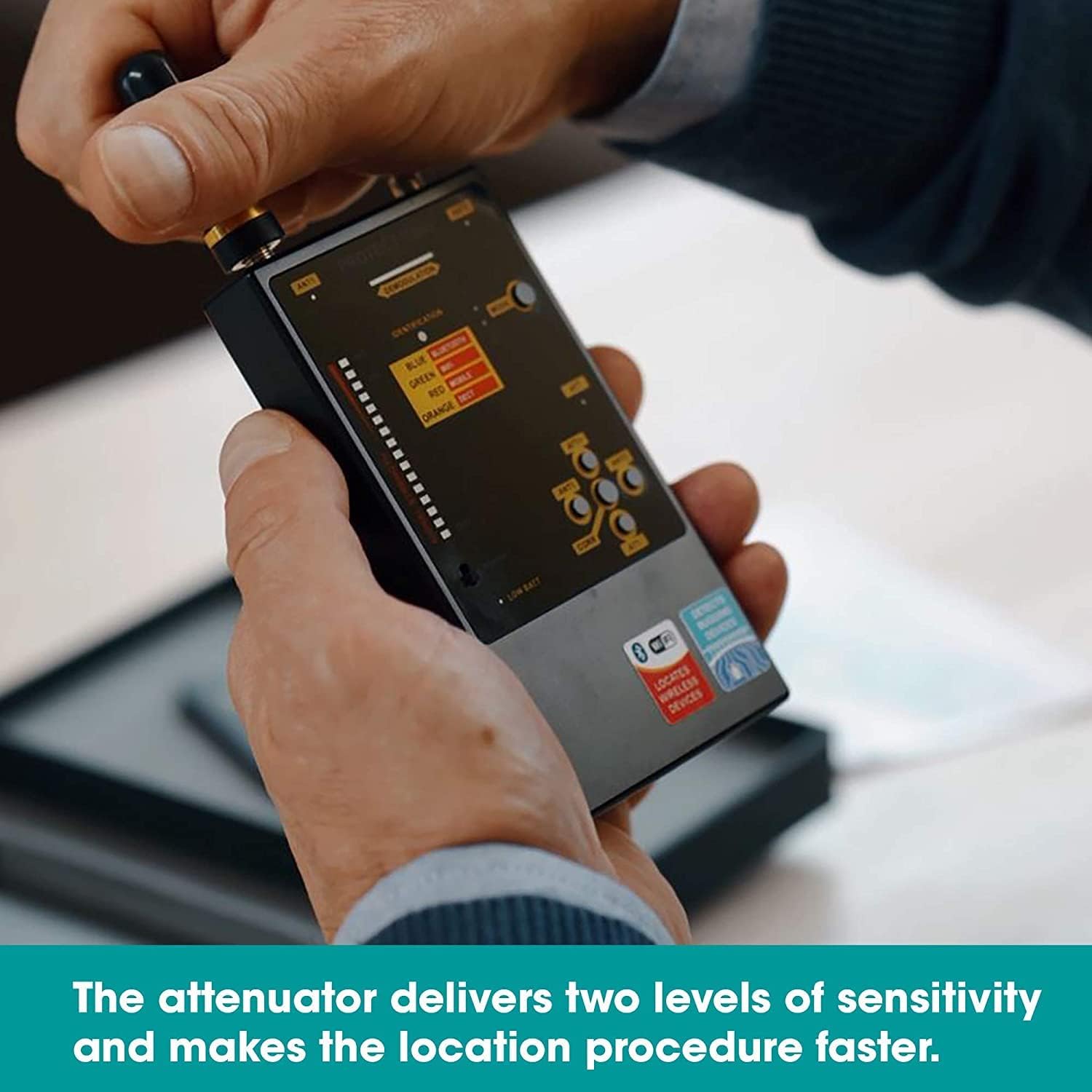
Figi 3: Adjusting the attenuator for optimal sensitivity during detection.
3.4 Mòd Alèt
The DD1206 offers three distinct alert modes:
- Son Mode: Audible alerts indicate signal detection and strength.
- Mòd Vibration: Discreet vibration alerts for silent operation.
- Mòd melanje: Combines sound and vibration alerts.
Peze a MÒD bouton pou chanje opsyon sa yo.

Figi 4: Switching between sound, vibration, and mixed alert modes.
3.5 Interpreting the Bargraph and Identification
- The 16-segment bargraph displays the detected signal strength. More illuminated segments indicate a stronger signal.
- La IDANTIFIKASYON section on the display provides an indication of the detected signal type (e.g., Bluetooth, Wi-Fi, Mobile, DECT).
- Move the device slowly around the area of interest. A rising bargraph and specific identification suggest proximity to a signal source.

Figi 5: The DD1206 display showing signal strength on the bargraph and identified signal types.
3.6 Using the Micro-Pointer Antenna
The Micro-Pointer antenna is designed for directional detection of higher frequency signals.
- Attach the Micro-Pointer antenna to either ANT1 or ANT2.
- Point the antenna in different directions to locate the strongest signal, indicated by the bargraph. The arrow on the antenna indicates the direction of maximum sensitivity.
- This antenna is particularly useful for pinpointing Wi-Fi and Bluetooth devices.

Figi 6: The Micro-Pointer antenna enhances detection of signals above 2 GHz, aiding in precise location.
3.7 Correlation Function
The correlation function helps identify FM transmitters by analyzing the presence of a probing sound.
- Activate the correlation function by pressing the CORR bouton.
- Listen for changes in the audio output or observe the display for indications of correlation, which suggests an FM transmitter is present.
4. Antretyen
Proper maintenance ensures the longevity and optimal performance of your DD1206 detector.
4.1 Netwayaj
- Siye aparèy la ak yon mou, twal sèk.
- Pa sèvi ak pwodui netwayaj likid oswa solvan, paske sa yo ka domaje aparèy la.
4.2 Ranplasman batri
- When the "Low battery" indicator appears, replace both AAA batteries promptly.
- Refer to Section 2.1 for battery installation instructions.
4.3 Depo
- Sere aparèy la nan yon kote ki fre epi sèk, lwen limyè solèy dirèk ak tanperati ekstrèm.
- Retire pil yo si ou sere yo pou yon bon bout tan pou evite flit.
NAN. Depanaj
If you encounter issues with your DD1206, refer to the following common problems and solutions.
| Pwoblèm | Kòz posib | Solisyon |
|---|---|---|
| Aparèy pa limen. | Pil ki mouri oswa ki mal enstale. | Tcheke polarite pil yo. Ranplase yo ak pil AAA nèf. |
| No signal detected or weak signal. | Incorrect antenna selected; sensitivity too low; signal source too far. | Ensure the correct antenna is attached and selected (ANT1 for wide-band, ANT2 for Micro-Pointer). Increase sensitivity using ATT+. Move closer to the suspected source. |
| Device overheats or loses signal. | Prolonged use in high temperatures; internal malfunction. | Allow the device to cool down. If the problem persists, contact customer support. |
| False alarms or constant high signal. | High background RF noise; sensitivity too high. | Decrease sensitivity using ATT-. Move to an area with less ambient RF interference. |
6. Espesifikasyon
Detailed technical specifications for the KJB DD1206 iProtect Digital RF Detector.
| Mak | KJB |
| Nimewo Modèl | DD1206 |
| Frequency Range (Antenna 1) | 50 - 12000 MHz |
| Frequency Range (Antenna 2) | 2.4 - 2.48 GHz, 4.9 - 5.875 GHz |
| Sous pouvwa | 2 x AAA batteries (LR 03) |
| Konsomasyon aktyèl la | Jiska 30mA |
| Operasyon Duration | Jiska 20 èdtan |
| Endikasyon | Active antenna, Low battery, Mode, Identification, Attenuator, Secondary demodulation |
| Dimensions (W/o antennas) | 120 x 70 x 16 mm |
| Dimensions (W/ antennas) | 210 x 70 x 16 mm |
| Materyèl | Metal |
| Pwa atik | 6 ons (apeprè 170g) |
| Rating Pwoteksyon Entènasyonal | IP66 |

Figi 7: Sensitivity graph illustrating the detection capabilities of the wide-band (rod) antenna and the Micro-Pointer antenna across different frequency ranges.
7. Garanti ak sipò
Information regarding product warranty and customer support was not provided in the available product data. For warranty details, technical assistance, or service inquiries, please contact KJB Security directly or refer to the documentation included with your purchase.
You may also visit the official KJB Security websit la pou jwenn enfòmasyon sipò ki pi ajou yo.


