1. Enstriksyon Sekirite Enpòtan
Tanpri li tout enstriksyon sekirite ak fonksyònman yo ak anpil atansyon anvan ou itilize televizyon sa a. Kenbe enstriksyon sa yo pou referans pita.
- Sous pouvwa: Sèvi ak televizyon an sèlman avèk sous kouran ki endike sou etikèt la.
- Vantilasyon: Asire bon vantilasyon. Pa bloke okenn ouvèti vantilasyon.
- Dlo ak imidite: Do not expose the TV to rain or moisture. Do not use near water.
- Netwayaj: Unplug the TV from the wall outlet before cleaning. Use a soft, dry cloth.
- Sèvis: Pa eseye fè sèvis pwodui sa a tèt ou. Refere tout sèvis yo bay pèsonèl sèvis kalifye.
- Plasman: Mete televizyon an sou yon sifas ki estab e plat. Evite mete l anba limyè solèy dirèk oswa toupre sous chalè.
2. Pake kontni
Verifye ke tout atik yo prezan nan pakè a:
- Coby LEDTV3218 32-Inch LED TV
- Kontwòl remote (avèk 2 pil AAA)
- Baz ak vis pou sipò televizyon
- Kòd pouvwa
- Manyèl Itilizatè (dokiman sa a)
3. Pwodwi souview
The Coby LEDTV3218 is a 32-inch LED television designed for clear picture quality and versatile connectivity. It features a 720p resolution display and a 60Hz refresh rate, suitable for everyday viewing.

Figi 3.1: Devan view of the Coby LEDTV3218 LED TV, showing the screen and stand.

Figi 3.2: Side view of the Coby LEDTV3218, illustrating its slim design.
4. Enstalasyon
4.1 Tache kanpe la
- Mete ekran televizyon an ak anpil atansyon sou yon sifas mou epi pwòp pou evite li reyur.
- Align the TV stand base with the mounting holes on the bottom of the TV.
- Fikse sipò a avèk vis yo bay yo. Asire w tout vis yo byen sere.
4.2 Konekte Aparèy
The TV offers various input ports for connecting external devices. Refer to Figure 4.1 for port locations.
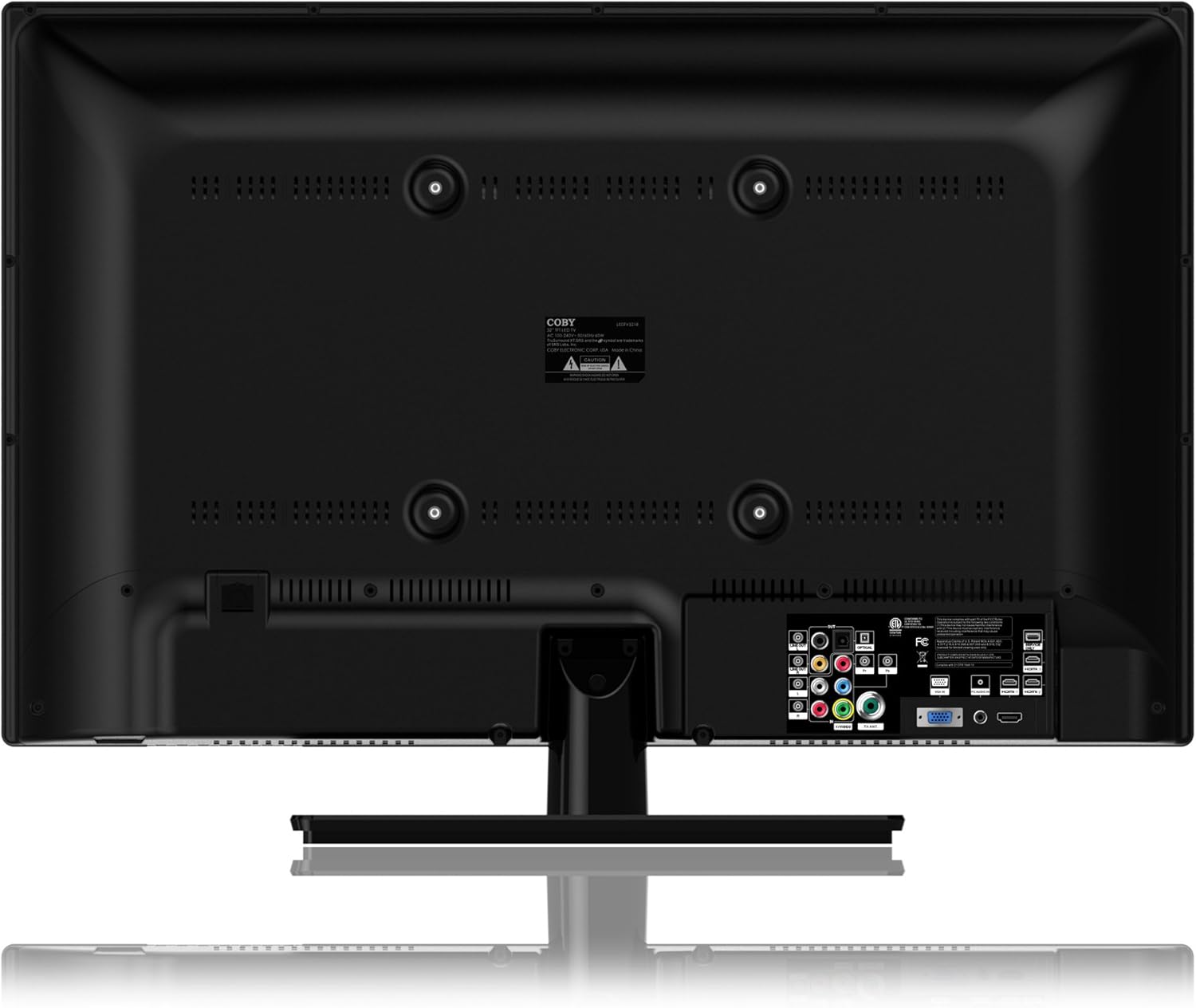
Figure 4.1: Rear panel connections of the Coby LEDTV3218.
- Antre HDMI (3): Connect Blu-ray players, game consoles, cable/satellite boxes, or other HDMI-enabled devices.
- VGA (PC Input): Konekte yon òdinatè pou itilize kòm yon monitè.
- Component Video (YPbPr): Konekte ansyen aparèy videyo yo lè l sèvi avèk kab konpozan.
- Composite Video (AV): Connect older video devices using RCA cables.
- Antenna/Cable (RF): Konekte yon antèn pou emisyon san fil oswa yon koneksyon televizyon kab.
- USB: For media playback (check manual for supported formats).
- Odyo Deyò: Konekte ak sistèm odyo ekstèn yo.
4.3 Premye pouvwa sou
- Konekte kòd kouran an nan televizyon an epi answit nan yon priz miray.
- Peze bouton pouvwa a sou televizyon an oswa sou kontwòl remote la.
- Follow the on-screen prompts to complete the initial setup, including language selection and channel scanning.
5. Opere televizyon ou
5.1 Fonksyon kontwòl Remote
The remote control allows you to access all TV functions. Insert the two AAA batteries (included) into the remote control, observing polarity.
- Pouvwa: Limen oswa etenn televizyon an.
- Antre: Selects the input source (HDMI, AV, Component, etc.).
- Volim +/-: Ajiste nivo volim.
- Chèn +/-: Chanjman chanèl yo.
- Meni: Ouvri meni Afichaj sou ekran (OSD) la.
- Bouton Navigasyon (Anwo/Anba/Agoch/Dwat/OK): Navige nan meni yo epi konfime seleksyon yo.
- Sòti: Closes the current menu.
- Bèbè: Aktive oubyen koupe son an.
5.2 Meni OSD (On-Screen Display).
Peze a Menu button on the remote to access the OSD. Use the navigation buttons to select and adjust settings.
- Anviwònman Foto: Adjust brightness, contrast, color, tint, sharpness, and select picture modes (e.g., Standard, Dynamic, Movie).
- Anviwònman son: Adjust bass, treble, balance, and select sound modes (e.g., Standard, Music, Movie). Enable or disable SRS TRuSurround XT.
- Anviwònman chanèl: Perform auto-scan or manual scan for channels. Access parental controls (V-Chip).
- Anviwònman tan: Set current time, sleep timer, and auto-off functions.
- Enstalasyon: Language selection, factory reset, software update (if available).
6. Antretyen
6.1 Netwaye televizyon an
Toujou debranche televizyon an anvan ou netwaye li.
- Ekran: Gently wipe the screen with a soft, lint-free cloth. For stubborn marks, use a screen cleaner specifically designed for LED displays, applied to the cloth, not directly to the screen.
- Kabinè: Wipe the cabinet and stand with a soft, dry cloth. Do not use abrasive cleaners or solvents.
6.2 Depo
If storing the TV for an extended period, disconnect all cables and store it in a cool, dry place, preferably in its original packaging to protect it from dust and physical damage.
NAN. Depanaj
Si w rankontre pwoblèm ak televizyon w lan, gade pwoblèm ak solisyon komen sa yo:
- Pa gen pouvwa:
- Asire w ke kòd kouran an byen branche nan televizyon an ak nan priz miray la.
- Tcheke si priz miray la ap fonksyone lè w branche yon lòt aparèy.
- Peze bouton pouvwa a sou televizyon an menm, pa sèlman sou telekòmand lan.
- No Picture/Poor Picture:
- Verifye ke sous antre ki kòrèk la chwazi (pa egzanp, HDMI 1, AV).
- Tcheke tout koneksyon kab ant televizyon an ak aparèy ekstèn yo.
- Adjust picture settings (brightness, contrast, sharpness) in the OSD menu.
- Si w ap itilize yon antèn, fè yon eskanè chanèl.
- No Sound/Poor Sound:
- Asire w ke volim nan pa bese epi li monte.
- Tcheke koneksyon kab odyo yo pou aparèy ekstèn yo.
- Adjust sound settings in the OSD menu.
- Kontwòl Remote pa travay:
- Ranplase pil yo ak pil nouvo, asire polarite kòrèk.
- Asire w pa gen okenn obstak ant telekòmand lan ak detèktè IR televizyon an.
- Dirije telekòmand lan dirèkteman nan direksyon televizyon an.
8. Espesifikasyon
Technical specifications for the Coby LEDTV3218 32-Inch LED TV:
| Karakteristik | Spesifikasyon |
|---|---|
| Mak | Coby |
| Nimewo Modèl | LEDTV3218 |
| Gwosè ekran | 32 pous |
| Teknoloji ekspozisyon | dirije |
| Rezolisyon | 720p |
| Rafrechisman pousantaj | 60 Hz |
| Pwa atik | 15.4 liv |
| Dimansyon pwodwi | 8 x 28.9 x 20.6 pous |
| Koulè | Nwa |
| Total pò HDMI | 3 |
| Parental Control Technology | V-Chip |
| Konfòmite Enèji | Energy Star 6.0 Compliant |

Figure 8.1: Energy Guide label for the Coby LEDTV3218, showing estimated yearly energy cost.
9. Garanti ak sipò
For warranty information or technical support, please refer to the warranty card included with your product or visit the official Coby websit la. Kenbe resi acha ou kòm prèv acha pou reklamasyon garanti.


