1. Entwodiksyon
Thank you for choosing the Philips Skies Outdoor Wall Light. This manual provides essential information for the safe installation, operation, and maintenance of your new lighting fixture. Please read these instructions carefully before installation and retain them for future reference.
This product is designed for outdoor use, providing ambient lighting without a motion sensor feature. Its durable aluminum construction and anthracite finish ensure longevity and aesthetic appeal.
2. Enfòmasyon sou Sekirite
- Sekirite elektrik: Installation must be performed by a qualified electrician in accordance with all local and national electrical codes. Always switch off the main power supply at the circuit breaker before commencing any electrical work.
- Itilizasyon deyò: This fixture is designed for outdoor use only. Ensure all connections are properly sealed and protected from moisture to prevent electrical hazards.
- Montaj: Asire w ke sifas enstalasyon an solid epi li ka sipòte pwa aparèy la.
- Kalite anpoul: Refer to the product specifications for compatible bulb types and wattage. Pa depase wat maksimòm lantage espesifye.
- Netwayaj: Dekonekte kouran an anvan ou netwaye. Sèvi ak yon twal mou.amp twal. Evite pwodui netwayaj abrazif oswa solvan.
3. Pake kontni
Verifye ke tout konpozan yo prezan anvan ou kòmanse enstalasyon an:
- Philips Skies Outdoor Wall Light fixture (1 unit)
- Materyèl pou monte (vis, lank miray)
- Manyèl Enstriksyon
Note: Light bulbs are typically sold separately unless otherwise specified. This luminaire is compatible with bulbs of various energy classes.

Figi 1: Devan view of the Philips Skies Outdoor Wall Light.
4. Enstalasyon ak Enstalasyon
Zouti obligatwa: Screwdriver, drill, wire strippers, electrical tape, voltage tester, pencil, measuring tape.
- Prepare pou enstalasyon: Switch off the power at the main circuit breaker to the location where the light will be installed. Ensure the power is off using a voltage tèsteur.
- Make Pwen Montaj: Hold the fixture against the wall at the desired installation location. Use a pencil to mark the drilling points for the mounting bracket.
- Fè twou: Drill pilot holes at the marked points. Insert wall anchors if necessary, depending on your wall material.
- Sipò pou monte: Fikse sipò montaj la sou miray la avèk vis yo bay yo.
- Koneksyon elektrik: Carefully connect the electrical wires from the wall to the fixture's wires. Typically, connect live (black/brown) to live, neutral (white/blue) to neutral, and ground (green/yellow) to ground. Ensure all connections are secure and insulated with electrical tape or wire nuts.
- Tache aparèy: Carefully align the fixture with the mounting bracket and secure it with the remaining screws. Ensure no wires are pinched.
- Install Bulb(s): Insert the appropriate bulb(s) into the sockets. Refer to the specifications for bulb type and wattage.
- Retabli pouvwa: Once the fixture is securely installed and all connections are made, switch the power back on at the circuit breaker.

Figure 2: Dimensional drawing of the Philips Skies Outdoor Wall Light (25 x 25 x 7 cm).
5. Operasyon Enstriksyon
The Philips Skies Outdoor Wall Light is designed for simple operation. As it does not feature a motion sensor, it is typically controlled by an external wall switch or a timer connected to your home's electrical system.
- Limen/Etenyen: Use the connected wall switch to turn the light on or off.
- Kontwòl revèy: If connected to an external timer, the light will operate according to the timer's programmed schedule.
6. Antretyen
- Netwayaj: Pou netwaye aparèy la, asire w ke kouran an koupe. Sèvi ak yon twal mou, sèk oswa yon ti kras mouye.amp cloth. Do not use harsh chemicals, abrasive cleaners, or scouring pads, as these can damage the finish.
- Ranplasman anpoul: If the light stops working, first check the bulb. Ensure the power is off before attempting to replace any bulbs. Allow the bulb to cool completely before touching it. Replace with a bulb of the same type and wattage jan sa espesifye nan detay pwodwi yo.
- Enspeksyon: Periodically inspect the fixture for any signs of wear, damage, or loose connections. If any issues are found, disconnect power and consult a qualified electrician.
NAN. Depanaj
| Pwoblèm | Kòz posib | Solisyon |
|---|---|---|
| Limyè pa limen. | Pa gen pouvwa nan aparèy la. Anpoul defo. Koneksyon fil elektrik ki lach. | Tcheke disjoncteurs. Ranplase anpoul. Ensure power is off, then check and secure wiring connections. |
| Limyè flickers. | Anpoul ki lach. Kalite/wat anpoul ki pa kòrèktage. Fil elektrik ki lach. | Sere boulon an. Ensure correct bulb is used. Ensure power is off, then check and secure wiring connections. |
| Dlo andedan aparèy la. | Move sele pandan enstalasyon an. So domaje. | Disconnect power. Inspect and reseal all entry points. If seal is damaged, replace fixture. |
8. Espesifikasyon
- Mak: Philips Lighting
- Modèl: Skies
- Materyèl: Aliminyòm
- Koulè: Anthracite / Charcoal
- Style: Wall Light Without Motion Sensor
- Pouvwa: 14 watts (maximum recommended)
- Kantite sous limyè: 2
- Dimansyon pwodwi: 25 x 25 x 7 cm
- Pwa: 1 kg
- Itilizasyon espesifik: Itilize deyò sèlman
- Sous pouvwa: Mache ak pil (Note: This contradicts other info, likely mains powered. Consult product packaging for definitive power source.)
- ASIN: B00B45OTIY
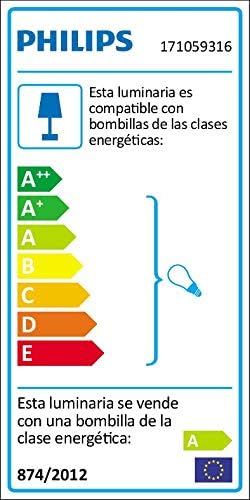
Figure 3: Energy efficiency label indicating bulb compatibility.
9. Garanti ak sipò
This Philips Skies Outdoor Wall Light comes with a 2-ane garanti soti nan dat acha a. Garanti sa a kouvri domaj nan materyèl ak atizan konn fè nan itilizasyon nòmal.
For technical support, warranty claims, or further assistance, please visit the official Philips Lighting websit la oubyen kontakte depatman sèvis kliyan yo. Kenbe prèv acha ou a pou validasyon garanti a.
Philips Lighting Official Websit: www.lighting.philips.com


