1. Entwodiksyon
The Planet GT-802S is a Gigabit Media Converter designed to convert 10/100/1000Base-T Ethernet signals to 1000Base-LX fiber optic signals. This device facilitates the extension of network distances over single-mode fiber, supporting distances up to 10 kilometers. It is compatible with IEEE 802.3, 802.3u, 802.3ab, and 802.3z standards, offering a reliable solution for various networking environments.
2. Karakteristik
- Converts 10/100/1000Base-T to 1000Base-LX fiber.
- Supports single-mode fiber with SC connector.
- Operates at 1310nm wavelength.
- Extends network distance up to 10 kilometers.
- Ploge-ak-jwe enstalasyon.
- Can operate standalone or within a media converter chassis (e.g., Planet MC-700/MC-1000R/MC-1500).
3. Pake kontni
Verifye ke pake ou a gen atik sa yo:
- Planet GT-802S Gigabit Media Converter
- 5V DC pouvwa adaptè
- Manyèl Itilizatè (dokiman sa a)

Figi 3.1: Package contents showing the GT-802S media converter and its power adapter.
4. Deskripsyon Fizik
4.1 Panèl devan
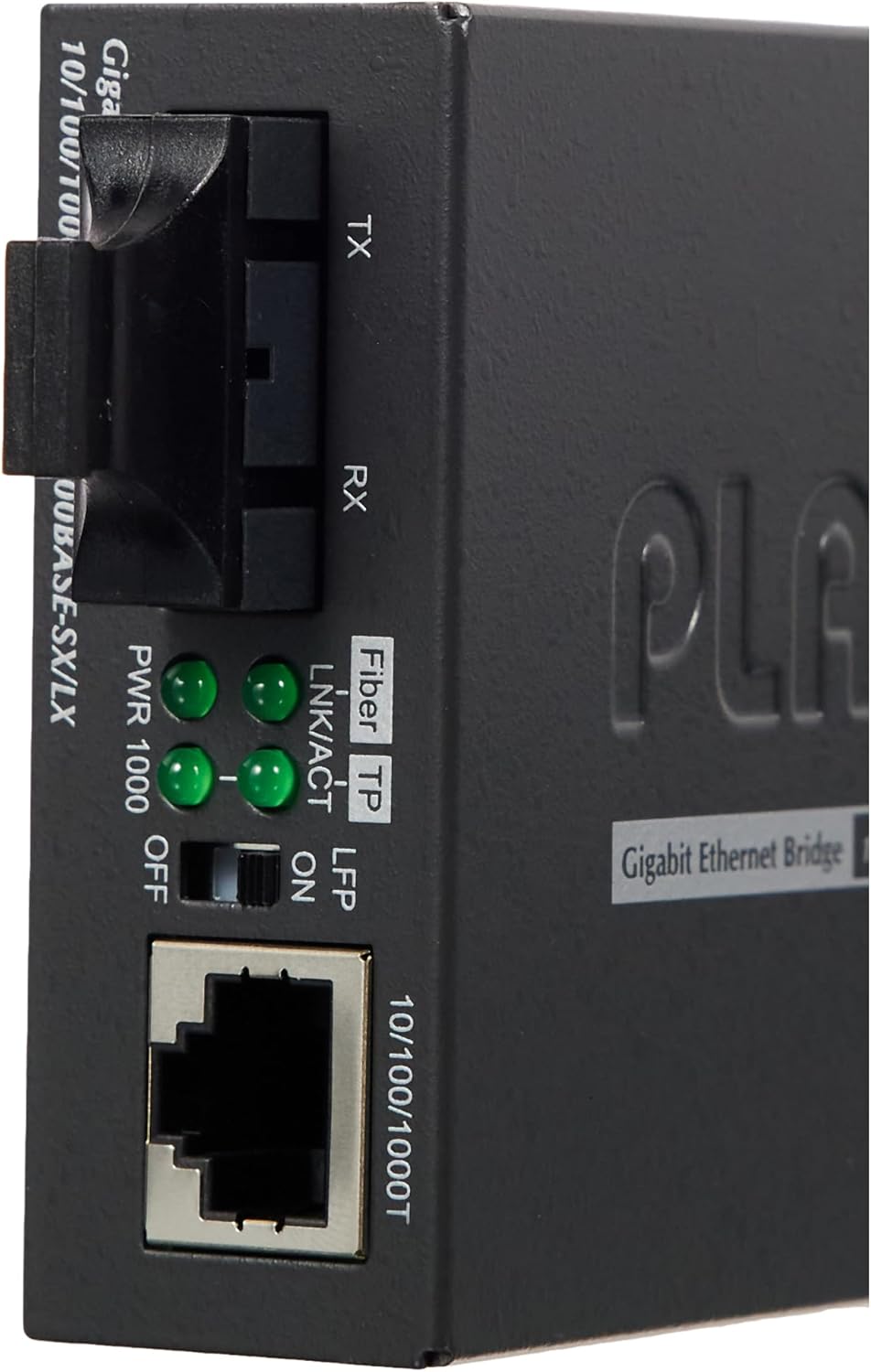
Figi 4.1: Panèl devan view of the GT-802S with ports and LED indicators.
The front panel of the GT-802S features the following components:
- 10/100/1000T Port: An RJ-45 connector for connecting to an Ethernet network device (e.g., switch, router, computer) using a standard Ethernet cable.
- Fiber Port (SC): An SC-type connector for single-mode fiber optic cable connection. This port consists of two parts: TX (transmit) and RX (receive).
- Endikatè ki ap dirije: Several LEDs provide status information:
- PWR: Power indicator. Lit when the device is powered on.
- 1000: Indicates a 1000Mbps (Gigabit) Ethernet connection on the RJ-45 port.
- LNK/ACT (TP): Link/Activity indicator for the RJ-45 (Twisted Pair) port. Lit when a link is established, blinks when data is being transmitted or received.
- LNK/ACT (Fiber): Link/Activity indicator for the Fiber port. Lit when a fiber link is established, blinks when data is being transmitted or received.
- LFP (Link Fault Pass-through): Indicates the status of the Link Fault Pass-through function.
4.2 Panèl dèyè

Figi 4.2: Panèl dèyè view of the GT-802S with power input and product label.
The rear panel includes the 5V DC pouvwa Antre for connecting the provided power adapter. It also features the product label with model number, serial number (e.g., AA402422302069), input specifications (5V, 2A), and regulatory compliance markings.

Figi 4.3: Close-up of the GT-802S product label.
4.3 Dimansyon

Figi 4.4: GT-802S size comparison.
The device measures approximately 2.72 x 3.82 x 1.02 inches (6.9 x 9.7 x 2.6 cm).
5. Enstalasyon
Follow these steps to set up your GT-802S Media Converter:
- Koneksyon pouvwa: Connect the provided 5V DC power adapter to the power input port on the rear panel of the GT-802S. Plug the adapter into a standard electrical outlet. The PWR LED on the front panel should illuminate.
- Koneksyon Ethernet: Connect one end of an Ethernet cable (Cat5e or higher) to the 10/100/1000T RJ-45 port on the GT-802S. Connect the other end of the Ethernet cable to your network device (e.g., switch, router, PC). The LNK/ACT (TP) LED should light up, and the 1000 LED should light up if a Gigabit connection is established.
- Fiber Optic Connection: Connect a single-mode fiber optic cable with SC connectors to the Fiber TX and RX ports on the GT-802S. Ensure the fiber cable is connected to a compatible fiber optic device at the other end. The LNK/ACT (Fiber) LED should light up when a stable fiber link is established.
Nòt: Ensure all cables are securely connected. For optimal performance, use high-quality cables.
6. Opere
Once properly set up, the GT-802S operates automatically. The LED indicators provide real-time status information:
- PWR (vèt): Endike aparèy la ap resevwa pouvwa.
- 1000 (vèt): Indicates the RJ-45 port is operating at 1000Mbps. If off, it's operating at 10/100Mbps.
- LNK/ACT (TP) (Green): Solid light indicates a valid Ethernet link. Blinking indicates data activity.
- LNK/ACT (Fiber) (Green): Solid light indicates a valid fiber link. Blinking indicates data activity.
- LFP (Green): Indicates the status of the Link Fault Pass-through function. Consult the full product manual for detailed LFP functionality.
7. Antretyen
To ensure the longevity and proper functioning of your GT-802S Media Converter, observe the following maintenance guidelines:
- Kenbe aparèy la nan yon anviwònman fre epi sèk, lwen limyè solèy dirèk ak sous chalè.
- Asire w ke gen ase vantilasyon toutotou inite a.
- Netwaye deyò a avèk yon twal mou epi sèk. Pa sèvi ak pwodui netwayaj likid oswa ayewosòl.
- Regularly inspect fiber optic connectors for dust or damage. Clean fiber connectors using appropriate fiber cleaning tools if necessary.
- Evite mete objè lou sou aparèy la.
NAN. Depanaj
If you encounter issues with your GT-802S, refer to the following common problems and solutions:
| Pwoblèm | Kòz posib | Solisyon |
|---|---|---|
| Pa gen kouran (LED PWR etenn) | Adaptè kouran an pa konekte oswa li gen pwoblèm; priz kouran an pa fonksyone. | Ensure power adapter is securely connected to the device and a working power outlet. Test the outlet with another device. Replace power adapter if faulty. |
| No Ethernet Link (LNK/ACT TP LED off) | Ethernet cable faulty or disconnected; connected device is off or faulty; incorrect cable type. | Check Ethernet cable connections. Try a different cable. Ensure the connected network device is powered on and functioning correctly. |
| No Fiber Link (LNK/ACT Fiber LED off) | Fiber cable faulty or disconnected; fiber connectors dirty; connected fiber device is off or faulty; incorrect fiber type. | Check fiber cable connections. Ensure fiber connectors are clean. Verify the connected fiber device is operational and compatible. Ensure single-mode fiber is used. |
| Slow Ethernet Speed (1000 LED off) | Connected Ethernet device does not support Gigabit speed; cable quality. | Ensure the connected device's port supports 1000Mbps. Use a high-quality Cat5e or Cat6 Ethernet cable. |
9. Espesifikasyon
| Karakteristik | Spesifikasyon |
|---|---|
| Modèl | GT-802S |
| Ethernet Port | 1 x 10/100/1000Base-T RJ-45 |
| Fib Port | 1 x 1000Base-LX SC (Single Mode) |
| Longèdonn | 1310nm |
| Distans | 10km |
| Estanda | IEEE 802.3, 802.3u, 802.3ab, 802.3z |
| Antre pouvwa | 5V DC, 2A |
| Dimansyon pwodwi (L x W x H) | 3.82 x 2.72 x 1.02 pous (9.7 x 6.9 x 2.6 cm) |
| Pwa atik | 7.1 ons (201 gram) |
| Tanperati Fonksyònman | 0°C to 50°C (32°F to 122°F) (Typical) |
| Tanperati Depo | -20°C a 70°C (-4°F a 158°F) (Tipik) |
| Imidite | 5% a 90% ki pa kondanse |
| Manifakti | Teknoloji planèt |
| Dat Premye Disponib | 21 avril 2013 |
10. Garanti ak sipò
The Planet GT-802S Media Converter is manufactured by Planet Technology. For warranty information, technical support, or service inquiries, please refer to the official Planet Technology website or contact their customer support directly. Specific warranty terms and conditions may vary by region and retailer.


