Entwodiksyon
The Heil Sound CC-1-XLR-Y is a high-quality microphone cable designed to connect Heil microphones with a standard 3-pin XLR output to Yaesu, Kenwood, or Icom transceivers featuring an 8-pin round microphone input. This cable also includes a 1/4 inch (6.35mm) jack for an external Push-To-Talk (PTT) switch, providing versatile control for your amateur radio setup. Constructed with commercial audio 'Heilwire', it ensures reliable and clear audio transmission.
Karakteristik kle
- Designed for Yaesu, Kenwood, and Icom transceivers with 8-pin round microphone inputs.
- Connects to Heil microphones with industry-standard 3-pin balanced XLR output connectors.
- Integrated 1/4 inch (6.35mm) jack for external Push-To-Talk (PTT) switch.
- Constructed with durable commercial audio 'Heilwire' for optimal performance and longevity.
- Cable length of 8 feet (approximately 2.4 meters).
Enstriksyon Enstalasyon
Follow these steps to properly connect your Heil microphone to your transceiver using the CC-1-XLR-Y cable.

Figi 1: Plis paseview of the Heil Sound CC-1-XLR-Y microphone cable, showing the coiled cable and both connector ends.
- Idantifye konektè:
- La 8-pin round female connector is for your Yaesu, Kenwood, or Icom transceiver's microphone input.
- La 3-pin XLR female connector is for your Heil microphone's XLR output.
- La 1/4 inch (6.35mm) jack is for an optional external PTT switch.
- Konekte ak mikwofòn nan: Insert the 3-pin XLR female connector of the CC-1-XLR-Y cable into the male XLR output of your Heil microphone. Ensure it clicks securely into place.
- Connect to Transceiver: Plug the 8-pin round female connector into the corresponding 8-pin round microphone input on your Yaesu, Kenwood, or Icom transceiver. Gently twist and push until it is fully seated.
- Connect PTT (Optional): If using an external PTT switch, plug its 1/4 inch (6.35mm) male connector into the 1/4 inch jack on the CC-1-XLR-Y cable.
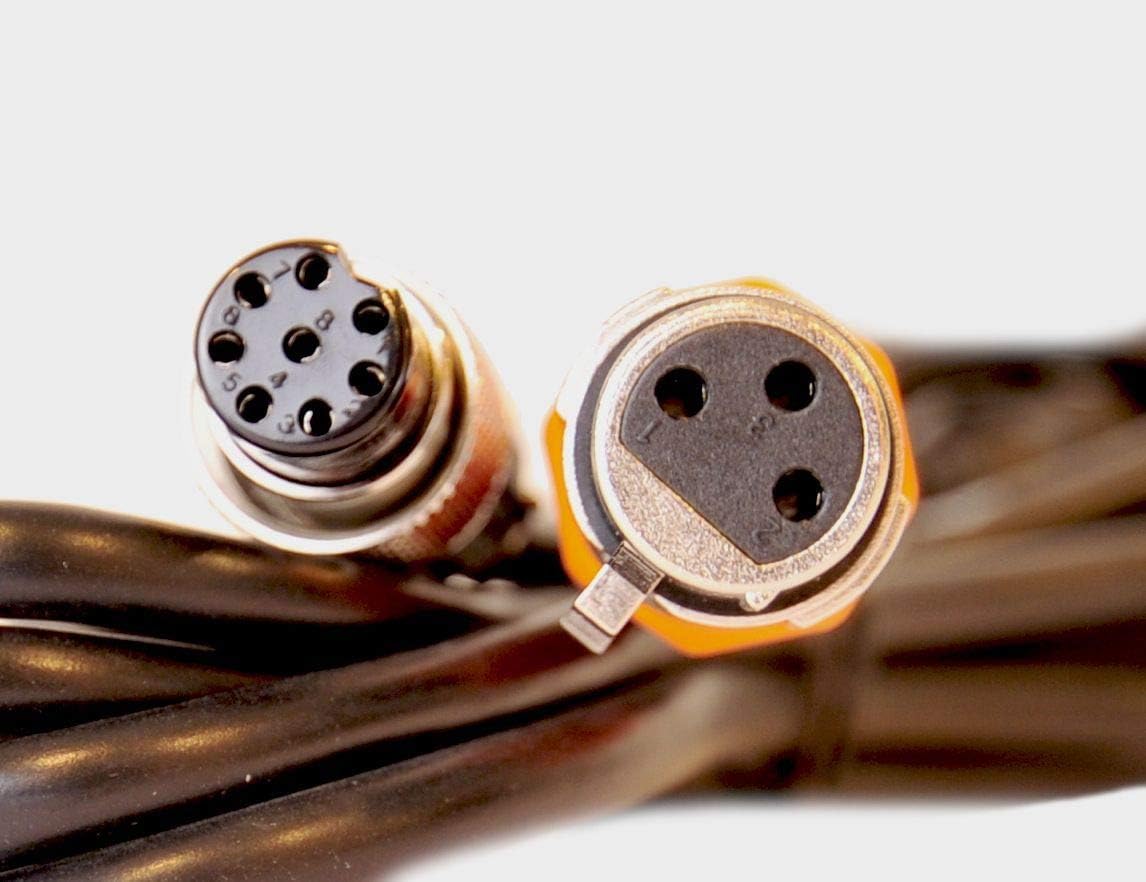
Figi 2: Close-up view of the 8-pin round female connector and the 3-pin XLR female connector, highlighting their distinct designs.
Enstriksyon Operasyon
Once the cable is correctly connected, operate your microphone and transceiver as usual. The CC-1-XLR-Y cable facilitates the audio signal transmission and PTT control between your Heil microphone and compatible transceiver.
- Ensure your transceiver's microphone input settings are configured correctly for an external microphone.
- If using an external PTT switch, activate it to transmit. If your microphone has an integrated PTT, the external PTT jack on the cable will typically override it or function in parallel, depending on your transceiver's configuration.
- Adjust microphone gain levels on your transceiver for optimal audio quality and to prevent over-modulation.
Antretyen
Proper care will extend the life and performance of your CC-1-XLR-Y cable.
- Depo: When not in use, coil the cable loosely. Avoid tight coiling or sharp bends, which can damage the internal wiring.
- Netwayaj: Keep connectors clean and free of dust and debris. Use a dry, lint-free cloth to wipe down the cable and connectors. Avoid using liquid cleaners directly on the connectors.
- Manyen: Always grasp the connector housing when plugging or unplugging the cable, not the cable itself. This prevents strain on the cable-to-connector joint.
- Anviwònman: Avoid exposing the cable to extreme temperatures, direct sunlight for prolonged periods, or moisture.
Depanaj
Si ou rankontre pwoblèm, re-view the following common troubleshooting steps.
- No Audio Transmission:
- Ensure all cable connections (microphone to cable, cable to transceiver) are secure.
- Verify the microphone is powered on (if applicable) and functioning correctly.
- Check your transceiver's microphone input settings and gain levels.
- If using an external PTT, ensure it is connected and functioning.
- Intermittent Audio or Poor Quality:
- Inspect the cable for any visible damage, kinks, or frayed sections.
- Ensure connectors are clean and free of corrosion or debris.
- Test with another known-good cable if available to isolate the issue.
- PTT Not Functioning:
- Confirm the external PTT switch is correctly plugged into the 1/4 inch jack.
- Test the PTT switch independently if possible.
- Check transceiver settings related to external PTT control.
Espesifikasyon
| Mak | HeiL |
| Non modèl | Heil Sound CC-1-XLR-YB |
| Nimewo Modèl Atik | CC-1-XLR-YB |
| Connector Type (Microphone End) | XLR 3-Pin Fi |
| Connector Type (Transceiver End) | 8-Pin Round Female |
| PTT Jack | 1/4 pous (6.35mm) |
| Longè kab | 8 pye (apeprè 2.4 mèt) |
| Kalite kab | Microphone Cable (Heilwire) |
| Koulè | Nwa |
| Pwa atik | 9.6 ons (apeprè 272 gram) |
| Aparèy konpatib | Heil Microphones, Yaesu/Kenwood/Icom Transceivers |
| Itilizasyon Andedan kay la / Deyò | Andedan kay la, deyò |
| UPC | 701630971455 |
Enfòmasyon sou Garanti
Heil Sound products are manufactured to high standards. For specific warranty details, please refer to the documentation included with your purchase or visit the official Heil Sound websit la. Kenbe prèv acha ou a pou nenpòt reklamasyon garanti.
Sipò pou Kliyan
If you require further assistance or have questions not covered in this manual, please contact Heil Sound customer support through their official website or authorized dealers. Provide your product model number (CC-1-XLR-YB) and a detailed description of your inquiry for efficient service.


