Entwodiksyon
The Korg TMR-50 is a versatile device designed to assist musicians in improving their pitch and rhythm. It integrates a tuner, metronome, and recorder into a single compact unit. These three functions can be used independently or simultaneously, offering comprehensive support for practice and performance. The TMR-50 also features high-quality linear PCM recording, allowing up to 100 tracks to be stored, and a USB port for easy data transfer to a computer. With its built-in microphone, speaker, and various rhythm variations, the TMR-50 is an essential tool for any musician.
Prekosyon Sekirite
- Do not expose the unit to extreme temperatures, direct sunlight, high humidity, or dusty environments.
- Evite lage aparèy la oswa soumèt li a gwo enpak.
- Pa eseye demonte oswa modifye aparèy la. Konfye tout antretyen bay pèsonèl kalifye.
- Use only the specified battery type (AAA) and ensure correct polarity during installation.
- Retire pil yo si ou pa pral itilize aparèy la pou yon peryòd tan pwolonje pou anpeche flit.
- Keep the unit away from sources of strong electromagnetic interference.
Kontni pake
Tanpri asire w ke tout atik sa yo prezan nan pakè w la:
- Korg TMR-50 Tuner Metronome Recorder unit
- 2 x AAA batteries (for initial use)
- Manyèl Itilizatè (dokiman sa a)
Non Pati ak Fonksyon
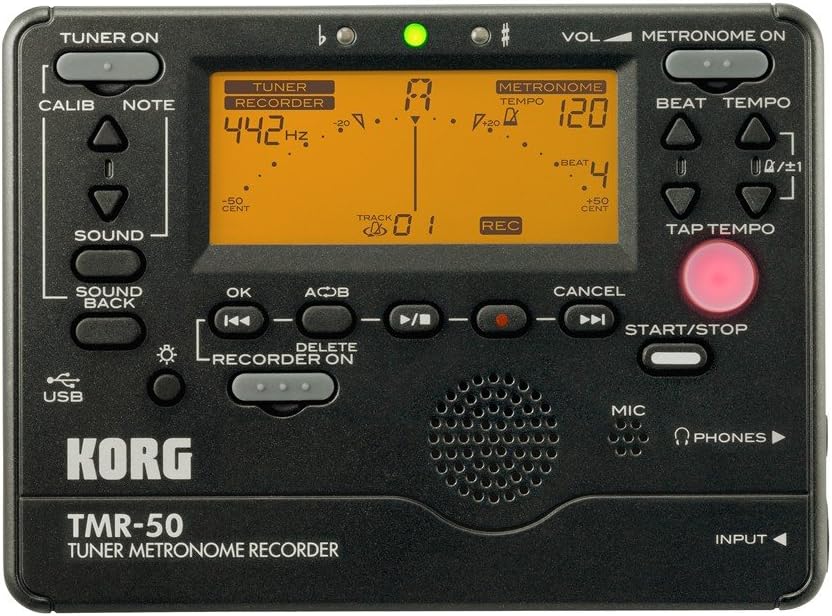
Figi 1: Panèl devan souview of the Korg TMR-50, showing all controls and the display.
Kontwòl sentonizè
- TUNER ON Button: Activates or deactivates the tuner function.
- CALIB Button: Adjusts the calibration frequency (standard is 440Hz, often adjustable to 442Hz as shown).
- NOTE Buttons (Up/Down Arrows): Selects the target note for tuning.
- Bouton SON: Activates the Sound Out function, which outputs a reference tone from the internal speaker.
- SOUND BACK Button: Engages the Sound Back function, allowing the unit to detect the input pitch and output the closest correct pitch for comparison.
Kontwòl Metronom
- METRONOME ON Button: Activates or deactivates the metronome function.
- VOL (Volume) Slider: Adjusts the output volume of the metronome and other audio.
- BEAT Buttons (Up/Down Arrows): Adjusts the number of beats per measure.
- TEMPO Buttons (Up/Down Arrows): Adjusts the metronome tempo in beats per minute (BPM).
- TAP TEMPO bouton: Allows you to set the tempo by tapping the button in time with the desired beat.
Recorder Controls
- RECORDER ON Button: Activates the recorder function.
- REC Button (Red Dot): Initiates recording when the recorder is active.
- OK bouton: Konfime seleksyon oswa aksyon.
- Rewind/Fast Forward Buttons (Double Arrows): Navigates through recorded tracks or within a track.
- Play/Pause Button (Triangle/Two Vertical Bars): Starts or pauses playback of a recorded track.
- Stop Button (Square): Sispann lekti oswa anrejistreman.
- A<->B Button: Sets a loop playback region within a recorded track.
- Bouton DELETE: Deletes selected recorded tracks.
- Bouton START/STOP: A general control for starting and stopping various functions, including recording and metronome.
Ekspozisyon ak Endikatè
- Ekspozisyon LCD: Shows tuning information (note, cent deviation, calibration), metronome tempo and beat, and recorder track number and status.
- Flat (b) / Sharp (#) Indicators: Lights up to indicate if the detected pitch is flat or sharp.
- Limyè Endikatè Vèt: Illuminates when the detected pitch is in tune.
Input/Output and Other Features
- MIKWOFÒN (MIC): Built-in microphone for recording and tuning.
- PHONES (Headphone Jack): Output for connecting headphones.
- Antre Jack: Input for connecting an external microphone or instrument pickup.
- Pò USB: For connecting to a computer to transfer recorded data.
- Oratè: Built-in speaker for metronome clicks, reference tones, and playback.
Enstalasyon
Enstalasyon batri
- Louvri kouvèti konpatiman batri a ki sou dèyè aparèy la.
- Mete de (2) pil AAA, asire w polarite ki kòrèk la (+/-) jan yo endike anndan konpatiman an.
- Fèmen kouvèti lòj batri a byen.
Power On/Off
- Pou pouvwa sou, peze epi kenbe la TUNER ON or METRONOME ON bouton pou apeprè yon segonn.
- Pou koupe pouvwa a, peze epi kenbe TUNER ON or METRONOME ON button again for approximately one second. The unit will also automatically power off after a period of inactivity to conserve battery life.
Operating the Tuner
- Peze a TUNER ON button to activate the tuner. The display will show tuning information.
- Adjust the calibration frequency using the KALIB button if needed. The default is typically 440Hz, but can be set to 442Hz or other values.
- Play a single note on your instrument. The TMR-50 will detect the pitch via its built-in microphone or an external input.
- Observe the display:
- The note name will be displayed.
- The meter indicates pitch deviation. Adjust your instrument until the meter is centered and the green indicator light illuminates.
- The 'b' (flat) or '#' (sharp) indicators will light up if the pitch is significantly off.
- Sèvi ak la SON button to output a reference pitch for ear training.
- Angaje a SOUND BACK function to hear the closest correct pitch while you play, aiding in intonation practice.
Operating the Metronome
- Peze a METRONOME ON button to activate the metronome.
- Adjust the tempo using the TEMPO Up/Down arrow buttons. The tempo range is typically from 30 to 252 BPM.
- Set the desired beat pattern using the BAT Up/Down arrow buttons. This controls the number of beats per measure and rhythm variations.
- Altènativman, sèvi ak la TAP TEMPO button to set the tempo by tapping it at your desired speed.
- Peze a KÒMANSE/KANPE button to begin or end the metronome click.
- Adjust the metronome volume using the VOL kurseur.
Opere Anrejistrè a
- Peze a RECORDER ON button to enable the recording function.
- Pou kòmanse anrejistreman, peze la REC button (red dot). The display will show "REC" and the track number.
- Play your instrument or sing into the built-in microphone.
- Pou sispann anrejistreman, peze la SISPANN bouton.
- To play back a recorded track:
- Use the Rewind/Fast Forward buttons to select the desired track.
- Peze a Jwe/Poz bouton pou kòmanse lecture.
- Peze a SISPANN bouton pou fini lekti a.
- To use the Loop Play function:
- Pandan lèktur, peze la A<->B button at the desired start point (A).
- Peze a A<->B button again at the desired end point (B). The section between A and B will loop continuously.
- Peze A<->B a third time to cancel the loop.
- To delete a track:
- Select the track you wish to delete using the Rewind/Fast Forward buttons.
- Peze a EFASE bouton.
- Confirm the deletion if prompted (usually by pressing OK).
Konekte ak yon òdinatè
The TMR-50 features a USB port for transferring recorded audio files to your computer. Connect the unit to your computer using a standard USB cable (not included). The device should appear as a removable storage device, allowing you to copy files. Refer to your computer's operating system instructions for managing external storage devices.
Antretyen
- Netwaye aparèy la avèk yon twal mou epi sèk. Pa sèvi ak pwodui netwayaj abrazif oswa solvan.
- Si w pa pral itilize aparèy la pou yon peryòd tan pwolonje, retire pil yo pou anpeche flit ak korozyon.
- Sere aparèy la nan yon kote ki fre epi sèk, lwen limyè solèy dirèk.
Depanaj
| Pwoblèm | Kòz posib / Solisyon |
|---|---|
| Aparèy pa limen. |
|
| Tuner is inaccurate or unresponsive. |
|
| Metronome sound is too low or absent. |
|
| Recorded audio is too quiet or distorted. |
|
| Pa ka transfere files atravè USB. |
|
Espesifikasyon
| Karakteristik | Detay |
|---|---|
| Nimewo Modèl | TMR-50 |
| Dimansyon (W x P x H) | 5.2 x 5.2 x 1.3 pous (apeprè) |
| Pwa | 6.7 ounces (excluding batteries) |
| Pwovizyon pou pouvwa | 2 x AAA pil |
| Gamme sentonizè | A0 (27.50 Hz) - C8 (4186.01 Hz) |
| Ranje Kalibrasyon | A4 = 410 – 480 Hz |
| Metwonòm Tempo Range | 30 - 252 BPM |
| Metronome Beat Settings | 0 – 9 beats, duplets, triplets, quadruplets, etc. (15 variations) |
| Fòma anrejistreman | Linear PCM (WAV) |
| Anrejistreman Kapasite | Up to 100 tracks (approx. 20 minutes total) |
| Antre / Sòti | INPUT jack (mono), PHONES jack (stereo), USB port (Type B) |
Garanti ak sipò
For warranty information and technical support, please refer to the warranty card included with your product or visit the official Korg website. Keep your proof of purchase for warranty claims. Do not attempt to repair the unit yourself, as this may void your warranty.
Official Korg Websit: www.korg.com


