Entwodiksyon
Thank you for choosing the Rowenta Adagio Thermal Coffee Maker CT 3818. This appliance is designed to brew delicious filter coffee and keep it warm for extended periods thanks to its insulated stainless steel carafe. Please read this manual carefully before using your coffee maker for the first time and keep it for future reference. Proper use and maintenance will ensure optimal performance and longevity of your appliance.
Enstriksyon Sekirite Enpòtan
- Li tout enstriksyon anvan ou itilize.
- Pa plonje aparèy la, kòd elektrik la, oswa ploge nan dlo oswa nenpòt lòt likid.
- Asire voltagVolim ki endike sou aparèy la koresponn ak vòltaj kouran lokal ou a.tage anvan konekte.
- Always unplug the coffee maker from the power outlet when not in use and before cleaning. Allow it to cool before adding or removing parts, and before cleaning the appliance.
- Do not operate any appliance with a damaged cord or plug, or after the appliance malfunctions or has been damaged in any manner. Contact Rowenta customer service for examination, repair, or adjustment.
- Pa kite kòd la pandye sou kwen yon tab oswa kontwa, oswa manyen sifas cho.
- Pa mete machin kafe a sou oswa toupre yon recho gaz oswa elektrik cho, ni nan yon fou chofe.
- Always ensure the thermal carafe is correctly positioned on the warming plate before brewing.
- The thermal carafe is designed for use with this appliance only. It must not be used on a range top.
- Do not clean the thermal carafe with abrasive cleaners, steel wool pads, or other abrasive materials.
- Aparèy sa a se pou itilize nan kay la sèlman.
- Kenbe aparèy la pa rive jwenn timoun yo.
Pwodwi souview
Familiarize yourself with the components of your Rowenta Adagio Thermal Coffee Maker.
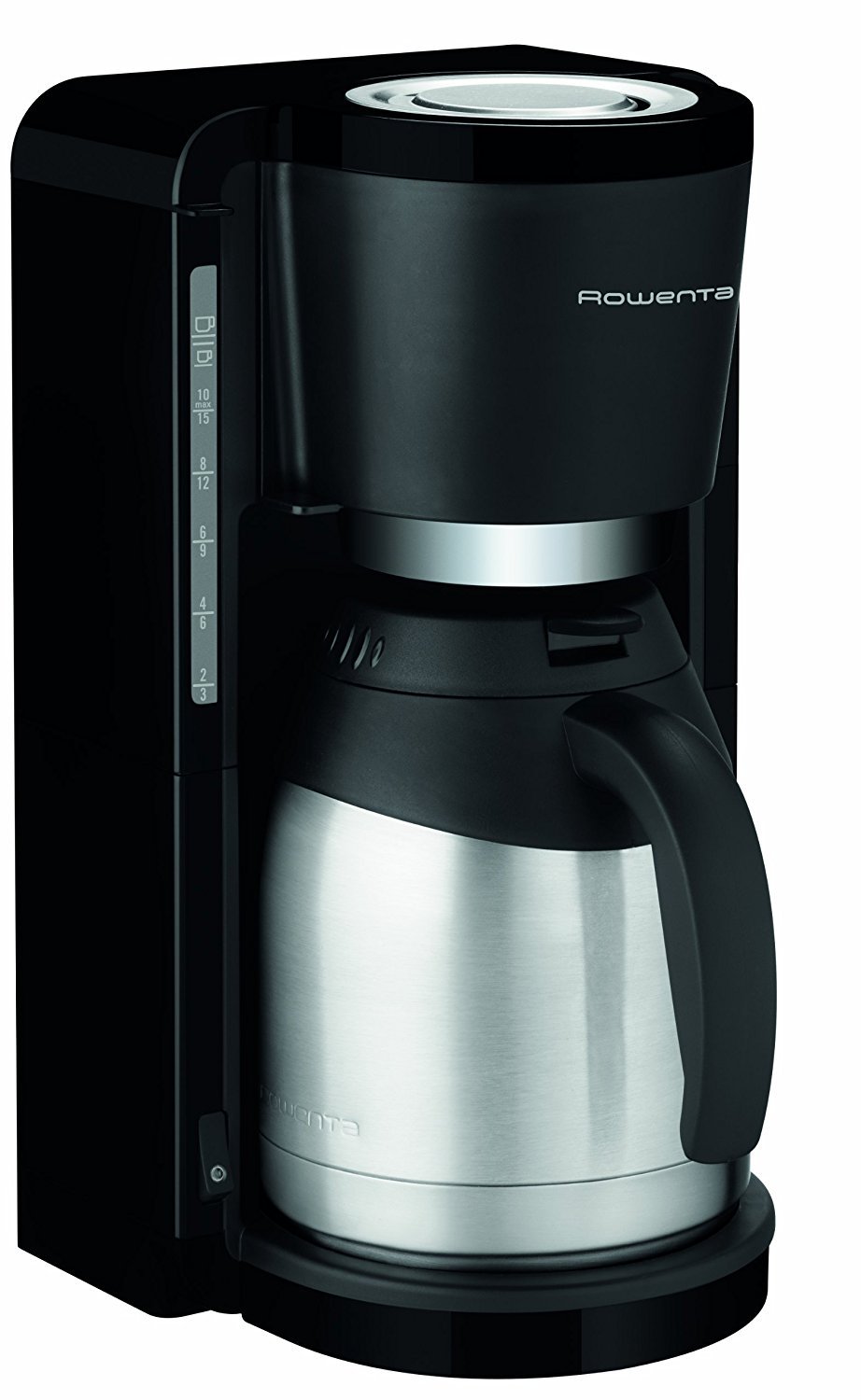

Eleman:
- A. Dlo rezèvwa ak Endikatè Nivo Dlo
- B. Detantè Filtè (detachable)
- C. Thermal Carafe with Lid
- D. Sou entènèt jwèt Brewing Head
- E. ON/OFF Switch with Indicator Light
- F. Cord Storage (underneath the unit)
Enstalasyon
1. Debake
- Retire tout materyèl anbalaj ak etikèt ki nan machin kafe a avèk prekosyon.
- Ensure all components listed in the Product Overview seksyon yo prezan e yo pa domaje.
2. Netwayaj Premye Itilizasyon an
Before brewing coffee for the first time, it is recommended to clean the appliance:
- Fill the water reservoir with cold water up to the MAX level.
- Place an empty filter paper (size 1x4 or similar) in the filter holder.
- Place the thermal carafe with its lid closed on the warming plate.
- Press the ON/OFF switch to start a brewing cycle without coffee.
- Once the cycle is complete, discard the water from the carafe and rinse the carafe and filter holder thoroughly.
3. Plasman
Place the coffee maker on a flat, stable, heat-resistant surface, away from water sources and heat. Ensure adequate ventilation around the unit.
Enstriksyon Operasyon
1. Ranpli rezèvwa dlo a
- Louvri kouvèti rezèvwa dlo a.
- Fill the reservoir with fresh, cold water using the thermal carafe. The water level indicator on the side of the reservoir shows the number of cups. Do not exceed the MAX fill line.
- Close the reservoir lid securely.
2. Adding Ground Coffee
- Remove the filter holder from the coffee maker.
- Insert a paper filter (size 1x4 or similar) into the filter holder.
- Add the desired amount of ground coffee into the paper filter. A general guideline is one tablespoon of coffee per cup, but adjust to your preference.
- Place the filter holder back into its position in the coffee maker. Ensure it is seated correctly.
3. Placing the Thermal Carafe
- Ensure the lid is properly closed on the thermal carafe.
- Place the thermal carafe onto the warming plate. The drip-stop system will engage when the carafe is removed and disengage when it is placed back, preventing drips.
4. Starting the Brewing Process
- Ploge fil elektrik la nan yon priz elektrik apwopriye.
- Press the ON/OFF switch. The indicator light will illuminate, signifying that the brewing process has started.
- The coffee maker will automatically brew the coffee.
5. After Brewing
- Once the brewing cycle is complete, the coffee maker will automatically shut off. The indicator light will turn off.
- The thermal carafe is designed to keep your coffee warm for up to 4 hours.
- To serve, simply pour from the thermal carafe.
- Debranche aparèy la nan priz kouran an apre w fin itilize li.
Netwayaj ak antretyen
Netwayaj regilye asire pi bon pèfòmans epi pwolonje lavi machin kafe ou a.
1. Netwayaj chak jou
- Toujou debranche machin kafe a epi kite l refwadi nèt anvan ou netwaye li.
- Remove the used paper filter and discard the coffee grounds.
- Wash the filter holder and the thermal carafe (including its lid) with warm, soapy water. Rinse thoroughly and dry. These parts are generally not dishwasher safe; refer to specific care instructions for the carafe.
- Siye eksteryè a nan machin nan kafe ak anonsamp twal. Pa sèvi ak pwodui netwayaj abrazif oswa kousinen.
2. Detartraj
Mineral deposits from water can build up over time, affecting performance. Descale your coffee maker regularly, depending on water hardness and frequency of use (e.g., every 2-4 months).
- Prepare a descaling solution according to the manufacturer's instructions (e.g., white vinegar and water, or a commercial descaling agent).
- Vide solisyon detartran an nan rezèvwa dlo a.
- Mete karafe tèmik vid la sou plak chofe a.
- Kòmanse yon sik preparasyon kafe. Kite mwatye solisyon an tranpe, apresa etenn machin kafe a epi kite l repoze pandan 15-20 minit pou solisyon an ka aji.
- Remete machin kafe a pou l fini sik preparasyon an.
- After the descaling cycle, run at least two full cycles with fresh, cold water to rinse the appliance thoroughly.
Depanaj
Si ou rankontre pwoblèm ak machin kafe ou a, gade pwoblèm ak solisyon komen sa yo:
| Pwoblèm | Kòz posib | Solisyon |
|---|---|---|
| Kafe pa koule. | Appliance not plugged in; ON/OFF switch not pressed; no water in reservoir. | Ensure plug is securely in outlet; press ON/OFF switch; fill water reservoir. |
| Kafe pa cho ase. | Appliance needs descaling; carafe lid not properly closed. | Descale the coffee maker; ensure carafe lid is tightly closed to maintain temperature. |
| Dlo koule soti nan inite a. | Water reservoir overfilled; filter holder not correctly seated; drip-stop mechanism blocked. | Do not exceed MAX fill line; ensure filter holder is firmly in place; clean drip-stop area. |
| Coffee overflows from the filter holder. | Too much coffee grounds; filter paper not correctly placed; coffee grounds too fine; appliance needs descaling. | Reduce coffee quantity; ensure filter paper is properly seated; use medium-ground coffee; descale the appliance. |
Espesifikasyon
- Modèl: CT 3818
- Mak: Rowenta
- Kapasite: 1.25 lit (10-15 tas)
- Pouvwa: 870 Watts (W) (Note: Original data indicated 870 KW, which is a likely typo. 870W is assumed based on typical coffee maker power consumption.)
- Voltage: 230 Volts
- Materyèl: Stainless Steel (carafe), Plastic (housing)
- Koulè: Nwa/Ajan
- Dimansyon (D x W x H): 26.5 cm x 27 cm x 38.5 cm
- Pwa: 2.2 Kilogram
- Karakteristik espesyal: Water level indicator, Cord storage, Drip-stop system, Automatic shut-off
Garanti ak sipò
This Rowenta appliance is designed for durability and performance. Rowenta offers a commitment to repairability for 2 ane for spare parts availability from the date of purchase.
For any questions, concerns, or to obtain service under warranty, please contact Rowenta customer service. You can find contact information on the official Rowenta websit entènèt la oubyen atravè revandè w la.
Tanpri kenbe prèv ou achte pou reklamasyon garanti.