Entwodiksyon
The Plantronics M25 Bluetooth headset is designed for convenient wireless communication and audio playback. It features an extended battery life with DeepSleep mode, ensuring readiness when needed. The headset provides whispered alerts for battery status and connection information, and allows for listening to music, internet radio, or navigation directions while managing calls.
Kontni pake
Verifye ke tout atik yo prezan nan pakè ou a:
- Plantronics M25 Bluetooth Headset
- AC Charger (100-240v)
- Klip sou zòrèy
Enstalasyon
1. Chaje Headset la
Before first use, fully charge the headset. Connect the AC charger to the headset's charging port. The indicator light will change to show charging status and turn off or change color when fully charged. A full charge can provide up to 5 months of readiness in DeepSleep mode.
2. Pairing ak yon Aparèy
To pair your Plantronics M25 headset with a Bluetooth-enabled device (e.g., smartphone, tablet):
- Asire w ke kas ekoutè a chaje epi li etenn.
- Press and hold the Call button on the headset until the indicator light flashes red and blue, indicating pairing mode.
- Sou aparèy ou an, aktive Bluetooth epi chèche nouvo aparèy.
- Select "Plantronics M25" from the list of available devices.
- Si yo mande w yon kòd sekrè, antre "0000" (kat zewo).
- Once paired, the headset's indicator light will stop flashing and a voice prompt will confirm the connection.
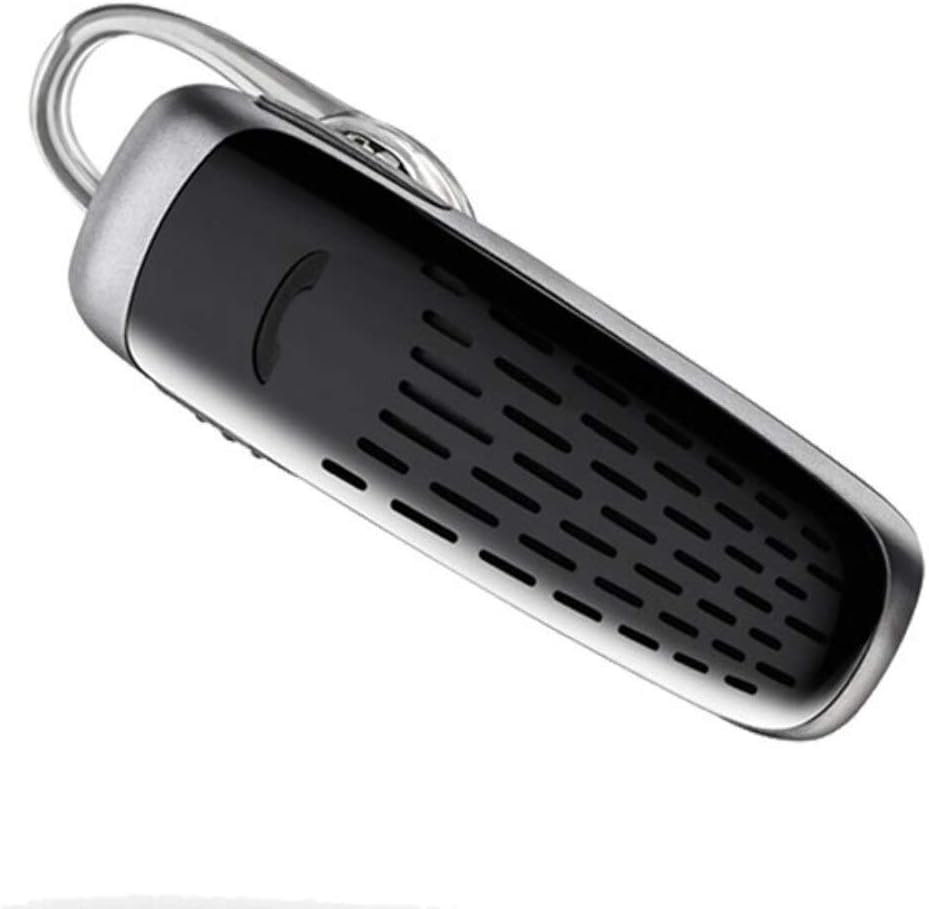
Image: The Plantronics M25 Bluetooth Headset, a compact black and silver device with an earloop, shown from an angled perspective. The call button is visible on the side.
Enstriksyon Operasyon
Power On/Off
- Pouvwa sou: Press and hold the Power button until the indicator light flashes blue.
- Pouvwa Off: Press and hold the Power button until the indicator light flashes red.
Fè ak Resevwa Apèl
- Reponn apèl: Peze bouton Rele a.
- Fini apèl: Peze bouton Rele a.
- Rejte apèl: Peze epi kenbe bouton Rele pou 2 segonn.
- Recomposition Dènye Nimewo: Peze bouton Apèl la de fwa.
Lektur odyo
The headset supports streaming audio from your device, including music, podcasts, and GPS directions.
- Jwe/Poz: Press the Call button during audio playback.
Mòd DeepSleep
The headset enters DeepSleep power-saving mode if it is disconnected from your phone for over 90 minutes. To wake it up when it's back in range (within 33 feet), simply tap the Call button.
Antretyen
- Netwayaj: Sèvi ak yon twal mou epi sèk pou netwaye kas ekoutè a. Pa sèvi ak pwodui netwayaj likid oswa ayewosòl.
- Depo: Sere kas ekoutè a nan yon kote ki fre epi sèk, lwen tanperati ekstrèm.
- Swen batri: To preserve battery life, avoid fully discharging the battery frequently. Charge the headset regularly, even if not in use.
- Rezistans dlo: Aparèy sa a se Pa reziste dlo. Avoid exposure to water or excessive moisture.
Depanaj
| Pwoblèm | Solisyon |
|---|---|
| Kas ekoutè a pa limen. | Ensure the headset is charged. Connect it to the AC charger and allow it to charge for at least 30 minutes before attempting to power on. |
| Cannot pair the headset with my device. |
|
| No audio or low audio volume. |
|
| Headset frequently disconnects. |
|
Espesifikasyon
| Karakteristik | Detay |
|---|---|
| Non modèl | Plantronics M25 |
| Koneksyon Teknoloji | Bluetooth |
| Teknoloji kominikasyon san fil | Bluetooth |
| Aparèy konpatib | Telefòn entelijan, Laptop, Odinatè Desktop, Tablèt, Oratè entelijan, Televizyon |
| Kalite kontwòl | Rele Kontwòl |
| Pwa atik | 0.3 ons (apeprè 8.5 gram) |
| Nivo rezistans dlo | Pa reziste dlo |
| Gamme frekans | 20 Hz a 20,000 Hz |
| Battery Life (DeepSleep) | Jiska 150 jou |
| Gamme Bluetooth | Jiska 10 mèt (33 pye) |
| Plasman Zòrèy | Nan Zòrèy |
| Faktè fòm | One Ear |
| Kontwòl bri | Anile aktif bri |
| Dimansyon pwodwi | 1.85 x 0.59 x 0.35 pous |
| Koulè | Nwa |
| Manifakti | Plantronics |
Garanti ak sipò
Enfòmasyon sou garanti: Please note that this product is sold with No Warranty or Return as per the provided information. Users are advised to verify product condition upon receipt.
For further assistance or inquiries, please refer to the official POLY support channels or visit their website. Contact information may be available on the product packaging or the manufacturer's official websit.
Avètisman: Espesifikasyon ak karakteristik pwodwi yo ka chanje san avètisman. Toujou gade dènye enfòmasyon manifakti a bay yo.


