1. Entwodiksyon
This manual provides essential information for the proper installation, operation, and maintenance of your Alpine VIE-X08VS 7-inch WVGA HDD Navigation and AV Integrated System. Please read this manual thoroughly before using the product to ensure safe and optimal performance. Keep this manual for future reference.
2. Enfòmasyon sou Sekirite
AVÈTISMAN: Si ou pa swiv enstriksyon sekirite sa yo, sa ka lakòz dife, chòk elektrik, oswa lòt blesi oswa domaj.
- Do not attempt to install or service this product yourself. Installation and service should be performed by qualified professionals.
- Do not operate the system in a way that distracts you from driving. Always prioritize road safety.
- Asire w tout fil elektrik yo byen konekte pou evite kous kout oswa domaj.
- Keep the unit free from moisture and extreme temperatures.
- Pa demonte oswa modifye aparèy la. Sa ka lakòz pwoblèm fonksyònman oswa blesi.
3. Pake kontni
Verifye ke tout atik yo prezan nan pakè a:
- Alpine VIE-X08VS Main Unit
- Film TV Antenna (4 front pieces)
- Hands-free Call Microphone (4m cable)
- Manyèl Itilizatè (dokiman sa a)
- Gid enstalasyon
4. Enstalasyon ak Enstalasyon
Professional installation is highly recommended for this integrated system. Incorrect installation can lead to damage to the unit or your vehicle's electrical system.
4.1. Chèk Pre-Enstalasyon
- Asire w ke batri machin nan dekonekte anvan ou kòmanse enstalasyon an.
- Confirm compatibility with your vehicle's dashboard and wiring harness.
4.2. Enstalasyon antèn
Install the included film TV antennas on the front windshield according to the separate installation guide. Ensure proper placement for optimal digital TV reception.
4.3. Plasman Mikwofòn
Mount the hands-free microphone in a location that allows clear voice pickup, typically near the driver's sun visor or rearview mirror. Route the cable discreetly to the main unit.
4.4. Initial Power-On and Settings
After installation, reconnect the battery. Upon first power-on, the system may guide you through initial setup steps, including language selection, time zone, and basic navigation preferences. Follow the on-screen prompts.
5. Operasyon Enstriksyon
The Alpine VIE-X08VS offers a comprehensive range of features. This section outlines the basic operation of key functions.
5.1. Navigation System
The 7-inch WVGA LCD provides clear map displays. The system supports both 2D and 3D map views for enhanced situational awareness. Utilize the Eco-Guide display function to support fuel-efficient driving.
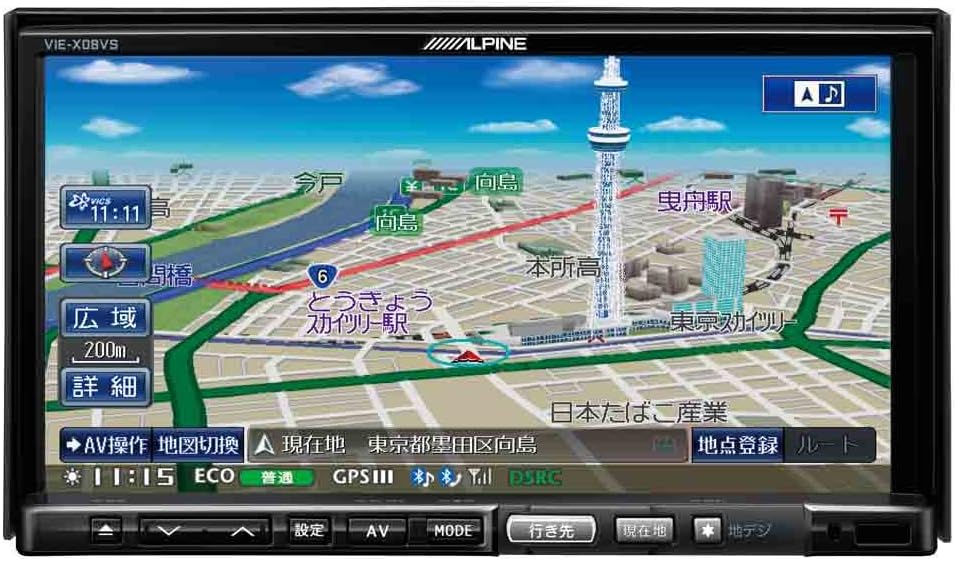
Figi 1: Devan view of the Alpine VIE-X08VS unit displaying a detailed navigation map with Tokyo Skytree visible.

Figi 2: Angle view of the Alpine VIE-X08VS unit, showing the navigation map and side profile.
5.1.1. Mizajou Kat Jeyografik
The system includes free map updates until the 2015 edition. For information on subsequent map updates, please refer to the Alpine support weboswa kontakte konsesyonè w la.
5.2. Audio/Video (AV) Features
The VIE-X08VS integrates various AV sources for your entertainment.
- HDD Music Storage: The built-in 60GB HDD is designed for audio, capable of automatically recording approximately 5,500 songs.
- Televizyon dijital: Access digital terrestrial TV broadcasts using the easy-to-use one-touch key.
- DVD-V/CD Playback: Insert DVDs or CDs into the disc slot for video and audio playback.
- Koneksyon Bluetooth: Pair your Bluetooth-enabled devices for audio streaming and hands-free calling.
- Medya USB/SD: Konekte aparèy USB yo oubyen mete kat SD pou jwe odyo ak videyo konpatib. files.
- 5.1ch Decoder: Enjoy enhanced audio quality with the built-in 5.1ch decoder.
- Rear Vision Link: Transmit high-quality video to rear monitors. This function also allows for navigation screen display and operation from the rear, enhancing the overall driving experience for passengers.
- Sony Walkman Compatibility: Connect compatible Sony Walkman devices for music playback.
5.3. Dual-Screen Display
The system supports a dual-screen display, allowing you to view both navigation and AV content simultaneously. This feature can be accessed via the on-screen menu or dedicated buttons.
6. Antretyen
Regular maintenance helps ensure the longevity and optimal performance of your Alpine VIE-X08VS unit.
6.1. Netwaye Display la
Sèvi ak yon twal mou epi sèk pou siye ekran an dousman. Pou tach ki difisil pou retire, siye yon ti kras.ampen the cloth with water or a screen-cleaning solution specifically designed for electronic displays. Avoid harsh chemicals or abrasive materials.
6.2. Netwayaj jeneral
Wipe the exterior of the unit with a soft, dry cloth. Do not allow liquids to enter the unit.
6.3. Disc Slot Care
Keep the disc slot free of dust and debris. Avoid inserting bent, scratched, or dirty discs, as this can damage the disc drive.
NAN. Depanaj
If you encounter issues with your Alpine VIE-X08VS, refer to the following common problems and solutions before contacting support.
| Pwoblèm | Kòz posib / Solisyon |
|---|---|
| Pa gen pouvwa | Check vehicle's fuse box. Ensure all power cables are securely connected. |
| Pa gen son | Verify volume level. Check speaker connections. Ensure audio source is selected correctly. |
| Pèt siyal GPS | Asire w antèn GPS la gen yon vizyon klè view of the sky. Move to an open area away from tall buildings or tunnels. |
| Aparèy Bluetooth la pa vle konekte | Ensure Bluetooth is enabled on both the unit and your device. Place devices close together. Delete previous pairings and try again. |
| Pwoblèm lèktur disk | Ensure the disc is clean and free of scratches. Verify the disc format is supported. |
8. Espesifikasyon
Detailed technical specifications for the Alpine VIE-X08VS unit:
| Karakteristik | Spesifikasyon |
|---|---|
| Manifakti | Alpine |
| Non modèl | VIE X08VS |
| Nimewo Modèl Pwodwi | VIE-X08VS |
| Dimansyon pwodwi (LxWxH) | 18.73 x 17.8 x 10 cm |
| Pwa atik | 3.2 Kilogram |
| Gwosè ekran | 7 pous |
| Kalite ekspozisyon | WVGA LCD |
| Kapasite Depo memwa | 60 GB (HDD) |
| Koneksyon Teknoloji | Bluetooth, USB |
| Sipòte Medya | DVD-V, CD, USB, SD |
| Kalite kat jeyografik | Lari |
| Kalite aliye | Panel Mount |
| Karakteristik espesyal | Hands-free calling, Digital TV, 5.1ch Decoder, Eco-Guide, Rear Vision Link |
| Kalite Veyikil konpatib | Machin pasaje |
9. Garanti ak sipò
For warranty information, please refer to the warranty card included with your product or visit the official Alpine websit la. Kenbe prèv acha ou pou reklamasyon garanti.
9.1. Sipò pou Kliyan
If you require technical assistance, have questions about your product, or need to arrange service, please contact Alpine customer support through their official websit la oswa enfòmasyon kontak yo bay nan dokimantasyon pwodwi ou a.


