1. Entwodiksyon
This manual provides detailed instructions for the proper use, installation, and maintenance of your GlobalSat RV-1000S 720P HD Video Camera. Please read this manual thoroughly before operating the device to ensure optimal performance and longevity.
The GlobalSat RV-1000S is designed to record high-definition video with a 120-degree wide-angle lens, featuring a 3D G-sensor for incident detection and a SiRF Star IV GPS chipset for location tracking. It includes a 2.5-inch TFT display for real-time viewing ak lèktur.
2. Pake kontni
Tanpri verifye ke tout atik ki nan lis anba a yo enkli nan pakè ou a:
- Main RV-1000S unit
- Charging cable (car charger)
- GPS antèn
- Manyèl enstriksyon (dokiman sa a)
3. Pwodwi souview
Familiarize yourself with the components of your RV-1000S camera:
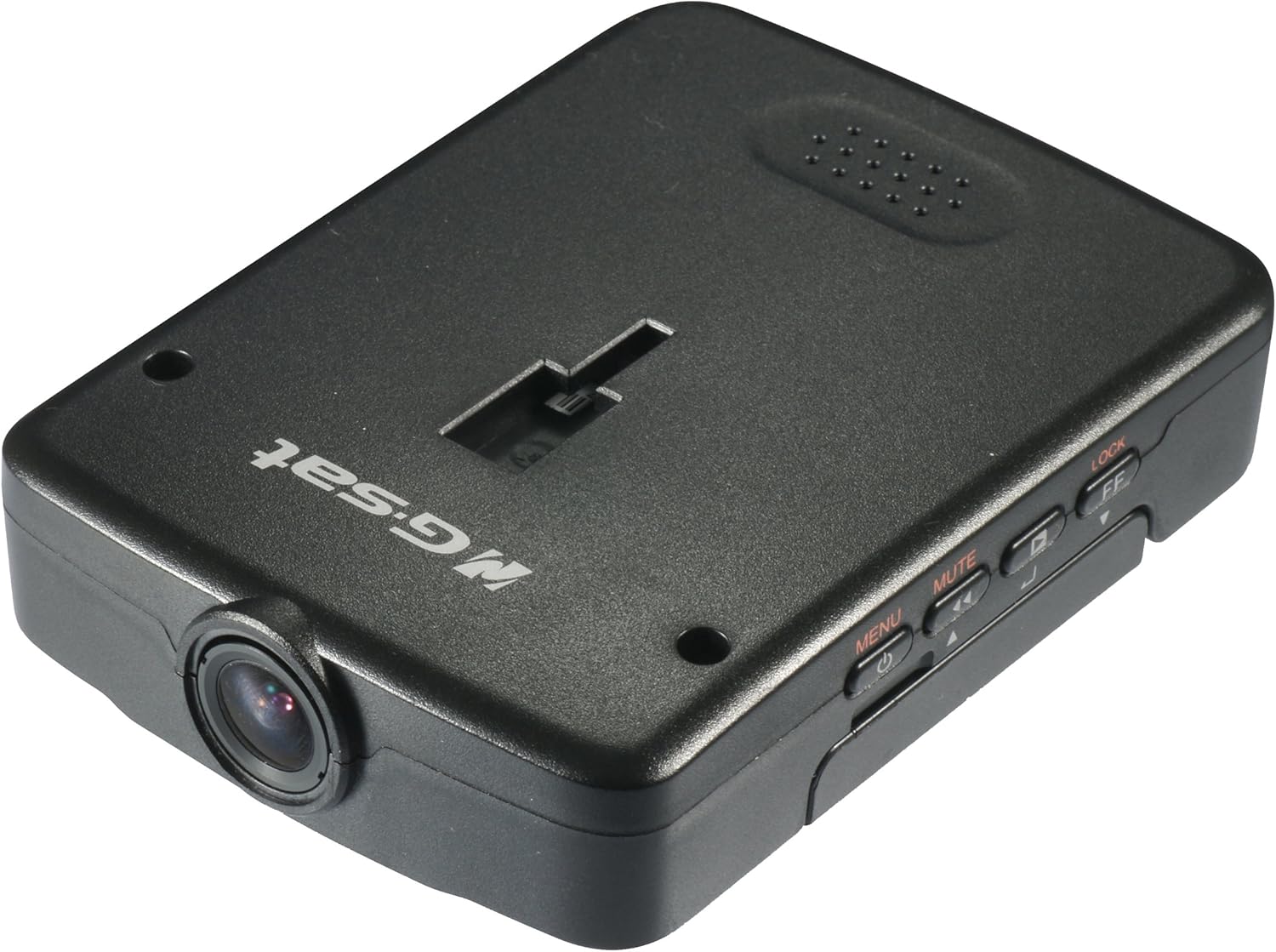
Figi 3.1: Top-desann view of the Globalsat RV-1000S HD Video Camera, showing the main unit with its lens, control buttons, and the "Globalsat" logo.

Figi 3.2: Devan view of the RV-1000S, highlighting the central camera lens. This is the primary component for video capture.
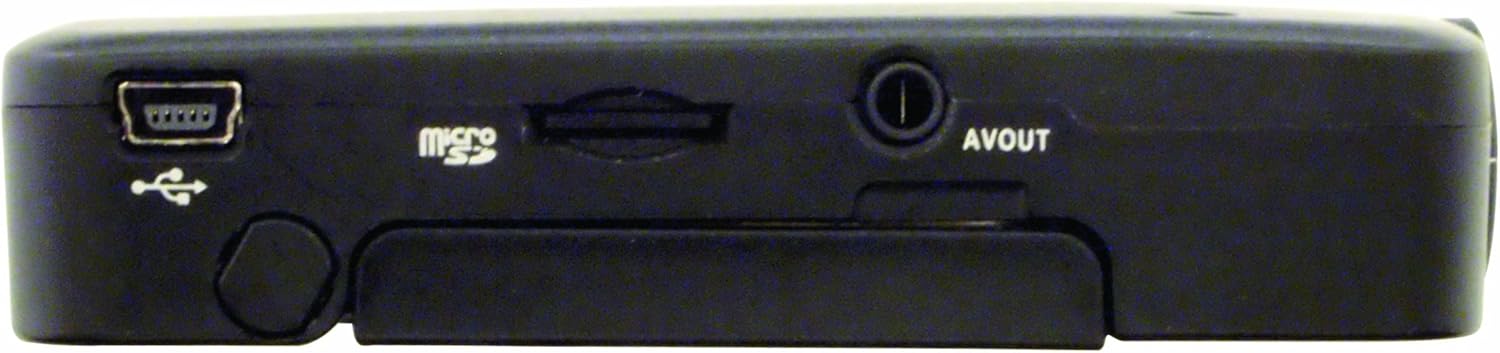
Figi 3.3: Top view of the RV-1000S, displaying the control buttons: Power/Menu, Mute, Play/Pause, and Lock/Fast Forward. These buttons are used for device control and navigation.
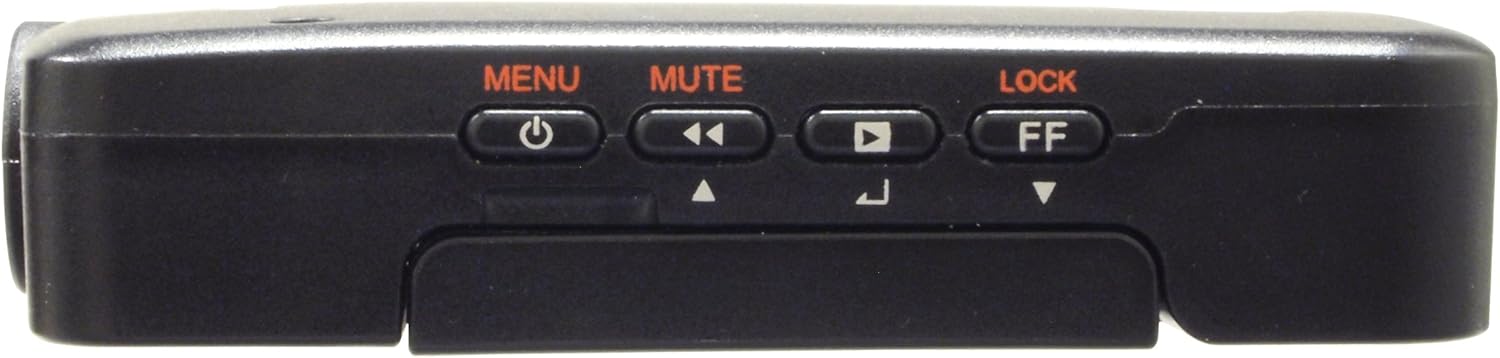
Figi 3.4: Anba view of the RV-1000S, showing the Mini-USB port for power/data, the Micro SD card slot, and the AV Out port. These ports are essential for connectivity and storage.

Figi 3.5: The RV-1000S with its 2.5-inch TFT display articulated and open, providing a clear view for real-time monitoring and video playback.
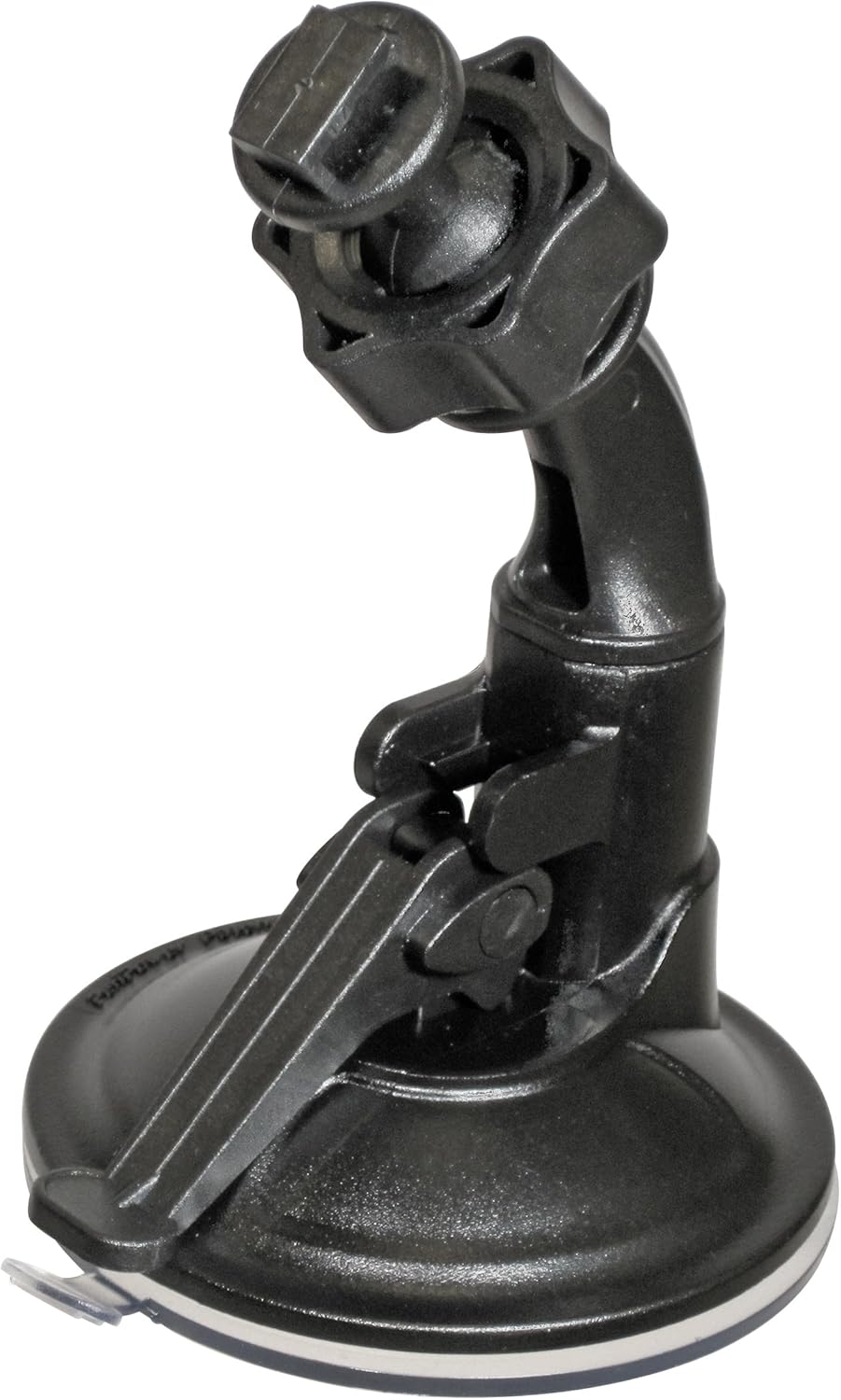
Figi 3.6: The adjustable suction cup mount for the RV-1000S, designed for secure attachment to a vehicle's windshield or dashboard.

Figi 3.7: The included car charger with a Mini-USB connector, used to power the RV-1000S and charge its internal battery via a vehicle's 12V power outlet.
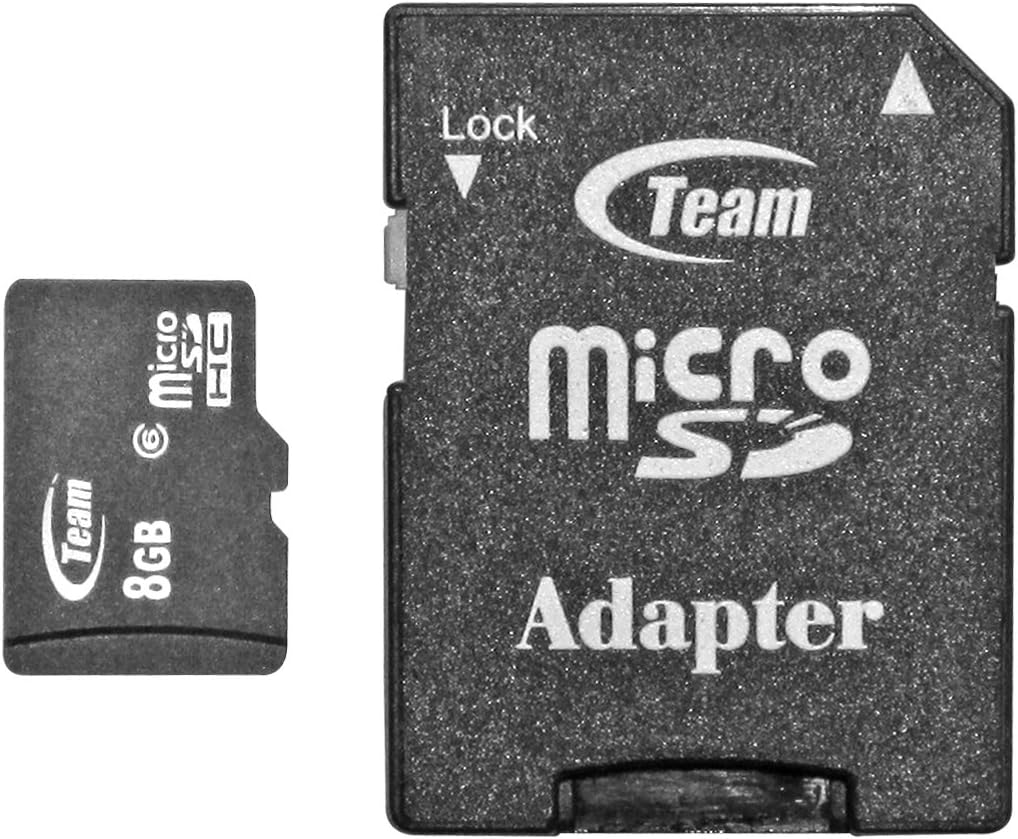
Figi 3.8: Yon ansyenample of a Micro SD card and its standard SD card adapter. The Micro SD card is inserted directly into the RV-1000S for video storage.
4. Enstalasyon
4.1. Installing the Micro SD Card
- Asire w ke aparèy la etenn.
- Locate the Micro SD card slot on the bottom of the RV-1000S (refer to Figure 3.4).
- Insert the Micro SD card into the slot with the gold contacts facing down until it clicks into place.
- Pou retire li, pouse kat la dousman jiskaske li soti.
Note: A Class 6 or higher Micro SD card (up to 32GB) is recommended for optimal recording performance.
4.2. Monte Kamera a
- Clean the desired mounting surface (e.g., windshield) thoroughly.
- Attach the suction cup mount (Figure 3.6) to the clean surface by pressing firmly and flipping the lever down to secure it.
- Slide the RV-1000S unit onto the mounting bracket until it clicks into place.
- Adjust the angle of the camera to ensure a clear view nan wout la.
4.3. Koneksyon pouvwa
- Connect the Mini-USB end of the car charger (Figure 3.7) to the Mini-USB port on the RV-1000S.
- Plug the other end of the car charger into your vehicle's 12V power outlet.
- The device will typically power on automatically when the vehicle starts and power off when the vehicle is turned off.
4.4. GPS Antenna Connection
Connect the external GPS antenna to the designated port on the RV-1000S. Position the antenna in a location with a clear view nan syèl la pou resepsyon siyal GPS optimal.
4.5. Anviwònman Inisyal (Dat/Lè)
- Peze a MENI button to access the settings menu.
- Navigate through the options using the arrow buttons (often combined with Mute/Play/Lock buttons).
- Select "Date/Time" and adjust the current date and time using the navigation buttons.
- Konfime paramèt ou yo epi sòti nan meni an.
5. Operasyon
5.1. Powering On / Off
- Otomatik: The device powers on/off with the vehicle's ignition when connected to the car charger.
- Manyèl: Peze epi kenbe la POUVWA/MENI button to manually power on or off the device.
5.2. Anrejistreman Videyo
- Once powered on, the RV-1000S typically begins recording automatically. A red recording indicator will flash on the screen.
- Pou kòmanse/sispann anrejistreman an manyèlman, peze bouton an JWE/POZ bouton.
- Recordings are saved to the Micro SD card in segments (e.g., 1, 3, or 5 minutes) based on loop recording settings.
5.3. G-Sensor Function
The built-in 3D G-sensor detects sudden impacts or rapid acceleration/deceleration. When triggered, the current video segment is automatically locked and protected from being overwritten by loop recording. This ensures critical incident footage konsève.
5.4. Manyèl File Fèmen
Pandan anrejistreman, peze la LOCK/FF button to manually lock the current video file. This prevents it from being overwritten.
5.5. Audio Mute
Peze a BÈN button to toggle audio recording on or off during video capture. An icon on the screen will indicate the audio status.
5.6. lèktur
- Stop recording if currently active.
- Peze a MENI button to enter the menu, then navigate to the playback mode.
- Sèvi ak la BÈN (anvan) ak LOCK/FF (next) buttons to browse through recorded files.
- Peze a JWE/POZ bouton pou kòmanse oswa pran yon poz lekti.
- Peze MENI ankò pou sòti nan mòd lekti a.
5.7. Navigasyon meni
Peze a MENI button to access system settings. Use the BÈN epi LOCK/FF buttons to navigate up and down through menu options. Press JWE/POZ to select an option or confirm a setting. Press MENI ankò sòti meni an.
Common settings include: Video Resolution, Loop Recording Duration, G-Sensor Sensitivity, Date/Time, Format SD Card, Language, etc.
6. Antretyen
6.1. Netwaye Aparèy la
- Ensure the device is powered off and disconnected from power.
- Sèvi ak yon twal mou epi sèk pou siye deyò kamera a.
- Pou lantiy la, sèvi ak yon twal espesyal pou netwaye lantiy ak yon solisyon pou evite reyur.
- Pa sèvi ak pwodwi chimik piman bouk oswa pwodui netwayaj abrazif.
6.2. Formatting the Micro SD Card
Regularly formatting the Micro SD card (at least once a month) can help maintain optimal recording performance and prevent data corruption. This can usually be done through the device's menu settings. Avètisman: Fòmataj la ap efase tout done ki sou kat la. Fè yon kopi enpòtan files anvan fòma.
6.3. Mizajou Firmware
Periodically check the GlobalSat official websit la pou nenpòt mizajou firmwèr ki disponib. Mizajou firmwèr yo ka amelyore pèfòmans, ajoute nouvo fonksyonalite, oswa ranje pinèz. Swiv enstriksyon ki vini ak pake mizajou firmwèr la ak anpil atansyon.
NAN. Depanaj
| Pwoblèm | Kòz posib | Solisyon |
|---|---|---|
| Aparèy pa limen. | No power supply; faulty cable; dead battery. | Check car charger connection; try a different power outlet; ensure vehicle ignition is on; charge the device for a period. |
| Anrejistreman an sispann sanzatann. | SD card full; SD card error; power interruption. | Format the SD card; replace the SD card; ensure stable power connection. |
| Move kalite videyo. | Lantiy sal; kondisyon limyè fèb; move reglaj rezolisyon. | Clean the lens; ensure adequate lighting; check video resolution settings in the menu. |
| Siyal GPS la pa resevwa. | GPS antenna not connected; antenna obstructed; poor satellite visibility. | Ensure GPS antenna is securely connected; reposition antenna for clear sky view; wait longer for signal acquisition. |
| Bouton yo pa reponn. | Aparèy bloke. | Perform a soft reset (if available, usually a small reset button) or power cycle the device by disconnecting and reconnecting power. |
8. Espesifikasyon
| Karakteristik | Detay |
|---|---|
| Nimewo Modèl | RV-1000S |
| Rezolisyon Capture Videyo | 720p HD |
| Ang lantiy | 120-degrees Wide Angle |
| GPS Chipset | SiRF Star IV |
| G-Capteur | 3D G-Capteur |
| Ekspozisyon ekran | 2.5 Inches TFT |
| Kalite Depo | Micro SD (up to 32GB, Class 6 or higher recommended) |
| Dimansyon pwodwi | 3.85 x 0.82 x 2.81 pous |
| Pwa atik | 4.2 ons |
| Koulè | Nwa |
| Manifakti | USGlobalSat, Inc. |
| Premye Dat ki disponib | 25 me 2012 |
9. Garanti ak sipò
9.1. Enfòmasyon sou Garanti
GlobalSat products are manufactured to the highest quality standards. For specific warranty terms and conditions, please refer to the warranty card included with your product or visit the official GlobalSat websit la. Kenbe resi acha ou kòm prèv acha pou reklamasyon garanti.
9.2. Sipò pou Kliyan
If you encounter any issues not covered in this manual or require further assistance, please contact GlobalSat customer support. Contact information can typically be found on the GlobalSat official websit la oubyen sou anbalaj pwodwi a.
For the most up-to-date support resources, including FAQs and driver downloads, please visit: www.globalsat.com.tw/support


