1. Pwodwi souview
The Brady BMP51 Voice and Data Communications Label Maker Starter Kit is designed for efficient and reliable labeling in various environments. This kit provides a comprehensive solution for creating durable labels for voice and data communications, electrical identification, facility and safety marking, lean identification, and laboratory identification.
The BMP51 label maker features thermal transfer print technology with a 300 dpi resolution, supporting single-color printing on over 190 stock parts materials. It offers multi-line print capabilities and optional PC connectivity for advanced label design and data management. The printer is built for portability and ease of use, ensuring high-quality labels for critical identification needs.
2. Konpozan ki enkli
The Brady BMP51 Voice and Data Communications Starter Kit includes the following items:
- BMP51 Printer
- USB kab
- Hardcase for storage and transport
- Gid Quick Start
- Adaptè AC/Charjè Batri
- Li-ion batri pake
- Label Cartridges: M-21-427, M-30-422, MC-475-412, MC-1000-595-YL-BK, MC-1500-595-WT-BK

Figure 2.1: All components included in the Brady BMP51 Voice and Data Communications Starter Kit, including the printer, hardcase, cables, power adapter, battery, and various label cartridges.
3. Enstalasyon
3.1 Enstalasyon ak Chaje Batri
- Open the battery compartment cover on the back of the BMP51 printer.
- Insert the Li-ion battery pack, ensuring proper orientation.
- Fèmen kouvèti lòj batri a byen.
- Connect the AC Adapter/Battery Charger to the printer and a power outlet to charge the battery before first use.
3.2 Label Cartridge Installation
- Open the label compartment cover on the top of the BMP51 printer.
- Insert the desired label/ribbon cartridge into the compartment. The printer automatically detects the cartridge type and calibrates.
- Fèmen kouvèti konpatiman etikèt la.
The BMP51 utilizes smart cartridges, eliminating the need for manual calibration when changing supplies.
4. Operasyon Enstriksyon
4.1 Basic Label Creation and Printing
- Power on the BMP51 printer.
- Use the QWERTY keypad to enter your desired label text.
- The large graphical display provides a preview of your label, including font size, rotation, and remaining supply.
- Utilize built-in templates and auto-formatting features for quick label design.
- Press the 'Print' button to print the label.

Figure 4.1: A technician operating the Brady BMP51 label maker to create labels for equipment within a server rack, demonstrating its portability and ease of use in field applications.
4.2 Advanced Connectivity and Label Design
The BMP51 offers multiple connectivity options for enhanced label creation:
- Koneksyon USB: Connect the printer to a PC using the provided USB cable for use with Brady's LabelMark software. This allows for expanded label design options and data management, including importing data from Excel files.
- Bluetooth & Wi-Fi Connectivity: Utilize the Brady Mobile apps on your smartphone or tablet to design, edit, and print labels wirelessly. These apps support importing MS Excel files, saving label files on mobile devices, and include built-in barcoding, symbols, and pictograms.
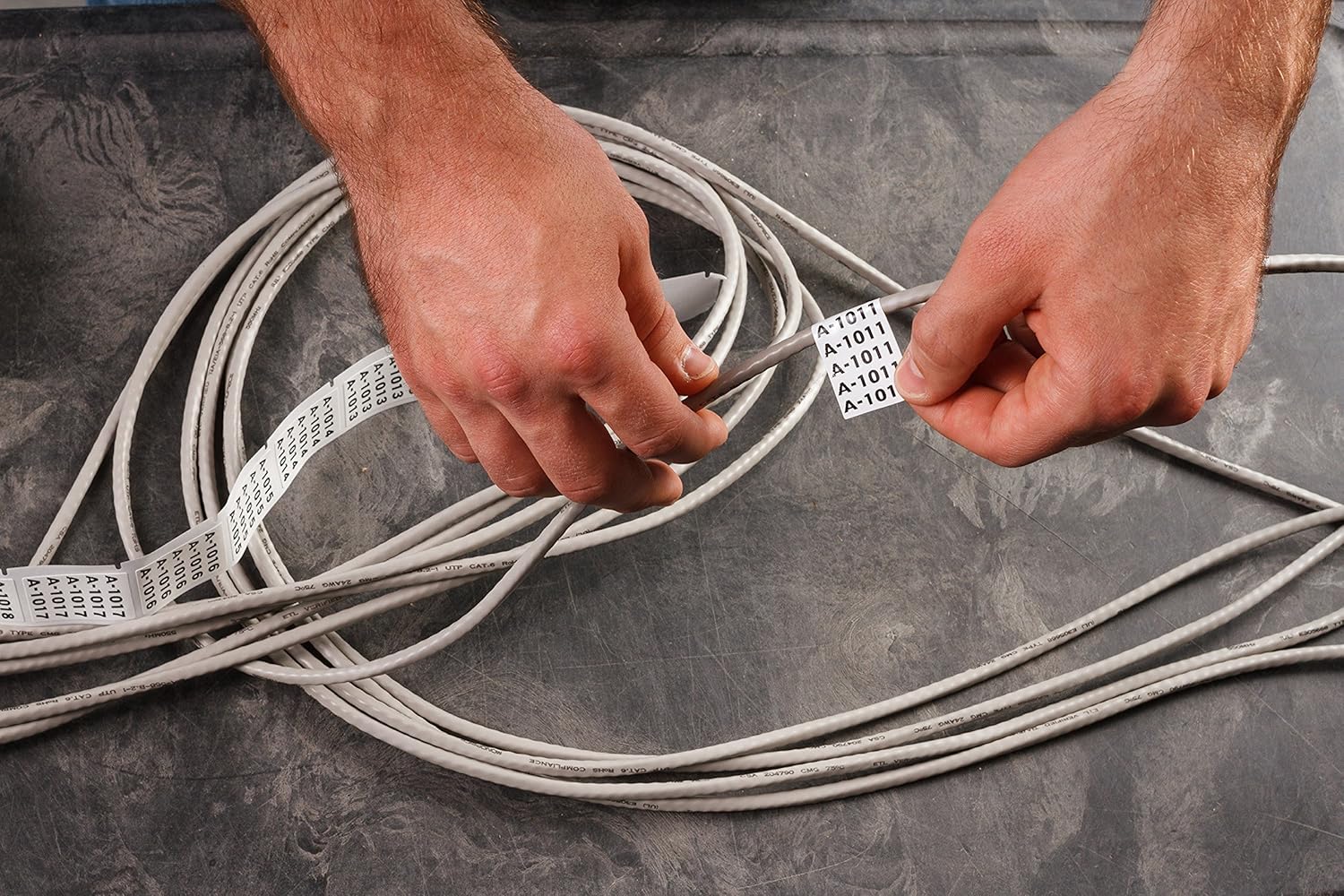
Figure 4.2: Close-up of hands applying self-laminating labels, printed by the BMP51, to multiple network cables. This illustrates the practical application of the labels for cable identification.

Figure 4.3: A row of network ports, each clearly identified with a label printed by the Brady BMP51, showcasing the clarity and durability of the labels for organized infrastructure.
4.3 Official Product Video: BMP51 Overview
Videyo 4.1: Yon ofisyèl finiview of the Brady BMP51 label maker, demonstrating its features, ease of use, and various applications in different work environments. This video highlights the printer's capabilities for fast and easy label creation.
5. Antretyen
Regular maintenance ensures optimal performance and longevity of your Brady BMP51 label maker.
5.1 Netwaye aparèy pou enprime a
- Periodically clean the internal components of the printer, especially the print head and feed mechanism.
- Use isopropyl alcohol and compressed air to remove dust, label adhesive residue, and small label fragments.
- Ensure the printer is powered off and disconnected from any power source before cleaning.
- For stubborn debris, a toothpick or tweezers may be used carefully to extract fragments from the feed mechanism.
Proper cleaning helps prevent inconsistent feeding, printing errors, and extends the life of the printer.
NAN. Depanaj
This section addresses common issues you might encounter with your BMP51 label maker.
- Inconsistent Feeding or Stopping Mid-Print: This is often caused by dust, label glue, or small label fragments accumulating within the printer. Refer to the Maintenance section for cleaning instructions.
- Backfeeding or Skipping Labels: Similar to inconsistent feeding, this can be due to internal debris interfering with the feed mechanism. Clean the printer thoroughly.
- "Out of Media" or "Invalid Media" Error Messages:
- Ensure the label cartridge is correctly installed and securely seated.
- Verify that the cartridge is not empty.
- Tcheke pou nenpòt obstak nan chemen etikèt la.
- If the issue persists after checking, the cartridge might be faulty or the printer's sensors may require cleaning.
- "Cut while printing" Error: This error may indicate wear and tear on the internal cutting mechanism. If regular cleaning does not resolve the issue, contact customer support for service options.
For further assistance, please refer to the Support section.
7. Espesifikasyon
| Karakteristik | Detay |
|---|---|
| Non modèl | BMP51 |
| Mak | Brady |
| Teknoloji Enpresyon | Transfè tèmik |
| Enprime Rezolisyon | 300 dpi |
| Sòti enprimant | Koulè sèl |
| Koneksyon Teknoloji | Bluetooth, USB, Wi-Fi |
| Karakteristik espesyal | Pòtab |
| Gwosè Maksimòm Medya | 25 inches (max roll length) |
| Supported Label Materials | Over 190 stock parts materials, including continuous and die-cut labels, heat-shrink tubing, self-laminating labels, raised profile, and durable vinyl. |
| Sous pouvwa | AA Batteries, Rechargeable Li-ion Battery Pack, AC Power Supply |
| Dimansyon pwodwi | 20 x 20 x 10 pous |
| Pwa atik | 14.9 liv |
| Koulè | Ble |
8. Enfòmasyon sou Garanti
The Brady BMP51 Label Maker Starter Kit includes a one-year limited warranty. For specific terms and conditions, please refer to the warranty documentation provided with your product or contact Brady customer support.
9. Sipò
For additional support, technical assistance, or to inquire about replacement parts and accessories, please visit the official Brady website or contact their customer service department. You can also refer to the Quick Start Guide included in your kit for immediate assistance.
Online resources and contact information can typically be found on the Brady Worldwide websit.


