1. Entwodiksyon
This user manual provides comprehensive instructions for the installation, operation, and maintenance of the Televes 5232 R-TV Separator SCATV Socket. Designed for efficient signal distribution, this socket ensures reliable connectivity for your television and radio systems. Please read this manual thoroughly before installation and use.
2. Enfòmasyon sou Sekirite
Toujou obsève prekosyon sekirite sa yo pou evite domaje aparèy la oswa blese tèt ou:
- Ensure power is disconnected from the main supply before performing any installation or maintenance.
- Pa ekspoze aparèy la nan imidite oswa tanperati ekstrèm.
- Only use appropriate tools for installation.
- Si ou pa sèten sou nenpòt etap enstalasyon, konsilte yon teknisyen kalifye.
- Kenbe soti nan atenn timoun yo.
3. Pwodwi souview
3.1. Karakteristik
The Televes 5232 SCATV Separator Socket is engineered for robust performance and ease of installation. Key features include:
- Quick and Secure Crimping: Designed for efficient and reliable cable termination.
- Firm Screw-like Fastening: Ensures a stable and durable connection.
- F-Connector Type Guide: Facilitates precise insertion of the live conductor.
- Wide Conductor Length Margin (5-15 mm): Minimizes the risk of short circuits between the live conductor and the cable mesh.
- 150° Opening Flange: Located on the upper part for flexible installation.
- Toothed Flange Design: Features 3 rows of 9 mm teeth for perfect and secure mesh fastening.
- Highly Practical and Superior Quality: Built for long-lasting performance and user convenience.
3.2. Eleman yo
The Televes 5232 socket consists of a metal mounting frame and a plastic cover plate with clearly marked TV and R (Radio) ports.

Figi 1: Plis paseview of the Televes 5232 SCATV R-TV Separator Socket, with its cover and mounting frame.
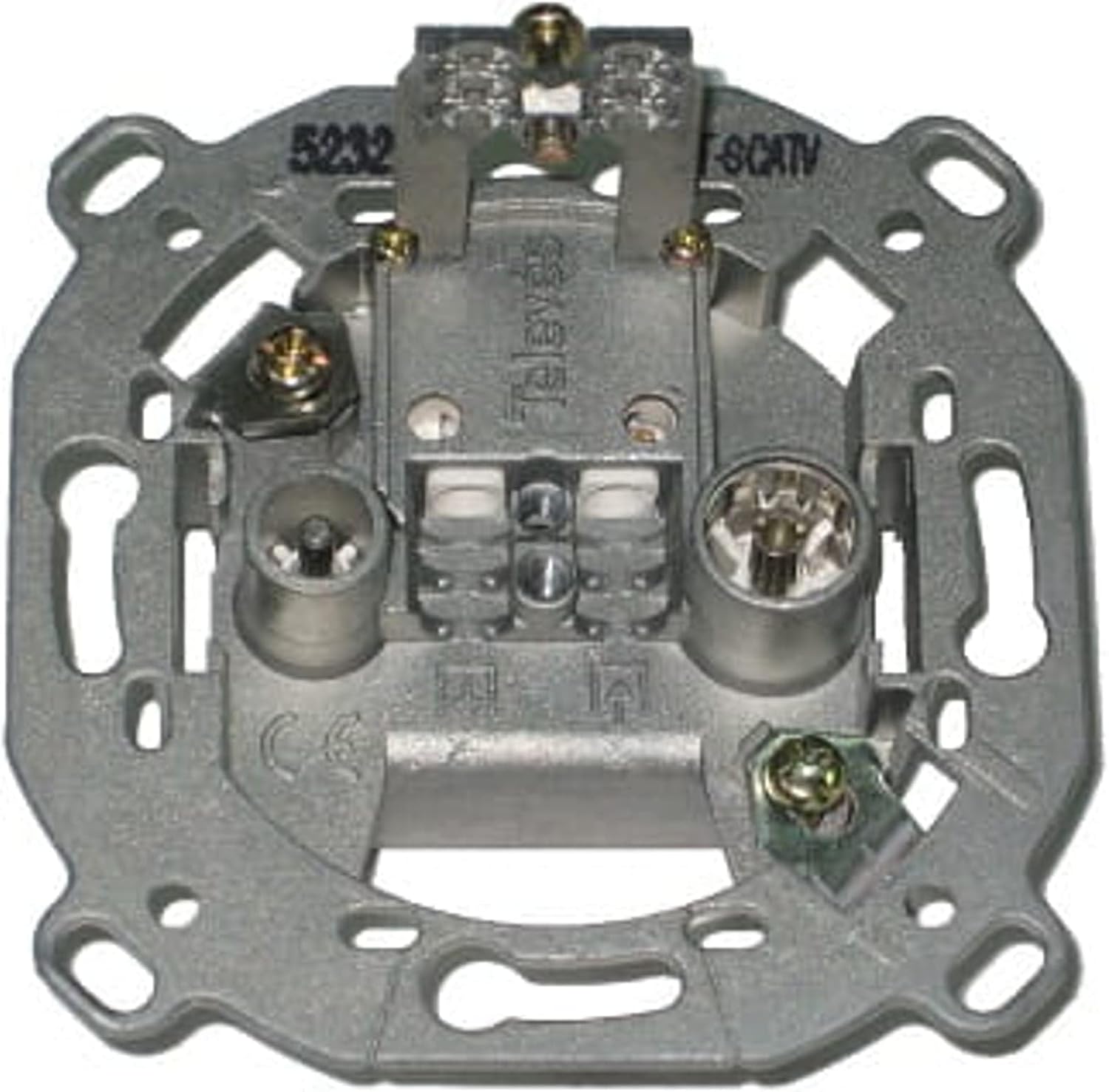
Figi 2: Detaye view of the metal mounting frame, highlighting the internal wiring terminals and model identification.

Figure 3: Front cover plate of the socket, indicating the TV and Radio output ports.
4. Enstalasyon ak Enstalasyon
Follow these steps for proper installation of your Televes 5232 SCATV R-TV Separator Socket:
- Preparasyon: Ensure the main power supply to the installation area is switched off. Prepare the coaxial cable by stripping the outer jacket, exposing the braiding (mesh), and the inner conductor. Ensure the inner conductor length is between 5-15 mm to prevent short circuits.
- Koneksyon kab: Insert the prepared coaxial cable into the F-connector type guide on the metal mounting frame (refer to Figure 2). Use the quick and secure crimping mechanism to firmly fasten the cable. The flange with 3 rows of 9 mm teeth will ensure perfect mesh fastening.
- Monte ankadreman an: Secure the metal mounting frame into the wall box using appropriate screws.
- Attaching the Cover Plate: Once the frame is securely mounted and cables are connected, snap the white plastic cover plate onto the metal frame. Ensure it clicks into place firmly.
- Koneksyon final: Connect your television to the port labeled 'TV' and your radio to the port labeled 'R' on the cover plate using appropriate coaxial cables.
After installation, restore power and test the signal reception on your connected devices.
5. Operasyon Enstriksyon
The Televes 5232 SCATV R-TV Separator Socket is a passive device that requires no active operation. Once correctly installed and connected, it functions automatically to separate the incoming signal into TV and Radio outputs.
- Connect your television's antenna input to the 'TV' port.
- Connect your radio's antenna input to the 'R' port.
- Ensure all connections are secure to maintain optimal signal quality.
6. Antretyen
The Televes 5232 SCATV R-TV Separator Socket requires minimal maintenance. To ensure its longevity and optimal performance:
- Netwayaj: Periodically wipe the exterior of the socket with a soft, dry cloth. Do not use abrasive cleaners or solvents.
- Tcheke Koneksyon: Occasionally check that all connected cables are securely fastened to the 'TV' and 'R' ports. Loose connections can lead to signal degradation.
- Kondisyon anviwònman: Ensure the socket is not exposed to excessive moisture, dust, or extreme temperatures, which could affect its performance.
NAN. Depanaj
If you experience issues with your Televes 5232 SCATV R-TV Separator Socket, refer to the following common problems and solutions:
| Pwoblèm | Kòz posib | Solisyon |
|---|---|---|
| No TV/Radio signal | Loose cable connection, faulty cable, issue with the main antenna/signal source. | Check all cable connections at the socket and to your devices. Ensure the main antenna or signal source is functioning correctly. Try replacing the coaxial cables. |
| Poor signal quality (e.g., snowy picture, static radio) | Loose connections, damaged cables, external interference, weak input signal. | Verify all connections are tight. Inspect cables for damage. Ensure the input signal strength is adequate. Consider using higher quality shielded cables. |
| Only one output (TV or Radio) working | Faulty cable connected to the non-working output, incorrect port usage. | Ensure the correct device is connected to the 'TV' and 'R' ports. Test the cable connected to the non-working output with another device or replace it. |
If the problem persists after trying these solutions, contact Televes customer support or a qualified technician.
8. Espesifikasyon
Detailed technical specifications for the Televes 5232 R-TV Separator SCATV Socket:
- Manifakti: Televés
- Modèl: 5232
- Dimansyon (L x W x H): Approximately 17.3 x 15.2 x 8.1 cm (as per package dimensions)
- Pwa: Approximately 1.04 kg (as per package weight)
- Kalite konektè: IEC Male (TV), IEC Female (FM)
8.1. Attenuation Values (dB)
The following table provides the typical attenuation values for different frequency bands:

Figure 4: Technical table detailing attenuation (Tłumienie) in dB across various frequency bands (Pasmo) for the Televes 5232.
| Sòti | Bann | Frekans (megaèrts) | Atenuasyon (dB) |
|---|---|---|---|
| TV (Male IEC) | TV | 5...65 | <8 (K.Zwrt. FM) |
| TV (Male IEC) | TV | - | 0.5 (televizyon) |
| FM (Female IEC) | FM | - | 3 (FM) |
| TV (Male IEC) | UHF | 470...862 | 0.5 (UHF) |
Note: Values are typical and may vary slightly depending on installation conditions.
9. Garanti ak sipò
For warranty information, please refer to the terms and conditions provided by your retailer or the official Televes website. If you require technical assistance or have questions regarding the Televes 5232 SCATV R-TV Separator Socket, please contact your point of purchase or Televes customer support.
Televes Contact Information: Tanpri vizite www.televes.com for regional contact details and support resources.


