1. Pwodwi souview
The Goobay 95175 is a wall-mounted infrared motion detector designed for both indoor and outdoor applications. It features a 180-degree detection area and a range of up to 12 meters, making it suitable for automatically switching lights, lamps, and LEDs. Its IP44 rating ensures protection against splashing water, allowing for reliable operation in outdoor environments.
This sensor accurately detects the movement of people and animals, particularly effective in darkness or low-light conditions. The sensor head is rotatable and tiltable, enabling optimal adjustment of the detection area to suit specific requirements.
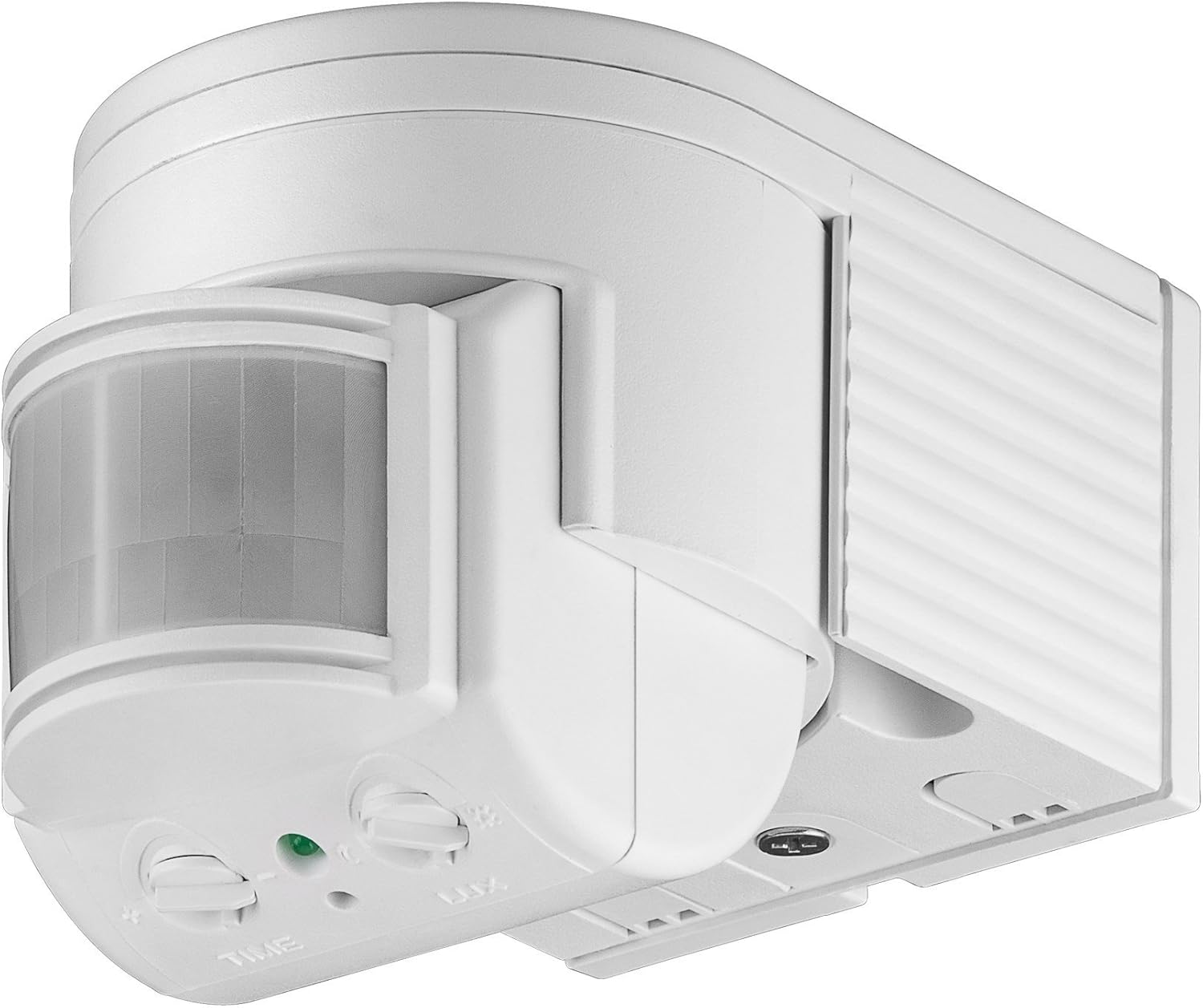
Image 1: Goobay 95175 Infrared Motion Detector. This image shows the white, wall-mounted motion detector with its adjustable sensor lens and control knobs for time and light sensitivity.
2. Enstriksyon Sekirite
- Sekirite elektrik: Installation and maintenance must be performed by a qualified electrician in accordance with local electrical codes and regulations.
- Dekoneksyon pouvwa: Always disconnect power to the circuit at the main fuse box or circuit breaker before performing any installation, wiring, or maintenance.
- Voltage: Asire vol opere atage of 230V (AC) is correctly supplied.
- Evalyasyon IP44: The device is protected against splashing water (IP44). Do not immerse in water or expose to direct high-pressure water jets.
- Montaj: Mount the device securely to a stable surface.
- Timoun: Kenbe aparèy la pa rive nan men timoun yo.
3. Pwodwi Features
- Ang deteksyon: 180 degre.
- Ranje deteksyon: Jiska 12 mèt.
- Klas pwoteksyon: IP44 (splash-proof), suitable for outdoor use.
- Ajisteman Capteur: Rotatable and tiltable sensor head for precise area coverage.
- Sansiblite limyè: Reglabl soti nan 3 luks (fènwa) rive nan 2000 luks (lajounen).
- Dire operasyon: Adjustable from 10 seconds to 420 seconds (7 minutes).
- Chanje Kapasite: Maximum 300W, minimum 1W.
- Opere Voltage: 230V (AC).
- Wotè enstalasyon: Recommended between 1.8 meters and 2.5 meters.
4. Enstalasyon ak Enstalasyon
This motion detector is designed for surface wall mounting. Ensure the mounting location is stable and provides the desired detection coverage.
4.1 Mounting Location Considerations
- Avoid mounting near heat sources (e.g., vents, direct sunlight) that could cause false triggers.
- Do not point the sensor directly at moving objects like trees or busy roads if not desired.
- The recommended installation height is between 1.8 m and 2.5 m for optimal performance.
4.2 Enstriksyon fil elektrik
- Dekonekte pouvwa: Koupe kouran prensipal la nan zòn enstalasyon an nan disjonktè a.
- Prepare Fil: Strip the insulation from the electrical wires (Live, Neutral, Load) according to standard electrical practices.
- Konekte fil yo: Use the screw terminals inside the detector to connect the wires. Typically:
- Connect the Live (L) wire from the power supply to the Live terminal on the detector.
- Connect the Neutral (N) wire from the power supply to the Neutral terminal on the detector.
- Connect the Load (L') wire (to the light fixture) to the Load terminal on the detector.
- Sekirize fil elektrik: Asire w ke tout koneksyon yo sere epi an sekirite.
- Detektè Mòn: Secure the detector to the wall using appropriate screws and anchors.
- Retabli pouvwa: Yon fwa enstalasyon an fini epi li verifye, retabli kouran an nan sikwi a.
5. Operasyon Enstriksyon
The Goobay 95175 motion detector features adjustable settings for light sensitivity and operating duration.
5.1 Adjusting Light Sensitivity (LUX)
The 'LUX' knob controls the ambient light level at which the detector becomes active. Rotate the knob:
- Towards the 'moon' symbol (lower lux value) for activation only in darker conditions (e.g., night).
- Towards the 'sun' symbol (higher lux value) for activation in brighter conditions (e.g., twilight or even daylight).
5.2 Adjusting Operating Duration (TIME)
The 'TIME' knob sets how long the connected light remains on after motion is detected and no further motion is sensed. Rotate the knob:
- Towards '-' for a shorter duration (minimum 10 seconds).
- Towards '+' for a longer duration (maximum 420 seconds / 7 minutes).
5.3 Ajiste Ang Capteur a
The sensor head can be manually rotated and tilted to precisely define the detection area. Adjust the sensor to cover the desired zone and avoid unwanted triggers.
6. Antretyen
The Goobay 95175 motion detector requires minimal maintenance.
- Netwayaj: Periodically wipe the sensor lens with a soft, dry cloth to remove dust or dirt that might obstruct detection. Do not use abrasive cleaners or solvents.
- Enspeksyon: Regularly check the device for any signs of damage or loose connections.
NAN. Depanaj
| Pwoblèm | Kòz posib | Solisyon |
|---|---|---|
| Limyè a pa limen lè gen mouvman. | No power; incorrect wiring; LUX setting too high; sensor obstructed; faulty bulb. | Check power supply; verify wiring connections; adjust LUX setting to 'moon' for testing; clear sensor path; replace bulb. |
| Limyè rete limen kontinyèlman. | Constant motion in detection area; TIME setting too long; faulty sensor. | Adjust sensor angle to exclude constant motion; reduce TIME setting; if problem persists, sensor may be faulty. |
| Limyè a limen sanzatann. | Heat sources or moving objects in detection area; sensor too sensitive. | Adjust sensor angle to avoid heat sources or unwanted movement (e.g., trees, pets); ensure secure mounting to prevent vibration. |
| Detection range is too short/long. | Incorrect installation height; sensor angle not optimized. | Verify installation height is within 1.8m - 2.5m; adjust sensor head angle. |
8. Espesifikasyon
| Mak | Goobay |
| Nimewo Modèl | 95175 |
| Manifakti | Wentronic GmbH |
| Dimansyon (L x W x H) | 11.9 x 7.3 x 8.1 cm |
| Pwa | 223 gram (7.87 ons) |
| Koulè | Blan |
| Kalite pouvwa | AC (kouran altènatif) |
| Voltage | 230 Volts |
| Ang deteksyon | 180 degre |
| Max Deteksyon Range | 12 mèt |
| Chanje Kapasite | 1W (min) - 300W (max) |
| Ranje sansiblite limyè | 3 lx - 2000 lx |
| Operating Duration Range | 10 seconds - 420 seconds (7 minutes) |
| Wotè enstalasyon | 1.8 m - 2.5 m |
| Pwoteksyon Rating | IP44 |
| Ranje Tanperati | 40 Degrees Celsius (Operating) |
| Batri obligatwa | Non |
| Aparèy konpatib | Lighting control, smart home hub, security system |
9. Garanti ak sipò
For warranty information or technical support, please refer to the documentation provided with your purchase or contact Goobay customer service directly. Keep your proof of purchase for any warranty claims.
Manifakti: Wentronic GmbH


